
Build Full-Stack Flutter Apps with Supabase & Flutter Go
Learn how to build a full-stack Flutter mobile app with Supabase authentication, PostgreSQL database, and Riverpod in 15 minutes using Flutter Go.
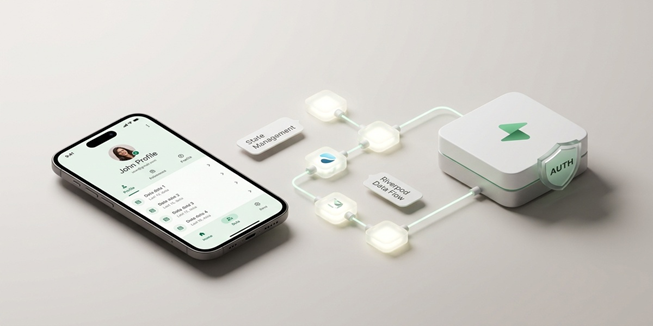
In 2026, building a full-stack mobile application no longer requires weeks of manual boilerplate wiring. By combining Flutter Go (https://fluttergo.ai) with Supabase, developers can generate a complete production-grade mobile application with email and OAuth authentication, relational PostgreSQL tables, Row Level Security (RLS), and reactive Riverpod 2.x state management in under 15 minutes.
Flutter Go handles the heavy lifting through autonomous prompt-to-app compilation. You describe your data model and screens in plain language, and the AI produces clean Dart code following Material 3 guidelines, launches an interactive live preview, syncs directly to your private GitHub repository, and prepares signed builds for Google Play and Apple TestFlight.
1. The 2026 Shift: Why Flutter and Supabase Are the Modern Full-Stack Standard
For years, mobile app developers struggled with the fragmentation of building separate front-end client applications and managing independent back-end microservices. Connecting a Flutter mobile front-end to a cloud database typically required days of tedious configuration:
· Writing repetitive data transfer objects (DTOs) and JSON serialization logic in Dart.
· Configuring OAuth redirect URLs and deep links manually across iOS Info.plist and AndroidManifest.xml.
· Setting up WebSocket connection managers to handle real-time database updates.
· Managing API secrets insecurely across client-side config files.
In 2026, the combination of Flutter Go and Supabase represents the gold standard for full-stack mobile engineering:
· Relational PostgreSQL Power: Unlike NoSQL document stores that suffer from complex querying limitations and unpredictable read pricing, Supabase provides an enterprise-grade PostgreSQL database with native Row Level Security.
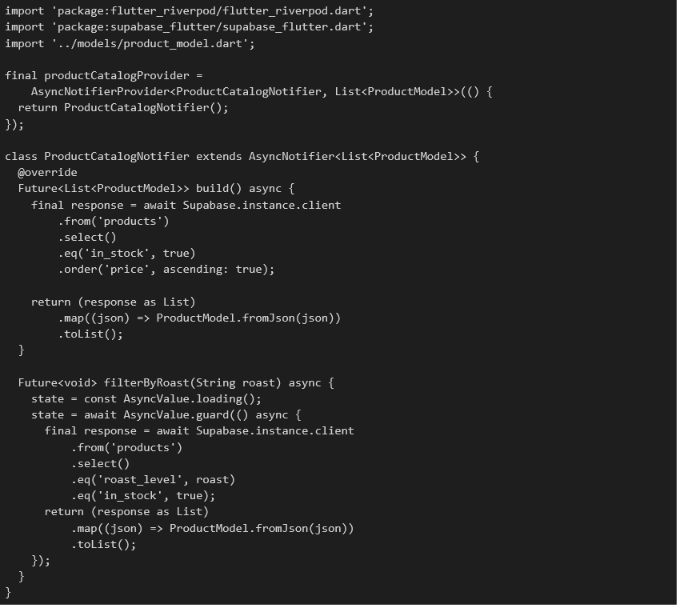
· Reactive Riverpod Integration: Flutter Go automatically structures state management using Riverpod 2.x AsyncNotifier patterns, binding reactive database streams directly to Material 3 UI widgets.
· Autonomous Prompt Compilation: Rather than writing boilerplate integration logic by hand, founders and developers simply describe their system requirements, and Flutter Go scaffolds the entire codebase in seconds.
2. Architecture Overview: How Flutter Go Binds Client Code to Supabase
Understanding the underlying architecture helps you write better prompts and maintain full control over your project. When you prompt a full-stack application inside the Flutter Go Studio (https://fluttergo.ai/docs/dashboard), the autonomous engine creates a clean three-tier architecture combining presentation, state, and data repositories.
2.1 The Secrets Vault Security Layer
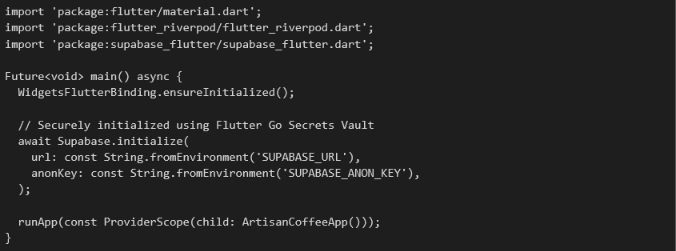
A critical advantage of Flutter Go is its dedicated Secrets Vault (https://fluttergo.ai/docs/backends). Instead of exposing your Supabase URL and anonymous public keys inside your client-side source code or hardcoding them into Git repositories, Flutter Go injects these environment variables securely at compile time. This ensures your private database credentials remain safe during version control commits and automated store builds.
3. Step-by-Step Tutorial: Building a Marketplace App in 15 Minutes
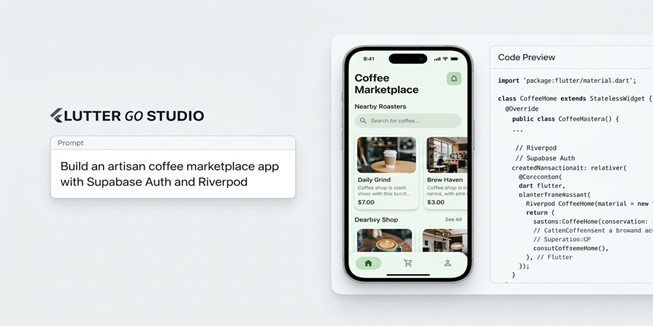
To demonstrate how rapid full-stack development works in practice, let us walk through building a complete Artisan Coffee Marketplace MVP featuring user authentication, product listings, shopping cart state, and order tracking.
3.1 Step 1: Crafting the Full-Stack Master Prompt (Minutes 0 to 3)
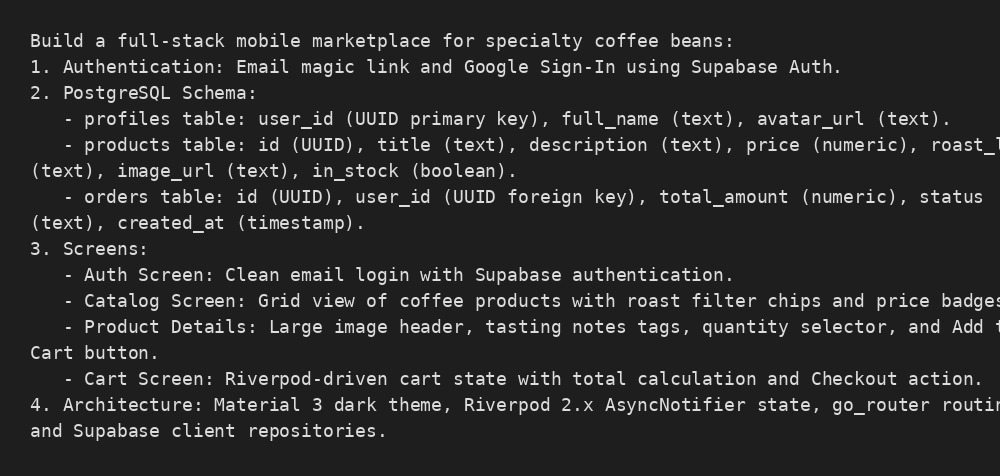
Navigate to Flutter Go (https://fluttergo.ai) and open the Studio prompt input. Enter the following comprehensive system prompt:
3.2 Step 2: Autonomous Project Compilation and Live Preview (Minutes 4 to 7)
Click Generate Project. The Flutter Go autonomous compiler parses your instructions and builds the full Flutter application:
· Scaffolds the standard Flutter project structure (lib/features/auth/, lib/features/catalog/, lib/features/cart/, lib/core/).
· Writes strongly typed Dart models matching your Supabase PostgreSQL tables.
· Implements reactive Riverpod providers for real-time inventory updates.
· Launches an interactive live mobile preview on the right side of the screen where you can interact with the app immediately.
3.3 Step 3: Connecting Your Supabase Project Credentials (Minutes 8 to 11)
Inside the Flutter Go Backends Settings (https://fluttergo.ai/docs/backends), connect your Supabase project:
3.4 Step 4: Reviewing the Generated Riverpod State Notifier
Here is an authentic look at the clean, enterprise-grade Dart code Flutter Go outputs for the coffee catalog repository:
4. Implementing Row Level Security (RLS) for Production Security
One of the most dangerous oversights when building mobile MVPs is leaving the database open to public read and write operations. Because mobile client apps communicate directly with Supabase via REST and WebSockets, you must enforce security at the database row level. Flutter Go prompts and configures standard PostgreSQL Row Level Security policies automatically.
4.1 Public Product Catalog Policy

4.2 User-Specific Order Security Policy
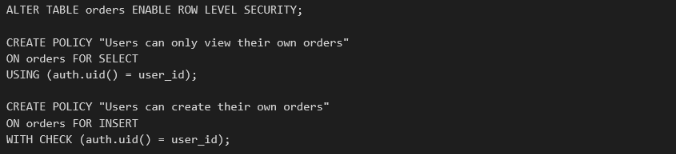
5. Local Mode Testing with Cursor, VS Code, and Mobile Simulators
When you are ready to take full engineering control over your project, you are never trapped in a browser tab. With Flutter Go Desktop (https://fluttergo.ai/download/), you can switch to Local Mode:
· Local Machine Execution: Run the AI generation engine locally on your laptop using your own OpenAI, Anthropic, or Gemini API keys.
· Native Device Simulators: Compile and test your application on local iOS Simulators and Android Emulators with sub-second hot reload speed.
· Seamless IDE Integration: Connect your project directly to Cursor, VS Code, or Android Studio. You can write custom animations or integrate third-party SDKs locally, and your changes remain fully compatible with Flutter Go.
6. From Code to Store: Deploying to Google Play and Apple TestFlight
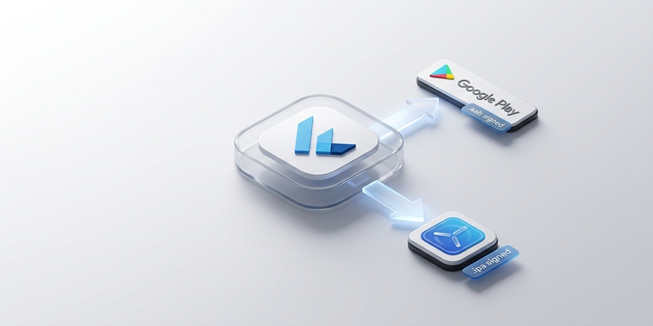
Once your full-stack mobile application is tested and verified on the interactive preview, Flutter Go automates the most intimidating part of mobile development: signed app store packaging and deployment.
6.1 Google Play Store Publishing (Signed AAB)
Flutter Go builds an optimized, signed Android App Bundle (.aab) using your Google Play service account key and uploads the build directly to your selected release track: Internal Testing, Closed Alpha, Open Beta, or Production.
6.2 Apple App Store and TestFlight Publishing (Signed IPA)
Flutter Go compiles a signed iOS package (.ipa) on dedicated cloud macOS build machines using your App Store Connect API keys and pushes the build straight to Apple TestFlight for instant beta testing.
7. Comparing Full-Stack Development Methods: Agency vs No-Code vs Flutter Go
8. Frequently Asked Questions (FAQ)
How does Flutter Go connect to Supabase?
Flutter Go uses the official supabase_flutter client package. You provide your Supabase project URL and anonymous public API key inside the Flutter Go Secrets Vault, and the AI agent automatically generates strongly typed repositories, authentication managers, and real-time database listeners.
Can I build relational databases with PostgreSQL using prompts?
Yes. When you describe table schemas, foreign key relationships, and data types in natural language, Flutter Go generates corresponding Dart models and SQL schema scripts that you can run directly inside your Supabase SQL editor.
Do I have to pay an expensive monthly subscription to export my code?
No. Unlike visual low-code platforms that gate source code export behind $70/month subscriptions, Flutter Go syncs your complete Flutter codebase directly to your private GitHub repository for free from day one.
Can I test my app on a real phone before publishing?
Yes. Flutter Go provides an interactive web simulator directly in the Studio dashboard, downloadable APK builds for Android testing, and one-click TestFlight deployment for iOS device testing.
9. Final Verdict: The Fastest Way to Build Full-Stack Mobile Software
The era of spending $40,000 and waiting four months for an agency to build a database-backed mobile application is over. By combining the relational power of Supabase with the autonomous prompt-to-app intelligence of Flutter Go , you can turn complex app concepts into clean, compilable, production-ready mobile software in a single afternoon.
Ready to launch your full-stack mobile application? Start building today for free at Flutter Go or download the Flutter Go Desktop App