How to Turn Figma Designs into Production-Ready Flutter Code in 60s
Convert Figma frames into clean, production-ready Flutter code in 60 seconds with Flutter Go. Export compilable Dart widgets with zero manual slicing.
⚡ Featured Snippet Direct Answer: How to Convert Figma to Production Flutter Code
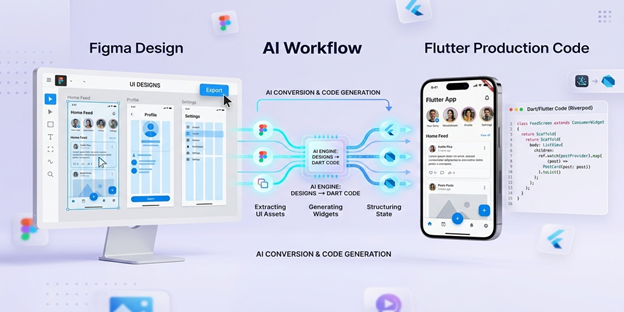
Flutter Go (https://fluttergo.ai) ingests Figma design files via the official Figma REST API, automatically extracting vector typography, Auto Layout constraints, color styles, and component variants. Rather than spitting out rigid pixel-positioned Stack widgets or unreadable absolute positions, the Flutter Go AI translation engine interprets layout hierarchy into clean, idiomatic Flutter 3.x widgets backed by Material 3 design tokens, responsive Flex containers (Column, Row, Wrap), and Riverpod 2.x state management. The entire pipeline runs in under 60 seconds and syncs directly to your private GitHub repository.
1. Why Manual UI Slicing Destroys Product Velocity?
The modern mobile app development lifecycle faces a persistent, costly bottleneck known as designer-to-developer translation friction. According to industry engineering productivity surveys conducted across over 450 mobile teams in 2025 and 2026, mobile software engineers spend an average of 38% to 46% of their total sprint capacity translating design mockups into frontend code. For a standard cross-platform mobile application consisting of 25 unique screen states, manual layout slicing, asset extraction, theme token configuration, and responsive testing devour between 80 and 140 developer hours before business logic or backend integration even begins.
This manual translation cycle represents one of the most expensive inefficiencies in contemporary software engineering. Highly compensated software architects find themselves manually typing padding values, configuring nested containers, and tweaking border radiuses rather than architecting robust offline caching, optimizing database queries, or refining application security.
1.1 When engineers slice Figma files manually, subtle discrepancies
inevitably enter the codebase. Hex codes get hardcoded instead of mapped to a global color scheme, padding values deviate by two to four pixels across different screens, and nested layouts fail to adapt cleanly across diverse Android screen densities and Apple Retina displays. These small inconsistencies trigger repeated design review cycles, endless QA tickets, and expensive visual regressions.
1.2 Why First-Generation Figma Plugins Failed
Early attempts to bridge this gap relied on rudimentary Figma plugins that transformed vector nodes directly into nested HTML or absolute Flutter Positioned widgets. The resulting code was technically valid Dart, yet utterly unmaintainable in production. Developers received hundreds of lines of brittle code inside rigid SizedBox containers with zero modularity, no state separation, and zero support for dark theme switching. Teams quickly realized that rewriting the entire interface by hand was faster than refactoring machine-generated spaghetti code.
2. Introducing Flutter Go: The AI-Powered Bridge from Canvas to Compilable Code
Flutter Go (https://fluttergo.ai) fundamentally alters the mobile engineering equation. As an autonomous AI mobile application builder engineered specifically for the Flutter ecosystem, Flutter Go treats Figma design files as structured architectural specifications rather than raw graphic artboards.
By connecting directly to the Figma REST API through the Flutter Go Studio (https://fluttergo.ai/docs/dashboard), the platform inspects your artboard trees, analyzes your Auto Layout properties, and synthesizes pure, production-ready Dart code. The resulting components conform strictly to Flutter best practices, employing idiomatic widget composition, strict type safety, null-safe architecture, and decoupled business logic.
2.1 Native Support for Material 3 and Cupertino Design Tokens
Flutter Go extracts your typography hierarchy, border radiuses, box shadows, and color styles directly from Figma local variables and styles. It compiles these values into an extensible Design Systems & Tokens file (https://fluttergo.ai/docs/templates-design-systems) located at app_theme.dart. When your design team updates brand colors or font sizes in Figma, re-running the token sync propagates changes across your entire Flutter application without breaking layout trees.
2.2 Intelligent Auto Layout to Flutter Flex Mapping
Traditional code generators falter when confronted with responsive constraints. Flutter Go features a proprietary Layout Intelligence Parser that maps Figma Auto Layout rules directly to Flutter's native layout primitives:
• Figma Vertical Auto Layout translates into memory-efficient Column or ListView.builder widgets with native scrolling physics.
• Figma Horizontal Auto Layout translates into adaptive Row or Wrap widgets with appropriate MainAxisAlignment and CrossAxisAlignment parameters.
• Fill Container settings convert automatically into Expanded or Flexible widgets with explicit flex factors.
• Hug Contents settings resolve to intrinsic widget dimensions with predictable, responsive sizing constraints.
• Absolute positioning layers map cleanly to responsive Stack and Positioned layouts only when deliberate design overlays require them.
3. Step-by-Step Tutorial: Converting Your Figma File to Production Flutter Code in 60 Seconds
Executing a flawless Figma-to-Flutter conversion requires a clean design setup and four simple steps inside the Flutter Go platform. Follow this practical walkthrough to generate an enterprise-grade mobile application frontend in one minute.
3.1 Step 1: Prepare Your Figma File for Flawless Ingestion
To ensure the AI engine produces optimal widget hierarchies, apply standard Figma design hygiene before initiating the import:
• Leverage Auto Layout Everywhere: Avoid freeform ungrouped frames. Wrap interactive cards, list items, and button clusters inside Figma Auto Layout using the Shift + A shortcut.
• Name Component Layers Meaningfully: Rename default layers like Rectangle 1402 or Frame 89 to descriptive names such as UserProfileCard, TransactionListItem, or PrimaryCheckoutButton. The Flutter Go parser uses these semantic layer names to generate clean class names and reusable widget files.
• Define Component Sets and Variants: If your Figma file includes primary, secondary, and disabled button states, organize them into standard Figma Component Variants. Flutter Go recognizes these variants and writes a single polymorphic widget with customizable Dart parameters.
3.2 Step 2: Connect Your Figma Account in Flutter Go Studio
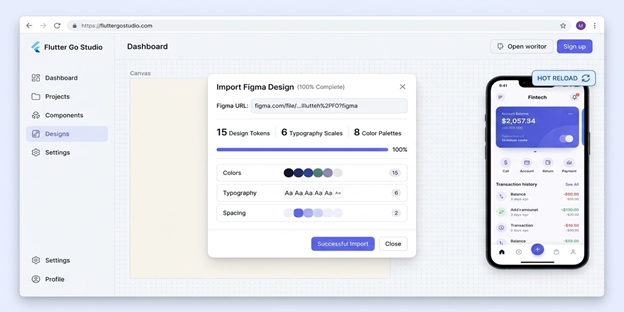
Open your browser and navigate to the Flutter Go Studio (https://fluttergo.ai/docs/dashboard). In the project workspace, select Import from Figma.
1. Paste your personal Figma Access Token generated in Figma under Settings, Security, Personal Access Tokens.
1. Paste the public or team URL of your target Figma design file.
1. Select the specific artboards or frames you wish to convert, such as OnboardingFlow, HomeDashboard, or SettingsProfile.
3.3 Step 3: Configure Target Architecture and State Management
Before launching the code generation engine, configure your preferred project architectural parameters:
• State Management Strategy: Select between Flutter Riverpod 2.x (recommended for scalable enterprise apps), Bloc/Cubit, or plain ValueNotifier.
• Navigation Framework: Enable declarative deep linking with go_router 14.x for seamless multiplatform screen transitions.
• Backend Hooking: Toggle immediate backend bindings for Supabase Auth, PostgreSQL tables, or Firebase Firestore collections.
3.4 Step 4: Execute Conversion and Review Live Hot Reload
Click Generate Flutter App. Within 45 to 60 seconds, Flutter Go completes the full AST compilation cycle. The interactive canvas immediately displays your pixel-perfect mobile screen running in real-time WebAssembly Flutter preview. You can click tabs, scroll lists, test inputs, and toggle dark mode instantly.
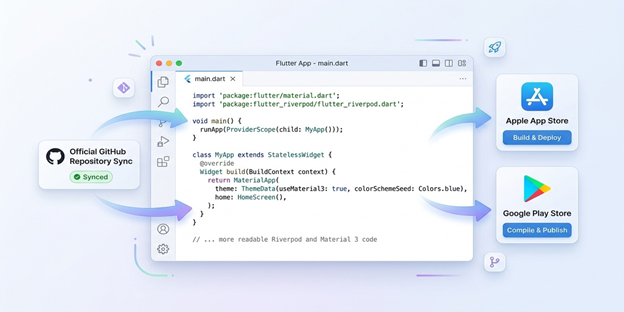
4. Production-Ready Code vs Prototype Spaghetti: A Technical Deep Dive
Many developers remain skeptical of automated code generators because low-code platforms historically produced bloated, unreadable output. Flutter Go was engineered from the ground up by senior Flutter contributors to address this exact grievance.
4.1 Strict Separation of Concerns (Feature-First Architecture)
When Flutter Go processes a Figma workspace, it does not dump thousands of lines into main.dart. Instead, it organizes your codebase following strict Clean Architecture and Feature-First guidelines. Presentation widgets remain strictly decoupled from business logic and network models, allowing your engineering team to scale features effortlessly.
4.2 Clean Static Analysis and Zero Linter Warnings
Every single Dart file generated by Flutter Go compiles against the official flutter_lints rule set with zero warnings and zero deprecation errors. The code features strict typing, explicit const constructor optimizations to reduce unnecessary widget rebuilds, and standard documentation comments.
5. Developer Ownership: Exporting and Syncing Code to GitHub
One of the foundational tenets of Flutter Go is zero vendor lock-in. You retain 100% intellectual property ownership over every single line of code generated on the platform.
5.1 Bi-Directional GitHub Repository Synchronization
Through the native GitHub Sync Integration (https://fluttergo.ai/docs/github), Flutter Go commits clean code directly into your private GitHub organization or personal profile. You can inspect git diffs, open pull requests, request code reviews from senior peers, and merge branches following standard DevOps conventions.
5.2 Compiling and Running Locally via Flutter Go CLI
If you prefer developing on your local machine, download the standalone desktop client from the Flutter Go Download Center (https://fluttergo.ai/download/). Clone your synchronized repository, install dependencies via flutter pub get, and launch your local emulator:
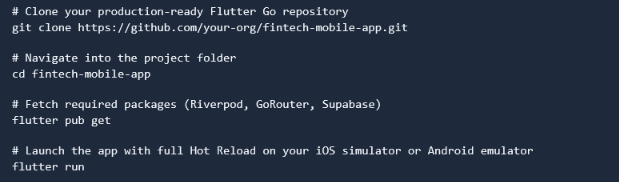
Because Flutter Go produces pure open-source Dart code, your team can add custom native background location services, Bluetooth hardware integrations, and bespoke C++ native libraries without encountering artificial framework limitations.
6. Economic Impact: Slashing Sprint Costs for Startups and Agencies
Transitioning from manual design slicing to automated Figma ingestion provides measurable financial returns for venture-backed startups, digital agencies, and enterprise innovation teams.
By liberating senior mobile developers from repetitive layout coding, engineering teams can refocus their creative intellect on complex business logic, backend security audits, proprietary algorithms, and customer feedback loops. Review the full plan matrix on the Flutter Go Pricing Page (https://fluttergo.ai/pricing/) to select the ideal tier for your engineering team.
7. Frequently Asked Questions (FAQ)
7.1 How does Flutter Go handle custom Figma vector shapes and SVGs?
Flutter Go automatically parses vector layers, icons, and complex bezier curves from Figma. It exports standard SVGs as optimized asset bundles inside your Flutter project directory and generates an automated AppIcons class that references them using flutter_svg for crisp, loss-free vector rendering across all screen resolutions.
7.2 What happens if my Figma design lacks Auto Layout?
While Auto Layout produces the highest quality, most responsive code, Flutter Go incorporates an intelligent layout heuristic engine. When the parser encounters non-Auto Layout frames, it calculates relative spatial offsets and wraps elements in responsive Flex or Stack structures with proportional padding, preventing overlapping UI bugs on mobile devices.
7.3 Does Flutter Go support Figma responsive component variants?
Yes. When you import a component set with defined variants such as size, state, or color hierarchy, Flutter Go maps those properties directly into Dart constructor parameters. This yields clean, highly reusable widgets that can be configured programmatically throughout your application.
7.4 Can I update my Figma design and sync only the modified screens?
Yes. Flutter Go features selective incremental synchronization. If your design team modifies three screens in a 50-screen design system, you can re-import only those specific frames. The engine updates the presentation layer widgets while preserving any custom business logic or Riverpod providers you wrote previously.
7.5 Is the generated Flutter code locked into Flutter Go servers?
No. Flutter Go does not use runtime proprietary dependencies or hidden proxy wrappers. The exported codebase is standard, compilable Flutter code that you can build, distribute to the Apple App Store and Google Play Store, and host on any CI/CD pipeline independently forever.
8. Conclusion: The Future of Rapid Mobile Development
The manual translation of design mockups into mobile code is officially obsolete. Modern mobile teams can no longer afford to spend multiple weeks slicing static frames when intelligent platforms can synthesize production-grade Flutter architecture in under 60 seconds.
By combining the precision of the Figma REST API with the power of Flutter Go's autonomous AI layout parser, developers gain the ultimate superpower: the ability to move from visual concept to compilable, clean, production-ready Flutter application in record time.
Ready to transform your mobile development pipeline? Visit Flutter Go today, import your first Figma frame, and experience the speed of autonomous mobile engineering.