Build a Lending Tracker App with FlutterGo, Then Fix the Screen That Opened Empty
We built Lent, a tracker for things you lend to friends, from one FlutterGo prompt, tested it in the preview and fixed seven problems with one more prompt.
You lend a friend your tent in August. In October you go camping, open the cupboard and remember you don't have it. Who does? A lending tracker sounds like an afternoon project: a list of items, who has each one, and a date it should come back.
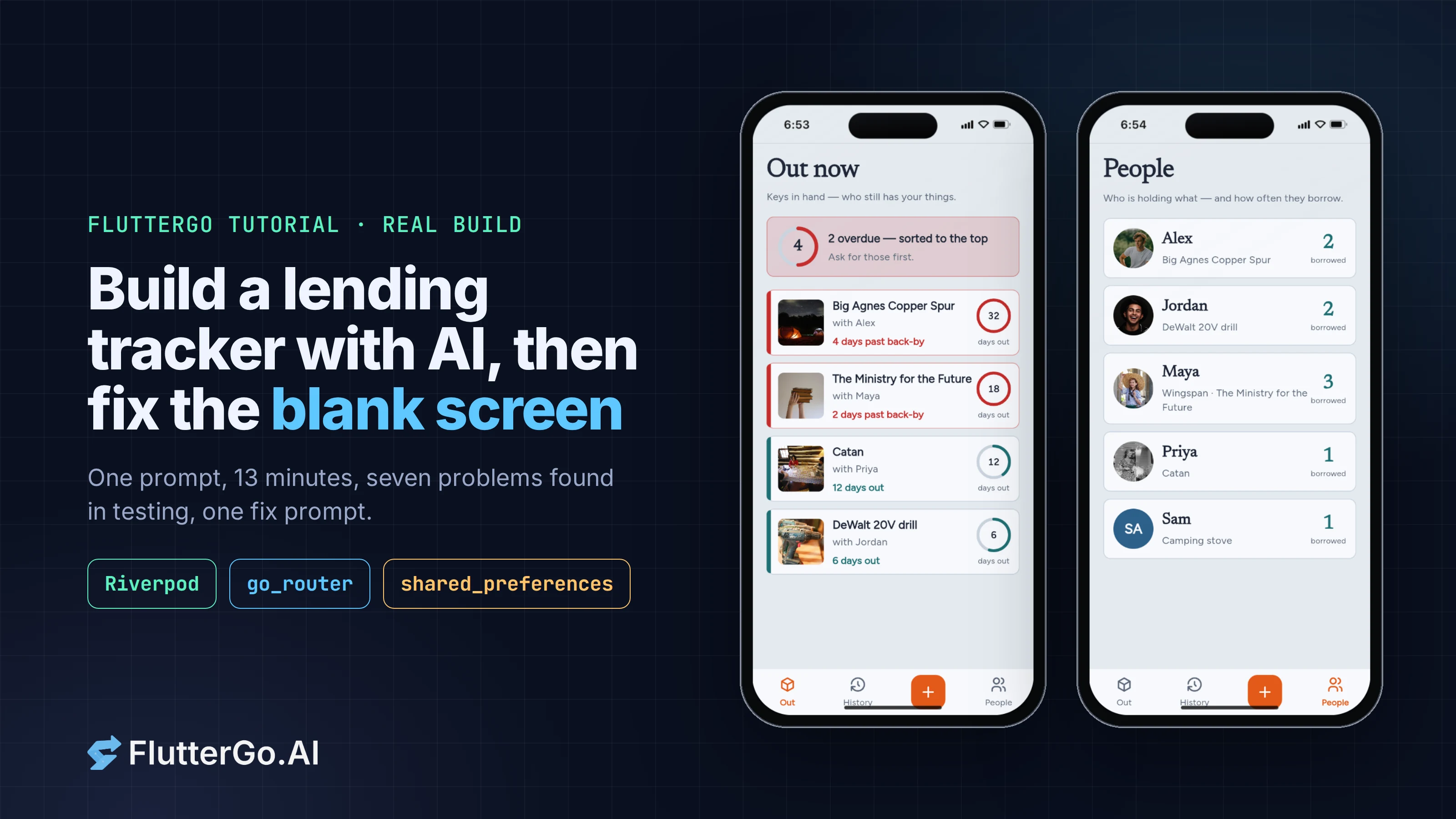
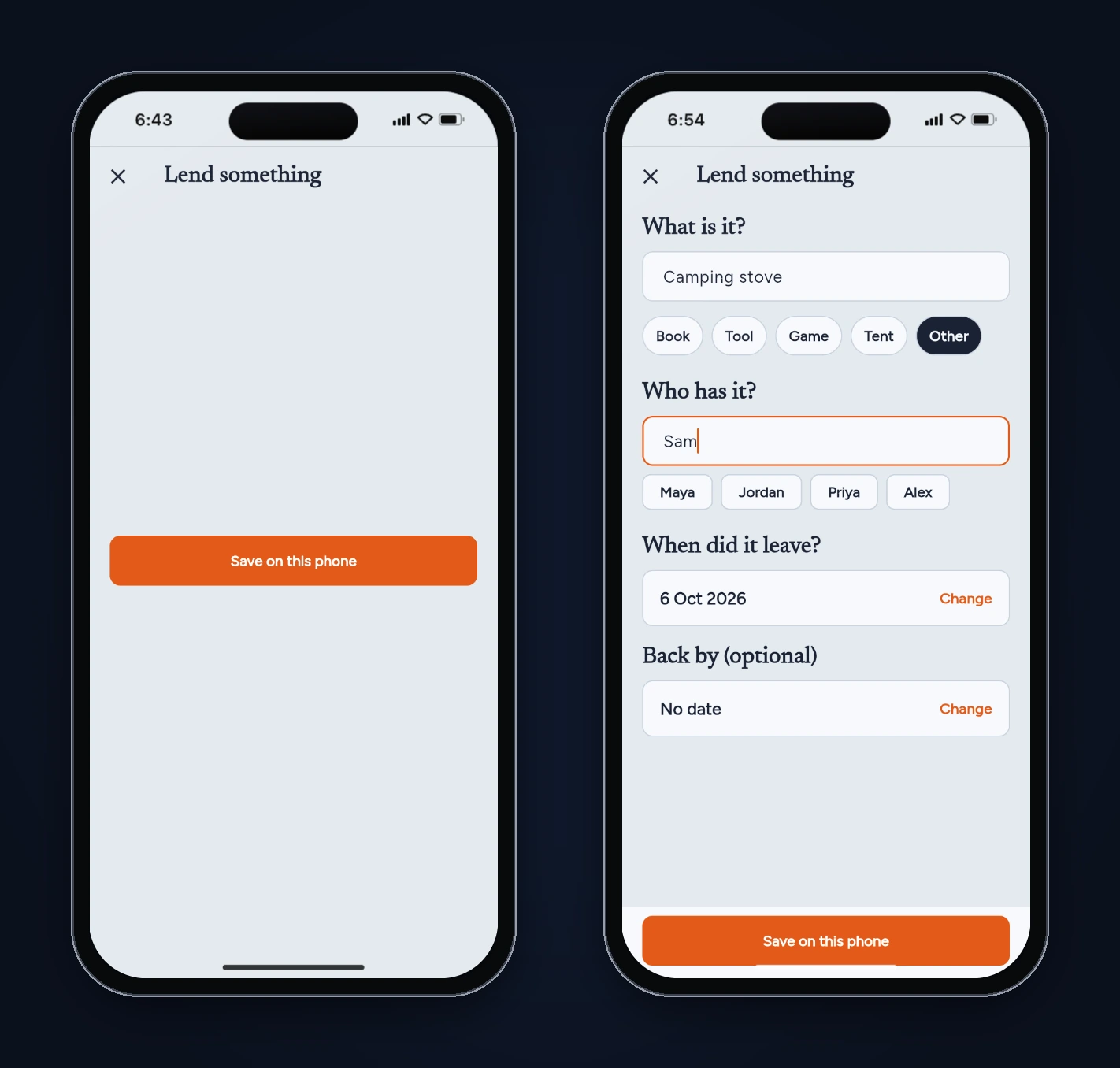
We asked FlutterGo, our AI Flutter app builder, for exactly that: an app called Lent. The first build looked finished. The overdue items were sorted to the top, the day counts were right and the History tab worked out how long each thing had been away. Then we tapped + to lend something, and the form was empty. Only the Save button showed, floating in the middle of the screen.
This tutorial covers the whole session: the prompt, what FlutterGo built, the tests we ran in the preview, the code behind each problem, and the one follow-up prompt that fixed all seven. Every screen below is a real screenshot of the build, taken on October 6, 2026.
Key takeaways
- One prompt produced a working lending tracker in 12 minutes 56 seconds: an Out now list with overdue items on top, item details with "extend" and "could I have it back?" actions, History with days away, a People tab and on-device storage.
- The list, sorting and date maths were right. The add screen wasn't: the Save button's Center sat in the scaffold's bottomNavigationBar, grew to fill the screen and left the form no room.
- Reading the code found two problems the empty form hid. Every friend outside the four sample names got Maya's photo, and "maya" and "Maya" counted as two different people.
- One fix prompt (3 minutes 9 seconds) fixed the form, gave new friends initials avatars, merged names regardless of case and spacing, moved the + button off the History tab, blocked impossible dates and added Undo after "Mark returned". We re-ran the tests on the new build.
What you'll build
Lent is a local-only app for the things you lend:
- An item with a name, a kind (book, tool, game, tent, other), who has it, the day it left and an optional "back by" date.
- Out now: everything that's still away, overdue items first, with how many days each has been gone.
- Item detail: extend the back-by date, copy a friendly "could I have it back?" message, or mark it returned.
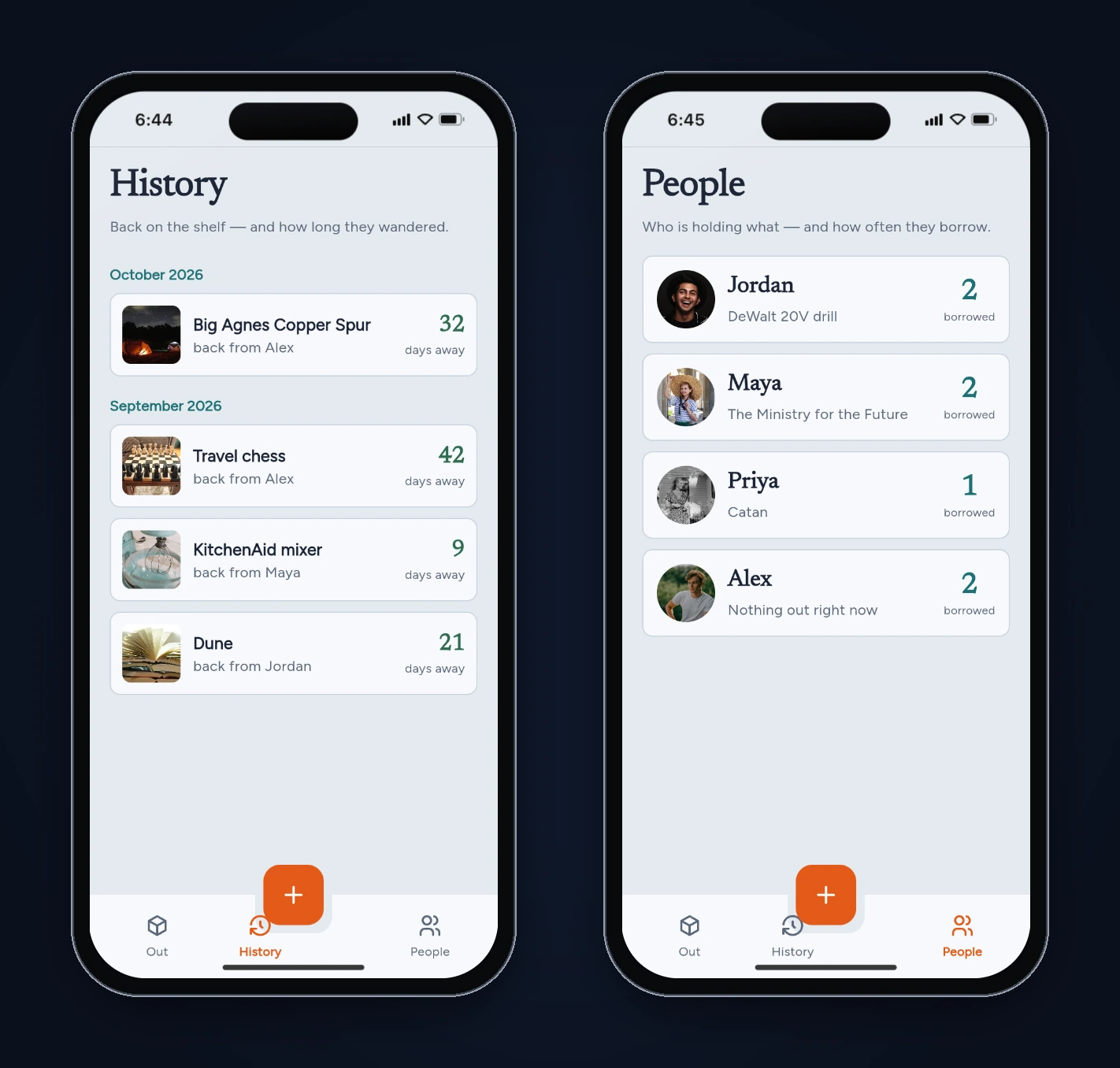
- History: returned items, grouped by month, with how long each was away.
- People: each friend, what they have right now and how many things they've borrowed in total.
It uses Riverpod for state, go_router for navigation and shared_preferences to save everything on the device. FlutterGo chose those packages. The prompt didn't name them.
Step 1: The prompt
We started from Studio Home with Mobile app selected and sent one paragraph:
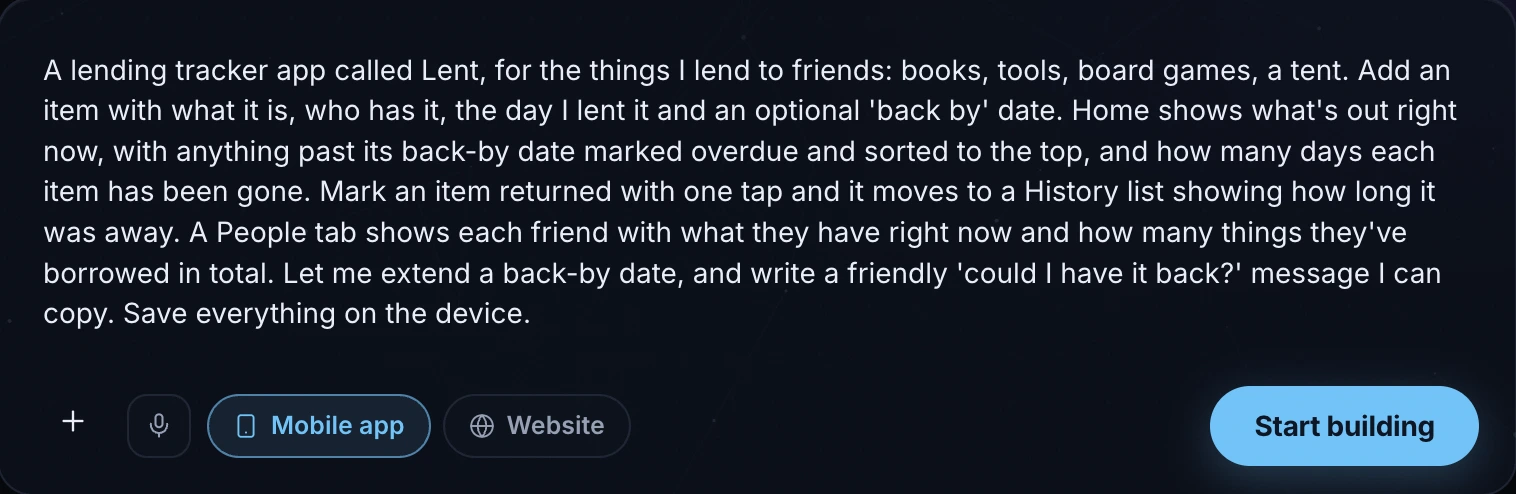
A lending tracker app called Lent, for the things I lend to friends: books, tools, board games, a tent. Add an item with what it is, who has it, the day I lent it and an optional 'back by' date. Home shows what's out right now, with anything past its back-by date marked overdue and sorted to the top, and how many days each item has been gone. Mark an item returned with one tap and it moves to a History list showing how long it was away. A People tab shows each friend with what they have right now and how many things they've borrowed in total. Let me extend a back-by date, and write a friendly 'could I have it back?' message I can copy. Save everything on the device.
Notice what it covers: the data on each item, the rule for "overdue", the sort order, and what each tab shows. It doesn't mention screens, packages or colours. FlutterGo fills those in, and you can change them later.
Step 2: What FlutterGo built
The build finished in 12 minutes 56 seconds. The work log had 159 steps and the project had 163 new files, 50 of them Dart files in lib/. It came with an onboarding flow, sample data (four friends, four items out, three returned), stock photos for each kind of item and a photo for each sample friend.
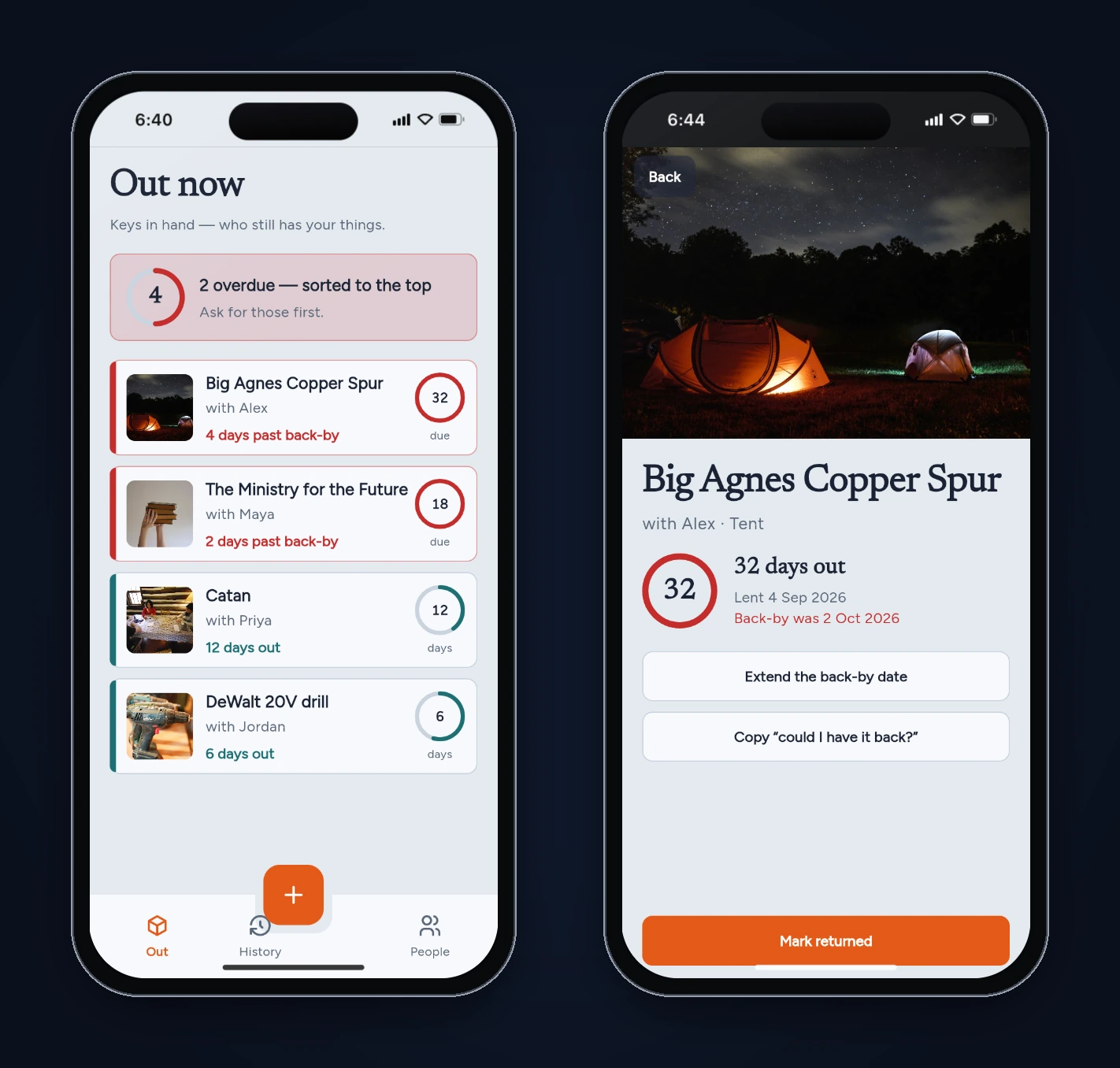
The core rules live in lib/models/loan.dart. "Overdue" compares dates without the time of day, so an item due today isn't overdue yet:
bool get isOverdue {
  if (!isOut || backBy == null) return false;
  final due = DateTime(backBy!.year, backBy!.month, backBy!.day);
  final today = DateTime.now();
  final start = DateTime(today.year, today.month, today.day);
  return due.isBefore(start);
}
The sort in lib/providers/loan_providers.dart puts overdue items first, the most overdue at the top, then everything else by days out. Both matched what we asked for.
Step 3: Test it like you'd use it
We tested in the static preview (iPhone 16 frame) on the sample data, then checked the numbers against the dates the app stores.
| Test | Expected | First build |
|---|---|---|
| Out now order | Overdue first, most overdue on top | Pass: tent (4 days over), book (2), then Catan (12 days out), drill (6) |
| Day counts | Days since the lent date | Pass |
| Extend the tent's back-by date to October 10 | Tent stops being overdue | Pass |
| Copy "could I have it back?" | Message copied, confirmation shown | Pass: a "Copied" confirmation appears |
| Mark the tent returned | Moves to History with days away | Pass: 32 days away |
| History | Grouped by month, newest first, right durations | Pass: chess 42, mixer 9, Dune 21 days |
| People | Holding now and lifetime count per friend | Pass |
| Tap + to lend something new | A form | Fail: empty screen |
The add screen opened empty
Tapping + opened "Lend something" with nothing on it but the Save button, in the middle of the screen. Nothing could be added, so the app could only ever show its sample data.
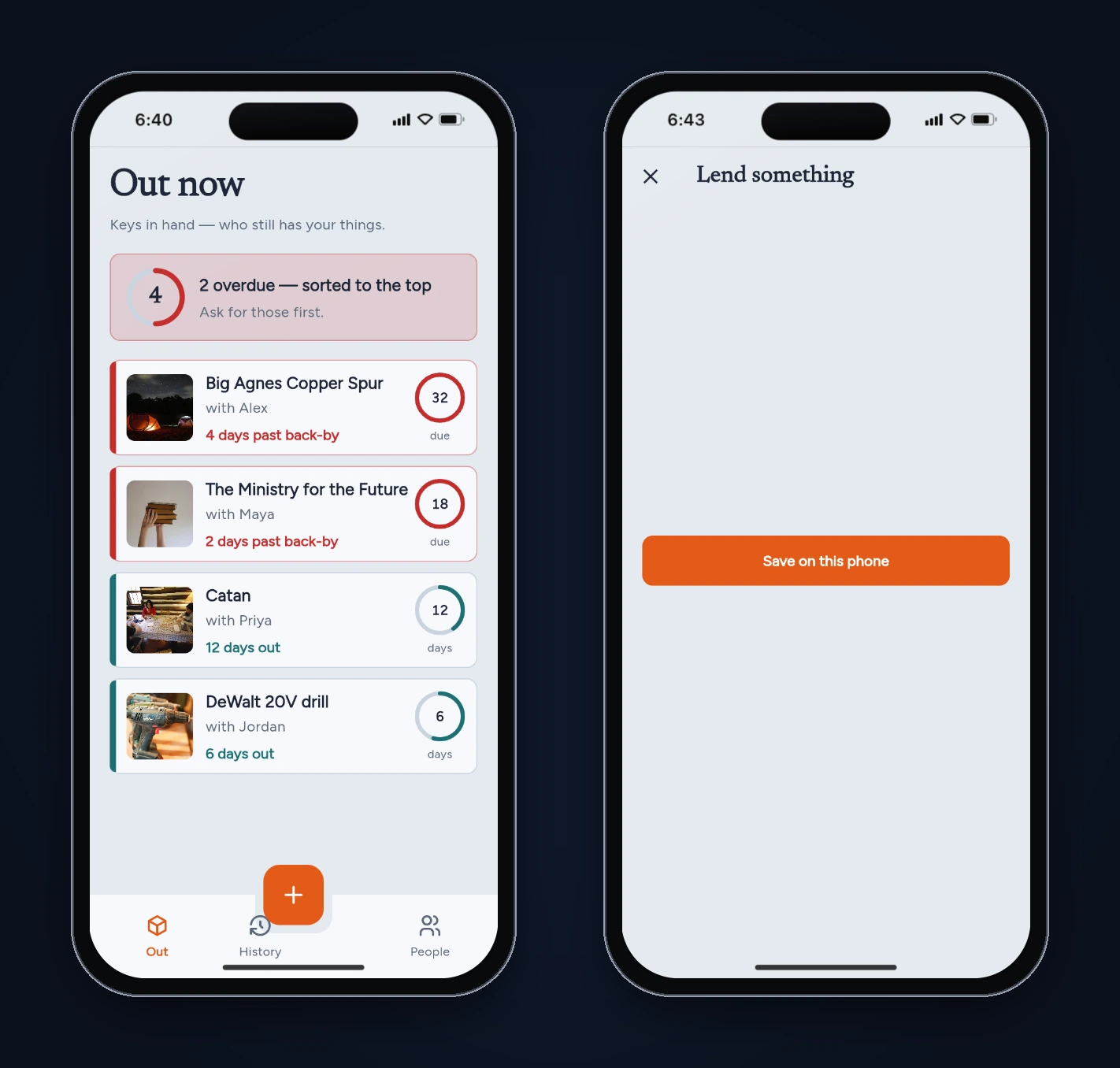
The form was in the code. The problem was the button underneath it. AddLoanScreen put the Save button in the scaffold's bottomNavigationBar, and the button widget (AppStatusButton) wraps itself in a Center:
return LayoutBuilder(
  builder: (context, box) {
    final full = box.hasBoundedWidth ? box.maxWidth : 240.0;
    return Center(
      child: Semantics(
        button: true,
        // ...
A Center expands to fill the space it's given. In a bottomNavigationBar that's the whole body, so the bar took the screen, the ListView holding the form got no height, and the button sat in the middle of an empty page. The fix is to give the button a fixed height, so the bar is only as tall as its content.
One testing note: the first time we opened this screen, we thought the preview had frozen. The form uses fade-in animations, and Chrome slows animations in tabs that aren't in front. Keep the preview tab in front while you test, so you don't mistake a throttled animation for a bug, or the other way round.
Things the empty form was hiding
With no way to add items in the preview, we read the save code in add_loan_screen.dart and the People code in loan_providers.dart. Three problems were waiting:
- Everyone new gets Maya's photo. The friend's photo is picked by name, and anything that isn't one of the four sample names falls through to Maya:
dart
  final photo = switch (who) {
    'Maya' => AppAssets.maya,
    'Jordan' => AppAssets.jordan,
    'Priya' => AppAssets.priya,
    'Alex' => AppAssets.alex,
    _ => AppAssets.maya,
  };
Lend your drill to Sam and the app shows Maya's face next to it.
-
"maya" and "Maya" are two people. People are grouped with
map.putIfAbsent(loan.borrowerName, ...), so the exact text is the key. Type the name in lowercase once, and People shows two Mayas with separate counts. (The save code does trim leading and trailing spaces.) -
Impossible dates. The "When did it leave?" picker allowed dates up to 400 days ahead, and the day count uses
.inDays.abs(), so an item "lent" next week would show as out for 7 days.
Two smaller issues
- The + button floated over the History tab's icon and label (visible in the History and People screenshots above).
- On overdue cards, the ring showed days out but was labelled "due", so "32 due" read like a count of something due.
We also wanted an Undo after "Mark returned". It's a single tap with no confirmation, and on a phone that's an easy mis-tap.
Step 4: Read the rest of the code
A few more things we noticed, not bugs:
- Sample data is written to storage on first launch. If the saved data ever fails to decode,
build()returns the sample data again without saving it, so the next change overwrites whatever was there. Worth a log line before shipping. - Item photos are chosen by kind, so every board game gets the same picture (our Wingspan test item got Catan's photo). Fine for a tracker. Add a photo picker if you want it to feel personal.
- The "could I have it back?" message says how long the item has been out, not how overdue it is. That's friendlier, and it's what we'd keep.
Step 5: Fix it with one prompt
We sent one follow-up message from the same chat, listing everything:
I tested Lent in the preview. Please fix these: 1) The 'Lend something' screen opens blank: only the Save button shows, in the middle of the screen. The status button's Center inside bottomNavigationBar grows to fill the whole body, so the form gets no height. Make the bottom bar only as tall as the button. 2) Anyone not in the four sample names (try 'Sam') gets Maya's photo. Give new people an initials avatar in their own colour instead. 3) People are grouped by the exact name text, so 'maya' or 'Maya ' becomes a second person. Match names ignoring case and extra spaces and keep the existing spelling. 4) The + button sits on top of the History tab icon and label. Lay out the bottom bar so the button doesn't cover a tab. 5) On overdue cards the ring shows days out but is labelled 'due'. Label it 'days out' like the others. 6) The lent date can be set in the future and the back-by date before the lent date. Don't allow either. 7) Add an Undo snackbar after Mark returned, in case of a mis-tap.
It finished in 3 minutes 9 seconds and added one file, lib/shared/widgets/person_avatar.dart. What changed, from the code:
- The Save button now sits in a
SizedBox(height: 48)inside the bottom bar, so the bar is button-sized. - New names go through
canonicalBorrowerName(), which reuses the spelling already on file when the name matches ignoring case and spaces. People are grouped by the same normalized key. photoForBorrower()reuses a friend's existing photo, and returns an empty path for anyone new, whichPersonAvatardraws as initials.- The lent-date picker's
lastDateis now today, and a back-by date that falls before a newly picked lent date is moved up to match. (The back-by picker already started at the lent date.) markReturnedis paired with a newundoReturn, offered in a six-second snackbar.- The + button moved into the tab row, and overdue rings are labelled "days out".
If you're writing your own fix prompt, the pattern is the same as last time: number each problem, say what you saw, and say what should happen instead. Pointing at the cause (Center in bottomNavigationBar) is optional, but it saves the agent a search.
Step 6: Re-test
We cleared the preview's storage so the app started from fresh sample data, then re-ran the tests on the fixed build.
| Test | Fixed build |
|---|---|
| Tap + | Pass: full form, Save button at the bottom |
| Lend a camping stove to "Sam" | Pass: added, shows "today" and 0 days out |
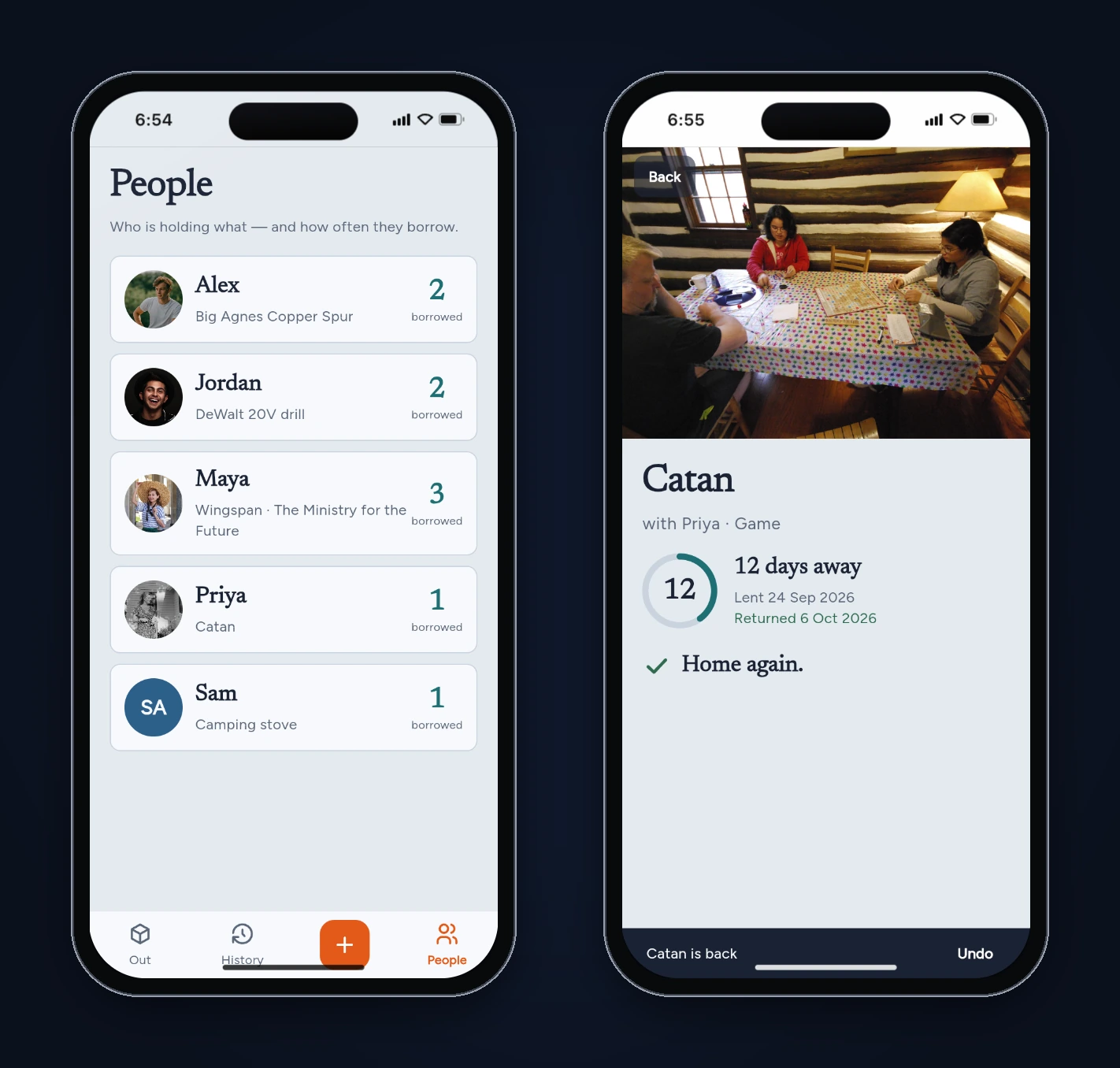
| Sam on People | Pass: "SA" initials avatar, 1 borrowed |
| Lend Wingspan to "maya " (lowercase, trailing space) | Pass: filed under Maya, who now has 3 borrowed |
| Lent-date picker | Pass: dates after today are greyed out |
| Back-by picker on Catan (lent Sep 24) | Pass: dates before Sep 24 are greyed out |
| Mark Catan returned, then Undo | Pass: "Catan is back" with Undo, and Catan is out again after tapping it |
| Overdue ring label | Pass: "days out" |
| Reload the preview | Pass: all six items still there |
What we'd do before shipping it
- Reminders. The app knows every back-by date but never says anything. A local notification on the due date is the obvious next prompt.
- Edit and delete. You can extend a date or mark something returned, but you can't fix a typo in an item name or delete an item added by mistake.
- Tests for the date rules.
isOverdue,daysOutanddaysOverdueare small pure functions. A handful of unit tests around midnight and month ends would keep them right as the app changes. - A real device run. We tested in the browser preview.
shared_preferencesbehaves the same on phones, but check the date picker and the snackbar on iOS and Android before you publish.
FAQ
How long did the build take?
12 minutes 56 seconds for the first build and 3 minutes 9 seconds for the fix, both in the FlutterGo studio on October 6, 2026.
Does Lent need a backend?
No. Everything is stored on the device with shared_preferences. If you want to share a list between two phones, ask FlutterGo to add a backend such as Supabase.
Can I use my own photos for items and friends?
Not in this build. Items get a stock photo by kind, and new friends get an initials avatar. A photo picker is a reasonable follow-up prompt.
Why did the empty screen only show up when we tapped +?
Because the bug was in one screen's layout, not in the data. Every other screen read the sample data correctly. Layout problems like this one show up the first time you look at the screen, which is why we open every screen in the preview before reading the code.
Sources
- Lent project in the FlutterGo studio, first build and fix build, October 6, 2026 (prompts, build times and source code read through the studio)
- Screenshots: FlutterGo static preview, iPhone 16 frame, October 6, 2026
- Scaffold.bottomNavigationBar and Center, Flutter API docs