Build a Warranty Tracker with FlutterGo, Then Fix the Date Bug That Added Three Days
We built Keepr, a warranty tracker, from one FlutterGo prompt, tested its date math, and fixed a month-end bug that stretched a one-month warranty to 3 March.
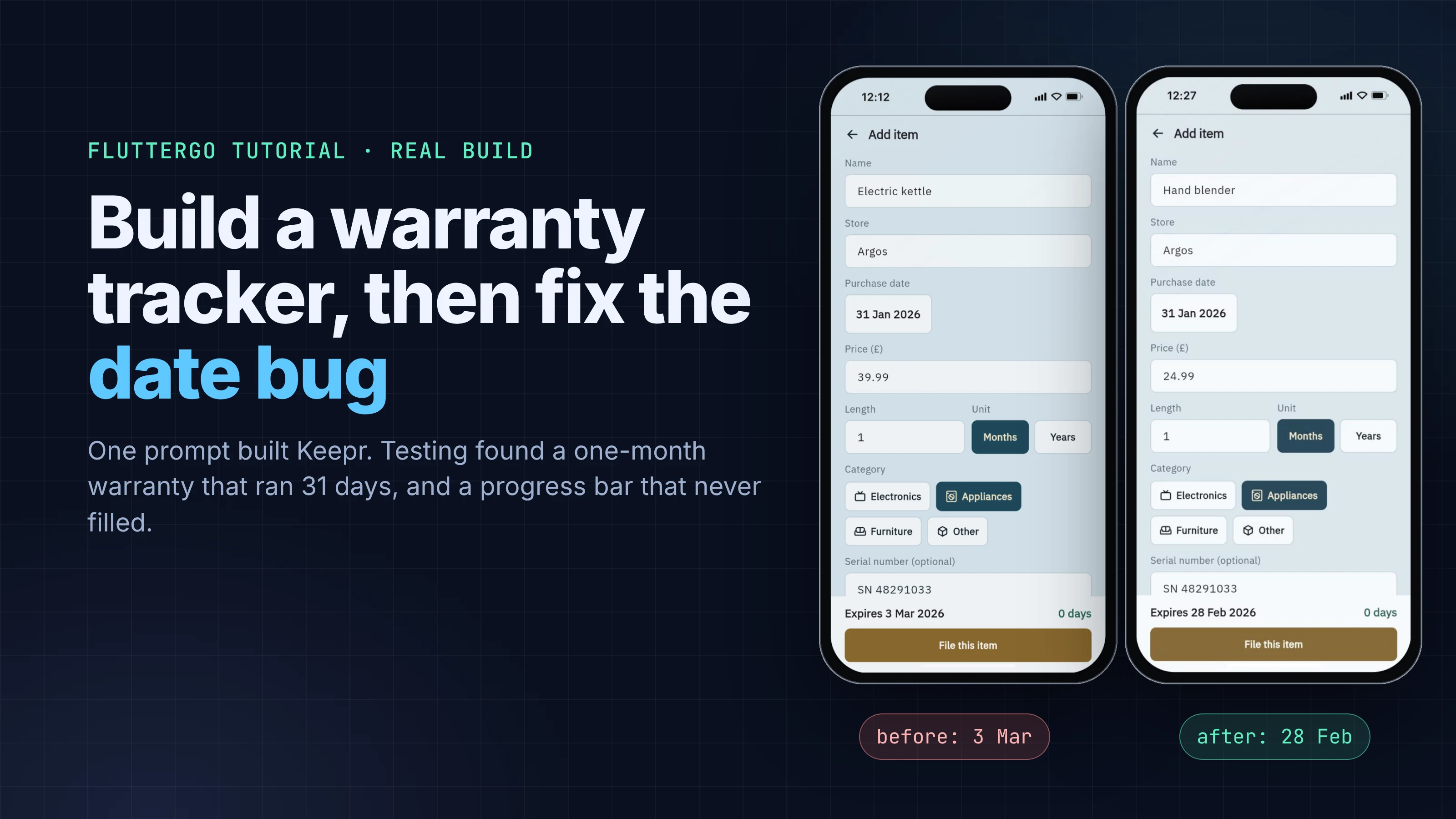
If you buy something on 31 January with a one-month warranty, when does the cover end? Most people would say 28 February. The first build of our warranty tracker said 3 March.
Date bugs like this don't crash anything. They hide in the one field nobody double-checks, and in a warranty app that field is the whole point. So this tutorial is about building the app and about testing it: we asked FlutterGo for a warranty tracker called Keepr, ran it in the preview, broke it on purpose with month-end and leap-day dates, read the code behind each bug, and fixed everything with one follow-up prompt.
Every screen below is a real screenshot of the build, taken on October 5, 2026.
Key takeaways
- One prompt produced a working warranty tracker in 10 minutes 31 seconds: items with store, price, purchase date and warranty length, a Home screen sorted by soonest expiry, an "Expiring soon" badge, an Expired section, search, and on-device storage.
- The first build added months with DateTime(year, month + n, day). Dart rolls an out-of-range day into the next month, so 31 January plus one month became 3 March, and 29 February 2024 plus three years became 1 March 2027.
- The "cover used" bar never filled anywhere in the app, even on an item at 96%, and adding an item left you on a page whose Back button did nothing.
- One fix prompt (1 minute 35 seconds) clamped dates to the last day of the month, fixed the bar, the navigation and a blank photo area. We retested each case on the new build.
What you'll build
Keepr is a small, local-only warranty file:
- Items with a name, store, purchase date, price, warranty length in months or years, a category and an optional serial number.
- Expiry and days left, worked out from the purchase date and the warranty length.
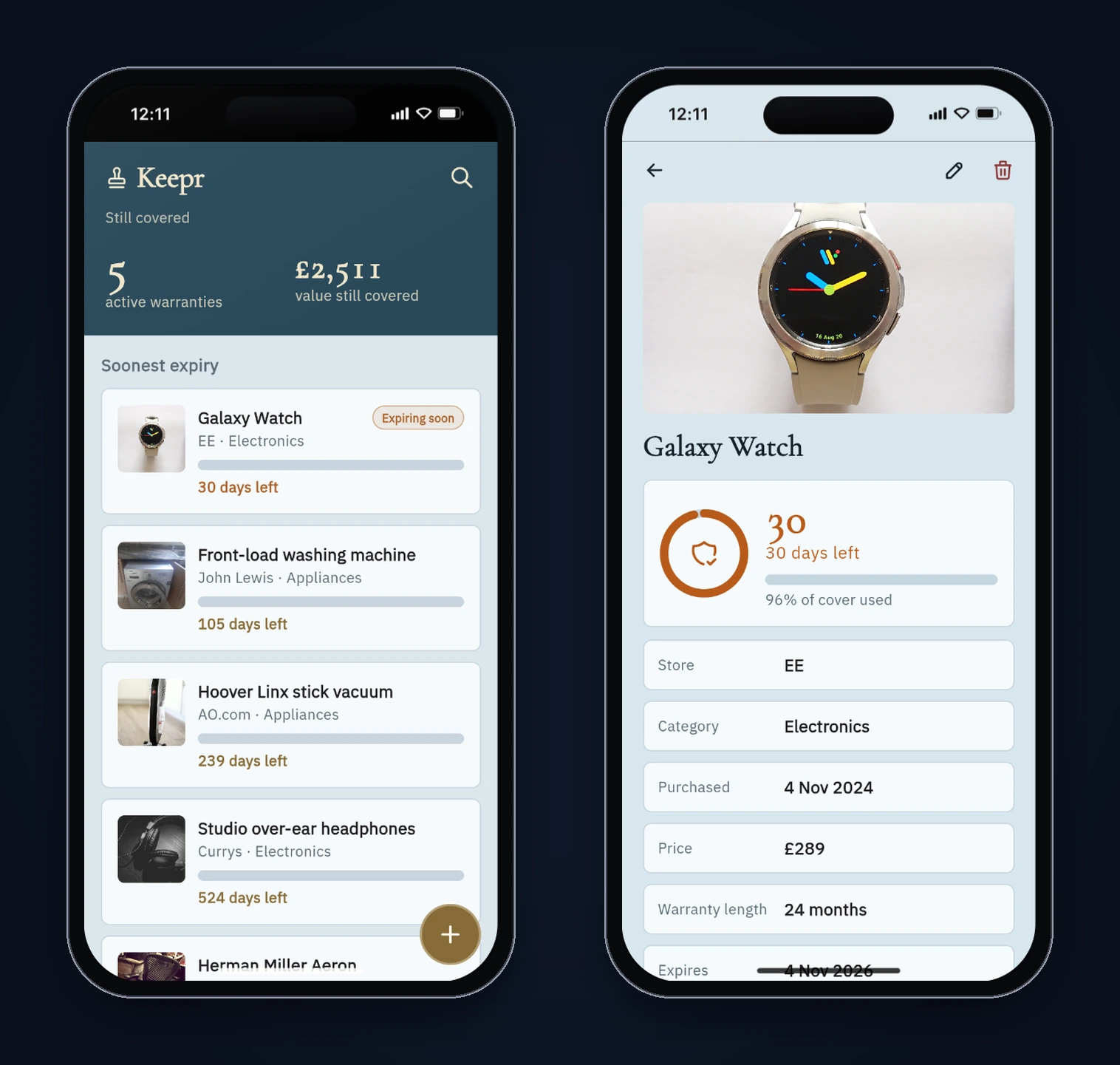
- Home with the number of active warranties and the value still covered, items sorted by soonest expiry, an "Expiring soon" badge at 30 days or fewer, and an Expired section at the bottom.
- Item detail with a bar showing how much of the warranty has been used, plus edit and delete.
- Search by item name or store, and local storage so everything survives a restart.
You need a FlutterGo account. Everything else happens in the browser.
Step 1: The prompt
This is the exact prompt we sent, unedited:
Build a mobile app called "Keepr" for keeping track of product warranties. Add an item with: name, store, purchase date, price, warranty length (in months or years), category (electronics, appliances, furniture, other), and an optional note for the serial number. The app works out the expiry date from the purchase date and the warranty length and shows how many days are left. Home screen: a summary at the top with the number of active warranties and the total value of items still covered, then items sorted by soonest expiry, with an "Expiring soon" badge when 30 days or fewer are left, and an "Expired" section at the bottom. Item detail: every field, the expiry date, a bar showing how much of the warranty has been used, plus edit and delete. Search by item name or store. Save everything on the device so it survives restarts. Clean, trustworthy design that works on iPhone and Android.
The prompt states every rule we planned to test: what counts as "expiring soon", what "value still covered" means, and where expired items go. If a rule isn't written down, you can't hold the app to it.
What it doesn't say is just as useful to notice. It never says what "one month" means at the end of a month, or which currency to use. FlutterGo picked pounds sterling (every price shows "£"), which is fine for a demo and something you'd change for your own market.
Step 2: What FlutterGo built
The studio reported Done 10m 31s and added 160 files. Before the build it wrote a design plan (docs/app-plan.md): a "carbon-copy" blue background with a brass accent and a teal header, Cormorant Garamond for headings and IBM Plex Sans for body text, and no tab bar, with search in the header and a round add button. It also seeded seven sample items with stock product photos so the app isn't empty on first launch. We didn't ask for the samples. They're handy for a demo, and you'd remove them before shipping.
When we pressed Run, the first preview compile failed with two errors in warranty_tile.dart: a const expression read colors.warning and colors.expired from the color theme. FlutterGo's "Fix 2 code errors" step fixed both in 32 seconds, and the preview built after that.
| Area | What the build used |
|---|---|
| State | flutter_riverpod 2.6: a Notifier<List<WarrantyItem>> plus helper functions for sorting, active count and covered value |
| Navigation | go_router |
| Storage | shared_preferences, one JSON string under the key keepr_items |
| Model | WarrantyItem with an expiresOn getter, daysLeft(), isExpiringSoon() and usedFraction() |
Step 3: Test it like a user would
Generated apps usually get the happy path right. We went after the edges a warranty app has to handle: month ends, leap days, the 30-day badge boundary, and getting around the app. All tests ran on October 5, 2026, in FlutterGo's static preview in the iPhone 16 frame.
| Test | Expected | First build |
|---|---|---|
| Home summary with the 7 seeded items | 5 active, £2,511 covered | Correct |
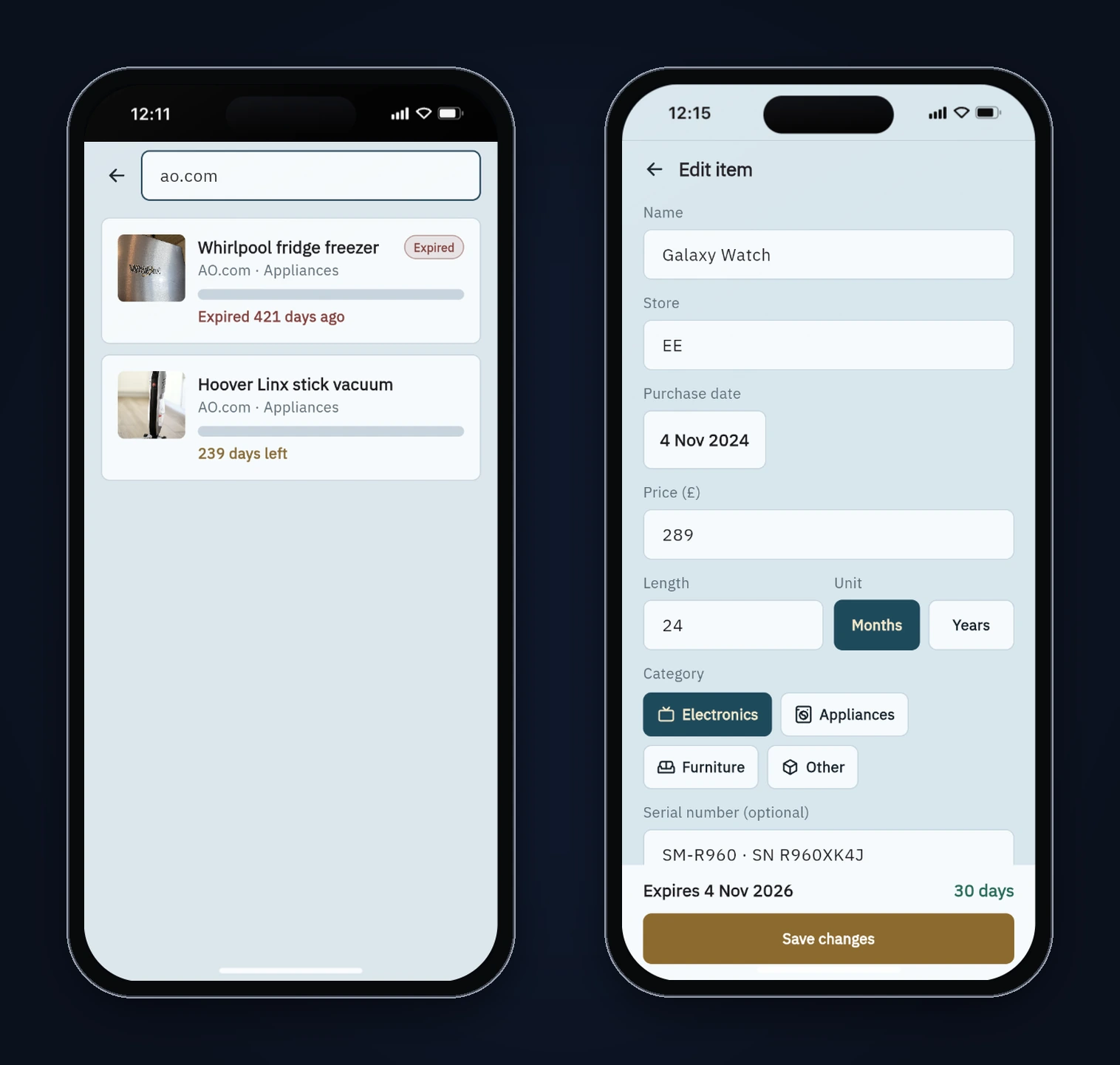
| Galaxy Watch, bought 4 Nov 2024, 24 months | Expires 4 Nov 2026, 30 days left, "Expiring soon" | Correct (30 days is inside the badge rule) |
| Washing machine and vacuum, days left | 105 and 239 | Correct |
| Search "ao.com" | The two AO.com items | Correct |
| Electric kettle, bought 31 Jan 2026, 1 month | Expires 28 Feb 2026 | 3 Mar 2026 |
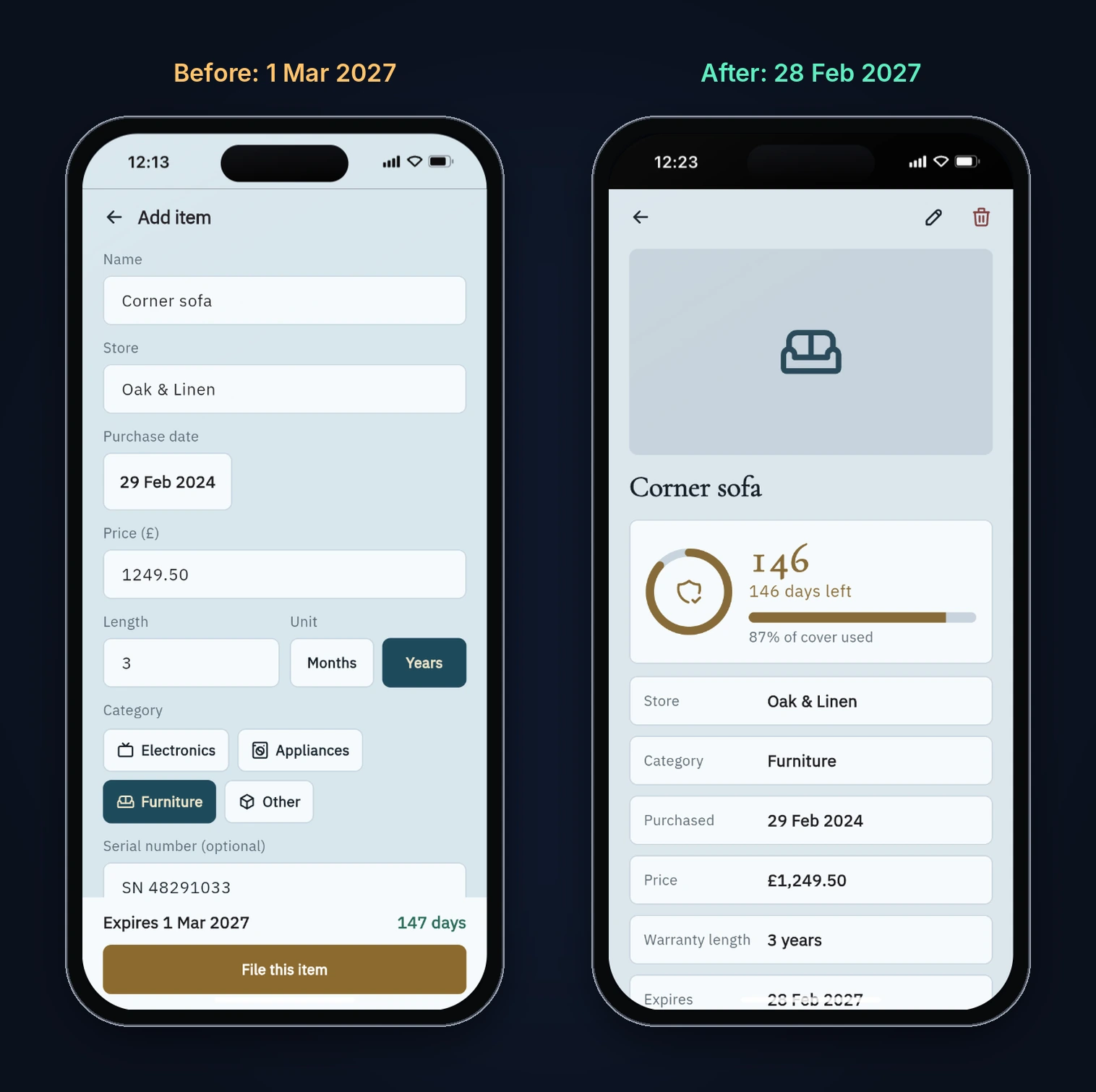
| Corner sofa, bought 29 Feb 2024, 3 years | Expires 28 Feb 2027, 146 days left | 1 Mar 2027, 147 days left |
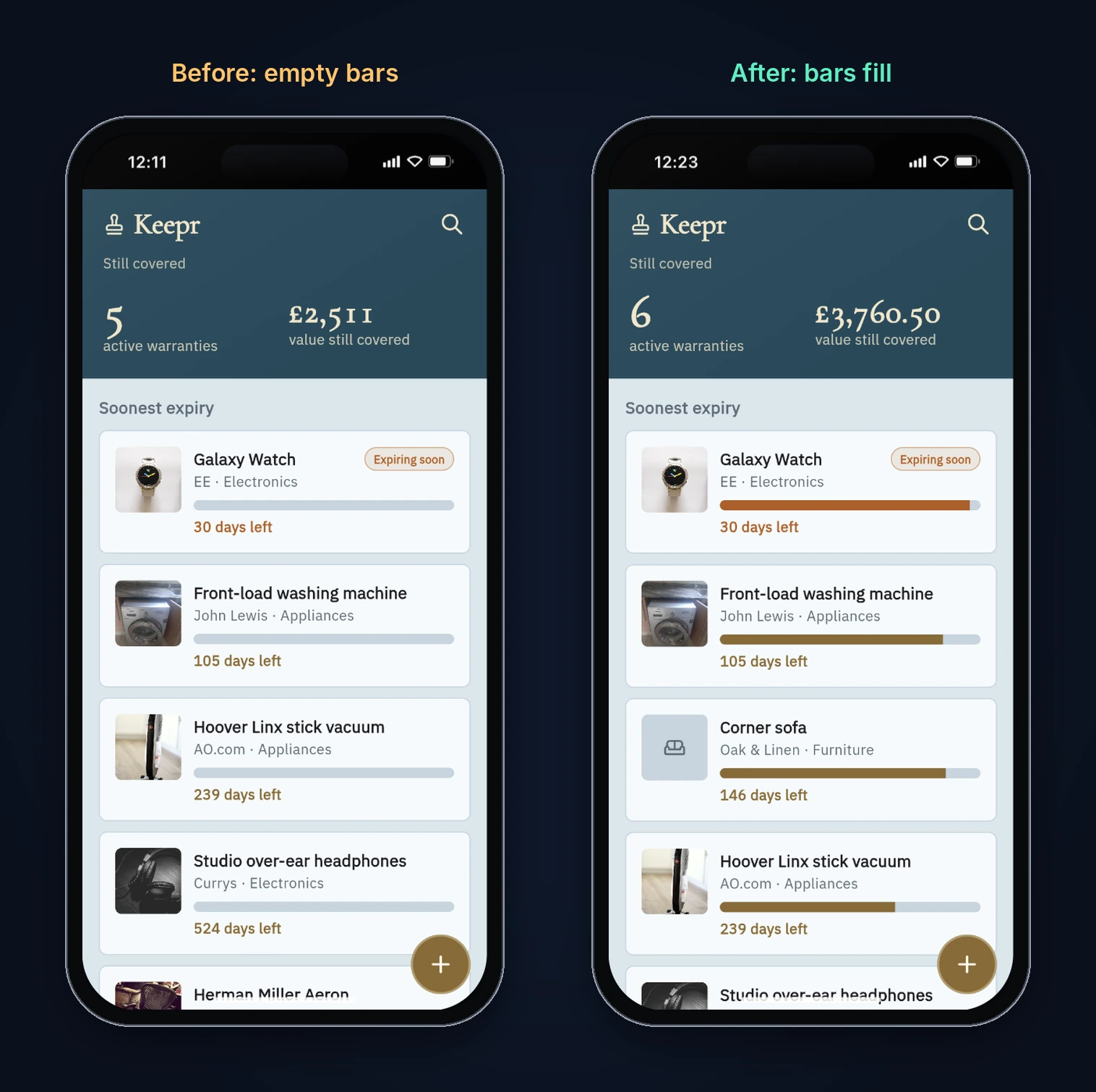
| "Cover used" bar on Home and detail | Filled to match the percentage | Always empty |
| Back from a newly added item | Return to Home | Back does nothing |
| Detail page of an item with no photo | Something in place of the photo | Large blank gap |
| Open Edit on an item; delete an item | Form filled in; item removed, back to Home | Correct |
| Reload the page | Data still there | Correct |
Bug 1: month-end dates spilled into the next month
Here is the first build's expiry calculation:
DateTime get expiresOn {
  return unit == WarrantyUnit.years
      ? DateTime(purchasedOn.year + length, purchasedOn.month, purchasedOn.day)
      : DateTime(purchasedOn.year, purchasedOn.month + length, purchasedOn.day);
}
It looks reasonable, and for most dates it is. The trouble is what DateTime does with a day that doesn't exist. Ask for 31 February 2026 and Dart doesn't throw or clamp. It counts forward past the end of February and gives you 3 March. Ask for 29 February 2027 and you get 1 March.
So a one-month warranty bought on 31 January ran for 31 days, and every item bought on the 29th, 30th or 31st of a month could get one to three extra days, depending on the month it landed in. The leap-day case is quieter but worse in practice: the sofa's countdown showed 147 days when the real answer was 146, so the app was promising cover on a day the warranty had already ended.
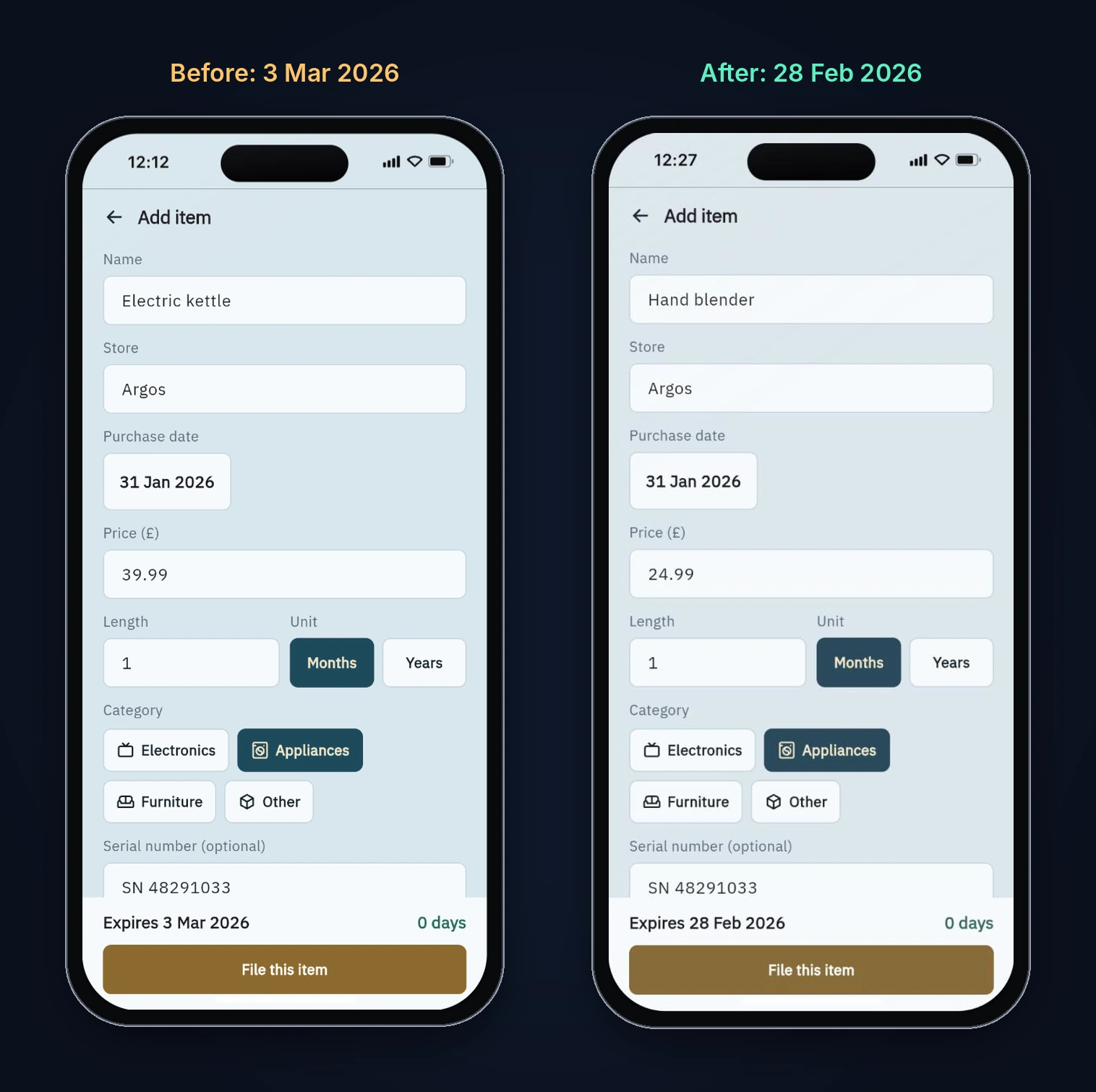
There's more than one sensible rule for "one month after the 31st", so pick one on purpose. We asked for the common one: if the target month is shorter, use its last day. That's also what Java's LocalDate.plusMonths and plusYears document. Their docs say an invalid result is adjusted to "the last valid day of the month". Whatever your warranty terms or local rules say, the date in the app should match them, and you should test the 29th, 30th and 31st.
Bug 2: the "cover used" bar never filled
The detail page said "96% of cover used" next to an empty bar, and every bar on Home was empty too. The bar is a custom SealBar widget:
Align(
  alignment: Alignment.centerLeft,
  child: FractionallySizedBox(
    widthFactor: v,
    child: ColoredBox(color: fill),
  ),
),
widthFactor sets the width, but nothing gives the fill a height. Align passes loose constraints down, and a ColoredBox with no child takes the smallest size it's allowed, so the fill was zero pixels tall. The percentage text came from the same value, which is why the number was right and the bar was blank. Adding heightFactor: 1 makes the fill take the full height of the track.
This is a nice reminder that a widget can be "correct" in code review and still render nothing. You only catch it by looking at the screen.
Bug 3: no way back after adding an item
After you file a new item, the form sends you to its detail page with context.go('/item/$id'). In go_router, go replaces the page stack instead of pushing onto it, so the detail page had nothing underneath it, and its Back arrow called context.pop() with nothing to pop. In the preview the arrow simply did nothing, and the only way out was reloading the app.
Bug 4: a blank gap where the photo should be
The seeded items have photos. Items you add don't, and the detail page left a 180-pixel empty box at the top for them. That's not a logic bug, but it makes your own items look broken next to the samples.
Step 4: The fix prompt
We sent one follow-up prompt describing all four problems, with the exact dates we'd tested:
I tested Keepr and found four bugs. Please fix them. 1) Expiry dates overflow at month ends: a 1-month warranty bought on 31 Jan 2026 shows "Expires 3 Mar 2026", and a 3-year warranty bought on 29 Feb 2024 shows 1 Mar 2027. When the target month is shorter, use the last day of that month (28 Feb 2026, 28 Feb 2027), for both months and years. 2) The warranty bar never fills: the detail screen says "96% of cover used" but the bar under it is empty, and every bar on Home is empty too. 3) After adding a new item the app opens its detail page, but the back arrow does nothing, so you're stuck there. Back should return to Home. 4) An item with no photo leaves a big blank gap at the top of its detail page; show the category icon on a tinted panel instead. Keep everything else as it is, including saved data.
FlutterGo reported Done 1m 35s. Giving it the failing input and the expected output for each bug matters more than the wording. "Dates are wrong" leaves it guessing. "31 Jan + 1 month should be 28 Feb" is a test it can check.
Step 5: Read the fix
The new date code converts years to months and clamps the day:
DateTime get expiresOn {
  final months = unit == WarrantyUnit.years ? length * 12 : length;
  return addClampedMonths(purchasedOn, months);
}

DateTime addClampedMonths(DateTime from, int months) {
  final rawMonth = from.month + months;
  var year = from.year + (rawMonth - 1) ~/ 12;
  var month = ((rawMonth - 1) % 12) + 1;
  if (month <= 0) {
    month += 12;
    year -= 1;
  }
  final lastDay = DateTime(year, month + 1, 0).day;
  final day = from.day < lastDay ? from.day : lastDay;
  return DateTime(year, month, day);
}
DateTime(year, month + 1, 0) is the usual Dart way to get the last day of a month: day 0 of the next month rolls back to the last day of this one. Two small notes from reading it. The month <= 0 branch can't run here, because Dart's % never returns a negative result for a positive divisor and warranty lengths are always positive, so it's harmless dead code. And the fix turns years into months, which means "3 years from 29 February 2024" and "36 months from 29 February 2024" now give the same answer. That's the consistency you want.
The other three fixes are one-liners:
SealBarnow passesheightFactor: 1to theFractionallySizedBox.- The detail page's Back button checks
context.canPop()and callscontext.go('/cover')when there's nothing to pop. The form still usesgo, so the fix lives on the detail page. - Items without a photo show their category icon on a tinted 200-pixel panel.
Step 6: Retest the fixed build
We reloaded the new preview build (our saved items carried over, because they live in local storage) and reran the failing cases:
| Test | Fixed build |
|---|---|
| Corner sofa, 29 Feb 2024 + 3 years | Expires 28 Feb 2027, 146 days left |
| New item, 31 Jan 2026 + 1 month | Expires 28 Feb 2026 |
| Bars on Home and detail | Filled to match the percentage (87% on the sofa) |
| Back from a newly added item | Returns to Home |
| Detail page with no photo | Category icon on a tinted panel |
| Home totals, sorting, Expired section | Unchanged and correct |
What's still worth fixing
We left a few things alone because they don't break the app, but you'd look at them before shipping:
- Days left uses
difference().inDaysbetween local midnights. On the day clocks change, two midnights can be 23 hours apart, andinDaysrounds that down to one day less. Our preview ran in a time zone without daylight saving, so we didn't see it. Counting calendar days in UTC avoids it. - The edit form fills the price with
pricePounds.toString(). In the web preview, £289 shows as "289". On a phone it would show "289.0", because Dart on native platforms prints whole doubles with a decimal point. Storing pence as an integer, as in our gift planner tutorial, avoids both that and rounding drift. - The currency is hard-coded to pounds. Fine for a UK app; otherwise, ask for your currency in the prompt.
- The serial number field's hint text ("SN 48291033") looks like a real value. A lighter hint style would stop people thinking it's prefilled.
- The add form's live preview shows "0 days" for a date that's already expired. "Expired" would be clearer.
Why test dates at the edges
Month-end and leap-day bugs survive because the dates you type while testing are usually the 1st, the 15th or today. Every warranty, subscription, rent or billing app adds months to dates, and every one of them meets the 31st eventually. A handful of edge cases catches most of it: the 29th, 30th and 31st of a month, 29 February, a date exactly at your "soon" threshold, and a date that's already passed. Five minutes with those dates found the worst bug in this build.
Try it
Keepr took two prompts and about 12 minutes of build time, plus the 32-second compile fix. The testing took longer, and that's the part worth copying. To try the same flow, describe your app in the AI Flutter app builder, then test it on the dates, amounts and paths your users will actually hit. For more build-and-test walkthroughs, see the habit tracker and score keeper tutorials, and our guide to Flutter local databases if you want to move beyond shared_preferences.
FAQ
Can FlutterGo build a warranty tracker from one prompt? Yes. Our prompt produced a working app with add, edit, delete, search, expiry countdowns and on-device storage in 10 minutes 31 seconds. The first preview compile needed a 32-second automatic fix, and our tests found four bugs that one more prompt fixed.
Why did 31 January plus one month become 3 March?
The first build created the date with DateTime(2026, 2, 31). Dart doesn't reject a day that doesn't exist. It counts forward from the start of February, so day 31 lands on 3 March. Clamping to the month's last day gives 28 February.
Does Keepr work offline?
Yes for your data: items are stored on the device with shared_preferences, and the app has no backend. (The generated app does use google_fonts, which fetches font files at runtime unless you bundle them.)
Is the code mine to change? The app is ordinary Flutter and Dart code. You can read every file in the studio, and that's how we reviewed each bug and fix in this tutorial.