Build a Chore Rota App with FlutterGo, Then Find the Bug That Skipped a Housemate's Turn
We built Rota, a shared-flat chore rotation app, from one FlutterGo prompt, tested swaps and deletes, and fixed the bugs that skipped people's turns.
Every shared flat has the same argument: whose turn is it? A chore rota app looks like a weekend project. A list of people, a list of chores, and a pointer that moves along when someone ticks a box.
The pointer is the hard part. We asked FlutterGo, our AI Flutter app builder, for a chore rotation app called Rota, with swaps and "away" cover. The first build looked finished and handled the normal case well. Then we swapped a turn, and the next morning's kitchen job skipped straight past Priya. Deleting a housemate moved someone else's overdue chore to the wrong person. And after ticking one chore, the next one on the list showed a tick it hadn't earned and ignored taps.
This tutorial covers the whole session: the prompt, what FlutterGo built, the tests we ran in the preview, the code behind each bug, and the follow-up prompt that fixed them. Every screen below is a real screenshot of the build, taken on October 5, 2026.
Key takeaways
- One prompt produced a working chore rota in 11 minutes 23 seconds: housemates with colours, daily, weekly and fortnightly chores that rotate, a Today screen grouped by person, a seven-day Week view, a History tally, swaps, away dates and on-device storage.
- The normal path worked. The edge cases didn't: after a swap, the rotation restarted from whoever ticked the chore, so someone in between lost their turn.
- Deleting a housemate kept each chore's position number but not the person, so turns slid to the wrong housemate.
- A ticked row's "done" state stayed on screen and moved to the next chore, which then couldn't be tapped. The fix is one key.
- A single fix prompt (3 minutes 24 seconds) made swaps real swaps with a payback, kept turns in place when someone is deleted, keyed the rows, added overdue chores to the Week view and put a confirmation in front of deletes. We re-ran the tests on the new build.
What you'll build
Rota is a local-only chore rotation app for a shared flat:
- Housemates with a name and a colour.
- Chores that repeat daily, weekly or every two weeks and rotate through the housemates in order.
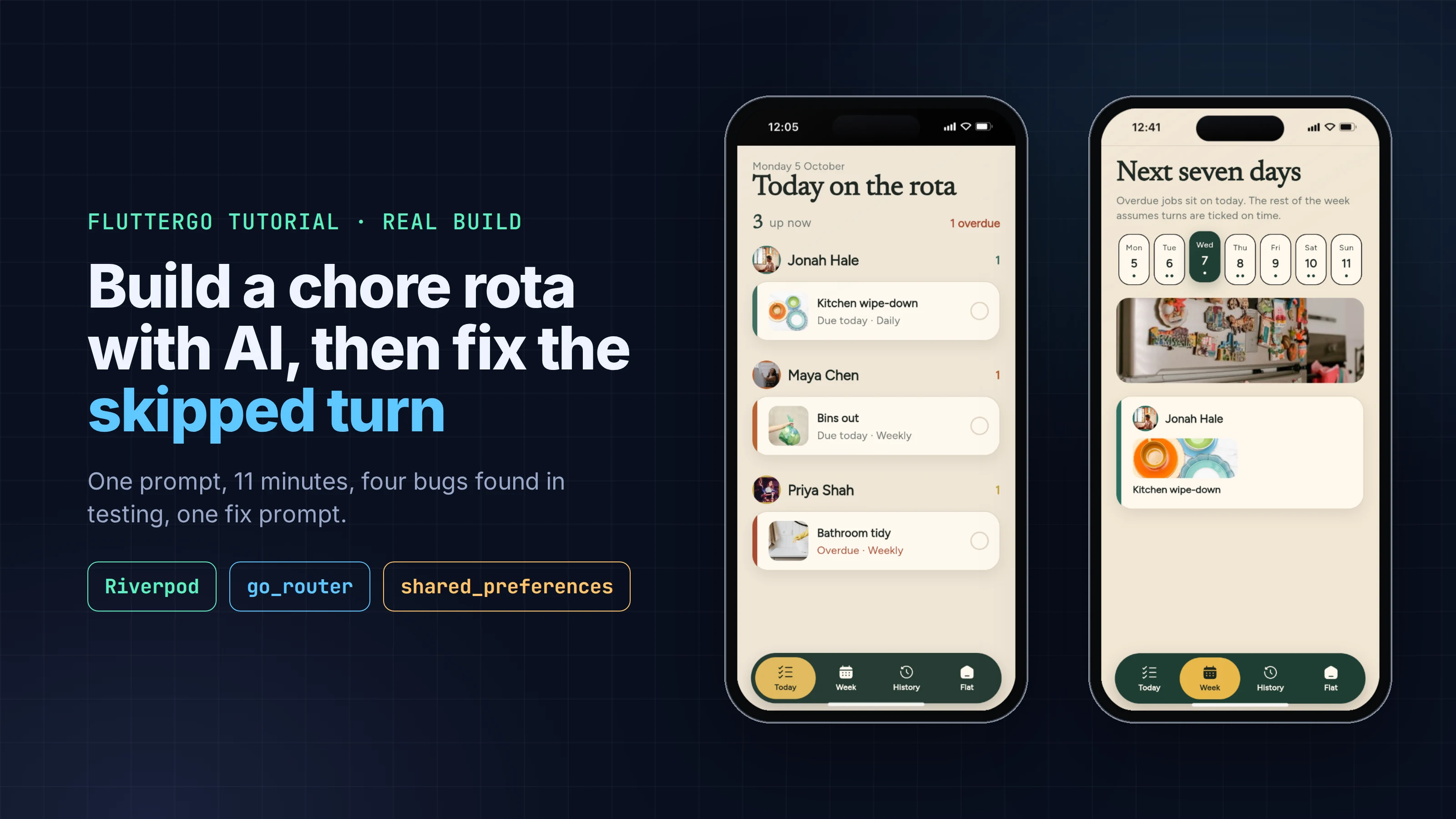
- Today: what's due and overdue, grouped by person, with a tick to mark it done.
- Week: who holds which chore for the next seven days.
- Swaps and away dates: hand one turn to someone else, or mark someone away so their turns go to the next person.
- History: who did what, with a tally for the last 30 days.
- Local storage, so everything survives closing the app.
You need a FlutterGo account. Everything else happens in the browser.
Step 1: The prompt
This is the exact prompt we sent from the studio home screen, unedited:
A chore rotation app called Rota for a shared flat. Add housemates (a name and a colour) and chores, each with a frequency: daily, weekly or every two weeks. Each chore rotates through the housemates in order: when someone marks it done, it passes to the next person and its next due date moves forward by its frequency. A Today screen shows what's due today and what's overdue, grouped by person, and a Week screen shows each person's chores for the next 7 days. Let me swap a single turn between two housemates, and mark someone as away for a date range so their turns go to the next person while they're gone. Keep a history of who did what and when, with a tally per person for the last 30 days. Let me edit and delete housemates and chores. Save everything on the device so it survives closing the app. Friendly, calm design that's easy to read at a glance.
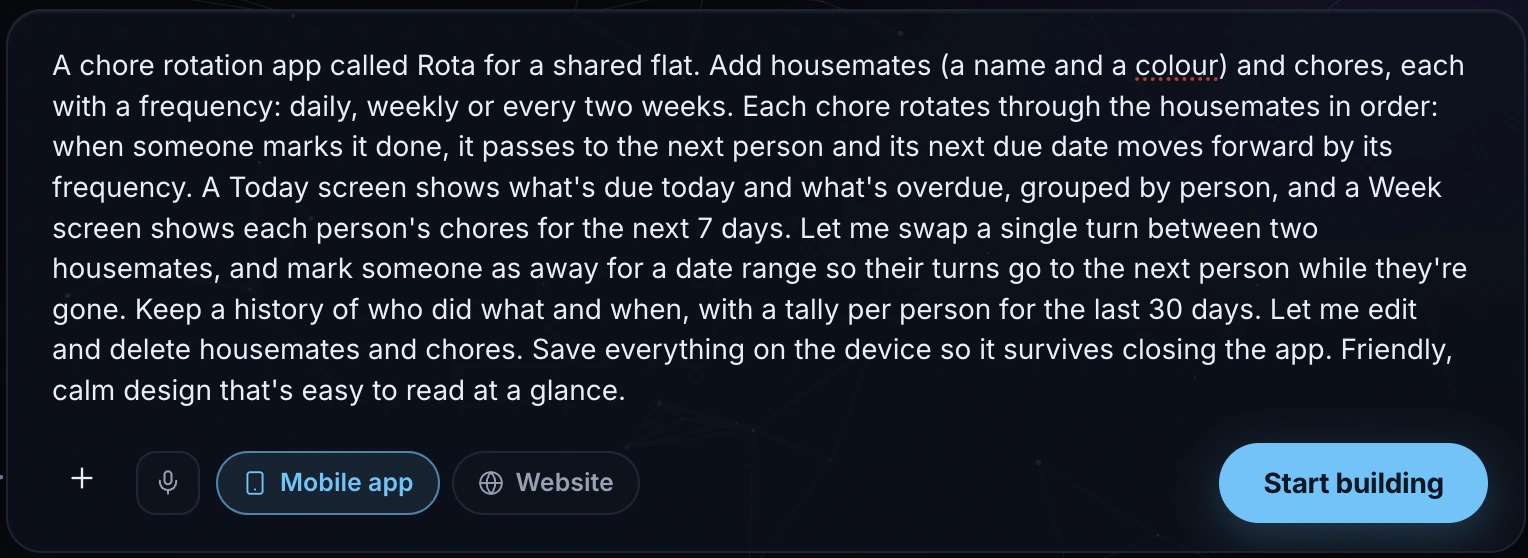
Two sentences carry most of the logic. "When someone marks it done, it passes to the next person" defines the rotation. "Swap a single turn" and "their turns go to the next person while they're gone" define the two exceptions. Exceptions are where rotation apps break, so they're what we tested hardest.
Step 2: What FlutterGo built
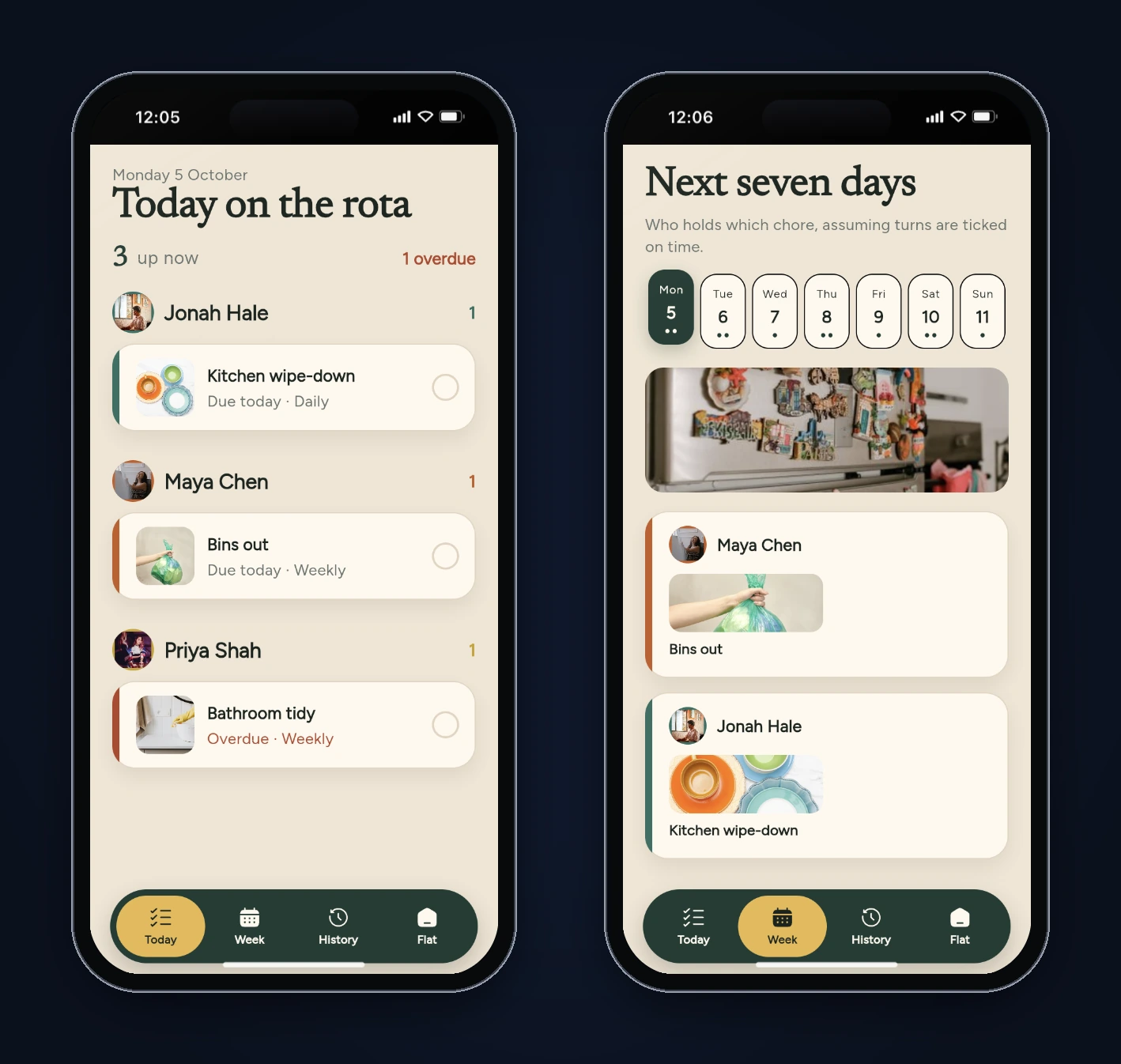
The agent reported Done 11m 23s after a 133-step work log and added 168 files. Its design plan (docs/app-plan.md) describes the concept as a "fridge rota on the kitchen wall": oat linen, bottle green and a maize accent, Newsreader for headings and Figtree for UI, and a floating pill navigation with Today, Week, History and Flat.
It also seeded four housemates (Maya, Jonah, Priya and Alex), five chores, a week of history and an away period for Priya, so the app isn't empty on first launch. We didn't ask for sample data; you'd remove it before shipping.
| Area | What the build used |
|---|---|
| State | flutter_riverpod 2.6: a RotaNotifier extends AsyncNotifier<RotaState> |
| Navigation | go_router 14 with a four-tab shell |
| Storage | shared_preferences: the whole state as one JSON string under rota_state_v1 |
| Rotation logic | lib/models/rota_engine.dart (who's up on a given day, the Week projection, the 30-day tally) and lib/providers/rota_providers.dart (tick, swap, delete, away) |
Step 3: Test it like a flat would
The normal case worked: tick Maya's bins and they pass to Jonah, a week later. So we went after the exceptions, the things a real flat does in the first month. All tests ran in FlutterGo's static preview in the iPhone 16 frame, and we read the saved state from the browser's local storage after each step to confirm what the screens showed.
| Test | Expected | First build |
|---|---|---|
| Today with the seed data | Jonah: kitchen; Maya: bins; Priya: bathroom (overdue) | Correct |
| Give Maya's bins turn to Priya, Priya ticks it | Next turn: Jonah | Next turn: Alex. Jonah skipped |
| Give Jonah's kitchen turn to Alex, Alex ticks it | Tuesday's kitchen: Priya | Tuesday's kitchen: Maya. Priya skipped |
| Delete Maya | Priya keeps her overdue bathroom turn | Bathroom moved to Alex |
| Tick a chore, then tick the one that moves up | Both can be ticked | The second row showed a tick and ignored taps |
| Week view on a day with an overdue chore | Overdue chore listed | Not listed |
| Reload the page | Data still there | Data still there |
Swaps skip people
The prompt asked to "swap a single turn between two housemates". The build's Swap screen is really a hand-off: "Pick a chore, then who should take this turn", with a single "Give it to" list. That's a reasonable reading, but the next step isn't.
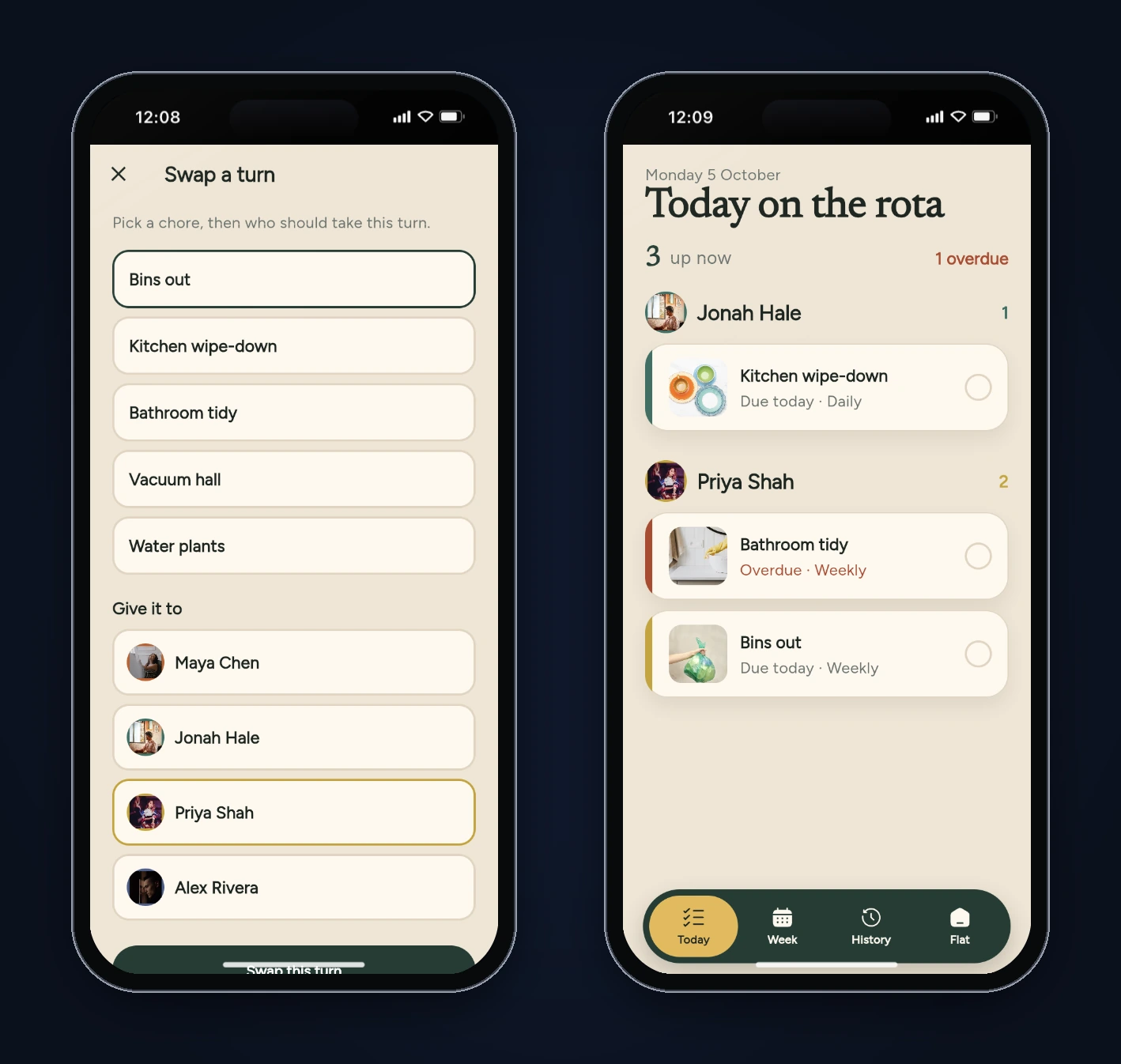
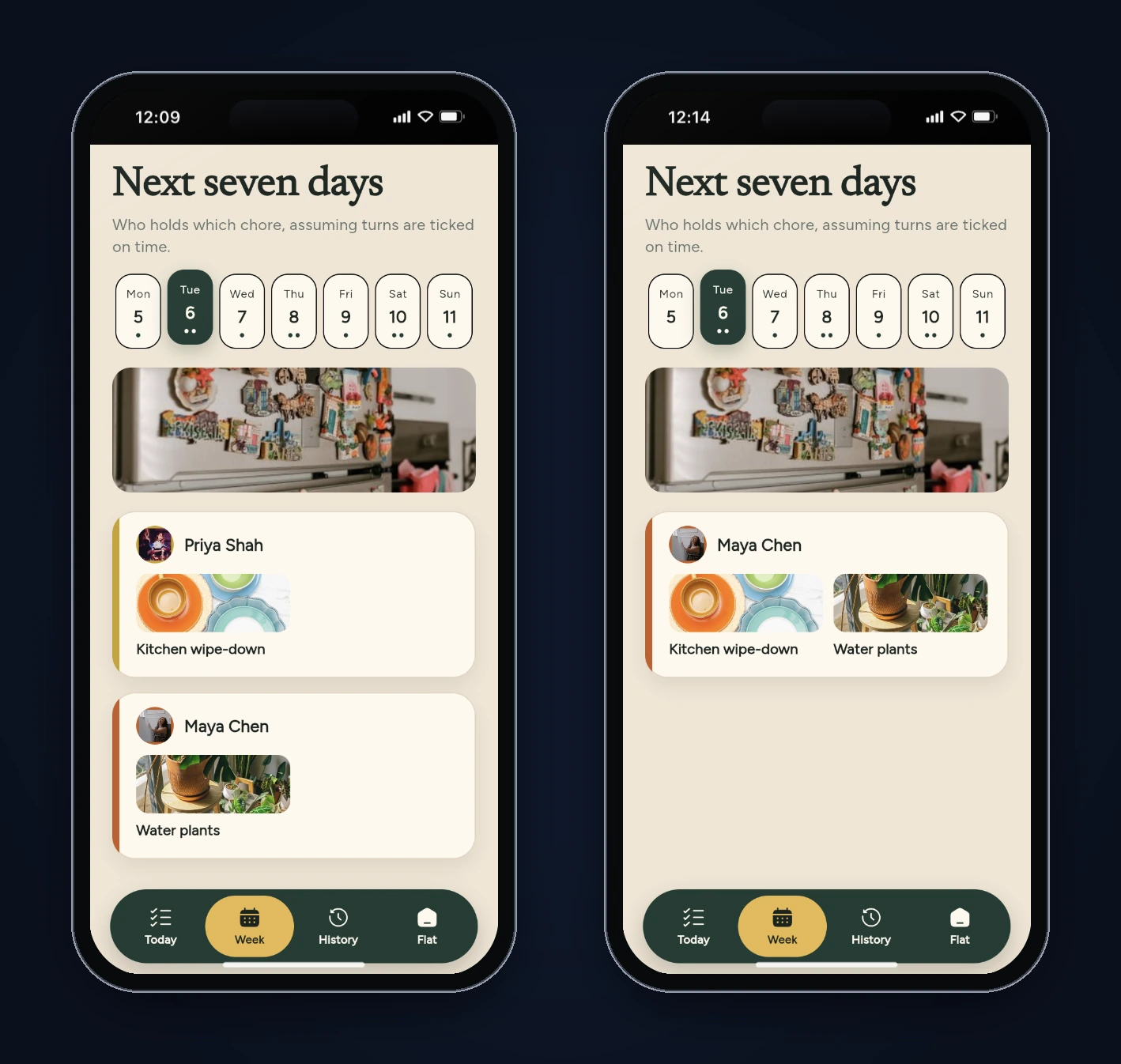
When Priya ticked the bins, the turn went to Alex. Jonah, who comes after Maya, was skipped. We repeated it with the daily kitchen chore so the effect shows up in the Week view: Tuesday's kitchen turn belonged to Priya before the hand-off and to Maya after it.
The cause is one line in completeChore. The next person is computed from whoever actually did the chore:
final whoId = RotaEngine.assigneeOn(current, chore, today); // the helper, after a swap
final who = RotaEngine.person(current, whoId);
final didAt = chore.rotationIds.indexOf(who.id);
final nextIndex = didAt < 0
    ? (chore.currentIndex + 1) % chore.rotationIds.length
    : (didAt + 1) % chore.rotationIds.length;
Without a swap, the person who ticks it is the person whose turn it was, so this works. With a swap or away cover, the helper's position is somewhere else in the order, and the rotation jumps to just after them. Everyone between the two positions loses a turn. The rotation should advance from currentIndex, the slot whose turn it was, no matter who did the work.
There's a second, quieter mismatch. The Week view assumes the rotation advances one slot per occurrence, so it showed Alex covering Priya's kitchen turn on Saturday and then doing his own on Sunday. Ticking Saturday's turn would have used the code above and jumped past Alex instead. The forecast and the real behaviour disagreed.
Deleting a housemate moves other people's turns
Each chore stores its rotation as a list of housemate IDs plus currentIndex, the position whose turn it is. Deleting a housemate removes their ID from every list, but the build only kept the index in range:
final ids = c.rotationIds.where((x) => x != id).toList();
var idx = c.currentIndex;
// ...
idx = idx < 0 ? 0 : (idx >= ids.length ? ids.length - 1 : idx);
Bathroom tidy was at index 2, Priya, in the order Maya, Jonah, Priya, Alex. After deleting Maya, the list became Jonah, Priya, Alex, and index 2 now pointed at Alex. Priya's overdue turn moved to him. If the deleted person sits before the current slot, the index has to move back by one.
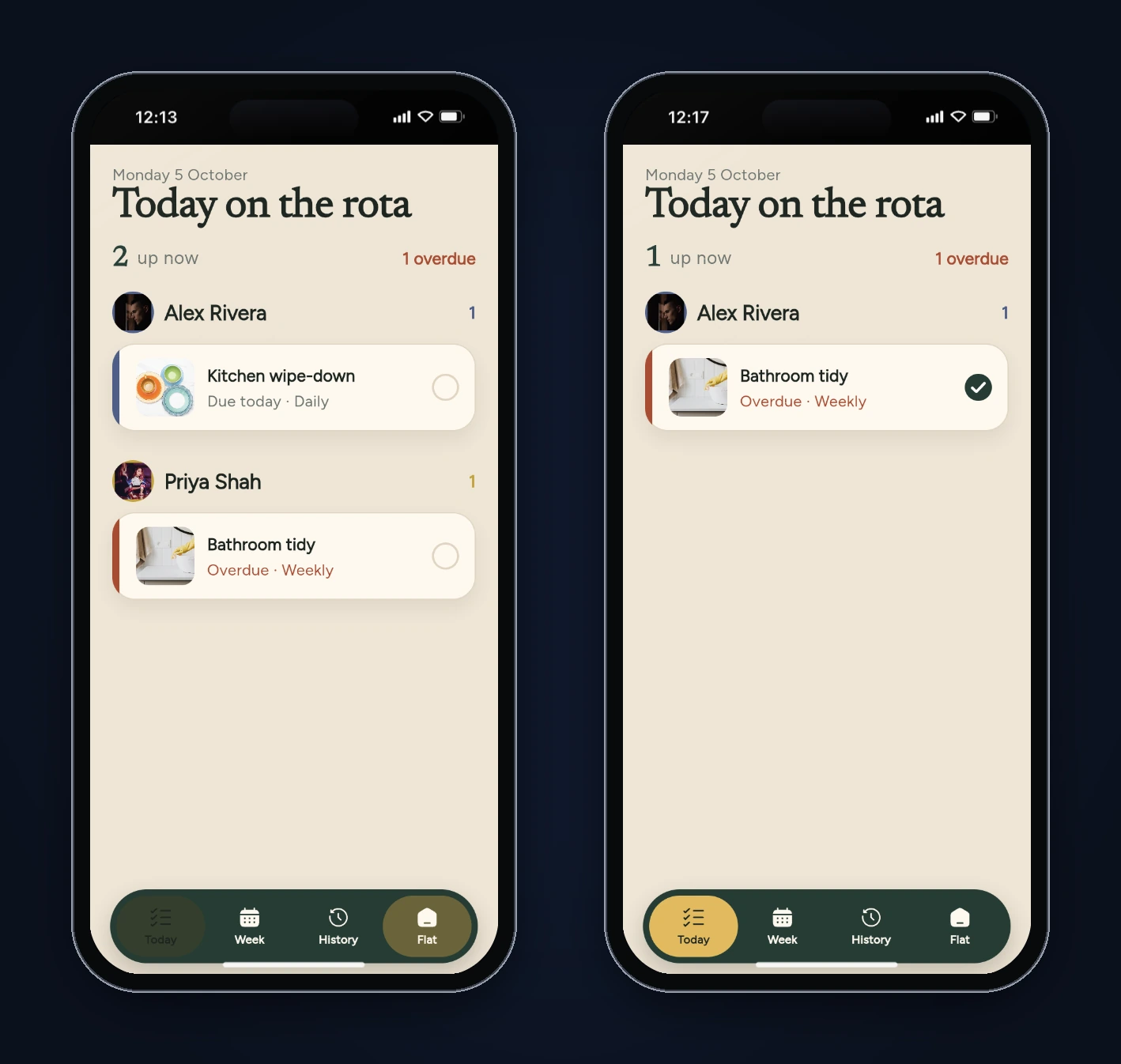
The app also deleted Maya the moment we tapped the bin icon, with no confirmation and no undo.
A tick that moves to the wrong row
That last screenshot shows a tick next to a chore nobody had done. We'd just ticked the kitchen chore in the same row position. Tapping the bathroom row did nothing, and the saved state confirmed it hadn't been marked done.
Each Today row is a StatefulWidget that remembers a local _done flag, so it can animate the tick before telling the store:
class _ChoreRowState extends State<_ChoreRow> {
  bool _done = false;
  // ...
  onTap: _done
      ? null
      : () async {
          setState(() => _done = true);
          await Future<void>.delayed(AppMotion.sm);
          widget.onDone();
        },
The rows have no key. When the kitchen chore left the list, Flutter matched the bathroom chore to the same element by position and reused its State, _done == true included. The fix is _ChoreRow(key: ValueKey(item.chore.id), ...), so each row's state belongs to its chore, not its slot. It's a classic Flutter list bug, and you'll only see it by ticking more than one item without leaving the screen.
Step 4: Read the rest of the code
A few things worth knowing before you build on it:
- Overdue chores keep their schedule. Ticking an overdue weekly chore moves its due date forward in steps of seven days from the old due date until it's in the future, so a Saturday chore stays on Saturdays. That's a reasonable choice, but it means a chore ticked two days late is due again five days later, not seven. Decide which you want.
- If everyone is away, the app still assigns someone.
assigneeOnreturns the original person when every housemate is marked away. - The rotation order can't be edited. It's the order housemates were added. The Edit chore screen has name, frequency and picture only.
- The iOS project is already on Apple's UIScene lifecycle, which apps built with Xcode 27 need. We cover why that matters in today's UIScene article.
Step 5: Fix it with one prompt
We sent the bugs back as one message, describing what we saw and what should happen instead:
We tested Rota and found four bugs. Please fix them: 1) Swap a turn: when someone takes another person's turn and ticks it, the rotation restarts after whoever ticked it, so people in between lose their turn (Alex did Jonah's kitchen turn and Priya's turn the next day vanished). The rotation should carry on from the original person's slot, and the original person should take the helper's next turn on that chore so it's a real swap. Away cover should also carry on from the away person's slot. 2) Deleting a housemate moves other chores to the wrong person (we deleted Maya and Priya's overdue bathroom turn jumped to Alex). Whoever was up next should stay up next. 3) After ticking a chore on Today, the chore that slides into that row shows a tick and can't be tapped. Key each row by chore id. 4) Show overdue chores on today in the Week view. Also ask for confirmation before deleting a housemate or chore.
FlutterGo reported Done 3m 24s after a 28-step work log. It updated the models, the rotation engine, the store, and the Today, Week and edit screens, and added one file, lib/shared/widgets/confirm_delete.dart.
We read the new code before testing it. The tick no longer looks at who did the chore. A new RotaEngine.afterComplete always advances currentIndex by one slot, and records a payback when a swap was used:
final swapped = chore.turnOverrideId != null &&
    who != null &&
    who == chore.turnOverrideId &&
    who != official;
if (swapped) {
  nextPaybacks[who] = official;
}
return chore.copyWith(
  currentIndex: (chore.currentIndex + 1) % chore.rotationIds.length,
  nextDue: advanceDue(chore.nextDue, chore.frequency, onDay),
  paybacks: nextPaybacks,
  clearOverride: true,
);
paybacks maps a helper to the person they covered. When the helper's own slot comes round, assigneeOn hands that turn to the person who owes it, so a swap evens out. Deleting a housemate now moves the index back when the removed person sat before the current slot (if (removedAt < idx) idx -= 1;) and wraps to the start if the index runs off the end. Today rows are built with key: ValueKey(item.chore.id). And the Week view walks each chore through the same afterComplete function the tick uses, so the forecast and the real behaviour can't drift apart again.
Step 6: Re-test
We cleared the preview's saved data so the seed came back, then repeated every test on the new build:
| Test | Fixed build |
|---|---|
| Alex covers Jonah's kitchen turn and ticks it | Tuesday: Priya (her turn kept). Wednesday: Jonah, paying Alex back |
| Tick a chore, then tick the row that moves up | Both ticks register; no stale tick |
| Week view on Monday | Priya's overdue bathroom tidy listed, with the note "Overdue jobs sit on today" |
| Delete Maya | A confirmation dialog first; then Priya keeps the overdue bathroom turn |
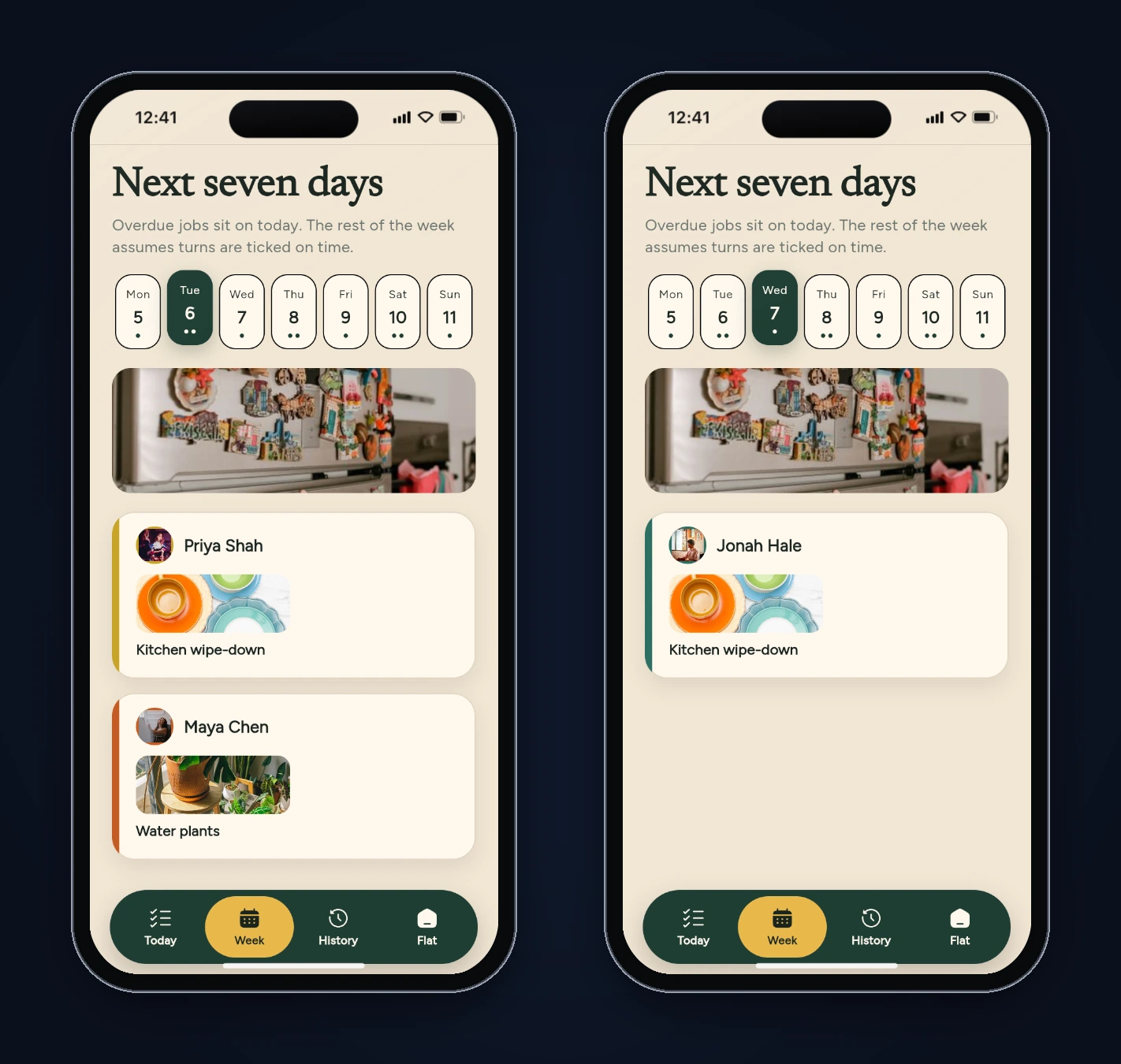
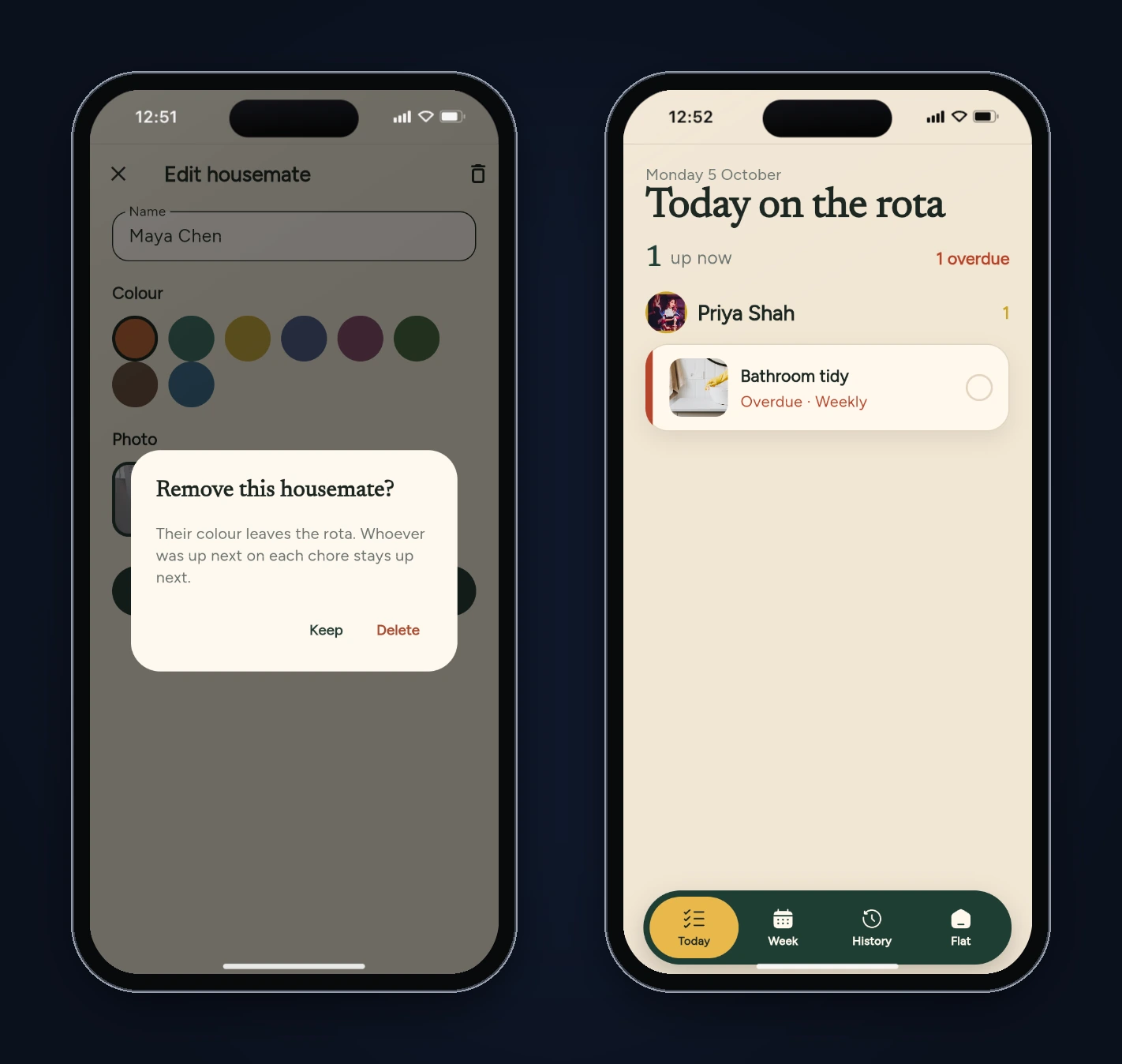
Two things we didn't test because they need real days to pass: an away period starting and ending, and paybacks on the weekly and fortnightly chores. The code paths are the same ones the daily chore exercised, but they're worth a unit test before you rely on them.
What we'd do before shipping it
- Write the rotation rules as tests. Three of the four bugs live in small functions with clear inputs and outputs: given this rotation, this index and this action, who's next? Unit tests on
completeChore,deleteHousemateand the Week projection would have caught them, and a widget test that ticks two rows in a row catches the fourth. - Remove the seed data and the stock photos, or keep them behind a "try with sample flat" button.
- Decide how overdue chores reschedule, and say so in the UI.
- Sync between phones. A flat rota only works if everyone sees the same list. The build stores data on one device; a shared backend is the next step, and our guide to full-stack Flutter apps with Supabase covers that route.
FAQ
Can FlutterGo build a chore rotation app from one prompt? Yes. One prompt produced a working app with rotating chores, a Today and Week view, swaps, away dates, history and local storage in 11 minutes 23 seconds. The edge cases needed a second prompt.
Why did swapping a turn skip someone? The first build advanced the rotation from the person who ticked the chore instead of from the slot whose turn it was. After a swap, those are different people.
Does Rota sync between housemates' phones?
Not in this build. Everything is saved on the device with shared_preferences. Syncing needs a backend.
Can I export the code? Yes. FlutterGo projects are standard Flutter projects; you can download the code or connect GitHub from the studio.