Xcode 27 Is Here and the iOS 27 SDK Is Required From April 2027. Check Your Flutter App's UIScene Migration First
Flutter apps that skip UIScene fail to launch when built with Xcode 27, and the iOS 27 SDK is mandatory from April 2027. How to check and migrate.
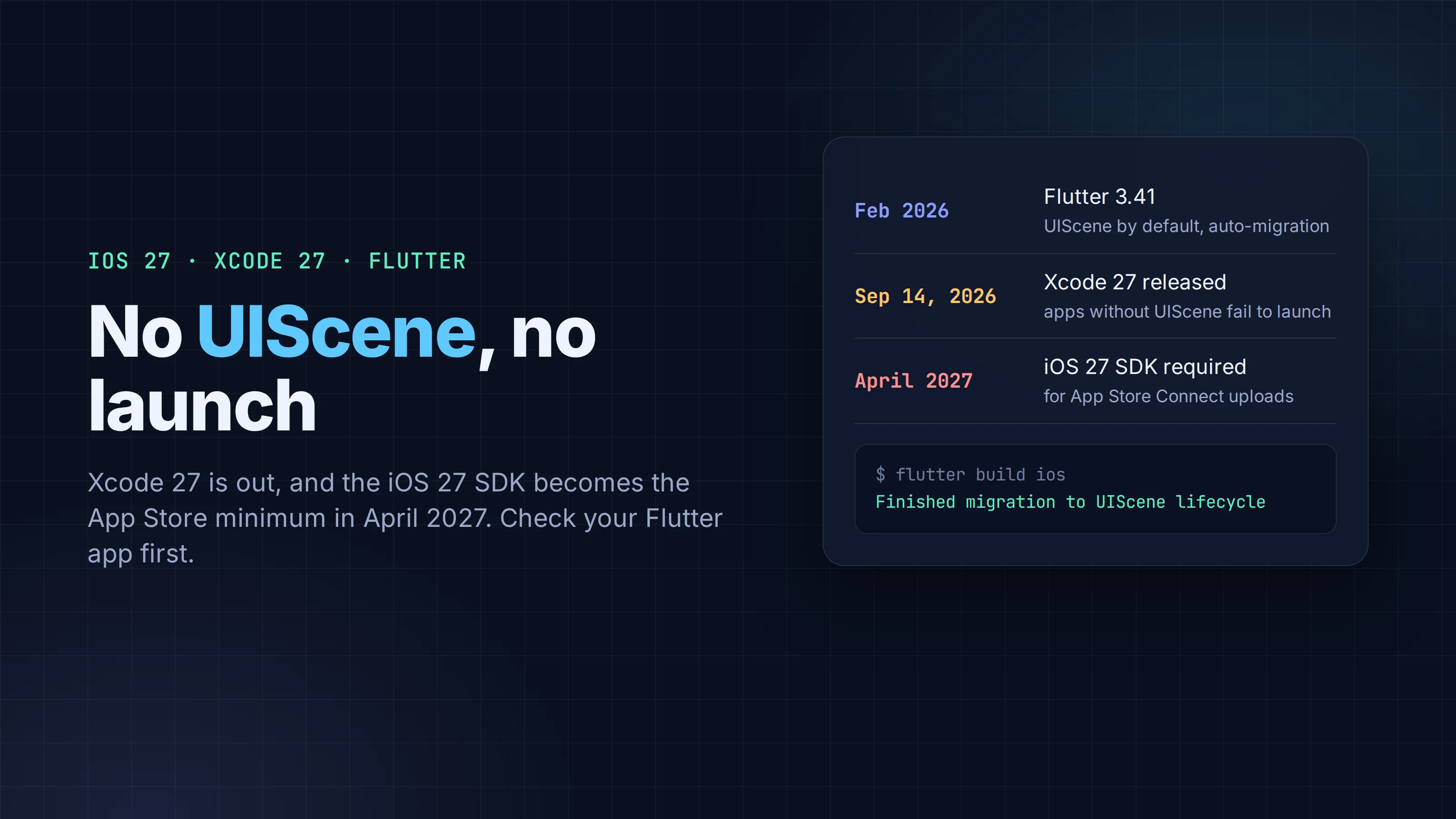
Apple's April deadlines usually feel far away in October. This one has a shortcut. On September 9, 2026, Apple said that from April 2027, iOS apps uploaded to App Store Connect "must be built with the iOS 27 & iPadOS 27 SDK or later." Xcode 27, which ships that SDK, came out five days later. And Flutter's docs say that apps which haven't adopted Apple's UIScene lifecycle "fail to launch on startup" when built with Xcode 27.
So the date that matters for a Flutter team isn't in April. It's the day someone updates Xcode on a build machine or a CI image. If the app's iOS project hasn't moved to UIScene, the next build starts and immediately crashes.
Most Flutter apps are already fine, because Flutter has migrated them automatically since 3.41. This piece is about the ones that aren't, and how to tell in a few minutes which group you're in.
Key takeaways
- Xcode 27 (build 27A266a) shipped on September 14, 2026. Apple requires the iOS 27 SDK for App Store uploads starting April 2027, so every iOS app has to build with Xcode 27 or later by then.
- UIKit apps built with the iOS 27 SDK must use the UIScene lifecycle or they won't launch. Flutter's docs say this applies to Flutter apps too.
- Flutter 3.41 (February 2026) made UIScene the default and migrates projects with an unmodified AppDelegate the next time you run flutter run or flutter build ios.
- Apps with a customised AppDelegate, add-to-app setups, apps still on Flutter 3.38 or older, and plugins that rely on app lifecycle events need manual changes.
- The check is quick: look for UIApplicationSceneManifest in Info.plist, see where plugins are registered in AppDelegate.swift, and audit the plugins that hook into the app delegate.
What Apple changed
Two separate announcements line up here.
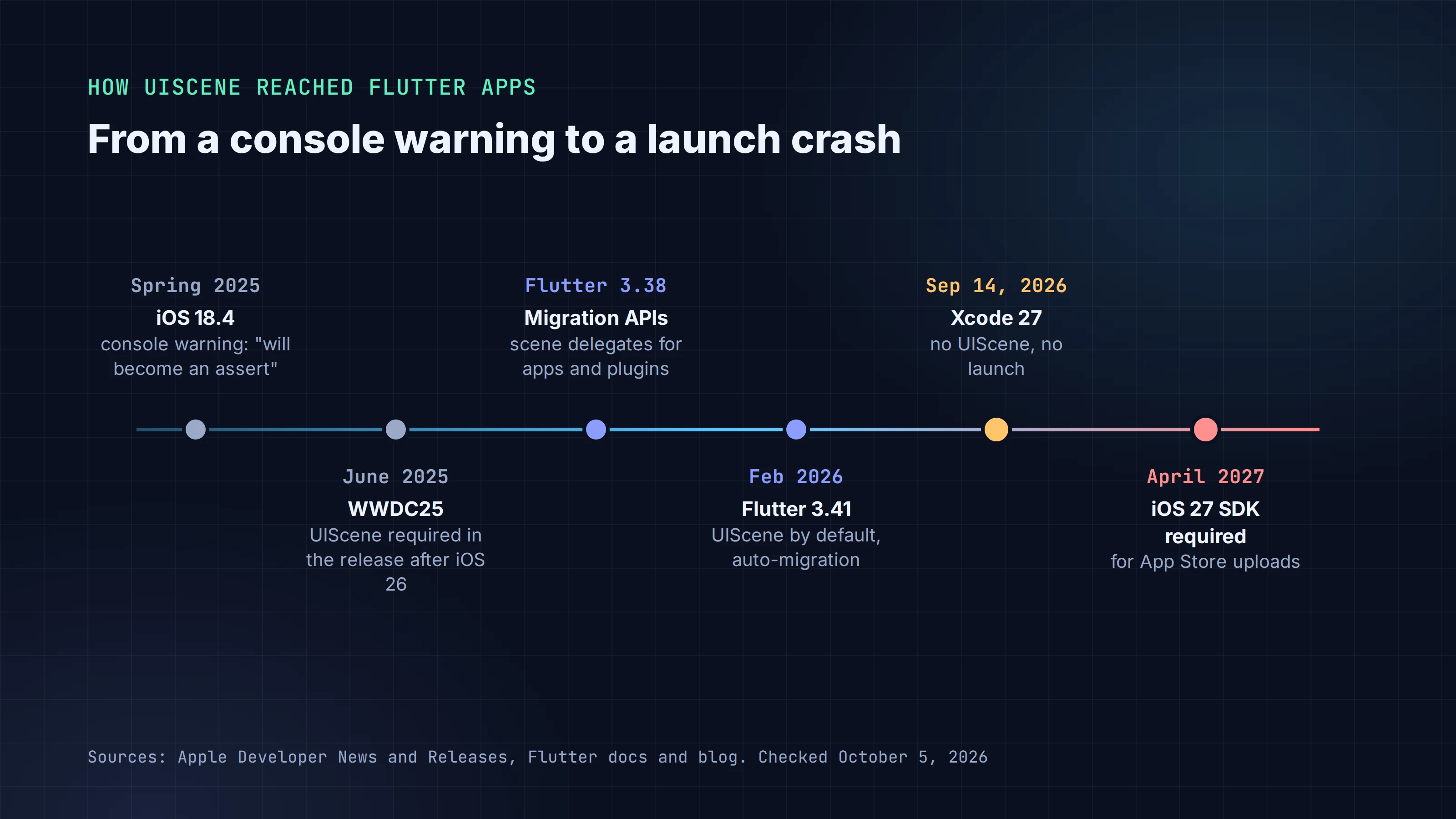
The first is the SDK floor. Apple's post "App Store submissions now open for the latest OS releases" (September 9, 2026) lists the requirements that apply "starting April 2027": iOS and iPadOS apps built with the iOS 27 and iPadOS 27 SDK or later, and the same for tvOS, visionOS and watchOS. Apple didn't give a day. The current floor (Xcode 26 and the iOS 26 SDK) took effect on April 28, 2026, but don't plan around a guess. Assume the first week of April and be pleasantly surprised.
The second goes back to WWDC 2025, when Apple said: "In the release following iOS 26, any UIKit app built with the latest SDK will be required to use the UIScene life cycle, otherwise it will not launch." iOS 27 is that release. Flutter's team wrote in August that Apple had turned the old warning into an assert in the iOS 27 beta, "just as they said they would."
If you've seen this line in your Xcode console since iOS 18.4, this is what it was warning about:
CLIENT OF UIKIT REQUIRES UPDATE: This process does not adopt UIScene lifecycle. This will become an assert in a future version.
Put the two together and the path is fixed. You must build with the iOS 27 SDK from April. Building with that SDK requires UIScene. So every Flutter app that ships to iOS after April 2027 must use UIScene.
Where Flutter stands
Flutter did most of this work ahead of time:
| Flutter version | What it means for UIScene |
|---|---|
| 3.38 | The APIs for the migration (FlutterSceneDelegate, FlutterImplicitEngineDelegate, scene callbacks for plugins) are available in stable |
| 3.41 (Feb 2026) | UIScene is the default for iOS apps, and the CLI migrates eligible apps automatically |
| 3.47 (current stable) | Same behaviour; the docs reflect this release |
The automatic migration has one condition: your AppDelegate must be unmodified. Run flutter run or flutter build ios on Flutter 3.41 or later, and if it can migrate the project, the CLI prints Finished migration to UIScene lifecycle. If it can't, it prints a warning with instructions instead. That warning is easy to lose in CI logs, so search for it.
Are you affected?
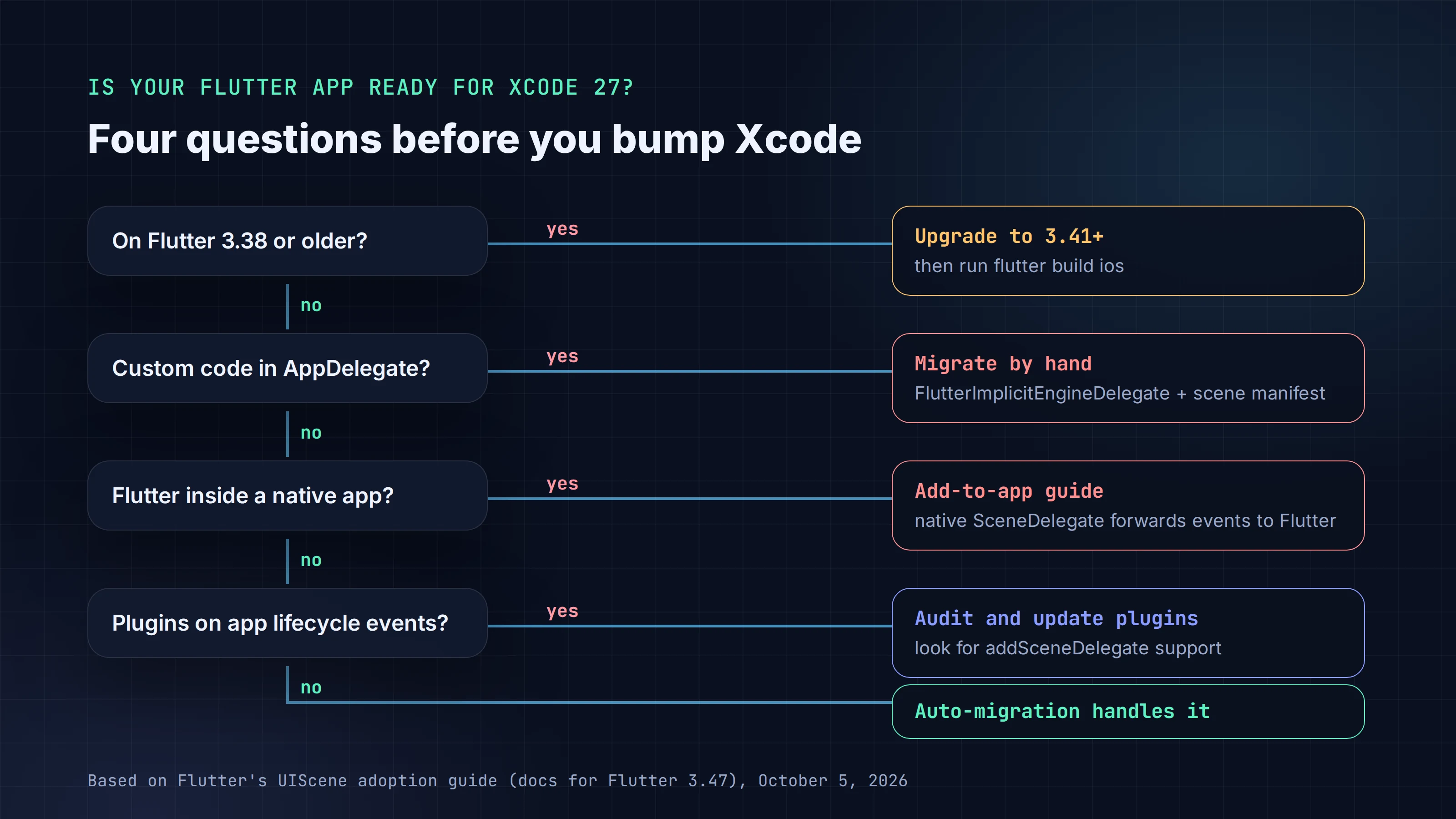
You probably need to do something if any of these is true:
- You're on Flutter 3.38 or older. Upgrade first; that alone fixes the simple cases.
- Your
AppDelegate.swift(or.m) has anything beyond the template. Method channels, platform view factories, third-party SDK setup, push notification delegates and analytics init code all count. These are common in apps that integrate native SDKs. - Flutter is embedded in an existing native iOS app (add-to-app). The native app owns the lifecycle, so it has to adopt UIScene itself and forward scene events to Flutter.
- You depend on plugins that use application lifecycle events, such as handling URLs, quick actions, background tasks or notifications. After the migration, UIKit stops calling the app delegate's UI lifecycle methods, so a plugin that only listens there goes quiet.
The five-minute check
Run these from your Flutter project root.
1. Is the scene manifest there?
grep -c UIApplicationSceneManifest ios/Runner/Info.plist
0 means the project hasn't been migrated. 1 means it has the manifest; check that it names FlutterSceneDelegate (or your own subclass) as the delegate class.
2. Where are plugins registered?
grep -n "GeneratedPluginRegistrant" ios/Runner/AppDelegate.swift
The old template registers plugins with GeneratedPluginRegistrant.register(with: self) inside application(_:didFinishLaunchingWithOptions:). A migrated app registers them in didInitializeImplicitFlutterEngine with engineBridge.pluginRegistry.
3. Let Flutter try.
flutter --version          # 3.41 or later
flutter build ios --no-codesign
Look for Finished migration to UIScene lifecycle, or for the warning telling you to migrate by hand. Commit the changes it makes to Info.plist and AppDelegate.swift so they don't depend on someone's local build.
4. Find plugins that may still need UIScene support. Plugins that listen to app lifecycle events register with addApplicationDelegate. Ones that have migrated also call addSceneDelegate. After flutter pub get, this lists iOS plugins that do the first but not the second:
python3 - <<'EOF'
import json, pathlib
deps = json.load(open('.flutter-plugins-dependencies'))
for p in deps['plugins'].get('ios', []):
    files = [f for d in ('ios', 'darwin')
             for f in pathlib.Path(p['path'], d).rglob('*')
             if f.suffix in ('.swift', '.m', '.mm')]
    text = ''.join(f.read_text(errors='ignore') for f in files)
    if 'addApplicationDelegate' in text and 'addSceneDelegate' not in text:
        print(p['name'], p.get('version', ''))
EOF
A plugin on that list isn't necessarily broken; it may only use non-UI events like didFinishLaunching. But each one deserves a look at its changelog and issue tracker, and a test on a device built with Xcode 27.
5. Build with Xcode 27 and launch on a real device or simulator. This is the test that matters. If the app starts, open the flows that depend on lifecycle events: a deep link, a push notification tap, a home screen quick action, returning from the background.
Migrating by hand
If the CLI couldn't migrate your app, Flutter's UIScene adoption guide has the full steps for Swift and Objective-C. The core of it for a Swift app:
Move plugin registration out of launch. Conform the app delegate to FlutterImplicitEngineDelegate and register plugins when the implicit engine is ready:
@objc class AppDelegate: FlutterAppDelegate, FlutterImplicitEngineDelegate {
  override func application(
    _ application: UIApplication,
    didFinishLaunchingWithOptions launchOptions: [UIApplication.LaunchOptionsKey: Any]?
  ) -> Bool {
    return super.application(application, didFinishLaunchingWithOptions: launchOptions)
  }

  func didInitializeImplicitFlutterEngine(_ engineBridge: FlutterImplicitEngineBridge) {
    GeneratedPluginRegistrant.register(with: engineBridge.pluginRegistry)
  }
}
Method channels and platform view factories that you used to create in didFinishLaunchingWithOptions move into the same callback, using engineBridge.applicationRegistrar.messenger() as the messenger. The docs flag one pattern as unsafe: grabbing the FlutterViewController from window?.rootViewController during launch "might crash."
Add the scene manifest to Info.plist:
<key>UIApplicationSceneManifest</key>
<dict>
  <key>UIApplicationSupportsMultipleScenes</key>
  <false/>
  <key>UISceneConfigurations</key>
  <dict>
    <key>UIWindowSceneSessionRoleApplication</key>
    <array>
      <dict>
        <key>UISceneClassName</key>
        <string>UIWindowScene</string>
        <key>UISceneDelegateClassName</key>
        <string>FlutterSceneDelegate</string>
        <key>UISceneConfigurationName</key>
        <string>flutter</string>
        <key>UISceneStoryboardFile</key>
        <string>Main</string>
      </dict>
    </array>
  </dict>
</dict>
Move UI lifecycle code to a scene delegate. After the migration, UIKit no longer calls applicationDidBecomeActive and the other UI-state methods on the app delegate. If you used them, create ios/Runner/SceneDelegate.swift with class SceneDelegate: FlutterSceneDelegate {}, override the scene equivalents there, and set UISceneDelegateClassName to $(PRODUCT_MODULE_NAME).SceneDelegate.
| App delegate method (no longer called for UI state) | Scene delegate equivalent |
|---|---|
applicationDidBecomeActive |
sceneDidBecomeActive |
applicationWillResignActive |
sceneWillResignActive |
applicationWillEnterForeground |
sceneWillEnterForeground |
applicationDidEnterBackground |
sceneDidEnterBackground |
application(_:open:options:) |
scene(_:openURLContexts:) |
application(_:continue:restorationHandler:) |
scene(_:continue:) |
application(_:performActionFor:completionHandler:) |
windowScene(_:performActionFor:completionHandler:) |
From Flutter's UIScene adoption guide (docs for Flutter 3.47, updated September 14, 2026).
Three things that change quietly
These don't crash. They just stop working, which is worse, because nobody notices until a user reports it.
- Launch options are
nil. After the migration,application(_:didFinishLaunchingWithOptions:)still runs, but its launch options are empty. Code that read a notification payload or URL from them has to move toscene(_:willConnectTo:options:). - Some setup still has to happen before launch finishes. The docs name three Apple APIs that must be configured before
didFinishLaunchingWithOptionsreturns:BGTaskSchedulerregistration, theUNUserNotificationCenterDelegate, and HealthKit background delivery. Because plugin registration now happens later, plugins that set these up need to expose a method yourAppDelegatecalls directly. Check the setup docs of your notification and background-task plugins. UIApplication.shared.delegate?.windowisnil. So are the old shortcuts to the screen and key window. Native code (yours or a plugin's) that used them to find the root view controller, for example to present a native sheet, needs to go through the scene's window instead.
What not to do
Flutter documents two escape hatches. Neither helps with Xcode 27.
enable-uiscene-migration: falseunderflutter: config:inpubspec.yamlonly hides the CLI warning.- Renaming the
Application Scene Manifestkey with a leading underscore turns UIScene off. That's useful to bisect a bug on Xcode 26, but an app without UIScene is exactly what fails to launch when built with Xcode 27.
Pinning CI to Xcode 26 works until April 2027, and then Apple stops accepting the build. Use the time to migrate, not to wait.
The rest of Apple's September notice
The same September 9 post has two smaller items worth adding to your release checklist:
- A new age-rating question. With Time Allowances, "If your app or game includes social media capabilities, you'll need to indicate them in App Store Connect."
- macOS 27 is Apple silicon only. If you ship a Flutter macOS app, Apple suggests building for arm64 only once you drop Intel support.
Where AI-generated code fits
We ran the same check on a project generated today. Rota, the chore rotation app from today's tutorial, came out of FlutterGo, our AI Flutter app builder, already on the UIScene lifecycle: its AppDelegate.swift conforms to FlutterImplicitEngineDelegate and registers plugins in didInitializeImplicitFlutterEngine, Info.plist has the UIApplicationSceneManifest, and the scene delegate is a SceneDelegate subclass of FlutterSceneDelegate. That's the current Flutter template, so new projects start in the right place.
The risk is in what happens next.
If an AI tool edits your AppDelegate.swift to add an SDK, a channel or a notification handler, check where it put the code. Anything added inside didFinishLaunchingWithOptions that touches the Flutter view controller or registers plugins is the pre-UIScene pattern, and the build that exposes it will be the first one on Xcode 27.
FAQ
Will my Flutter app crash on iOS 27 devices if I don't change anything? The requirement is tied to the SDK you build with, not the device. An app already on the App Store, built with an older SDK, isn't the issue. The crash comes from building with Xcode 27 (the iOS 27 SDK) without UIScene, and from April 2027 you can't upload builds made with anything older.
Which Flutter version do I need? 3.41 or later gives you UIScene by default and the automatic migration. The migration APIs exist from 3.38. The current stable is 3.47.
Does the automatic migration cover my plugins?
No. It migrates your app project. Plugins have to adopt FlutterSceneLifeCycleDelegate themselves; the Flutter team migrated the plugins it maintains and filed issues against community plugins. Update your dependencies and check the ones flagged by the script above.
Can I keep using Xcode 26 for now? Until April 2027, yes. After that, App Store Connect won't accept the build. Migrating now gives you months to find the lifecycle bugs instead of days.
Sources
- Apple Developer News, App Store submissions now open for the latest OS releases, September 9, 2026
- Apple Developer, Software Releases (Xcode 27, 27A266a, September 14, 2026)
- Flutter docs, UIScene adoption, updated September 14, 2026
- Flutter blog, How Flutter stays ahead of iOS releases, August 25, 2026
All sources checked on October 5, 2026.