Where AI App Builders Still Fail, and How We Catch It Before You Do
Five real FlutterGo builds, twelve bugs that compiled cleanly and looked fine. What they had in common, and the test-and-read routine that caught them.
Over the past week we built five apps in FlutterGo, our AI Flutter app builder, and wrote each one up in public: a reading list, an interval timer, a habit tracker, a board game score keeper and a gift planner. Every build compiled and ran in the preview. And every build had at least one bug that a person tapping through the demo for thirty seconds would miss.
That is the honest state of AI app generation in late 2026. The failures that remain aren't syntax errors or red screens. FlutterGo's pipeline is built to analyze and repair compile errors. What's left is code that compiles, runs and looks right, but quietly does the wrong thing with an ID, a price or a date.
Here is what went wrong across those five builds, the pattern behind it, and the routine we now run on every app before we call it done.
Twelve bugs, five apps
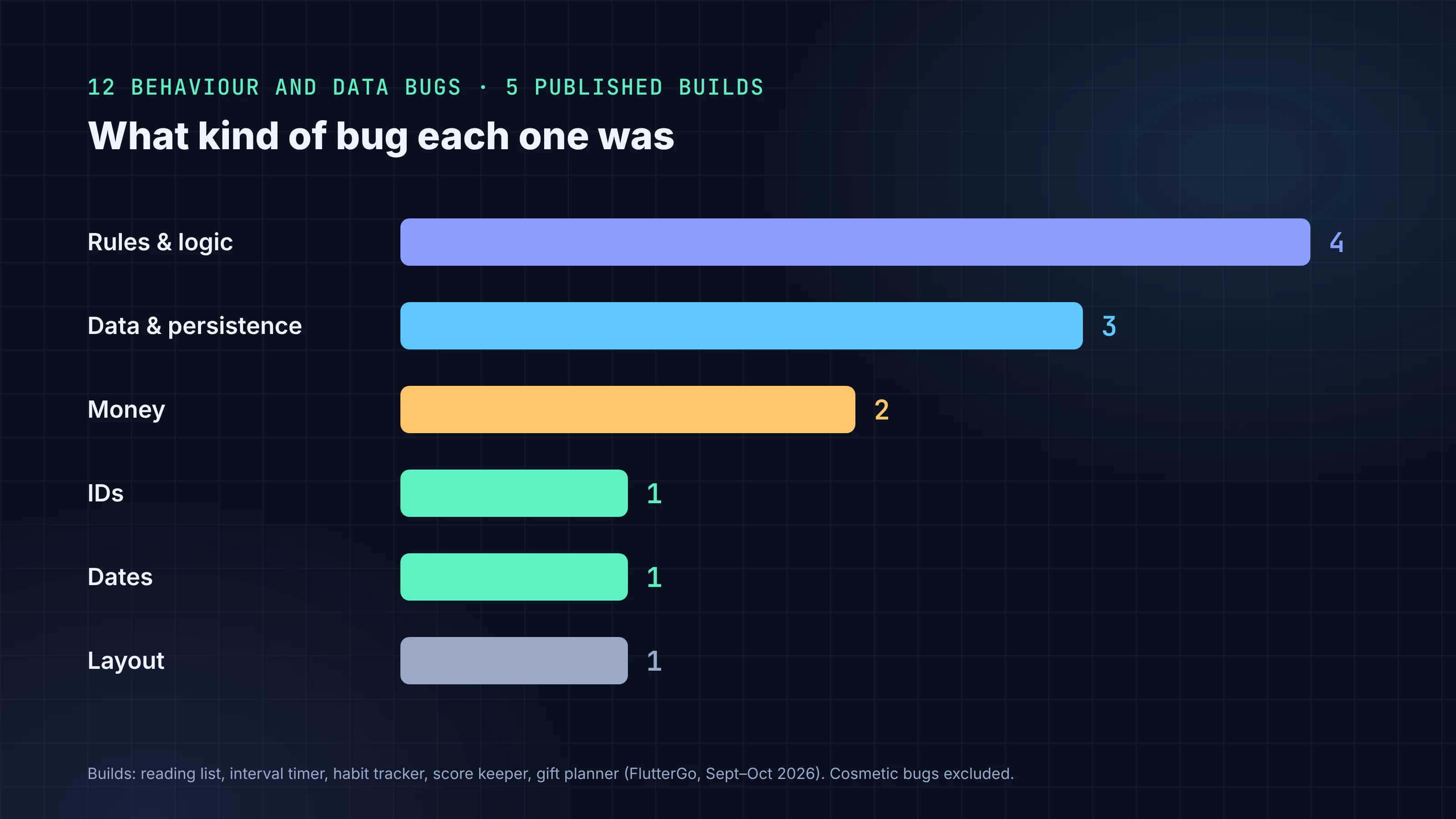
Each of these is documented, with the code, in the linked tutorial. We've left out the cosmetic ones (a chart bar overflowing its card, hint text showing up as names, a broken image path) to keep the list to behaviour and data.
| App | What we saw | What the code was doing |
|---|---|---|
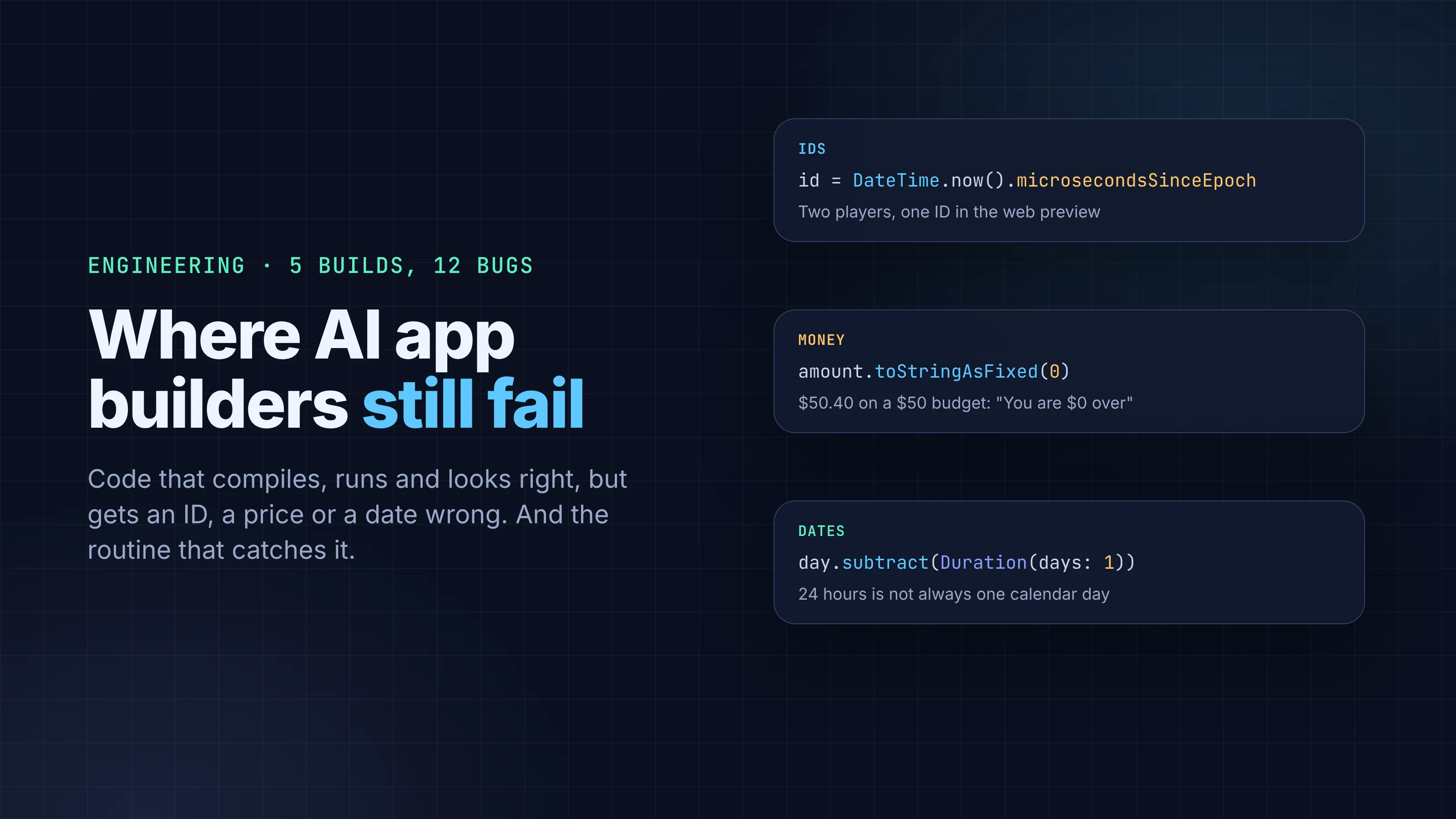
| Score keeper | Tapping +1 for Player 2 also scored Player 3 | IDs came from DateTime.now().microsecondsSinceEpoch. In the web preview the microseconds always ended in 000, so two players created in the same millisecond got the same ID |
| Score keeper | A tie crowned one winner | Only one player could be marked as the winner |
| Gift planner | A $50.40 gift against a $50 budget showed "You are $0 over" | Every amount was shown with toStringAsFixed(0) |
| Gift planner | Opening and saving the gift without changes turned $50.40 into $50 | The edit form was filled from that rounded text, then saved it back |
| Habit tracker | Add and Edit screens were blank | A button in bottomNavigationBar expanded to fill the screen |
| Habit tracker | Everything reset on reload | All data lived in memory |
| Habit tracker | (Found by reading, not testing) a streak could skip a date when clocks change | subtract(Duration(days: 1)) subtracts 24 hours, not one calendar day |
| Habit tracker | (Found by reading) the weekly rate dropped every morning and climbed back as habits were checked | A comment said "Today counts only when completed", but the code counted every habit scheduled today as due |
| Interval timer | Save did nothing | The preset list was const; the browser console showed "Cannot modify a constant list" |
| Interval timer | Skipping every phase still logged "8 rounds · 72 kcal" | Sessions were logged without checking that any work phase ran |
| Interval timer | Tabata 20/10 ×8 showed "4 min work" instead of 2:40 | The summary line wasn't computed from the workout's own values |
| Reading list | (Found by reading) a book moved back to Reading kept its finish date | copyWith(finishedOn: null) can't clear a field written as finishedOn ?? this.finishedOn |
What these have in common
Line them up and four patterns stand out.
The model wrote a reasonable default, not your rule. Rounding money to whole dollars looks tidy on a card. Using a timestamp as an ID works in nearly every tutorial. Ending a game with one winner is what most games do. None of these is wrong in general; each was wrong for the app we asked for. The prompt for the gift planner said nothing about cents, and the prompt for the score keeper said nothing about ties.
Dates, money and identity are where the defaults bite. Four of the twelve bugs touch one of the three. Dart's own docs warn about the date case: DateTime.subtract takes an exact duration, and "if the resulting DateTime has a different daylight saving offset than this, then the result won't have the same time-of-day". A streak counter that steps back 24 hours at a time will, once a year, step over a calendar day.
The happy path hides it. Several bugs only appear with a specific sequence: two players added quickly, an amount with cents, a reload, a skipped phase, a status moved backwards. A demo walks forward through the app once. Real users don't.
Some bugs only show up in code. The streak, weekly-rate and finish-date bugs never appeared on screen during our tests. We found them by reading the generated store and model files. Clicking around would not have caught them.
Fixes can fail too
The fixes came from the same agent, and they were mostly good. One follow-up prompt describing the gift planner's symptoms got back integer cents, an exact edit form and a migration for saved data using (value * 100).round(). We didn't prescribe any of that.
But the first fix for the score keeper's IDs used Random().nextInt(1 << 32). On native Dart that is the allowed maximum (the docs say max may be "between 1 and (1<<32) inclusive"). Compiled to JavaScript for the web preview, it became nextInt(0) and broke. A second prompt changed it to nextInt(0x7fffffff). The lesson isn't that the agent is careless. It's that every fix needs the same test that found the bug, run again on the same target.
How we handle it now
This is the routine behind every FlutterGo tutorial. None of it is clever, and you can run it on any builder's output.
- Write the test plan before you build. Ten to fifteen numbered checks, written from the prompt. For each rule in the prompt, one check that tries to break it: a tie, a value with cents, two items created back to back, a reload, the back button.
- Test the edges, not the tour. Run the plan in the preview, then reload and run the persistence checks again.
- Read three kinds of code on purpose. Anything that makes IDs, anything that does money, anything that does date arithmetic. Also read
copyWith, anything markedconstthat the app later edits, and any comment that states a rule. This takes ten minutes and found three of our twelve bugs. - Describe symptoms, not code, in the fix prompt. "A $50.40 gift on a $50 budget shows $0 over, and saving without changes turns it into $50" worked better than telling the agent which method to change.
- Re-run the failing checks after every fix, on the same target (web preview and device can differ, as the
1 << 32fix showed). - Keep the bug in the write-up. Every tutorial on our blog names what broke. It is more useful to a reader than a clean demo, and it keeps us honest about where generation still needs a person.
Our post on judging a builder by the repo it leaves you covers the structural review; this routine covers behaviour. If you are starting out, How to Build a Flutter App with AI in 2026 walks through the whole process.
What this doesn't tell you
Five apps is a small sample, and all five were single-user, on-device apps without a backend. We don't know yet how the mix changes with auth, sync or payments, and we won't guess. We also only report on our own builder's output here; we haven't run the same prompts through other tools. As the 30-apps series continues, we'll keep logging every bug with its cause, and revisit these patterns with the larger set.
FAQ
Do AI app builders produce buggy code? In our five builds, every app compiled and ran, and every app had at least one logic or data bug that a quick demo missed. Where we asked for fixes, one or two follow-up prompts were enough.
What should I check first in AI-generated Flutter code?
How it creates IDs, how it stores and displays money, how it does date arithmetic, whether data survives a reload, and whether copyWith can clear nullable fields.
Can the AI fix its own bugs? Usually, when you describe the symptom precisely. Re-test after the fix: one of our fixes worked on native Dart but broke in the web preview.