Google Play's API 36 Extension Runs Out November 1. What Flutter Apps Have to Change
Google Play now requires API 36 for app updates, with extensions ending November 1. What changes for Flutter apps on Android 16, and how to test it.
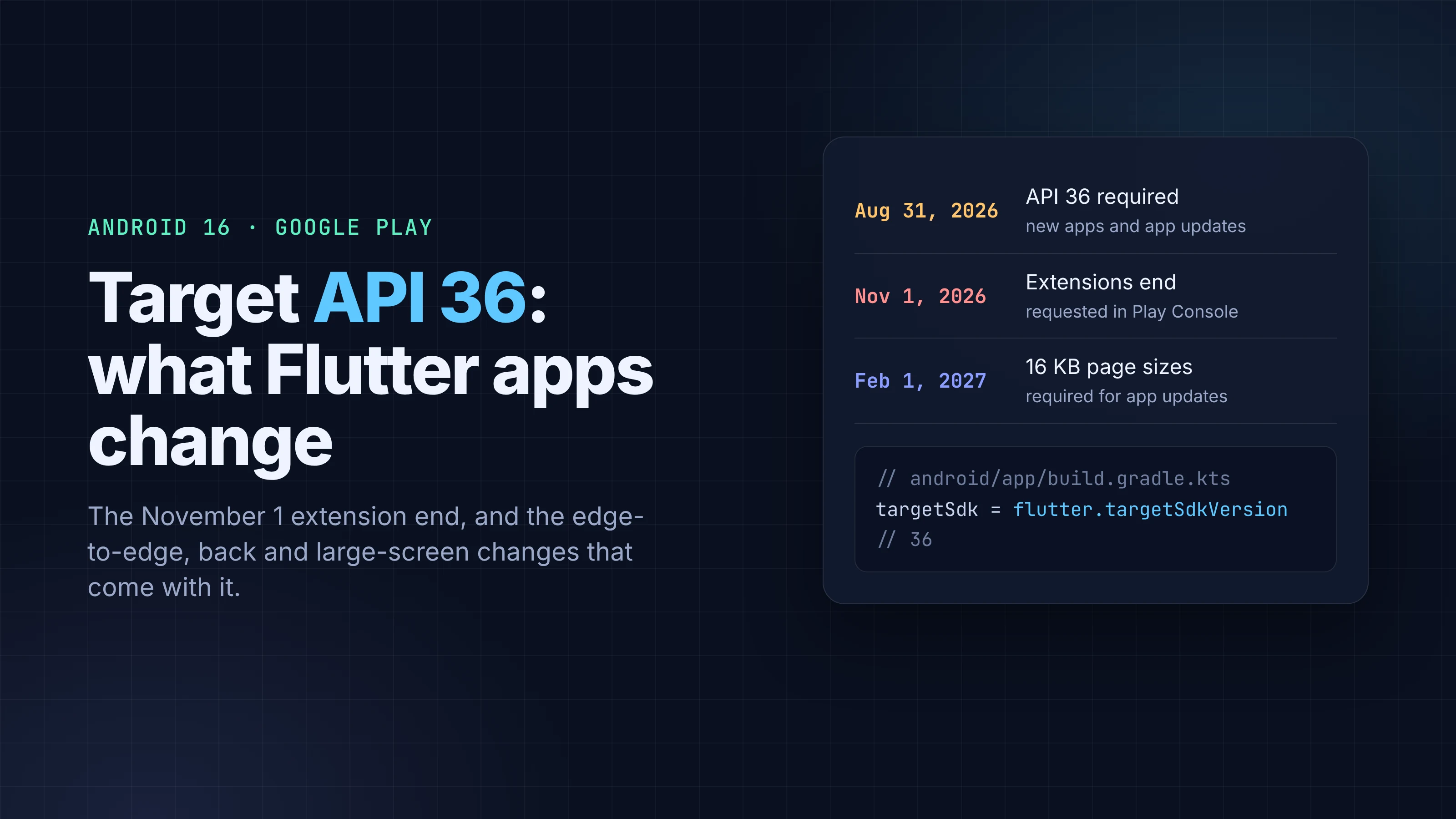
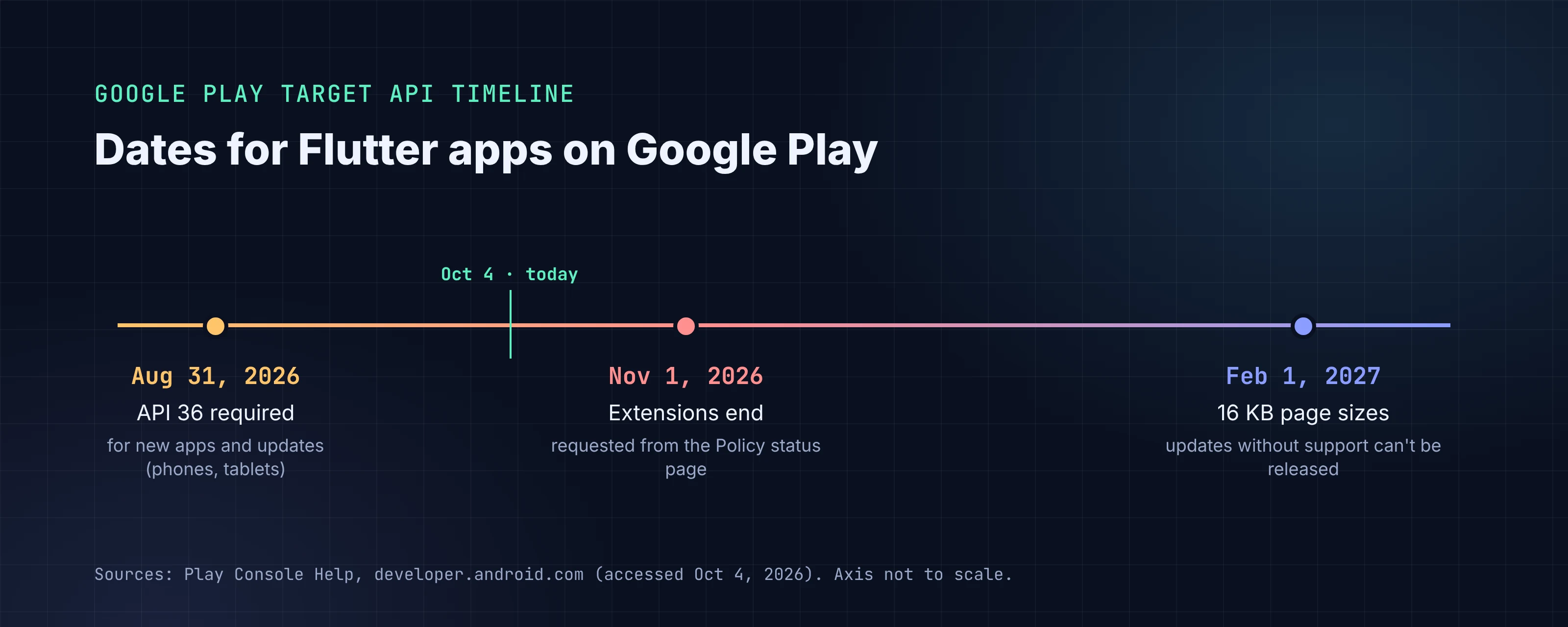
Since August 31, 2026, Google Play has required new apps and app updates to target Android 16 (API level 36). Teams that weren't ready could ask for more time, and that extension ends on November 1, 2026. If your Flutter app's last release still targets 35, your next update has a hard deadline four weeks from now.
The version bump itself is usually one line. What takes time is what Android 16 does differently once you target it: you can no longer opt out of edge-to-edge, predictive back is on, and orientation locks stop working on tablets and foldables. This piece covers what changed, which parts Flutter already handles, and what to test before you upload.
Every requirement below was checked against Google Play Console Help, developer.android.com, docs.flutter.dev and the Flutter source on October 4, 2026.
Key takeaways
- New apps and updates must target API 36 on Google Play since August 31, 2026. Google offered extensions to November 1, 2026, requested from the Policy status page in Play Console.
- Existing apps don't disappear if you miss it. Apps must target API 35 or higher to stay available to new users on newer Android versions. Below that, they're only offered to devices running the app's target version or lower.
- Flutter has defaulted targetSdk to 36 since Flutter 3.35. Projects that hard-coded a number in build.gradle.kts don't pick that up when you upgrade Flutter.
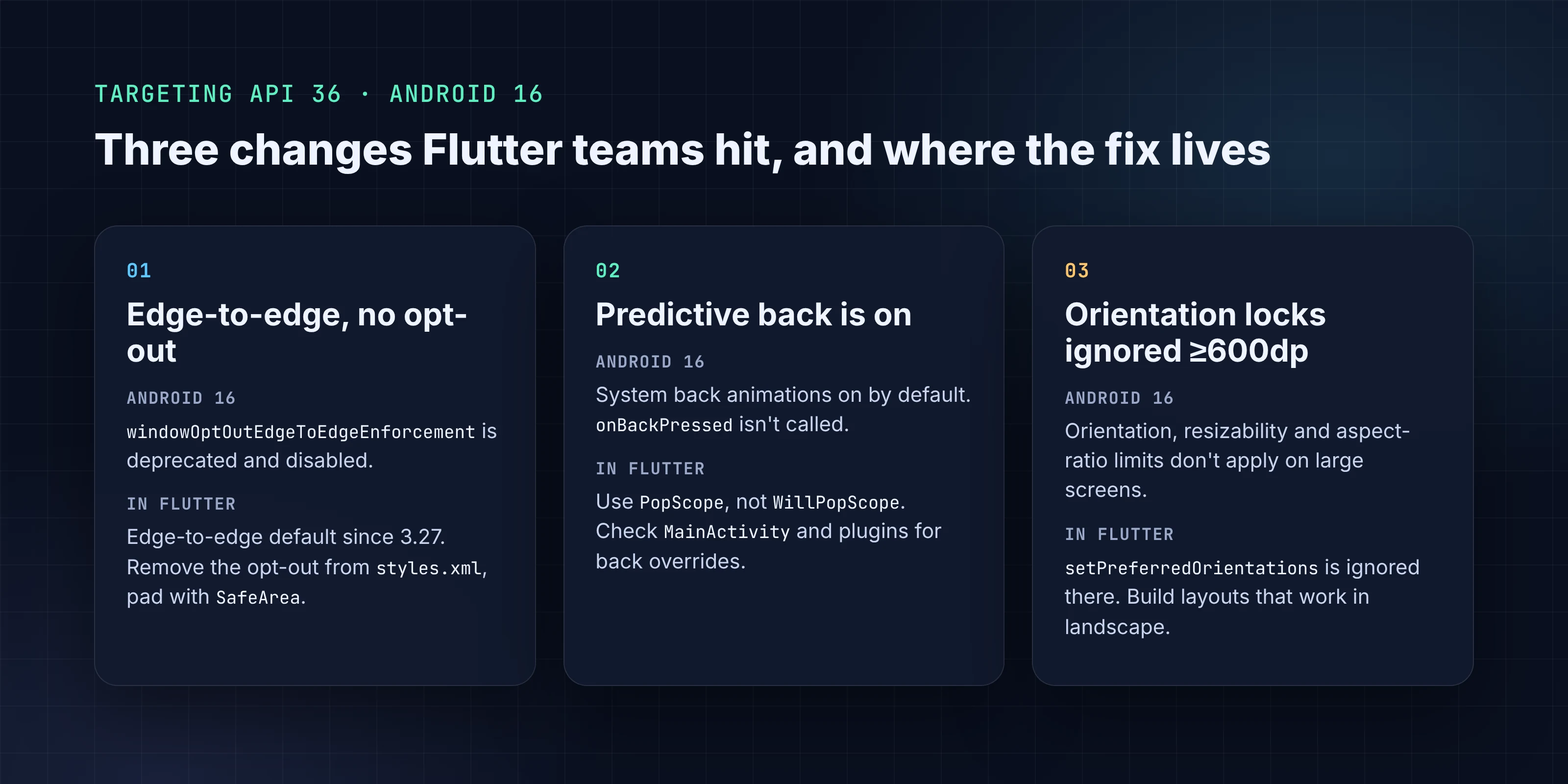
- Targeting 36 removes the edge-to-edge opt-out, turns on predictive back animations and stops onBackPressed, and ignores orientation and aspect-ratio locks on screens 600dp and wider.
- Separately, Google Play's current 16 KB page size deadline for app updates is February 1, 2027. Every Flutter Android app ships native code, so it applies to you.
What Google Play requires, and by when
The Play Console Help page is direct: "New apps and app updates must target Android 16 (API level 36) or higher to be submitted to Google Play." It took effect on August 31, 2026, for phone and tablet apps. Other form factors have lower floors: Wear OS and Android Automotive OS apps need API 35, and Android TV and Android XR apps need API 34.
On the extension, the same page says: "You will be able to request an extension to November 1, 2026 if you need more time to update your app." The form is on "the details page of the warning or issue on the Policy status page in Play Console", and affected apps received a link in their Play Console notifications.
Two things people get wrong:
- The deadline gates submissions, not existing installs. An app that targets 35 stays on the store. You just can't ship an update until it targets 36.
- Visibility uses a lower floor. Google's rule for existing apps is that they "must target Android 15 (API level 35) or higher to remain available to new users on devices running Android OS higher than your app's target API level." An app targeting API 34 or lower is only offered to devices on its target version or older.
So the real risk for most teams isn't removal. It's finding out on release day that an urgent fix can't ship.
Where targetSdk lives in a Flutter project
Flutter's template sets the Android versions from the Flutter Gradle plugin:
// android/app/build.gradle.kts
android {
    compileSdk = flutter.compileSdkVersion
    ndkVersion = flutter.ndkVersion

    defaultConfig {
        minSdk = flutter.minSdkVersion
        targetSdk = flutter.targetSdkVersion
    }
}
The template comment explains it: "Any value starting with "flutter." gets its value from the Flutter Gradle plugin." On current stable, FlutterExtension.kt sets targetSdkVersion and compileSdkVersion to 36 and minSdkVersion to 24. We checked the tagged sources: Flutter 3.32.0 shipped 35, and 3.35.0 moved to 36. The 3.35.0 release notes list the change as "[Android 16] Bumping Framework Default TargetSdk to 36".
That gives you the first check. If your file says targetSdk = flutter.targetSdkVersion and you're on Flutter 3.35 or later, you already target 36. If it says targetSdk = 34 or 35, someone pinned it, and upgrading Flutter won't change it.
Bumping can also surface build tool floors. Flutter's current Gradle checks stop the build below Android Gradle Plugin 8.6.0, Gradle 8.7 or Kotlin 2.0, and warn below AGP 8.11.1, Gradle 8.14 and Kotlin 2.2.20. Java 17 is required. Run flutter pub outdated too: plugins that compile against older SDKs are a common source of build failures after the bump.
The three Android 16 changes Flutter teams hit
Android 16 has a long list of behavior changes for apps that target it. For a typical Flutter app, three matter.
1. Edge-to-edge is no longer optional
Android 15 drew apps edge-to-edge but let you opt out. Android 16 removes that: "For apps targeting Android 16 (API level 36), R.attr#windowOptOutEdgeToEdgeEnforcement is deprecated and disabled, and your app can't opt-out of going edge-to-edge."
Flutter switched its default to SystemUiMode.edgeToEdge in Flutter 3.27, so most apps already draw behind the status and navigation bars. What breaks is apps that added the opt-out to their Android styles to buy time. Flutter's breaking-change page warns that using it "on Android 16 or later might cause your app to crash", and recommends a values-35 resource directory "that contains styles without the android:windowOptOutEdgeToEdgeEnforcement attribute."
What to do: search android/app/src/main/res/ (including values-night) for windowOptOutEdgeToEdgeEnforcement and remove it. Then check screens for content under the status bar or the gesture bar, and fix them with SafeArea or MediaQuery.paddingOf(context) instead of hard-coded padding.
2. Predictive back is on, and onBackPressed stops firing
For apps targeting 36 on Android 16 devices, "the predictive back system animations (back-to-home, cross-task, and cross-activity) are enabled by default." And: "onBackPressed is not called and KeyEvent.KEYCODE_BACK is not dispatched anymore."
On the Dart side, most of the work was done years ago. WillPopScope was deprecated in Flutter 3.16 in favor of PopScope, because back handling now has to be declared ahead of time rather than decided when the gesture fires. In Flutter 3.38, the default Android page transition became PredictiveBackPageTransitionsBuilder, and the default transition time went from 300ms to 450ms.
The risk is on the native side. If MainActivity overrides onBackPressed, or a plugin you use listens for KEYCODE_BACK, that code stops running on Android 16. Android documents a temporary escape (android:enableOnBackInvokedCallback="false" on the application or activity), but treat it as a stopgap.
What to do: replace any remaining WillPopScope with PopScope and onPopInvokedWithResult, check MainActivity.kt for back overrides, and test every screen that blocks or confirms back (unsaved forms, checkout steps, nested navigators) on an Android 16 device or emulator.
3. Orientation locks are ignored on large screens
This one surprises portrait-only apps: "For apps targeting Android 16 (API level 36), orientation, resizability, and aspect ratio restrictions no longer apply on displays with smallest width >= 600dp." Apps fill the window, and there's no pillarboxing. The exceptions are games (by android:appCategory), users who opt back in from the device's aspect ratio settings, and screens narrower than 600dp.
In Flutter terms, SystemChrome.setPreferredOrientations([DeviceOrientation.portraitUp]) no longer holds on tablets, foldables and Chromebooks. Flutter's docs say so directly: "This means that SystemChrome.setPreferredOrientations is ignored on these devices." Android 16 offers a temporary opt-out with the manifest property android.window.PROPERTY_COMPAT_ALLOW_RESTRICTED_RESIZABILITY, but Android says it "won't apply when targeting API level 37", and Flutter's breaking-change page notes that Android 17 removes it.
What to do: open the app on a large-screen emulator in landscape. Look for stretched forms, images cropped by fixed aspect ratios, and layouts built around one fixed width. Constrain content width with ConstrainedBox or LayoutBuilder breakpoints rather than relying on the lock.
Lower-impact changes worth a search
A few other target-36 changes only matter if your app or a plugin uses the feature:
elegantTextHeightis ignored once you target 36. Check text with tall scripts if you set it natively.scheduleAtFixedRate: "at most one missed execution of scheduleAtFixedRate is immediately executed when the app returns to a valid lifecycle."- Health permissions:
BODY_SENSORSmoves to granular permissions underandroid.permissions.healthfor fitness apps.
Some Android 16 changes apply to every app on Android 16, whatever it targets, including adjusted JobScheduler and WorkManager runtime quotas and default protection against intent redirection. Targeting 35 doesn't avoid those, so they belong in your general Android 16 testing.
The other deadline: 16 KB page sizes
This often lands in the same upgrade. Google's current wording: "Starting February 1, 2027, if your app updates don't support 16 KB memory page sizes, you won't be able to release these updates." Play's technical requirements say "Apps that contain native code must support devices with 16 KB memory page sizes", and every Flutter Android app ships native libraries (the engine and your compiled Dart code).
Google's guidance is that Android Gradle Plugin 8.5.1+ aligns uncompressed native libraries to 16 KB and NDK r28+ compiles 16 KB-aligned code by default. Current Flutter stable defaults to NDK 28.2. Check the result rather than assuming it: APK Analyzer's alignment column or zipalign -c -P 16 will tell you, and so will a 16 KB emulator image.
One open item to watch: a Flutter issue filed on September 30, 2026 (flutter/flutter#193545) reports a misaligned segment in the ARM64 release libflutter.so for Flutter 3.44.2 and 3.47.5. The reporter describes it as a finding from inspecting the binary, with no crash reproduced, and the Flutter team hadn't responded when we checked. It doesn't change what you should do today, but it's worth following before February.
A pre-upload checklist
targetSdk = flutter.targetSdkVersion(or36) andcompileSdk = flutter.compileSdkVersioninandroid/app/build.gradle.kts, on Flutter 3.35 or later.- AGP, Gradle, Kotlin and Java at or above Flutter's current floors. Plugins updated with
flutter pub outdated. - No
windowOptOutEdgeToEdgeEnforcementin anystyles.xml. Insets handled withSafeAreaorMediaQuerypadding. - No
WillPopScope. NativeonBackPressedoverrides removed or moved toOnBackPressedCallback. Back-blocking screens tested on Android 16. - Layouts checked on a 600dp+ emulator in both orientations.
- 16 KB alignment verified on the release bundle.
- Upload to an internal or closed testing track first. Play's pre-launch report is "automatically generated when you upload an app bundle or APK, subject to capacity within our device lab."
- If you can't make November 1, request the extension from the Policy status page today rather than on October 31.
What this means for FlutterGo projects
FlutterGo, the AI Flutter app builder, generates a standard Flutter project with a normal android/ folder. The project we built this week, a gift planner called Ribbon, has targetSdk = flutter.targetSdkVersion in android/app/build.gradle.kts, so it follows the Flutter default. If you've edited that file in your exported code, check it again before you upload. The behavior changes apply to any Flutter app, generated or hand-written, so run the large-screen and back-gesture checks either way. If you're shipping your first Play release, our Google Play publishing walkthrough and the AAB vs APK explainer cover the rest of the pipeline. We also covered Android developer verification, which comes with its own 2027 timeline.
FAQ
Will my Flutter app be removed from Google Play if it doesn't target API 36? No. The API 36 rule blocks new submissions and updates. Existing apps that target API 35 or higher stay available to new users. Apps targeting API 34 or lower are only shown to devices running their target version or older.
Which Flutter version targets API 36 by default?
Flutter 3.35.0 changed the default targetSdkVersion to 36, and current stable still uses 36. A project only gets that default if build.gradle.kts uses flutter.targetSdkVersion.
Can I still lock my Flutter app to portrait? On phones, yes. On screens 600dp and wider, Android 16 ignores the lock for apps targeting 36, apart from games and users who opt in from device settings. The temporary opt-out property stops working when you target API 37.