Flutter Maps in 2026: google_maps_flutter or flutter_map, Set Up and Priced
Adding a map to a Flutter app in 2026: google_maps_flutter vs flutter_map, setup on Android, iOS and web, what Google charges, and the OSM tile rules.
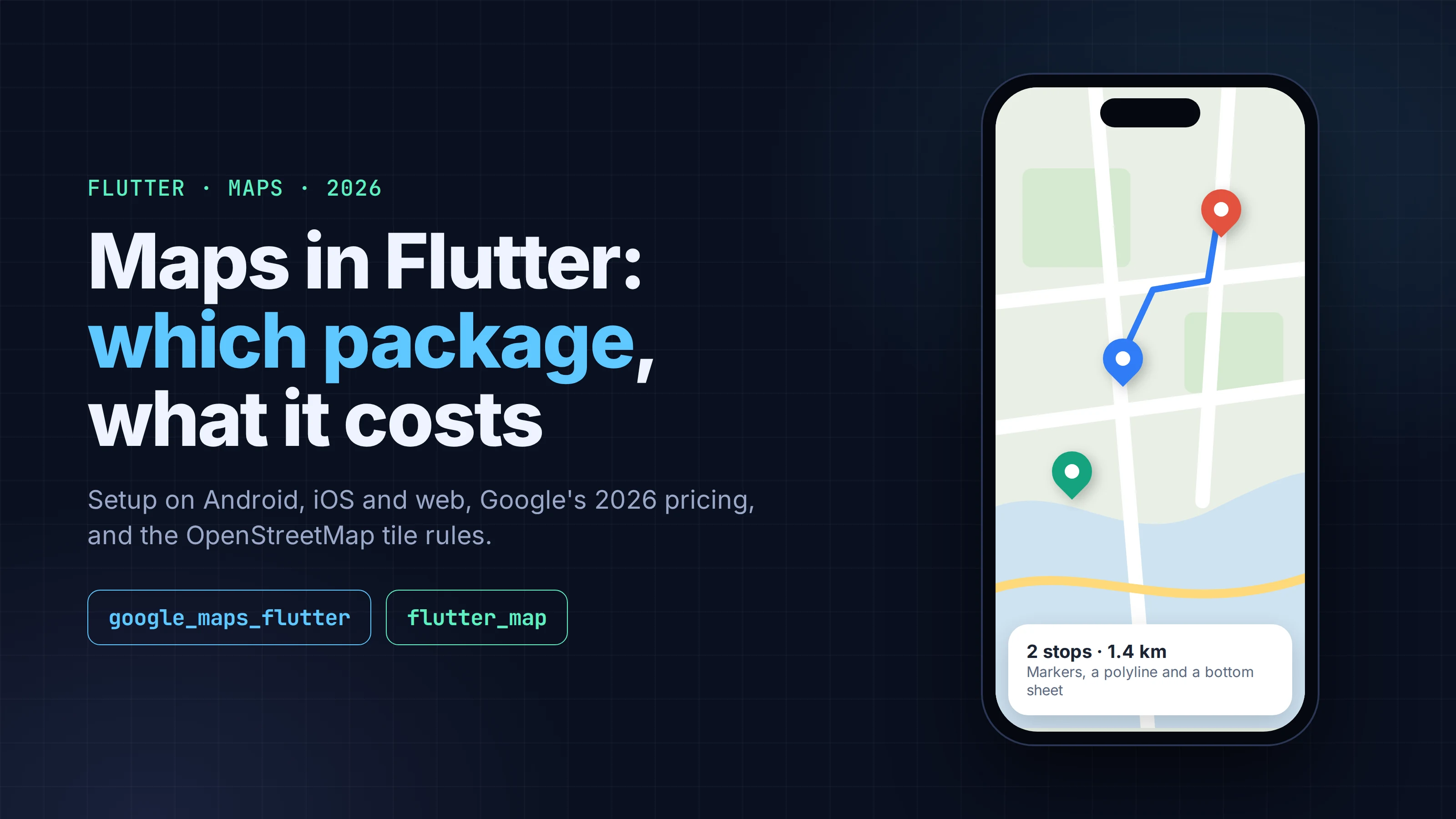
Most Flutter apps that need a map end up choosing between two packages. google_maps_flutter is the Flutter team's wrapper around the native Google Maps SDKs. flutter_map is a pure-Dart map widget that draws tiles from whatever server you point it at. Both had over 870,000 downloads on pub.dev in the last 30 days, and both are actively maintained.
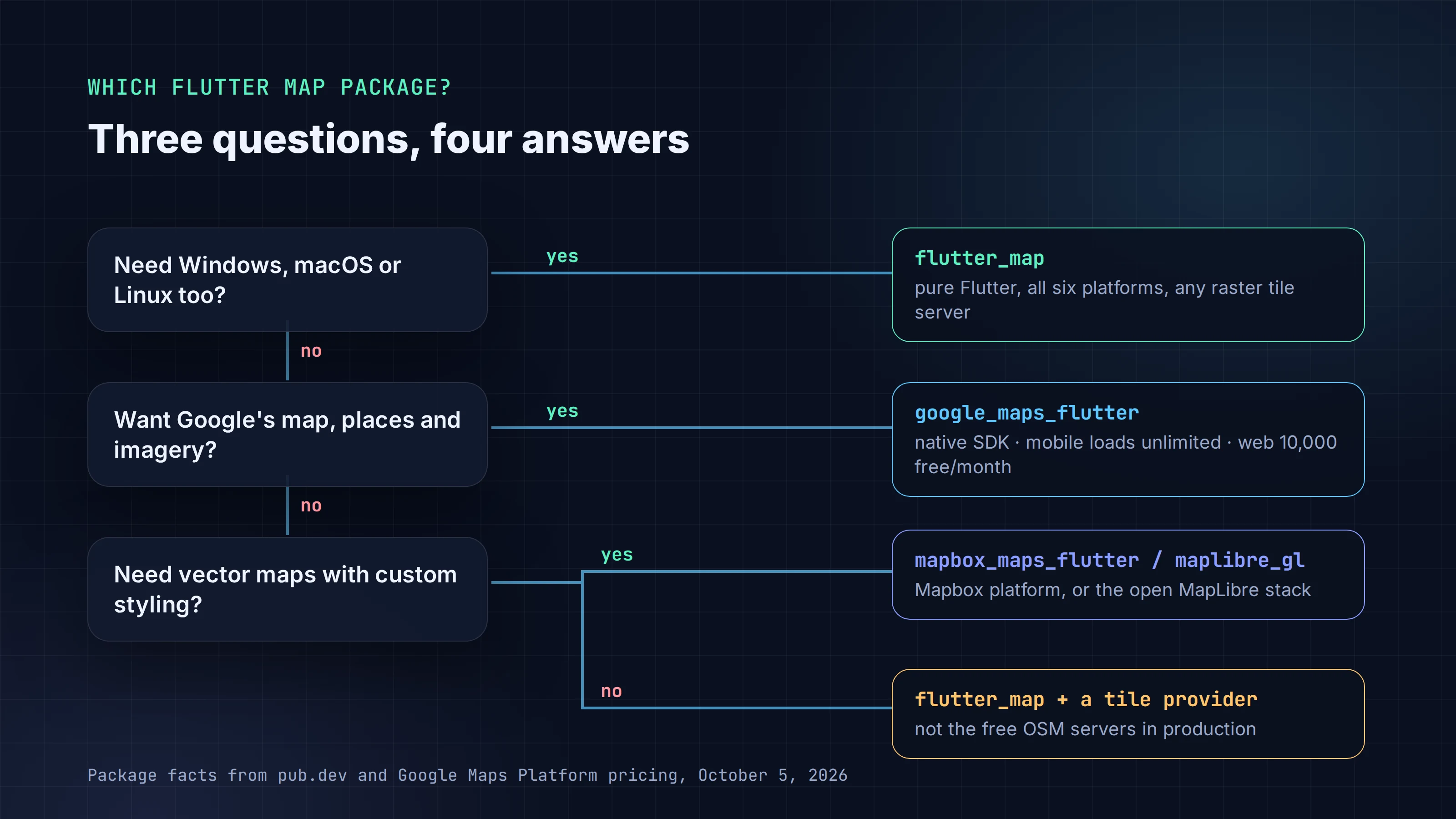
The short answer: if you ship to Android and iOS and want Google's map data, search and Street View-style polish, use google_maps_flutter. Native mobile map loads have no usage charge in 2026, though you still need a Google Cloud project with billing turned on. If you want to choose your own map provider, run on desktop too, or keep Google out of your app, use flutter_map, and don't point a production app at OpenStreetMap's free tile servers.
This guide covers the decision, what each option costs, the setup that works on Android, iOS and web, and the errors people hit on day one. Versions, prices and policies were checked on pub.dev, the packages' own docs, Google's pricing pages and the OpenStreetMap Foundation's tile policy on October 5, 2026.
Key takeaways
- google_maps_flutter 2.18.2 (flutter.dev, September 26, 2026) supports Android, iOS and web. It has no desktop support and now needs Flutter 3.47 or later.
- Google's pricing page lists the Maps SDK (native Android and iOS maps) as unlimited. Web maps bill as Dynamic Maps: 10,000 free loads a month, then $7.00 per 1,000.
- On iOS, add google_maps_flutter_ios_sdk10 (iOS 16+) or _sdk9 (iOS 15+). The README calls the default iOS implementation legacy: it doesn't support Swift Package Manager and won't get updates.
- flutter_map 8.3.2 runs on all six Flutter platforms with any raster tile server. It caches tiles by default since 8.2.0 and needs userAgentPackageName, or OpenStreetMap blocks your tiles.
- OpenStreetMap's public tiles are free to look at, not free to build a business on: no bulk downloads, no offline packs, and access "may be withdrawn at any point" for commercial services.
Which Flutter map package should you use?
| google_maps_flutter | flutter_map | mapbox_maps_flutter | maplibre_gl | |
|---|---|---|---|---|
| Publisher | flutter.dev | fleaflet.dev | mapbox.com | maplibre.org |
| Latest version | 2.18.2 (Sep 26, 2026) | 8.3.2 (Aug 27, 2026) | 3.0.0 (Oct 2, 2026) | 0.27.1 (Sep 10, 2026) |
| How it renders | Native Google Maps SDK in a platform view | Pure Flutter widgets | Native Mapbox SDK (GL JS on web) | Native MapLibre SDK |
| Platforms | Android, iOS, web | Android, iOS, web, Windows, macOS, Linux | Android, iOS, web | Android, iOS, web |
| Map data | Any raster tile server you choose | Mapbox | Any MapLibre style / vector tiles | |
| Key or token | Google API key, billing-enabled project | Depends on the tile provider | Mapbox access token | Depends on the tile provider |
| Likes / downloads (30 days) | 4,629 / 1,007,544 | 2,179 / 872,816 | 383 / 114,834 | 134 / 116,002 |
Versions, publishers, likes and downloads from pub.dev on October 5, 2026.
How we'd choose:
- Google Maps look and data on phones:
google_maps_flutter. It's the default for a reason: the map, places and imagery users already know, with mobile loads that don't count against a quota. - Your own tiles, desktop support, or a map that's just another widget:
flutter_map. Markers are ordinary widgets, it works the same everywhere, and you can swap tile providers with one URL. - Vector maps with custom styling:
mapbox_maps_flutterif you're happy on Mapbox's platform,maplibre_glfor the open-source MapLibre stack.flutter_mapdraws raster tiles only; its docs say vector tiles aren't supported natively. - Apple Maps:
apple_maps_flutterexists, but it's iOS-only, its last release (1.4.0) is from January 2025, and its README still calls it a "developers preview." We wouldn't build on it today.
What a map costs in 2026
Google replaced the old $200 monthly credit on March 1, 2025 with a free usage cap per product. The cap that matters for a Flutter app depends on the platform the map runs on:
| Where the map runs | Google SKU | Free per month | After the free cap |
|---|---|---|---|
Android and iOS (google_maps_flutter) |
Maps SDK | Unlimited | No charge |
Flutter web (google_maps_flutter_web) |
Dynamic Maps | 10,000 loads | $7.00 per 1,000, falling to $0.53 per 1,000 above 5 million |
| A static image of a map | Static Maps | 10,000 | $2.00 per 1,000 |
From Google Maps Platform's core services pricing list, last updated September 28, 2026.
Google's Android and iOS usage pages say it directly: "All mobile usage of the Maps SDK for Android is unlimited," and the same for iOS. The catch is the setup, not the bill: "you must enable billing on each of your projects and include an API key or OAuth token with all API or SDK requests." So you need a billing account even if you never pay anything. Other Google APIs you add later, such as Places autocomplete or Directions, are billed separately, so check those before you wire them in.
flutter_map costs whatever your tile provider charges. OpenStreetMap's own servers (tile.openstreetmap.org) cost nothing, but the OSM Foundation is clear that they are "funded by donations and sponsorship, and capacity is limited." For a production app, use a commercial tile host or run your own. The flutter_map docs have setup pages for Stadia Maps, Thunderforest, Mapbox and others, and the OSM wiki keeps a list of raster tile providers. Check each provider's own pricing page for its free tier.
Set up google_maps_flutter
1. Get a key and turn on the SDKs
Create an API key in the Google Cloud console for a project with billing turned on, then enable Maps SDK for Android, Maps SDK for iOS and, if you ship to the web, the Maps JavaScript API. Restrict the key before you ship: Android keys to your package name and signing certificate SHA-1, iOS keys to your bundle ID, web keys to your domains.
2. Add the packages
flutter pub add google_maps_flutter
# iOS: pick the SDK-specific implementation
flutter pub add google_maps_flutter_ios_sdk10   # iOS 16+
# or: flutter pub add google_maps_flutter_ios_sdk9   # iOS 15+
The iOS step is new in 2026 and easy to miss. The google_maps_flutter README now says the default iOS implementation "is a legacy implementation that does not support Swift Package Manager, and will not receive future updates." Adding one of the SDK-specific packages replaces it automatically. Use _sdk10 if your iOS deployment target is 16 or higher, _sdk9 for iOS 15.
google_maps_flutter 2.18.2 also raised its floor to Flutter 3.47 and Dart 3.13. On an older Flutter, pub will resolve an older version of the package.
3. Put the key in each platform
Android, in android/app/src/main/AndroidManifest.xml inside <application>:
<meta-data android:name="com.google.android.geo.API_KEY"
           android:value="YOUR KEY HERE"/>
iOS, in ios/Runner/AppDelegate.swift: add import GoogleMaps at the top, and call GMSServices.provideAPIKey("YOUR KEY HERE") as the first line of application(_:didFinishLaunchingWithOptions:), before the return. The package README shows the full file.
Web, in the <head> of web/index.html:
<script src="https://maps.googleapis.com/maps/api/js?key=YOUR_API_KEY"></script>
Don't commit real keys to a public repository. Inject them at build time, for example through Gradle properties on Android and an .xcconfig file on iOS, and rely on the key restrictions from step 1 for the keys that do ship inside the app.
4. Show a map with a marker
import 'package:flutter/material.dart';
import 'package:google_maps_flutter/google_maps_flutter.dart';

class SimpleMap extends StatelessWidget {
  const SimpleMap({super.key});

  static const LatLng _sydney = LatLng(-33.852, 151.211);

  @override
  Widget build(BuildContext context) {
    return Scaffold(
      body: GoogleMap(
        initialCameraPosition: const CameraPosition(target: _sydney, zoom: 11.0),
        markers: {
          const Marker(
            markerId: MarkerId('sydney'),
            position: _sydney,
            infoWindow: InfoWindow(title: 'Sydney'),
          ),
        },
        onMapCreated: (GoogleMapController controller) {
          // Keep the controller if you need to move the camera later.
        },
      ),
    );
  }
}
Give the GoogleMap a bounded size. The README warns that putting it in an unbounded widget, such as directly inside a Column without Expanded, throws an exception.
To move the camera later, keep the controller and call controller.animateCamera(CameraUpdate.newCameraPosition(...)). To show the user's own location, set myLocationEnabled: true and request the location permission first; our guide to Flutter permissions covers that flow.
Advanced markers and map IDs
google_maps_flutter 2.15.0 (March 2026) added Advanced Markers. They're where marker features are heading: the plugin's web README says "Legacy Marker APIs are deprecated, and new features will only be available through the Advanced Marker system." Advanced Markers need a Map ID from the Cloud console:
GoogleMap(
  mapId: 'my-map-id',
  markerType: GoogleMapMarkerType.advancedMarker,
  initialCameraPosition: const CameraPosition(target: _sydney, zoom: 11.0),
)
The older cloudMapId parameter is deprecated in favour of mapId. On web, load the marker library too: add &libraries=marker to the script URL.
Platform differences worth knowing
- Web doesn't rotate or tilt the map, has no "My location" button, and draws the map in an
HtmlElementView. If Flutter widgets sit on top of the map, wrap them withpointer_interceptorso they get the clicks. - Android uses Texture Layer Hybrid Composition by default, which the README recommends. The legacy Android renderer is gone, so asking for it does nothing. If the first map open stutters, call
GoogleMapsFlutterAndroid.warmup()earlier in the app. - Desktop isn't supported at all. If you need Windows, macOS or Linux, that alone decides it: use
flutter_map.
Set up flutter_map
1. Add the packages
flutter pub add flutter_map latlong2
On Android, release builds need <uses-permission android:name="android.permission.INTERNET"/> in the manifest. On macOS, add the com.apple.security.network.client entitlement. Debug builds often work without these, which is why tiles "disappear" in the first release build.
2. Draw a map
This is the minimal example from the flutter_map docs, with the user agent filled in and a marker added:
import 'package:flutter/material.dart';
import 'package:flutter_map/flutter_map.dart';
import 'package:latlong2/latlong.dart';
import 'package:url_launcher/url_launcher.dart';

class OsmMap extends StatelessWidget {
  const OsmMap({super.key});

  @override
  Widget build(BuildContext context) {
    return FlutterMap(
      options: const MapOptions(
        initialCenter: LatLng(51.509364, -0.128928), // London
        initialZoom: 9.2,
      ),
      children: [
        TileLayer(
          urlTemplate: 'https://tile.openstreetmap.org/{z}/{x}/{y}.png',
          userAgentPackageName: 'com.yourcompany.yourapp',
        ),
        const MarkerLayer(
          markers: [
            Marker(
              point: LatLng(51.509364, -0.128928),
              width: 40,
              height: 40,
              child: Icon(Icons.location_pin, size: 40),
            ),
          ],
        ),
        RichAttributionWidget(
          attributions: [
            TextSourceAttribution(
              'OpenStreetMap contributors',
              onTap: () => launchUrl(Uri.parse('https://openstreetmap.org/copyright')),
            ),
          ],
        ),
      ],
    );
  }
}
A few things that aren't obvious from the code:
- Layers are children, drawn in order. Tiles first, then polylines, polygons and markers, then attribution on top. A marker's
childcan be any widget, so a custom pin is just aContaineror anImage. userAgentPackageNameis required in practice. flutter_map sends it asflutter_map (<your id>). The docs warn that if it's "unspecified or set to a generic string (like 'com.example.app'), then requests will return a blocked tile." On web, the browser controls the user agent, so this setting has no effect there.- Attribution is required by the licence.
RichAttributionWidgetshows a small button that expands into the credits. OpenStreetMap's policy says not to hide attribution "beneath UI, behind toggles, or off-screen."launchUrlcomes fromurl_launcher, so add that package too. - Caching is built in. Since 8.2.0, flutter_map caches tiles on every platform except web, with a 1 GB soft limit, designed to meet OSM's caching rule. It isn't an offline mode.
OpenStreetMap's tile rules, and why flutter_map apps get blocked
This is the part that catches teams after launch. flutter_map's own docs report that on June 9, 2025, OpenStreetMap's data showed flutter_map as the largest single user agent on its tile servers, averaging 1,610 tile requests per second over the day. The same page says that in data from May 28, 2025, more than 99 million daily tile requests came from unidentified apps using flutter_map. OpenStreetMap now blocks requests that don't identify the app sending them.
The policy for tile.openstreetmap.org, in short:
- You must send a user agent that identifies your app, show visible attribution, use the HTTPS URL, and cache tiles (at least 7 days if you can't read the cache headers).
- You must not bulk-download tiles or offer prefetch. "Offline use is not permitted," and "download this city for offline use" features are prohibited.
- There's no guarantee. "We may block access, without notice, if your usage degrades the service," and commercial services should "be especially aware that access may be withdrawn at any point."
The public OSM servers are fine for development and small hobby apps. For anything you sell, point urlTemplate at a commercial provider or your own tile server. Every flutter_map setup page for a provider is the same pattern: change the URL, add the key the provider gives you, and update the attribution.
For true offline maps, the flutter_map docs list options that work with your own tiles: flutter_map_tile_caching for bulk downloads (GPL licensed, so check that fits your app), flutter_map_cache (MIT), and MBTiles or PMTiles files through flutter_map_mbtiles and flutter_map_pmtiles.
Common errors and fixes
| Symptom | Likely cause | Fix |
|---|---|---|
| Grey or blank Google map on Android | API key restricted to a different package name or SHA-1, Maps SDK for Android not enabled, or billing off | Check the key's restrictions in the Cloud console. Debug, release and Play App Signing builds each have their own certificate, so add each SHA-1 the app is signed with |
| iOS crash on launch: "Google Maps SDK for iOS must be initialized via [GMSServices provideAPIKey:...]" | No provideAPIKey call, or it runs after the map is created |
Call it at the start of application(_:didFinishLaunchingWithOptions:) |
| Web map darkened with "For development purposes only" | Key or billing problem; Google's error page lists codes such as BillingNotEnabledMapError and RefererNotAllowedMapError |
Open the browser console, read the error code, fix the key's referrer list or the billing account |
| Flutter exception when the map appears | GoogleMap placed in an unbounded widget |
Wrap it in Expanded or give it a fixed height |
| flutter_map tiles show a "blocked" image, or a 403 from OpenStreetMap | Missing or generic userAgentPackageName |
Set it to your real package name, and move to a commercial tile provider for production |
| flutter_map works in debug, no tiles in release | Missing INTERNET permission (Android) or network entitlement (macOS) |
Add them, then rebuild |
| flutter_map goes grey when zoomed far in | The tile server has no tiles at that zoom | Set maxNativeZoom on TileLayer to the server's highest zoom so flutter_map scales the last available tiles |
FAQ
Is Google Maps free in a Flutter app? On Android and iOS, map loads through the Maps SDK are listed as unlimited on Google's pricing page, so they don't cost anything. You still need a billing-enabled Google Cloud project. Flutter web maps bill as Dynamic Maps after 10,000 free loads a month, and APIs like Places or Directions are priced separately.
Does google_maps_flutter work on Windows, macOS or Linux?
No. Its supported platforms are Android, iOS and web. flutter_map runs on all six Flutter platforms.
Can I use flutter_map offline? Yes, with tiles you're allowed to store: your own tile server, a provider whose terms allow it, or MBTiles/PMTiles files. Not with OpenStreetMap's public servers, whose policy forbids offline use and bulk downloading.
Do I need to change anything for iOS in 2026?
Add google_maps_flutter_ios_sdk10 (or _sdk9 for iOS 15) next to google_maps_flutter. The default iOS implementation is legacy, doesn't support Swift Package Manager and won't receive updates.
Building the rest of the app
A map screen is usually one part of a bigger app: a store finder, a delivery tracker, a run log. FlutterGo is an AI Flutter app builder that writes a standard Flutter project you can export, so the packages and setup in this guide apply to the code it generates as much as to code you write by hand. If you describe a map in your prompt, name the package you want and where the API key should come from, and check the platform setup above before your first release build.