Flutter QR Code Scanner in 2026: mobile_scanner Setup, Lifecycle and Fixes
Build a Flutter QR code scanner in 2026 with mobile_scanner 7.4: which package to pick, Android and iOS setup, a scanner screen, image scans and fixes.
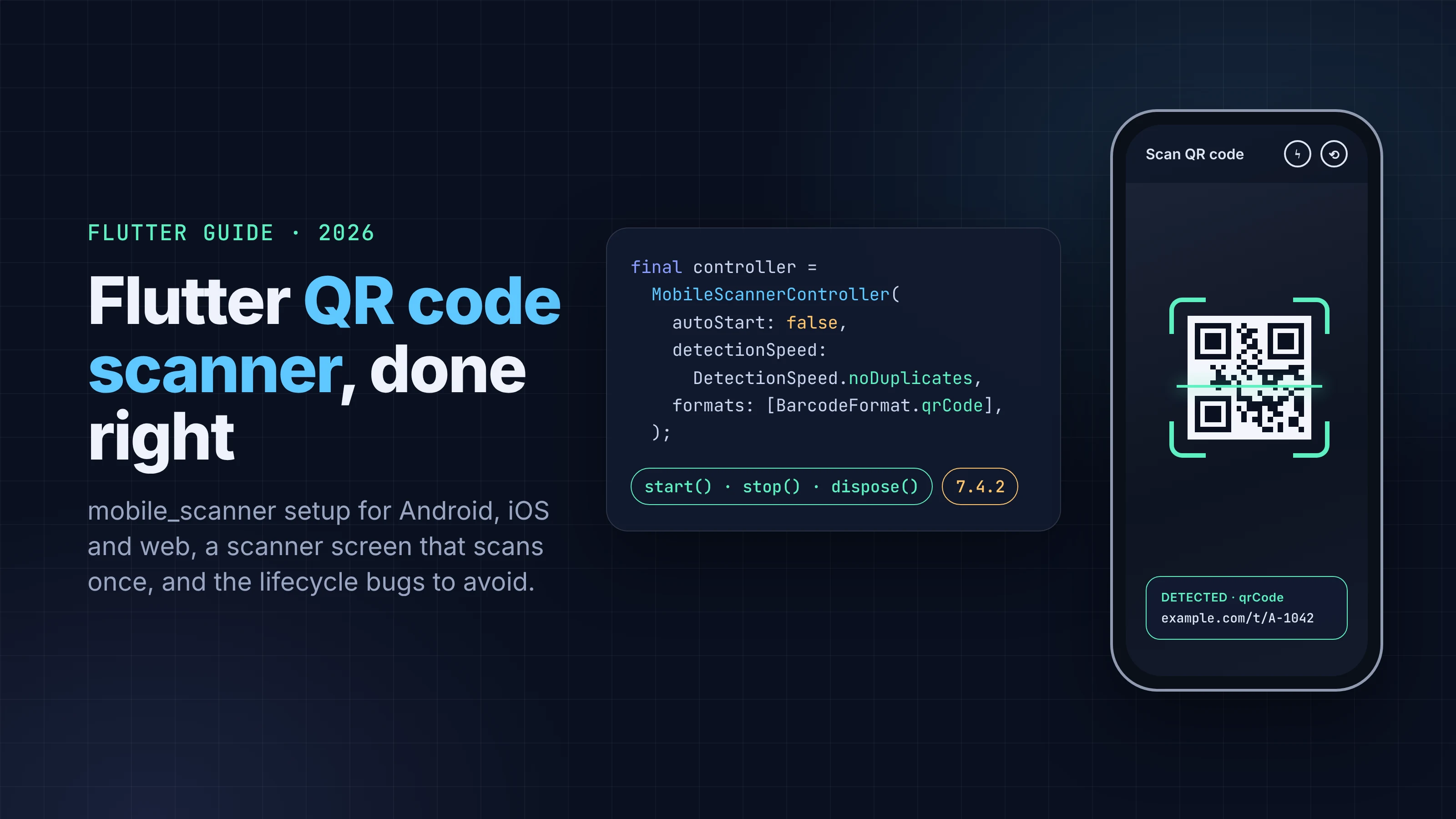
A lot of older Flutter QR code scanner tutorials still start with flutter pub add qr_code_scanner. That package hasn't had a release since August 2022, and its own README says it is "in maintenance mode only." In 2026 the default is mobile_scanner. It's one widget for Android, iOS, macOS and the web, built on CameraX and ML Kit on Android and on Apple's Vision framework on iOS and macOS.
Getting a preview on screen takes a few lines. The bugs show up later: the same code fires over and over, the camera stays on after you leave the screen, or the preview goes black after the app comes back from the background. This guide starts with the package choice and the per-platform setup, then builds a scanner screen that avoids those three bugs. Shorter sections at the end cover scanning from a photo and generating QR codes.
Package versions and platform rules below were checked on pub.dev, the package READMEs, developers.google.com, developer.apple.com and MDN on October 5, 2026. We checked every API name in the Dart snippets against the package API reference, but we didn't compile them for this post, so run flutter analyze on your own project.
Key takeaways
- Use mobile_scanner 7.4.2 (published September 14, 2026). It supports Android, iOS, macOS and web, but not Windows or Linux.
- qr_code_scanner is in maintenance mode and qr_code_scanner_plus is a maintenance-only fork. Neither belongs in a new project.
- iOS needs NSCameraUsageDescription in Info.plist. Without it, Apple's docs say the system terminates your app. On Android the plugin declares the camera permission for you, and it needs minSdk 23 or higher.
- Set detectionSpeed: DetectionSpeed.noDuplicates, or the default normal speed can report the same code repeatedly while it stays in frame.
- If you pass your own MobileScannerController, start and stop it on app lifecycle changes yourself, and dispose() it when the screen closes.
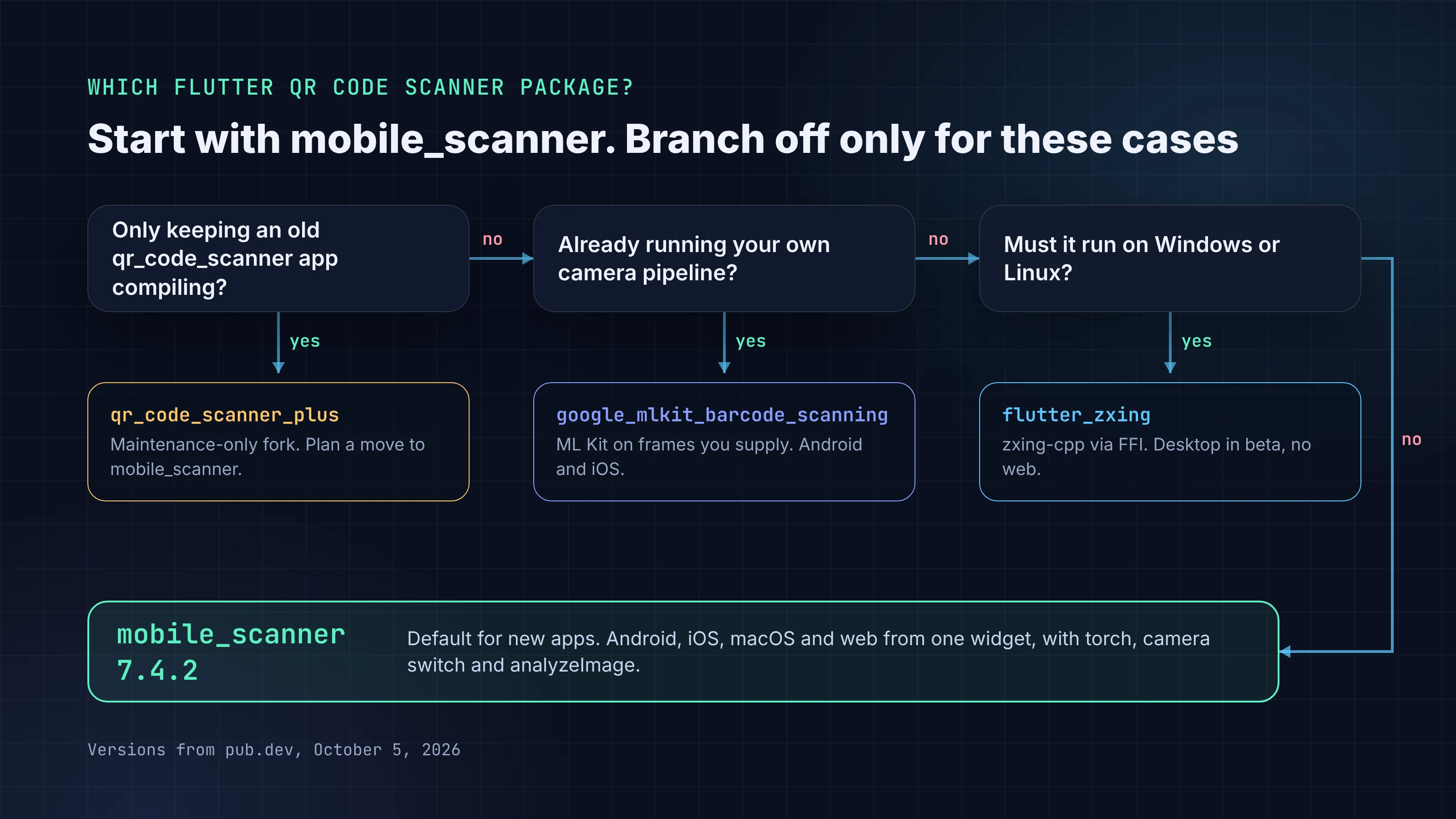
Which Flutter QR code scanner package should you use?
For almost every app, mobile_scanner. It's the only option in this table that is actively developed, ships a camera widget, and runs on both mobile platforms plus the web.
| Package | Latest release | Platforms | Engine | Status |
|---|---|---|---|---|
mobile_scanner |
7.4.2, Sep 14, 2026 | Android, iOS, macOS, web | CameraX + ML Kit (Android), AVFoundation + Vision (Apple), BarcodeDetector or ZXing (web) | Active, verified publisher steenbakker.dev |
google_mlkit_barcode_scanning |
0.16.1, Aug 17, 2026 | Android, iOS | ML Kit; no camera UI, you supply the frames | Active, unofficial ("not sponsored or maintained by Google") |
flutter_zxing |
2.3.0, Apr 20, 2026 | Android, iOS; macOS, Linux and Windows in beta; no web | zxing-cpp through Dart FFI | Active, also generates codes |
qr_code_scanner_plus |
2.3.0, Sep 2026 | Android, iOS, web (limited) | ZXing (Android), AVFoundation (iOS) | Maintenance-only fork, "New feature PRs will be rejected" |
qr_code_scanner |
1.0.1, Aug 15, 2022 | Android, iOS, web (limited) | ZXing (Android), MTBBarcodeScanner (iOS) | Maintenance mode; README points to mobile_scanner |
Versions and dates from pub.dev on October 5, 2026.
When to pick something else:
google_mlkit_barcode_scanningif you already run your own camera pipeline (for example, thecameraplugin for a photo feature) and want to pass frames to ML Kit as anInputImage. Its README requires iOS 15.5 and notes that ML Kit doesn't support 32-bit architectures.flutter_zxingif you need a desktop target, or one package that scans and generates. Its README says it can scan "from the camera stream, an image file, or a URL." It has no web support, because "Dart FFI is not available on the web."qr_code_scanner_plusonly to keep an existingqr_code_scannerapp compiling. Its README says its "sole purpose is to keep existing projects compiling" and suggestsmobile_scannerfor new work.
Set up mobile_scanner on Android, iOS and web
Add the package:
dependencies:
  mobile_scanner: ^7.4.2
Android. The plugin's own manifest declares android.permission.CAMERA and marks the camera feature as optional, so the Android build merges both into your app's manifest. You don't add them yourself. controller.start() asks for the runtime permission when it runs. Since 7.1.3 the plugin's minimum is SDK 23 ("in line with Flutter requirements," says the changelog), so raise minSdk in android/app/build.gradle(.kts) if your project hard-codes a lower number.
On Android, the ML Kit model is either bundled with your app or downloaded on demand:
| Bundled (default) | Unbundled | |
|---|---|---|
| How it ships | Model compiled into your APK | Downloaded through Google Play services |
| Size estimate, mobile_scanner README | 3 to 10 MB | About 600 KB |
| Size estimate, Google's ML Kit docs | About 2.4 MB | About 200 KB |
| First scan | Works immediately | "Might have to wait for model to download before first use" |
The two sources give different estimates, so measure your own release build before and after if size matters. To switch to the unbundled model, add one line to android/gradle.properties:
dev.steenbakker.mobile_scanner.useUnbundled=true
Unbundled only makes sense for apps that ship to devices with Google Play services and where a few MB of download size matters more than the first scan working offline. For most apps, keep the default.
iOS. Add a camera purpose string to ios/Runner/Info.plist:
<key>NSCameraUsageDescription</key>
<string>Scan QR codes on tickets and receipts.</string>
This key is mandatory. Apple's AVFoundation authorization guide says your app needs it "before it requests authorization or attempts to use a capture device. Otherwise, the system terminates your app." Write a real reason; the string is what users see in the permission alert. Add NSPhotoLibraryUsageDescription too if you'll let users pick a photo to scan with image_picker (covered below). Since 7.1.0 the plugin requires iOS 13 or later.
macOS. Tick Camera under Signing & Capabilities in Xcode, as the README says.
Web. Nothing to configure since 5.0.0: the decoding library "is automatically loaded on first use." By default, the plugin uses the browser's native BarcodeDetector where available (the README lists Chrome 83+, Edge 83+ and Safari 17+) and falls back to zxing-wasm, a WebAssembly build of ZXing. That binary (about 2 MB) loads from the jsDelivr CDN, so a strict Content Security Policy or an offline kiosk will need a plan for it.
A permission denial is permanent on some platforms. The start() docs warn: "If the permission is denied on iOS, MacOS or Web, there is no way to request it again." Your UI has to send the user to system settings instead. Our Flutter permissions guide covers runtime permissions and denied states in detail, so we won't repeat that here.
Build a scanner screen with MobileScannerController
You can drop in MobileScanner(onDetect: ...) with no controller, and the widget will pause and resume itself on app lifecycle changes. Its useAppLifecycleState flag does this, but only when you don't pass a controller. As soon as you need a torch button, a camera switch or a way to stop after one result, you'll want a controller, and lifecycle handling becomes your job.
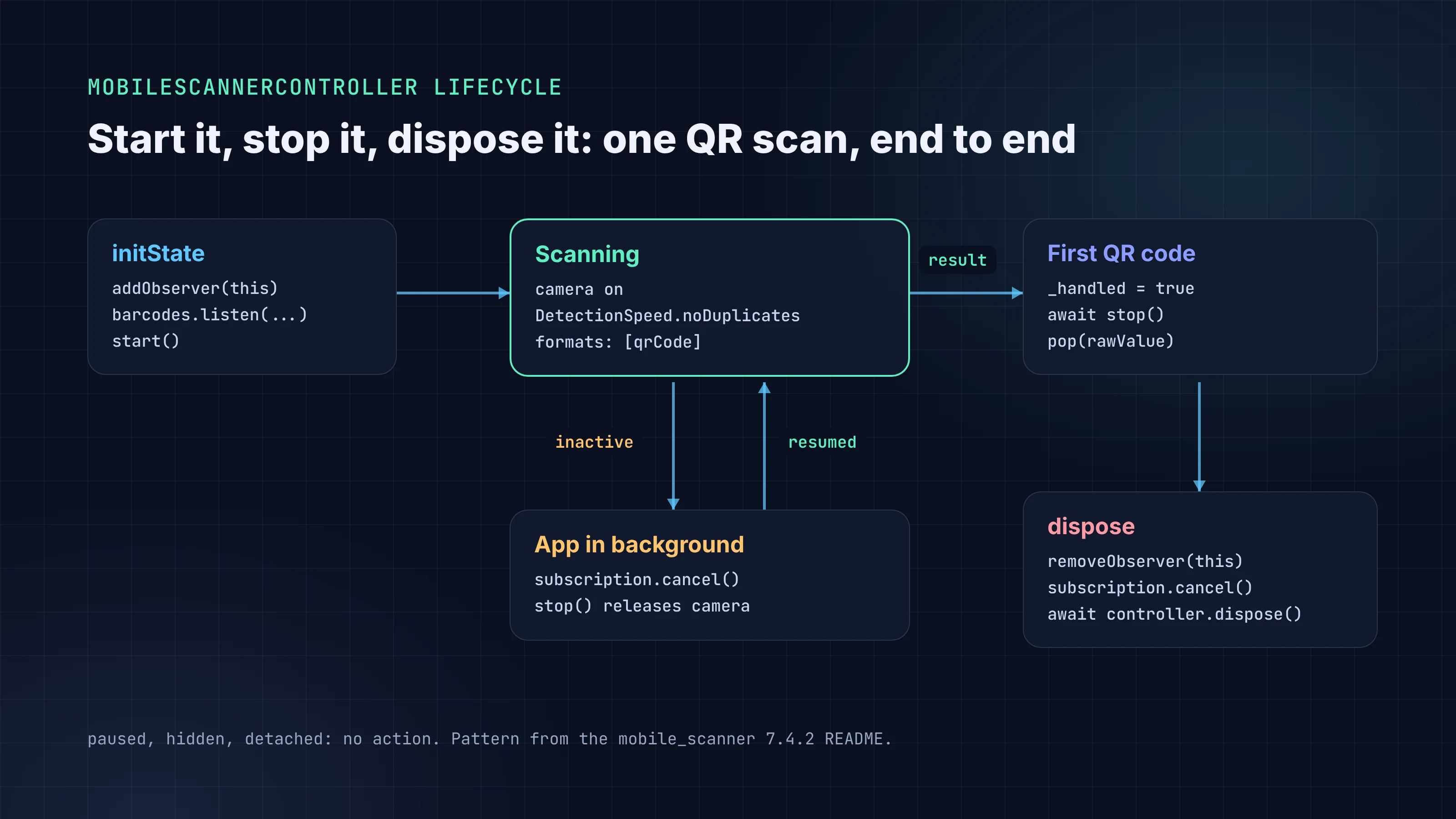
This screen scans one QR code, returns its value to the caller, and follows the lifecycle pattern from the README:
import 'dart:async';

import 'package:flutter/material.dart';
import 'package:mobile_scanner/mobile_scanner.dart';

class ScanPage extends StatefulWidget {
  const ScanPage({super.key});

  @override
  State<ScanPage> createState() => _ScanPageState();
}

class _ScanPageState extends State<ScanPage> with WidgetsBindingObserver {
  final MobileScannerController _controller = MobileScannerController(
    autoStart: false,
    detectionSpeed: DetectionSpeed.noDuplicates,
    formats: const [BarcodeFormat.qrCode],
  );
  StreamSubscription<BarcodeCapture>? _subscription;
  bool _handled = false;

  @override
  void initState() {
    super.initState();
    WidgetsBinding.instance.addObserver(this);
    _subscription = _controller.barcodes.listen(_handleBarcode);
    unawaited(_controller.start());
  }

  @override
  void didChangeAppLifecycleState(AppLifecycleState state) {
    if (!_controller.value.hasCameraPermission) return;

    switch (state) {
      case AppLifecycleState.detached:
      case AppLifecycleState.hidden:
      case AppLifecycleState.paused:
        return;
      case AppLifecycleState.resumed:
        _subscription = _controller.barcodes.listen(_handleBarcode);
        unawaited(_controller.start());
      case AppLifecycleState.inactive:
        unawaited(_subscription?.cancel());
        _subscription = null;
        unawaited(_controller.stop());
    }
  }

  Future<void> _handleBarcode(BarcodeCapture capture) async {
    if (_handled || capture.barcodes.isEmpty) return;
    final String? value = capture.barcodes.first.rawValue;
    if (value == null) return;

    _handled = true; // ignore anything that arrives while we leave
    await _controller.stop();
    if (!mounted) return;
    Navigator.of(context).pop(value);
  }

  @override
  Widget build(BuildContext context) {
    return Scaffold(
      appBar: AppBar(
        title: const Text('Scan QR code'),
        actions: [
          ValueListenableBuilder<MobileScannerState>(
            valueListenable: _controller,
            builder: (context, state, _) {
              if (state.torchState == TorchState.unavailable) {
                return const SizedBox.shrink();
              }
              return IconButton(
                icon: Icon(
                  state.torchState == TorchState.on
                      ? Icons.flash_on
                      : Icons.flash_off,
                ),
                onPressed: _controller.toggleTorch,
              );
            },
          ),
          IconButton(
            icon: const Icon(Icons.cameraswitch),
            onPressed: () => _controller.switchCamera(),
          ),
        ],
      ),
      body: MobileScanner(
        controller: _controller,
        errorBuilder: (context, error) => Center(
          child: Text(
            error.errorCode == MobileScannerErrorCode.permissionDenied
                ? 'Camera access is off. Turn it on in Settings to scan.'
                : 'Camera error: ${error.errorCode.name}',
          ),
        ),
      ),
    );
  }

  @override
  Future<void> dispose() async {
    WidgetsBinding.instance.removeObserver(this);
    unawaited(_subscription?.cancel());
    _subscription = null;
    super.dispose();
    await _controller.dispose();
  }
}
Open it with final code = await Navigator.of(context).push<String>(MaterialPageRoute(builder: (_) => const ScanPage())); and you get the scanned string back, or null if the user backs out.
Stop duplicate scans
The controller's default is DetectionSpeed.normal, which the docs describe as scanning "while respecting the configured scan timeout between individual scans." That timeout, detectionTimeoutMs, defaults to 250 ms, so a code held in frame for two seconds can reach your callback several times. DetectionSpeed.noDuplicates reports a code "once, and never again until another barcode has been scanned." Avoid unrestricted unless you need it: the docs warn it can cause memory problems on older devices.
noDuplicates still lets a different code through, and your handler is async. That's why the screen also sets _handled before it awaits anything. It's cheap insurance against pushing the same result screen twice.
Limiting formats to [BarcodeFormat.qrCode] helps too. The scanner stops reporting the EAN barcode on the cereal box behind the QR code.
Handle the app lifecycle
With autoStart: false, the camera runs only when you call start(). The pattern above stops the camera and cancels the subscription when the app becomes inactive, and restarts both on resume. It also skips everything when there's no camera permission, so a denied user doesn't get a loop of failing restarts.
stop() and pause() aren't the same. stop() releases the camera session, and the docs say the camera "can be restarted using start." pause() "stops to update camera frame and scan barcodes" but keeps the session. Use stop() when leaving the screen or backgrounding the app. That lets other apps, and other controllers in your own app, have the camera.
Scan a QR code from an image
Users often have the code in a screenshot or a photo rather than in front of the camera. MobileScannerController.analyzeImage takes a file path and returns a BarcodeCapture?, which is null when nothing is found. Pair it with image_picker (1.2.3, flutter.dev):
import 'package:image_picker/image_picker.dart';
import 'package:mobile_scanner/mobile_scanner.dart';

Future<String?> scanFromGallery(MobileScannerController controller) async {
  final XFile? file =
      await ImagePicker().pickImage(source: ImageSource.gallery);
  if (file == null) return null;

  final BarcodeCapture? capture = await controller.analyzeImage(
    file.path,
    formats: const [BarcodeFormat.qrCode],
  );
  if (capture == null || capture.barcodes.isEmpty) return null;
  return capture.barcodes.first.rawValue;
}
Pass the same controller your scanner screen uses. Two limits from the docs: analyzeImage works on Android, physical iOS devices and macOS, but "is not supported on the iOS Simulator," and it throws an UnsupportedError where file analysis isn't available, which includes the web. Wrap the call in try/catch and hide the "pick a photo" button on web.
On iOS, image_picker needs NSPhotoLibraryUsageDescription. Its README notes that App Store policy requires the key even when the permission is never actually requested.
Generate QR codes with qr_flutter
Scanning usually has a partner screen that shows a code: a ticket, an invite link, a device pairing code. qr_flutter 4.1.0 (theyakka.com, verified publisher) renders one as a widget on every Flutter platform:
import 'package:flutter/material.dart';
import 'package:qr_flutter/qr_flutter.dart';

class InviteCode extends StatelessWidget {
  const InviteCode({super.key, required this.url});
  final String url;

  @override
  Widget build(BuildContext context) {
    return QrImageView(
      data: url,
      version: QrVersions.auto,
      size: 240,
      backgroundColor: Colors.white,
      errorCorrectionLevel: QrErrorCorrectLevel.M,
    );
  }
}
Two cautions. First, 4.1.0 is from May 14, 2023. It still renders fine, but don't expect new features. Second, the README on GitHub shows options such as gradient that aren't in the 4.1.0 API reference on pub.dev, so build from the pub.dev docs, not the repository's main branch. The default backgroundColor is transparent, so set a light one if your app has a dark theme; dark modules on a dark screen are hard to read.
If the code is a link into your own app, make it a real deep link so the system camera can open it too. Our Flutter deep linking guide covers that setup.
Common Flutter QR scanner problems and fixes
| Symptom | Likely cause | Fix |
|---|---|---|
| App crashes the moment the scanner opens (iOS) | NSCameraUsageDescription missing |
Add the key to ios/Runner/Info.plist |
| Black or empty preview | Camera permission denied earlier; on iOS, macOS and web it can't be re-requested | Pass an errorBuilder that explains permissionDenied, check controller.value.hasCameraPermission, and link to system settings |
| Black preview after returning from the background | Your own controller isn't restarted on resumed |
Add the WidgetsBindingObserver pattern above |
Error controllerNotAttached |
start() waits up to 500 ms for a MobileScanner widget that uses the controller, and none appeared (for example, the widget sits behind a loading condition) |
Build the MobileScanner with that controller in the same frame you call start() |
| Same code handled several times | Default DetectionSpeed.normal, plus an async handler |
Use DetectionSpeed.noDuplicates and a "handled" flag |
| Camera stays on, or another screen can't open it | Controller never stopped or disposed | stop() on inactive, await controller.dispose() in dispose() |
| "Pick from photos" fails on iOS | Running on the Simulator, where analyzeImage isn't supported |
Test analyzeImage on a physical device |
| Camera never starts on the web | Page served over plain HTTP | Serve over HTTPS; getUserMedia() is "only available in secure contexts" (localhost counts as secure) |
| Web scans fail behind a strict CSP or offline | zxing-wasm fallback can't load from jsDelivr |
Allow the CDN, or test on browsers that provide native BarcodeDetector |
| Build fails on Android after upgrading | minSdk below 23 |
Raise minSdk to 23 or higher |
Building it with FlutterGo
If you build your app with FlutterGo, the AI Flutter app builder, you can describe a "scan a ticket QR code" screen in plain English and preview the generated Flutter app. Check the generated scanner against this guide anyway: mobile_scanner rather than an old package, the iOS purpose string, noDuplicates, and a controller that is stopped and disposed. If you save scan history on the device, see our Flutter local database guide. Before submission, the App Store rejections post lists what reviewers flag most often.
FAQ
What is the best QR code scanner package for Flutter in 2026?
mobile_scanner. Version 7.4.2 was published on September 14, 2026, it comes from a verified publisher, and it supports Android, iOS, macOS and web from one widget. Use google_mlkit_barcode_scanning only if you already manage the camera yourself.
Is qr_code_scanner still maintained?
No. Its last release, 1.0.1, is from August 15, 2022, and its README says it is "in maintenance mode only" and points to mobile_scanner. The qr_code_scanner_plus fork keeps old projects compiling but rejects new features.
Does mobile_scanner work on Flutter web?
Yes. It uses the browser's BarcodeDetector where available and a WebAssembly ZXing build otherwise. Serve the app over HTTPS, and note that analyzeImage isn't supported there.
Why does my Flutter QR scanner detect the same code multiple times?
The default DetectionSpeed.normal only waits out a scan timeout (250 ms by default) between results, so a code that stays in view can be reported again. Set detectionSpeed: DetectionSpeed.noDuplicates and guard your handler with a flag before you navigate.
Do I need permission_handler for mobile_scanner?
Not to scan. start() requests camera access itself. You'll still want a way to send users to settings after a permanent denial; the permissions guide linked above covers that part.