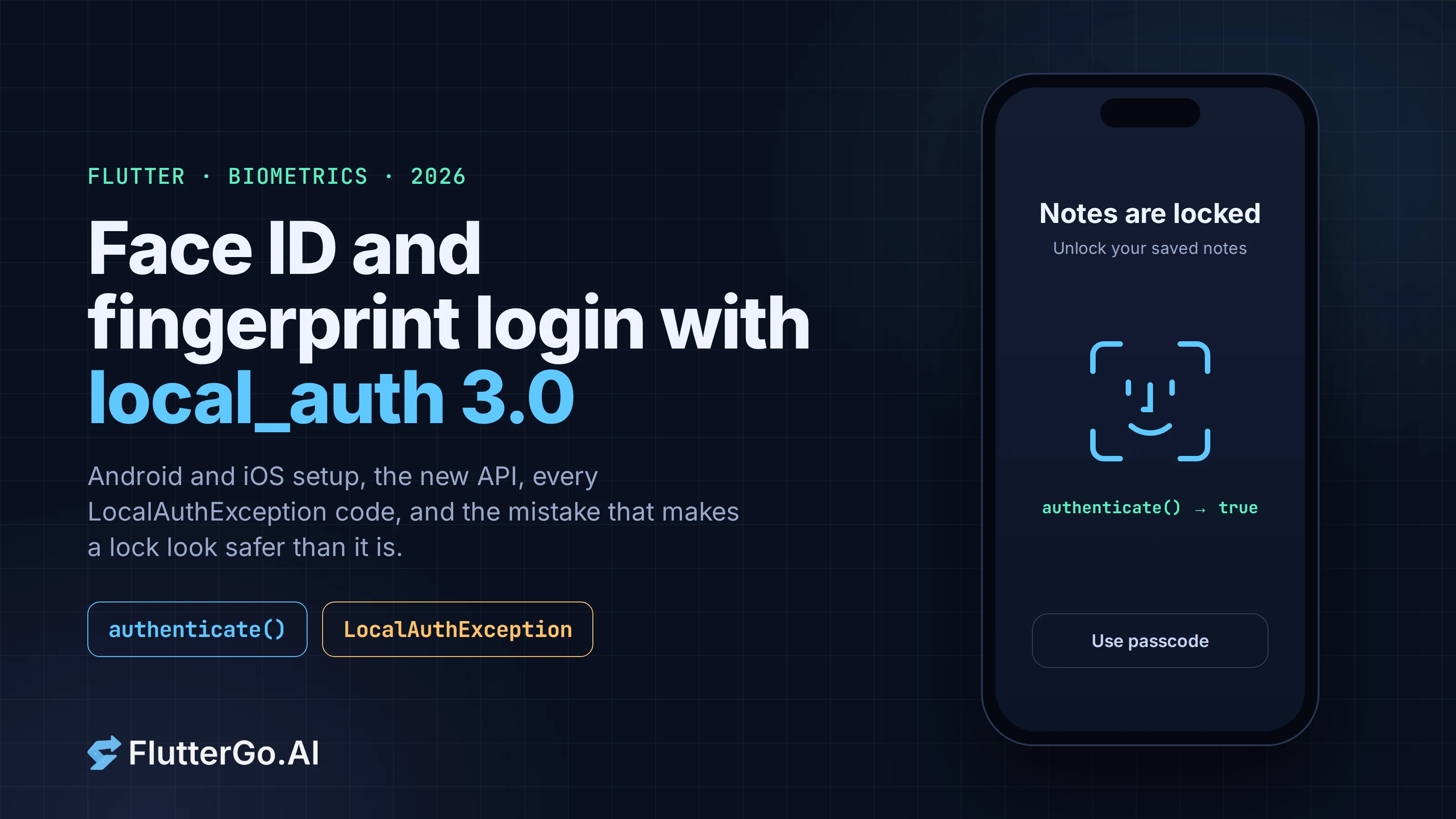
Flutter Biometric Login in 2026: local_auth for Face ID and Fingerprint, Set Up and Debugged
Add Face ID and fingerprint login to a Flutter app with local_auth 3.0: Android and iOS setup, the new API, LocalAuthException codes and the fixes.
To add Face ID or fingerprint unlock to a Flutter app, you use local_auth, the Flutter team's plugin. In 2026 that means version 3.x, and most tutorials you'll find were written for 2.x. Version 3.0 renamed the option everyone copied (stickyAuth), deleted AuthenticationOptions, and swapped PlatformException for a typed LocalAuthException. Code from an older tutorial either won't compile or catches nothing.
This guide covers the current setup on Android and iOS, the 3.x API, every error code with what to do about it, and the one design mistake that makes a biometric lock look secure when it isn't. Versions and READMEs were checked on pub.dev and in the flutter/packages repository on October 6, 2026.
Key takeaways
- local_auth 3.0.2 (flutter.dev, July 9, 2026) supports Android API 24+, iOS 13+, macOS 10.15+ and Windows 10+. There's no web or Linux support.
- Android needs three things: FlutterFragmentActivity, the USE_BIOMETRIC permission, and an AppCompat launch theme. iOS needs one: NSFaceIDUsageDescription in Info.plist.
- In 3.x, authenticate() takes biometricOnly and persistAcrossBackgrounding as direct parameters. AuthenticationOptions and useErrorDialogs are gone.
- A wrong finger returns false. Everything else (no hardware, nothing enrolled, lockout, cancel) throws LocalAuthException with a LocalAuthExceptionCode.
- authenticate() returns a bool. On its own that's a UI gate, not encryption. To protect a token, store it with flutter_secure_storage behind the platform keystore.
Which package should you use for biometrics in Flutter?
Use local_auth. It's published by flutter.dev, it's the plugin the official docs point to, and it's the only option with endorsed implementations for Android, iOS, macOS and Windows.
| local_auth | |
|---|---|
| Latest version | 3.0.2 (July 9, 2026) |
| Publisher | flutter.dev (verified) |
| Platforms | Android (API 24+), iOS 13+, macOS 10.15+, Windows 10+ |
| Platform packages | local_auth_android 2.2.1, local_auth_darwin 2.0.4, local_auth_windows 2.0.2 |
| Likes / downloads | 3.38k likes, 1.57M downloads |
| What it returns | true / false, or a LocalAuthException |
From pub.dev and the flutter/packages repository, October 6, 2026.
The platform packages are endorsed, so you only add local_auth to pubspec.yaml. Add local_auth_android or local_auth_darwin directly only if you import them, for example to customize dialog text.
dependencies:
  local_auth: ^3.0.2
If your app also stores a session token, add flutter_secure_storage (11.2.0 at the time of writing) as well. The last section explains why.
What changed in local_auth 3.0
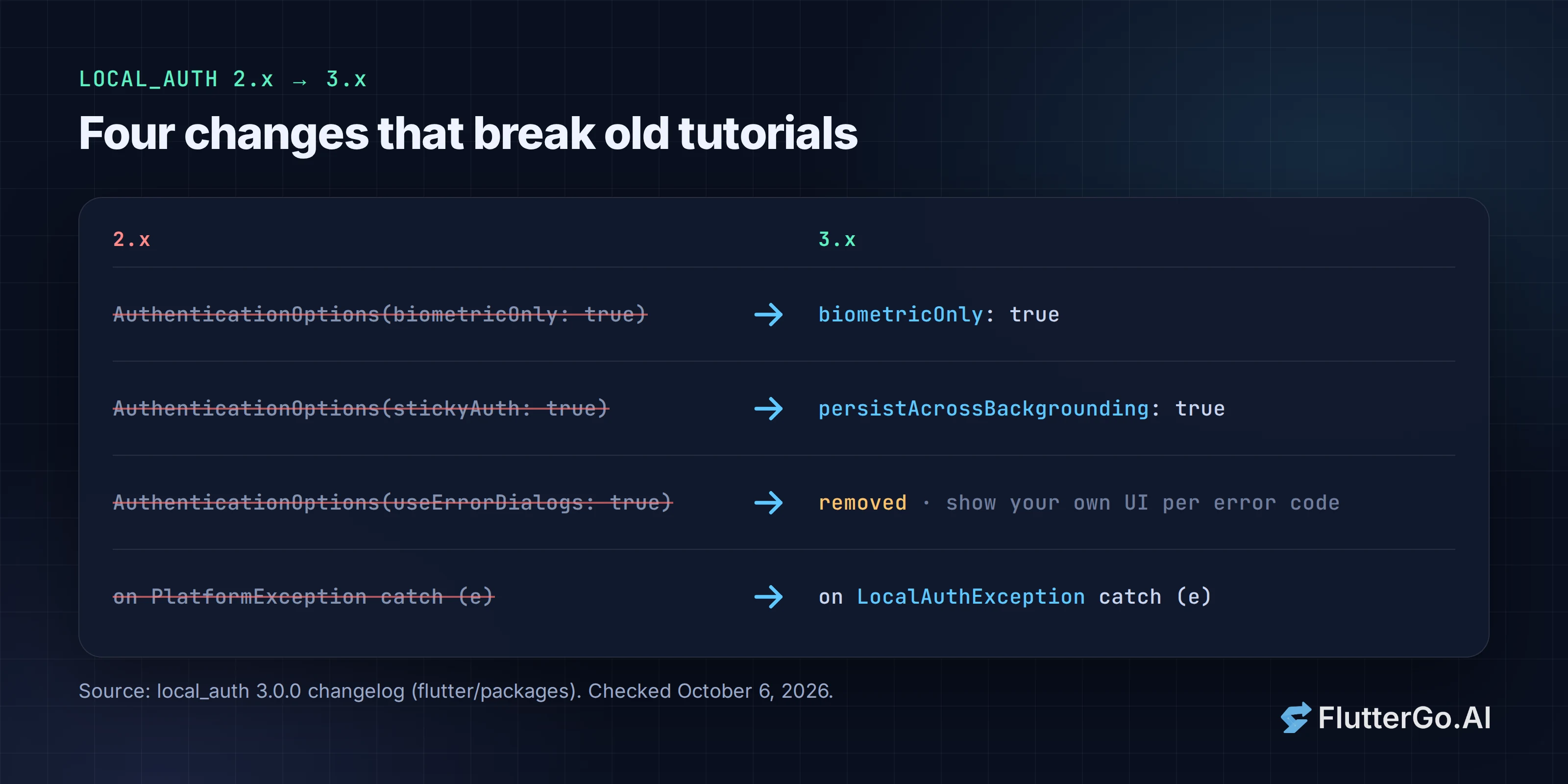
If you're upgrading from 2.x, or following an older tutorial, these are the breaking changes from the 3.0.0 changelog:
| 2.x | 3.x |
|---|---|
options: AuthenticationOptions(biometricOnly: true) |
biometricOnly: true |
AuthenticationOptions(stickyAuth: true) |
persistAcrossBackgrounding: true |
AuthenticationOptions(useErrorDialogs: true) |
Removed. Show your own UI from the error code. |
on PlatformException catch (e) with string codes |
on LocalAuthException catch (e) with LocalAuthExceptionCode |
| Android 16+ (API 16), iOS 9+ | Android API 24+, iOS 13+ |
The removal of useErrorDialogs is the one that changes behavior. In 2.x the plugin could show a native dialog telling the user to enroll a fingerprint. In 3.x nothing appears unless you build it, so a device with no enrolled biometrics just throws and the user sees whatever your catch block shows.
Android setup
The local_auth_android README lists three changes. Miss the first and authentication fails before any prompt appears.
1. Use FlutterFragmentActivity. The Android biometric prompt needs a FragmentActivity. Change MainActivity:
import io.flutter.embedding.android.FlutterFragmentActivity

class MainActivity: FlutterFragmentActivity() {
    // ...
}
If your AndroidManifest.xml points at FlutterActivity directly, change it there to FlutterFragmentActivity.
2. Add the permission to android/app/src/main/AndroidManifest.xml:
<uses-permission android:name="android.permission.USE_BIOMETRIC"/>
3. Use an AppCompat launch theme. The README says the LaunchTheme parent must be a Theme.AppCompat theme "to prevent crashes on Android 8 and below." In android/app/src/main/res/values/styles.xml:
<style name="LaunchTheme" parent="Theme.AppCompat.DayNight">
    ...
</style>
Since 3.x requires API 24 (Android 7.0), Android 7 and 8 devices are still in range, so don't skip this one.
iOS setup
Add a Face ID usage string to ios/Runner/Info.plist:
<key>NSFaceIDUsageDescription</key>
<string>Unlock your saved notes with Face ID.</string>
Write the reason the user will read. Apple's sample code says the system shows this string the first time your app tries to use Face ID, and that without the key "the system won't allow your app to use Face ID." Touch ID doesn't need a usage string.
Check what the device supports
local_auth has three capability checks, and they answer different questions:
canCheckBiometrics: does the device have biometric hardware?isDeviceSupported(): can the device authenticate the user at all, biometric or passcode?getAvailableBiometrics(): which biometrics are enrolled right now?
The README's own warning is worth repeating: canCheckBiometrics only means the hardware exists, not that a face or finger is enrolled.
import 'package:local_auth/local_auth.dart';

final LocalAuthentication auth = LocalAuthentication();

Future<bool> canOfferBiometricUnlock() async {
  if (!await auth.isDeviceSupported()) return false;
  final List<BiometricType> enrolled = await auth.getAvailableBiometrics();
  return enrolled.isNotEmpty;
}
Use this to decide whether to show the "Unlock with Face ID" switch in settings at all. The README suggests you check that something is enrolled rather than which type: types are device-specific, and Android often reports BiometricType.strong or BiometricType.weak rather than face or fingerprint.
Authenticate the user
Future<bool> unlock() async {
  try {
    return await auth.authenticate(
      localizedReason: 'Unlock your saved notes',
      biometricOnly: false,
      persistAcrossBackgrounding: true,
    );
  } on LocalAuthException catch (e) {
    return handleAuthError(e);
  }
}
What each parameter does in 3.x:
localizedReason: the text in the prompt. It must not be empty.biometricOnly:trueblocks the passcode, PIN and pattern fallback. It isn't supported on Windows, because Windows Hello doesn't let apps choose the method.persistAcrossBackgrounding: if the system cancels the prompt because the app went to the background (a phone call, a notification tapped by accident), the plugin waits and retries when the app comes back. This is the oldstickyAuth.sensitiveTransaction: defaults totrue. It enables platform precautions such as a confirm step after face unlock on some Android devices. Leave it on for payments, and considerfalsefor a simple app lock.authMessages: per-platform dialog text, usingAndroidAuthMessagesandIOSAuthMessagesfrom the platform packages.
Should you set biometricOnly: true? Only if the passcode would be a weaker check than you can accept. For an app lock, the device passcode is the same secret that unlocks the phone, so allowing it is reasonable. It also means someone whose fingerprint stopped working can still get in.
LocalAuthException codes and what to do with each
A failed match (wrong finger, face not recognized) returns false without throwing. Most other outcomes throw LocalAuthException. These are the codes in local_auth_platform_interface 1.1.0:
| Code | What happened | What to show or do |
|---|---|---|
userCanceled |
The user tapped Cancel | Nothing. Stay on the lock screen. |
systemCanceled |
The system dismissed the prompt, e.g. the app was backgrounded | Retry, or set persistAcrossBackgrounding: true |
timeout |
The prompt timed out | Offer a "Try again" button |
userRequestedFallback |
The user chose the passcode or "Use password" option | Show your own sign-in (account password) |
noBiometricsEnrolled |
Hardware exists but nothing is enrolled | Explain where to enroll in system settings |
noCredentialsSet |
No biometrics and no device passcode | Biometric lock can't work; fall back to account sign-in |
noBiometricHardware |
The device has no biometric hardware | Hide the biometric option |
biometricHardwareTemporarilyUnavailable |
Hardware is busy or a paired sensor is missing | Retry later, offer the fallback now |
temporaryLockout |
Too many failed attempts, locked for a while | "Try again in a moment" plus the fallback |
biometricLockout |
Biometrics locked until the device passcode is used | Retry with biometricOnly: false, or ask the user to unlock the phone |
authInProgress |
You called authenticate() while a prompt was open |
Guard against double taps |
uiUnavailable |
The prompt couldn't be shown (e.g. no Activity on Android) | Usually a setup bug; check FlutterFragmentActivity |
deviceError, unknownError |
Platform-level failure | Log e.description and fall back |
A handler that covers the cases users actually hit:
bool handleAuthError(LocalAuthException e) {
  switch (e.code) {
    case LocalAuthExceptionCode.userCanceled:
    case LocalAuthExceptionCode.systemCanceled:
      return false;
    case LocalAuthExceptionCode.noBiometricsEnrolled:
    case LocalAuthExceptionCode.noCredentialsSet:
    case LocalAuthExceptionCode.noBiometricHardware:
      showMessage('Biometric unlock isn\'t set up on this device. Sign in with your password instead.');
      return false;
    case LocalAuthExceptionCode.temporaryLockout:
    case LocalAuthExceptionCode.biometricLockout:
      showMessage('Too many attempts. Use your passcode or try again shortly.');
      return false;
    default:
      debugPrint('local_auth failed: ${e.code} ${e.description}');
      return false;
  }
}
showMessage stands in for whatever your app uses: a SnackBar, a dialog or an inline error.
Common errors and their fixes
The prompt never appears on Android and you get uiUnavailable. MainActivity still extends FlutterActivity. Switch it to FlutterFragmentActivity and rebuild. A hot restart isn't enough, because this is native code.
The app crashes on an Android 8 device when the prompt opens. The launch theme isn't an AppCompat theme. Set the LaunchTheme parent to Theme.AppCompat.DayNight.
Face ID never works on iOS, even though Touch ID devices are fine. NSFaceIDUsageDescription is missing from Info.plist. Without it, the system won't let your app use Face ID. Add the key and reinstall the app.
canCheckBiometrics is true but authentication throws noBiometricsEnrolled. That's expected: it checks hardware, not enrollment. Use getAvailableBiometrics() before you show the option.
Old code doesn't compile: The named parameter 'options' isn't defined. You're on 3.x with a 2.x snippet. Move biometricOnly up a level and rename stickyAuth to persistAcrossBackgrounding.
The prompt disappears when a notification arrives. The system canceled it. Set persistAcrossBackgrounding: true, or handle systemCanceled by offering a retry.
Nothing happens in the iOS Simulator. Enable Face ID under Features → Face ID → Enrolled, then use Matching Face or Non-matching Face to answer the prompt. On an Android emulator, add a fingerprint in the emulator's system settings, then use the Fingerprint section of the Extended Controls panel to touch the sensor.
Biometrics gate the UI, they don't encrypt anything
This is the part most tutorials skip. authenticate() returns a bool. If your app keeps a refresh token in shared_preferences and shows the home screen when that bool is true, the token is still in plain storage. Someone with a rooted device or a backup of the app's files can read it without ever seeing your Face ID prompt.
A biometric lock does its job when the thing behind it is also protected:
- Store secrets (tokens, keys) with
flutter_secure_storage, which uses the Android Keystore and the iOS/macOS Keychain. Its README documentsAndroidOptions.biometric(), which ties a value to biometric authentication on Android (API 23+). It also documents iOSaccessibilityoptions for when Keychain values can be read. - Use
local_authfor the app-lock moment: when the app opens or returns from the background after a set time. - Keep a non-biometric way back in, such as the account password. Biometrics get locked out, sensors break and people get new phones.
For a notes app, a lock screen built on local_auth alone is fine. For banking, health or anything where the token is the real prize, put the token behind the keystore too.
Biometric lock in an app built with FlutterGo
If you build the app with FlutterGo, the AI Flutter app builder, you can ask for this in plain English: "Add a Face ID / fingerprint lock when the app opens, with the account password as a fallback, and keep the session token in secure storage." The generated project is a normal Flutter project, so the same rules apply. Check that MainActivity extends FlutterFragmentActivity, that Info.plist has NSFaceIDUsageDescription, and that the catch block handles LocalAuthException, not PlatformException. Biometrics need a real device or an emulator with enrolled biometrics, so test the lock outside the browser preview. For the other runtime prompts your app may need, see our guide to Flutter permissions in 2026.
FAQ
Does local_auth work on Flutter web?
No. local_auth 3.0.2 supports Android, iOS, macOS and Windows. On the web you'd use WebAuthn (passkeys) through a different package or your auth provider.
Can I tell whether the user used Face ID or a fingerprint?
No. authenticate() only tells you whether authentication succeeded. getAvailableBiometrics() tells you what's enrolled, not what was used.
What replaced stickyAuth in local_auth?
persistAcrossBackgrounding, a direct parameter of authenticate() since 3.0.0.
Do I need NSFaceIDUsageDescription if I only support Touch ID?
The local_auth_darwin README requires it for Face ID. Add it anyway: you can't control which iPhone your users have.
Is local_auth enough to secure a banking app?
Not by itself. It confirms the person holding the phone passed a biometric or passcode check. Pair it with keystore-backed storage for secrets and with server-side session controls.
Sources
- local_auth on pub.dev (version, platforms, likes, downloads), checked October 6, 2026
- local_auth README and 3.0.0 changelog, flutter/packages
- local_auth_android setup and local_auth_darwin setup
- LocalAuthExceptionCode source, local_auth_platform_interface 1.1.0
- flutter_secure_storage on pub.dev, 11.2.0, checked October 6, 2026
- NSFaceIDUsageDescription and Logging a User into Your App with Face ID or Touch ID, Apple Developer Documentation
- USE_BIOMETRIC permission, Android Developers