Flutter GenUI, Explained: When an Agent Builds the Screen at Runtime
What Flutter's genui package and the A2UI protocol do, how runtime generative UI differs from AI code generation, and how ready it is in October 2026.
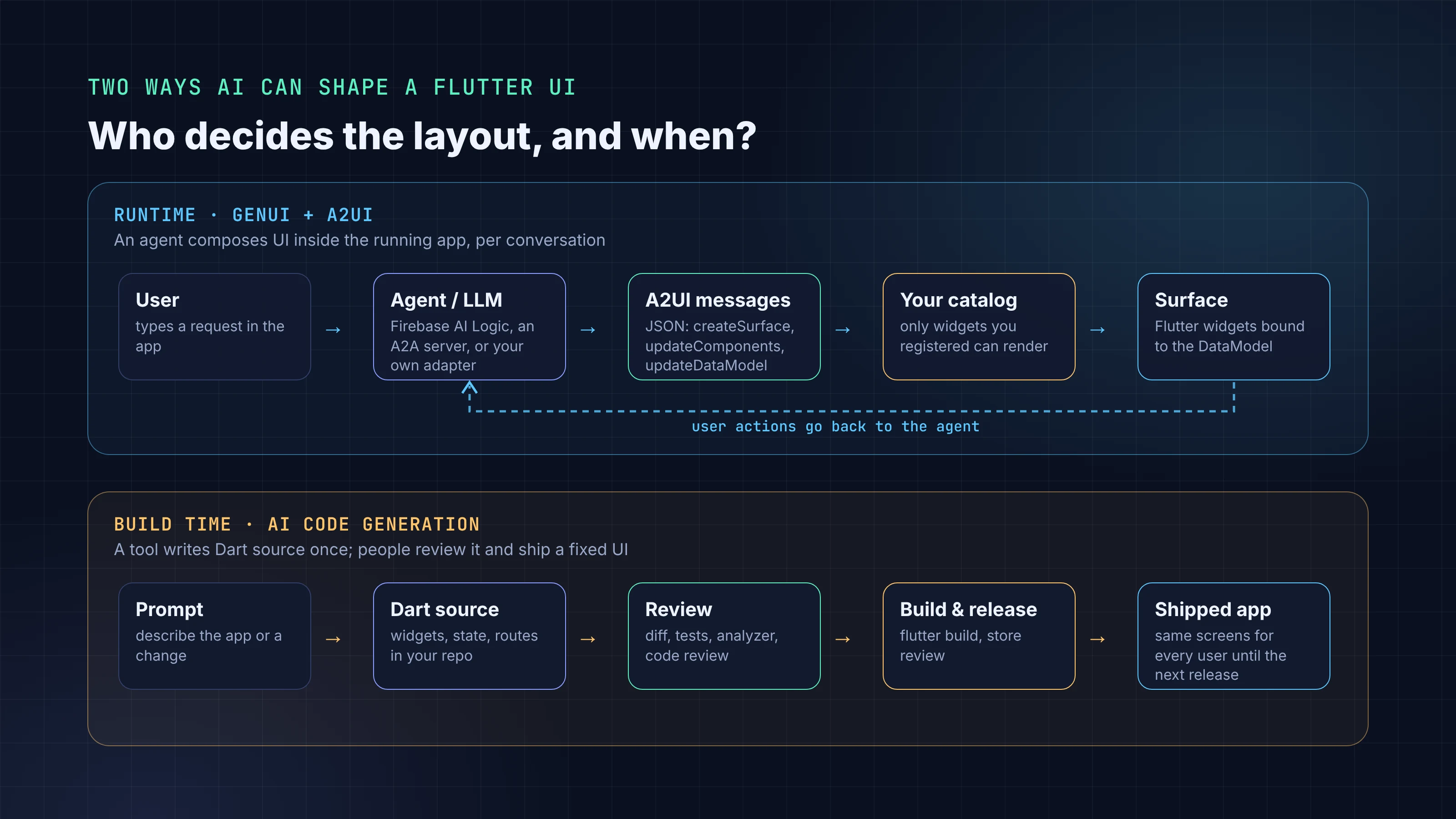
AI can now produce a Flutter screen in two different ways. One writes Dart before you ship: a coding assistant or an app builder generates widgets, you review the diff, and every user gets the same compiled UI. The other happens after you ship. An agent decides what to show while the app runs, picks widgets from a list you approved, and the app renders them on the spot.
Flutter GenUI is the second kind. The genui package, published by labs.flutter.dev, and the A2UI protocol under it let a model answer with interactive UI built from your own widget catalog instead of a paragraph of text. Flutter's 2026 roadmap describes the goal as interfaces "that aren't just pre-built, but adapt in real-time to user intent."
We checked package versions, APIs and dates on pub.dev, docs.flutter.dev, the flutter/genui repository and a2ui.org on October 5, 2026.
Key takeaways
- Flutter GenUI renders UI that a model describes as A2UI JSON messages. The model never sends Dart code, and it can only request widgets registered in your catalog.
- The current release is
genui0.10.4 (September 29, 2026), and it targets A2UI v0.9. The repository calls it "highly experimental" and docs.flutter.dev calls it alpha. - Every minor release from 0.6.0 to 0.10.0 lists breaking changes. The separate Firebase AI and Google Generative AI adapter packages are now discontinued.
- Runtime generative UI and build-time code generation solve different problems. Use GenUI where the UI should change per request, and ordinary source code everywhere else.
- A sensible start today is one contained surface with a small catalog, behind a feature flag, with the version pinned.
What is Flutter GenUI?
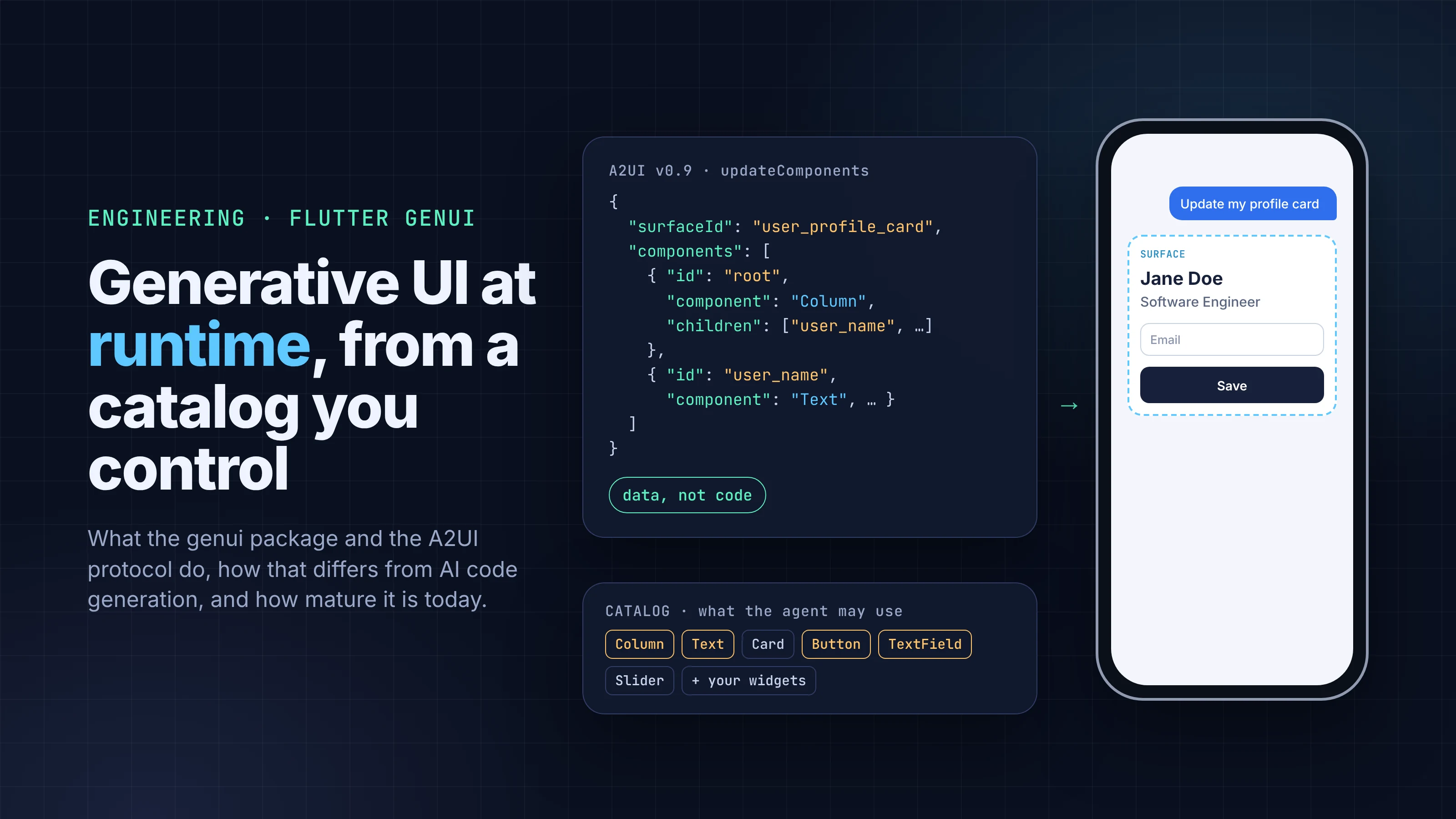
The GenUI SDK docs call it "an orchestration layer" between your user, your widgets and an AI agent. The user types a request, which goes to a model. The model streams back structured messages that say which surface to create, which components to put in it, and what data to bind. The package parses those messages into Flutter widgets.
When the user taps a button or edits a field, the event goes back to the model with its context, and the model can update the UI again. The docs suggest showing "a clickable carousel of product widgets" instead of describing products in text, and generating a trip-planning form with sliders, date pickers and text fields.
The main classes in the 0.10.4 API:
Conversationis the facade you call.sendRequest(ChatMessage)sends a message, and itseventsstream reports surfaces being added or removed.SurfaceControlleris the runtime engine. It holds your catalogs, processes incoming A2UI messages, tracks surface state and turns user interactions into messages for the model.CatalogandCatalogItemdefine the widgets the model may use. Each item has a name, a JSON data schema and a builder function.DataModelis an observable store. Widgets bind to paths in it, and "only the widgets that depend on that specific piece of data are rebuilt."A2uiTransportAdapterparses the model's streamed text into A2UI messages and calls youronSendcallback when something needs to go out.Surfaceis the widget that displays one generated surface.
A2UI: the JSON protocol under Flutter GenUI
A2UI is an open protocol maintained by Google with outside contributors, under the Apache 2.0 license. Its own summary of the design is "Declarative data format, not executable code." The client keeps a catalog of trusted components, and the agent can only ask for components from that catalog.
The v0.9 specification, marked stable and the version genui supports today, defines four messages from agent to client: createSurface, updateComponents, updateDataModel and deleteSurface. In the other direction, the client sends action messages for user interactions and error messages for client-side failures. Components arrive as a flat list linked by ID, which suits streamed output. Here is the spec's updateComponents example, condensed:
{
  "version": "v0.9",
  "updateComponents": {
    "surfaceId": "user_profile_card",
    "components": [
      { "id": "root", "component": "Column", "children": ["user_name", "user_title"] },
      { "id": "user_name", "component": "Text", "text": "John Doe" },
      { "id": "user_title", "component": "Text", "text": "Software Engineer" }
    ]
  }
}
Data binding uses JSON Pointer paths. A TextField whose value is {"path": "/contact/email"} reads from and writes to that spot in the surface's data model, and the agent can change the value later with updateDataModel without resending the layout.
Flutter is one of several renderers listed on a2ui.org, so the same agent output can, in principle, drive a web client and a Flutter client. The A2UI repository says the current production release is v0.9.1 and the v1.0 specification is a release candidate. Keep an eye on that: the last protocol move, to v0.9, came with a breaking genui release (0.8.0).
The catalog limits what the agent can render
The catalog is the most important design decision in a GenUI integration. The components page describes it as what "defines the set of widgets that the AI is allowed to use."
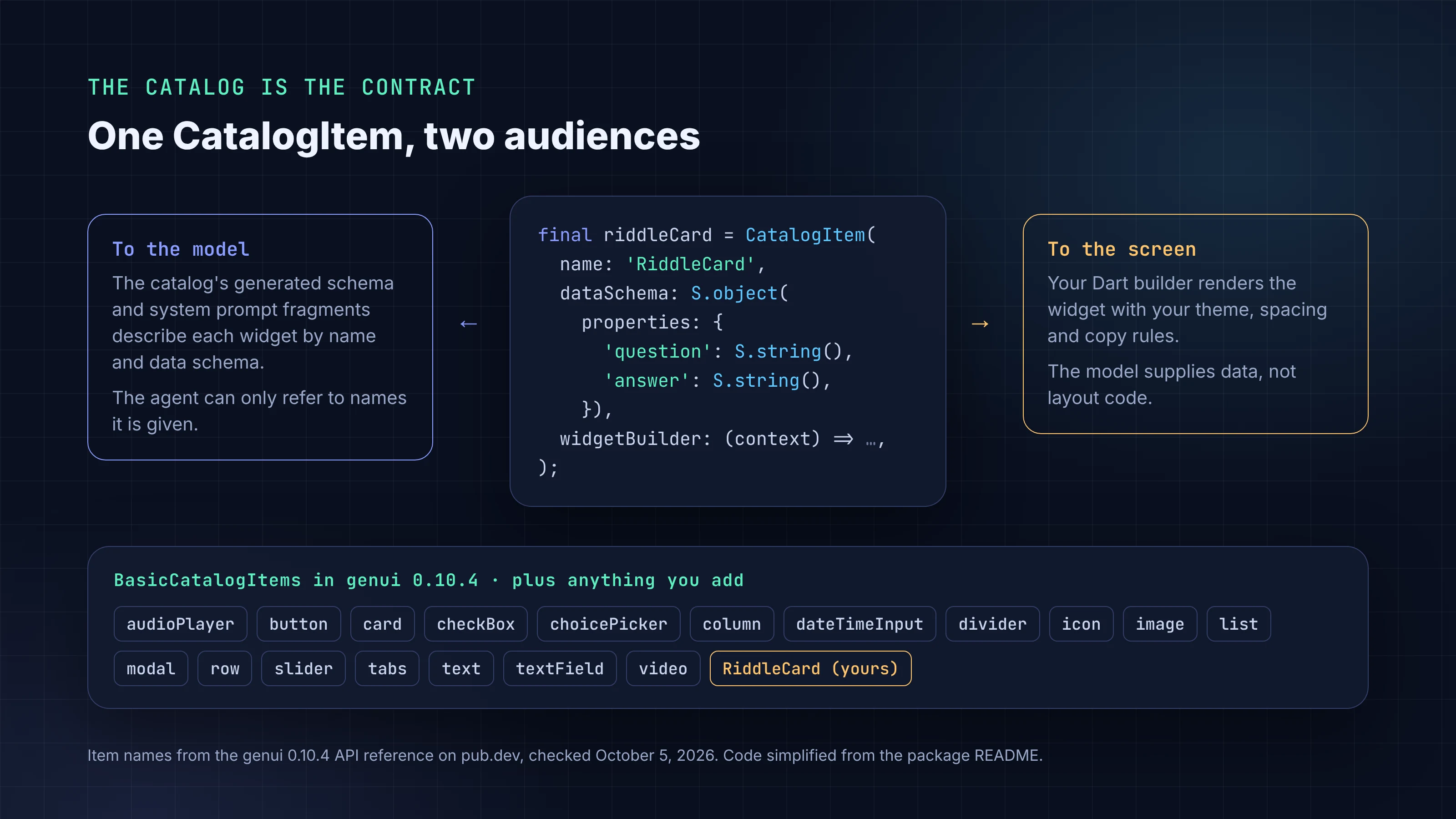
A CatalogItem has two audiences. The model sees its name and data schema, because the Catalog generates a schema and system prompt fragments describing what's available. The screen sees whatever your widgetBuilder returns. The model fills in data that fits the schema, and your Dart code decides padding, typography, colors and behavior.
That has three practical consequences.
First, safety. The agent sends data, not code, so it can't add a widget you didn't register or run its own logic on the device. It can still put misleading text into a widget you did register, so content checks still matter.
Second, brand consistency. A generated surface built from your own ProductCard looks like the rest of your app because it is your widget. The A2UI v0.9 announcement on the Google Developers Blog puts it bluntly: "Frontend developers don't want new components."
Third, rules belong in code. In 0.10.2, for example, TextField.validationRegexp started blocking submissions that don't match. If a constraint matters, put it in the schema or the builder instead of hoping the model follows a prompt.
BasicCatalogItems in 0.10.4 has 18 components, among them button, card, column, row, text, textField, slider, dateTimeInput, choicePicker, tabs, modal, image and video. You can add or replace items with copyWith and remove them with copyWithout.
Connecting GenUI to a model: Firebase AI Logic, A2A or your own
genui isn't tied to one model. The repository says you "can use any AI SDK" and names firebase_ai and dartantic_ai as examples. The get-started guide, last updated September 29, 2026, describes three routes. Firebase AI Logic suits apps that call the model from the Flutter client, and the guide notes that "Firebase handles the management of your Gemini API key". The genui_a2a package (0.10.1) connects to an agent on your server over a WebSocket through A2uiAgentConnector. Or you write your own adapter in the onSend callback.
Older tutorials use genui_firebase_ai and genui_google_generative_ai. Both stopped at 0.7.1 and are marked discontinued on pub.dev as "deprecated and no longer needed with current versions of the GenUI package."
A minimal sketch against genui 0.10.4
This follows the package README, adjusted to the 0.10.4 API reference. The README on main still shows CoreCatalogItems, Surface(host: ...) and a positional copyWith. In 0.10.4 those are BasicCatalogItems, Surface(surfaceContext: ...) and copyWith(newItems: ...). We checked the snippet against the API docs but did not compile it. riddleCard is the custom item from the README, and myLlmClient stands in for your model client.
import 'package:flutter/material.dart';
import 'package:genui/genui.dart';

class AssistantPanel extends StatefulWidget {
  const AssistantPanel({super.key});

  @override
  State<AssistantPanel> createState() => _AssistantPanelState();
}

class _AssistantPanelState extends State<AssistantPanel> {
  late final SurfaceController _controller;
  late final A2uiTransportAdapter _transport;
  late final Conversation _conversation;
  final _surfaceIds = <String>[];

  @override
  void initState() {
    super.initState();
    // The catalog: basic items plus your own (riddleCard from the README).
    _controller = SurfaceController(
      catalogs: [BasicCatalogItems.asCatalog().copyWith(newItems: [riddleCard])],
    );
    _transport = A2uiTransportAdapter(onSend: _sendToModel);
    _conversation = Conversation(controller: _controller, transport: _transport);

    _conversation.events.listen((event) {
      if (event is ConversationSurfaceAdded) {
        setState(() => _surfaceIds.add(event.surfaceId));
      } else if (event is ConversationSurfaceRemoved) {
        setState(() => _surfaceIds.remove(event.surfaceId));
      }
    });
  }

  // Call your model or agent, then feed its streamed text back in.
  Future<void> _sendToModel(ChatMessage message) async {
    await for (final chunk in myLlmClient.streamGenerateContent(message)) {
      _transport.addChunk(chunk);
    }
  }

  void ask(String text) => _conversation.sendRequest(ChatMessage.user(text));

  @override
  Widget build(BuildContext context) {
    return ListView(
      children: [
        for (final id in _surfaceIds)
          Surface(surfaceContext: _controller.contextFor(id)),
      ],
    );
  }

  @override
  void dispose() {
    _conversation.dispose();
    _transport.dispose();
    _controller.dispose();
    super.dispose();
  }
}
On iOS and macOS you also need the com.apple.security.network.client entitlement for outbound requests, and Firebase may need a higher minimum OS version than Flutter's default.
Generative UI in Flutter vs AI code generation
Both get called "AI-generated UI". They put the model at different points and leave you with different things.
| Runtime (GenUI + A2UI) | Build time (code generation) | |
|---|---|---|
| When AI runs | Every session, on the user's request | While you develop |
| What it produces | A2UI JSON rendered by your catalog | Dart source in your repository |
| Who reviews output | Nobody, per response; you review the catalog and prompts | You, before merge and release |
| What varies | Layout and content per user and per request | Nothing until the next release |
| Model calls | In production, per interaction | During development |
| Testing | Catalog widgets are testable; generated combinations are open-ended | Normal widget, golden and integration tests |
| Typical failure | An odd or unhelpful layout at runtime, inside catalog limits | Bugs that review and tests can catch before release |
Build-time generation is what coding assistants and app builders do. FlutterGo, our AI Flutter app builder, works this way: you describe an app, it generates Flutter code, and you check it in a live preview. The output is source you own and read like any other code, which is why we argued you should judge an AI app builder by the repo it leaves you.
The two don't compete. Most of an app is fixed screens like onboarding, settings and checkout, where predictable behavior and tests matter more than variety. Those belong in source, whoever wrote the first draft.
GenUI fits a narrower set of places where the right UI depends on what the user just asked: an assistant panel that answers with a comparison card instead of a paragraph, a planner that builds the form it needs, a support flow that shows the relevant controls. Even there, the catalog widgets are ordinary Dart that you write, test and review.
Trust is where the two differ most. Flutter developers are already weighing how far to rely on AI agents, a theme in what 3,500 Flutter developers said about agents and trust. Runtime UI moves part of that question out of code review and into production, where nobody sees a response before the user does.
How mature is Flutter GenUI in October 2026?
The repository README is direct: "This is a highly experimental package, which means the API will change (sometimes drastically)." docs.flutter.dev says "The genui package is in alpha and is likely to change." The publisher is labs.flutter.dev, a verified publisher on pub.dev but separate from the flutter.dev publisher behind core packages such as webview_flutter.
The versions page shows 13 releases between 0.5.0 (November 12, 2025) and 0.10.4 (September 29, 2026). The changelog lists breaking changes in every minor release from 0.6.0 to 0.10.0. In 0.7.0, core classes lost their prefix (GenUiConversation became Conversation, GenUiSurface became Surface). 0.8.0 moved to A2UI v0.9 and renamed CoreCatalog to BasicCatalog. 0.10.0 moved the A2UI message types into a new a2ui_core package.
The docs trail the code, too. Besides the README gaps above, the docs.flutter.dev components page still lists message names from the older protocol (surfaceUpdate, dataModelUpdate), and the input-events page refers to a ContentGenerator.
On platforms, pub.dev lists Android, iOS, macOS and web; Windows and Linux are not listed. The package needs Dart 3.10 and Flutter 3.35.7 or later.
Google is investing here. GenUI is on the Flutter roadmap, and the package has had five releases since mid-July. Still, a 0.x package tracking a protocol on its way to 1.0 will break again. Plan for migrations.
How to try generative UI in Flutter without betting the app on it
If generative UI fits a real problem in your app, the docs and changelog point to a cautious path:
- Pick one contained surface, such as an assistant panel or a single "help me choose" flow. Keep it away from navigation and checkout, and put it behind a feature flag so you can turn it off without a release.
- Keep the catalog small. A handful of your own tested widgets with tight schemas gives the model fewer ways to go wrong than the full basic set. Use
copyWithoutto drop basic items you don't want. - Put rules in schemas and builders. Required fields, enums, validation patterns and length limits belong in the
CatalogItem, where the app enforces them. - Keep API keys off the device. Use Firebase AI Logic or your own server (for example through
genui_a2a) rather than shipping a raw model key. - Pin the exact
genuiversion, read the changelog before each upgrade, and budget time for it while the package is 0.x. - Plan the empty and failure states.
Surfacetakes adefaultBuilderfor a surface with no definition yet. Decide what users see when the model is slow, offline or returns something unusable. - Review real sessions.
configureLoggingexposes the package's logs. You can't review each response before users see it, so review a sample afterwards and tighten the catalog and prompts.
Everything outside that surface stays ordinary Flutter code, reviewed and tested the way it is today.
FAQ
Is the genui package ready for production? Its own documentation says not yet: the repository calls it "highly experimental" and docs.flutter.dev calls it alpha. As of October 2026 it is at 0.10.4, and recent minor releases included breaking changes. A limited, flagged rollout on one surface is the cautious approach.
How is GenUI different from AI code generation? Code generation writes Dart source before release, which you review, test and ship as a fixed UI. GenUI composes UI from your catalog while the app runs, so the layout can change per request, but no one reviews individual responses before users see them.
Does the AI send Dart code to the app? No. A2UI is a declarative JSON format. The agent can only reference components in the app's catalog, and your Dart code renders them.