Build a Gift Planner with FlutterGo, Then Catch the Bug That Rounded Every Price
We built Ribbon, a gift planner, from one FlutterGo prompt, tested the budget math, and fixed a rounding bug that quietly changed saved prices.
Money bugs in small apps rarely crash anything. The numbers just come out a little wrong, and nobody notices until a budget card says you're over by $0.
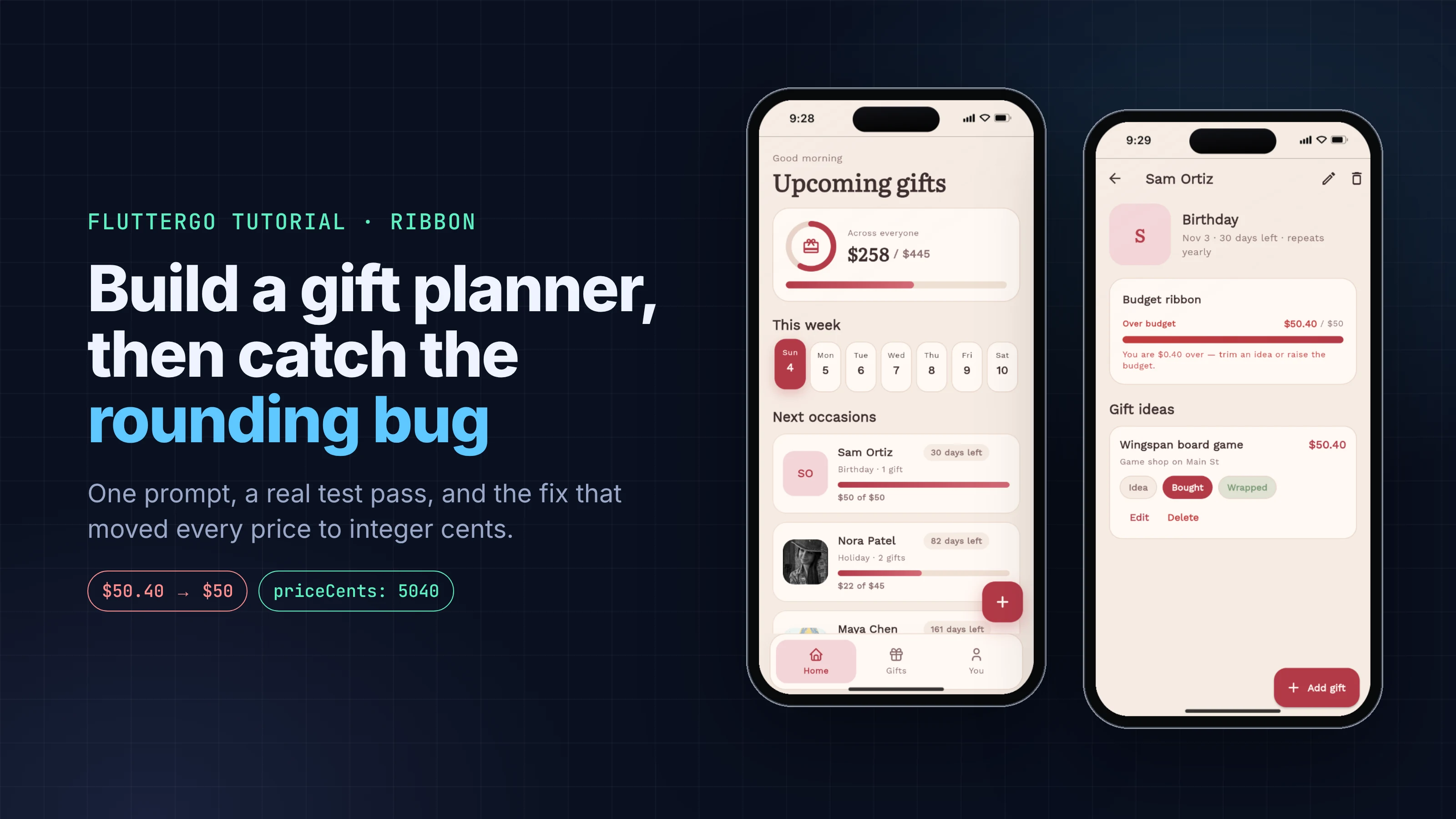
That's what happened here. We asked FlutterGo for a gift planner called Ribbon: people, occasions, budgets and gift ideas, all saved on the device. The first build looked finished. Then we entered a $50.40 board game against a $50 budget, and the app told us we were "$0 over". Opening the gift and pressing Save, without touching anything, turned its price into $50.
This tutorial walks through the whole session: the prompt, what came back, the tests we ran in the preview, the code behind each bug, and the one follow-up prompt that fixed them. Every screen below is a real screenshot of the build, taken on October 4, 2026.
Key takeaways
- One prompt produced a working gift planner in 5 minutes 39 seconds: people with occasions and budgets, gift ideas with idea / bought / wrapped status, a Home list sorted by next occasion, a Gifts tab and on-device storage.
- The first build stored money as double and printed every amount with toStringAsFixed(0). That rounded $50.40 to $50 on screen, and because the edit form was filled from the rounded text, saving an untouched gift changed its stored price.
- One-off occasions whose date had passed showed "Today" forever, and adding a person left you on a page with no back button.
- A single fix prompt (1 minute 48 seconds) moved all money to integer cents, migrated the data already saved, added a "Passed" state and fixed navigation. We re-ran every test on the new build.
What you'll build
Ribbon is a small, local-only gift planner:
- People with an occasion (birthday, holiday, anniversary or other), a date and a budget. Birthdays and anniversaries repeat every year.
- Gift ideas per person with a name, price, optional "where to buy" note and a status: idea, bought or wrapped.
- Budget tracking: bought and wrapped gifts count as spent, with a progress bar that turns red when someone goes over.
- Home sorted by the next occasion with days left, plus totals across everyone.
- Local storage, so everything survives closing the app.
You need a FlutterGo account. Everything else happens in the browser.
Step 1: The prompt
This is the exact prompt we sent, unedited:
A gift planner called Ribbon. Add the people I'm buying gifts for, each with an occasion (birthday, holiday, anniversary or other), the occasion date and a budget. Birthdays and anniversaries repeat every year. For each person keep a list of gift ideas with a name, a price, an optional note for where to buy it, and a status: idea, bought or wrapped. Show each person's spent total (bought and wrapped gifts) against their budget with a progress bar that turns red when they go over. The home screen lists people by the next upcoming occasion with how many days are left, plus a total spent and total budget across everyone. Let me edit and delete people and gifts. Save everything on the device so it survives closing the app. Warm, cosy design that still feels clean.
Two parts of it do a lot of work. "Birthdays and anniversaries repeat every year" tells the planner which dates roll over, so the countdown never goes negative for a birthday. "Bought and wrapped gifts" defines what "spent" means, which is the rule most budget apps get vague about.
Step 2: What FlutterGo built
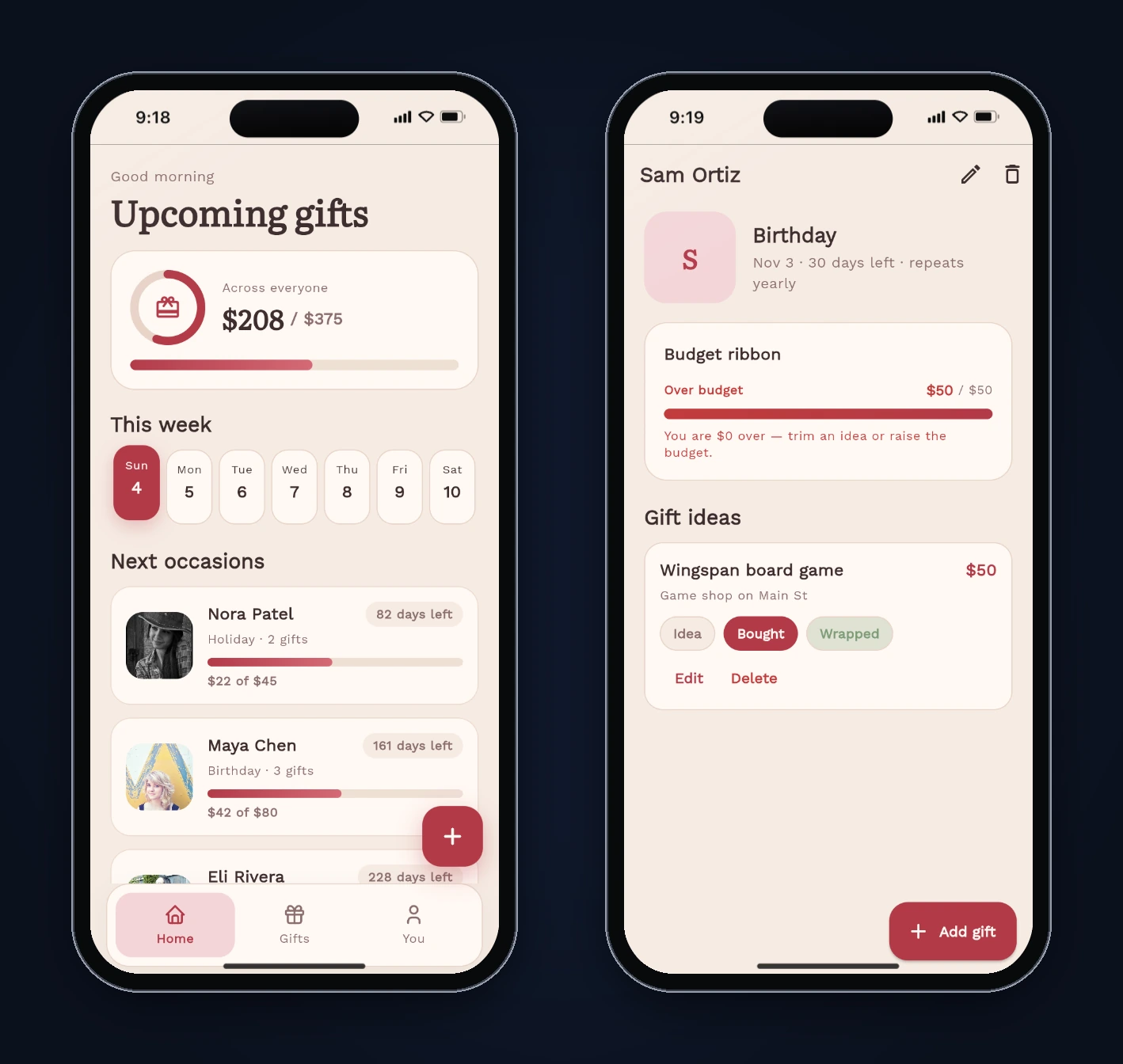
The agent reported Done 5m 39s and added 167 files. It also wrote a design plan (docs/app-plan.md): a "rose linen" palette with a cranberry accent, Literata for headings and Work Sans for UI, and three bottom tabs (Home, Gifts, You). It seeded four sample people (Maya, James, Nora and Eli) so the app isn't empty on first launch. We didn't ask for the sample data. It's useful for a demo, and you'd remove it before shipping.
The parts that matter for this tutorial:
| Area | What the build used |
|---|---|
| State | flutter_riverpod 2.6: a StateNotifier<AsyncValue<List<GiftPerson>>> store plus derived providers for sorting and totals |
| Navigation | go_router with a StatefulShellRoute.indexedStack for the three tabs |
| Storage | shared_preferences, one JSON string under the key ribbon_gift_people_v1 |
| Models | GiftPerson and GiftIdea with toJson / fromJson |
flutter analyze passed with 9 warnings (info-level lints, including a deprecated dart:js import in a web-only theme file).
Step 3: Test it like a user would
Generated apps tend to pass the happy path. We tried to break the parts a real user would lean on: money, dates, and getting around. All tests ran in FlutterGo's static preview in the iPhone 16 frame.
| Test | Expected | First build |
|---|---|---|
| Totals on Home (4 seeded people) | $208 of $375 | Correct |
| Days left: Nora (Holiday, Dec 25), Maya (Birthday, Mar 14) | 82 and 161 days from Oct 4 | Correct |
| Add Sam, budget $50, gift $50.40 marked Bought | "$0.40 over" | "Over budget $50 / $50", "You are $0 over" |
| Edit that gift, change nothing, Save | Price stays $50.40 | Saved as $50 |
| Add "Book club swap", Other, Sep 20, 2026 (already past) | Shown as past | "Oct 4 · Today", pinned to the top of Home |
| Back from a newly added person | Return to Home | No back button |
| Reload the page | Data still there | Data still there |
The totals and the yearly countdown were right, and persistence worked. Three things were not.
Bug 1: every amount was rounded, and editing saved the rounded value
The model stored prices and budgets as double, which is fine for $50.40. The trouble was in how they were displayed and edited. Every screen printed money with one helper:
String formatMoney(num value) => '\${value.toStringAsFixed(0)}';
toStringAsFixed(0) gives zero digits after the decimal point. Dart's own docs show 5.25.toStringAsFixed(0) returning "5", so $50.40 becomes "$50". The over-budget check compared the real values (50.4 > 50), which is why the card turned red while saying "$0 over".
The edit form made it worse. It filled the price field from the same rounded text:
_price.text = gift.price.toStringAsFixed(0);
So the field showed "50", and pressing Save parsed "50" and wrote it back. We confirmed it in the browser's localStorage: the gift's price went from 50.4 to 50 after an edit where we changed nothing.
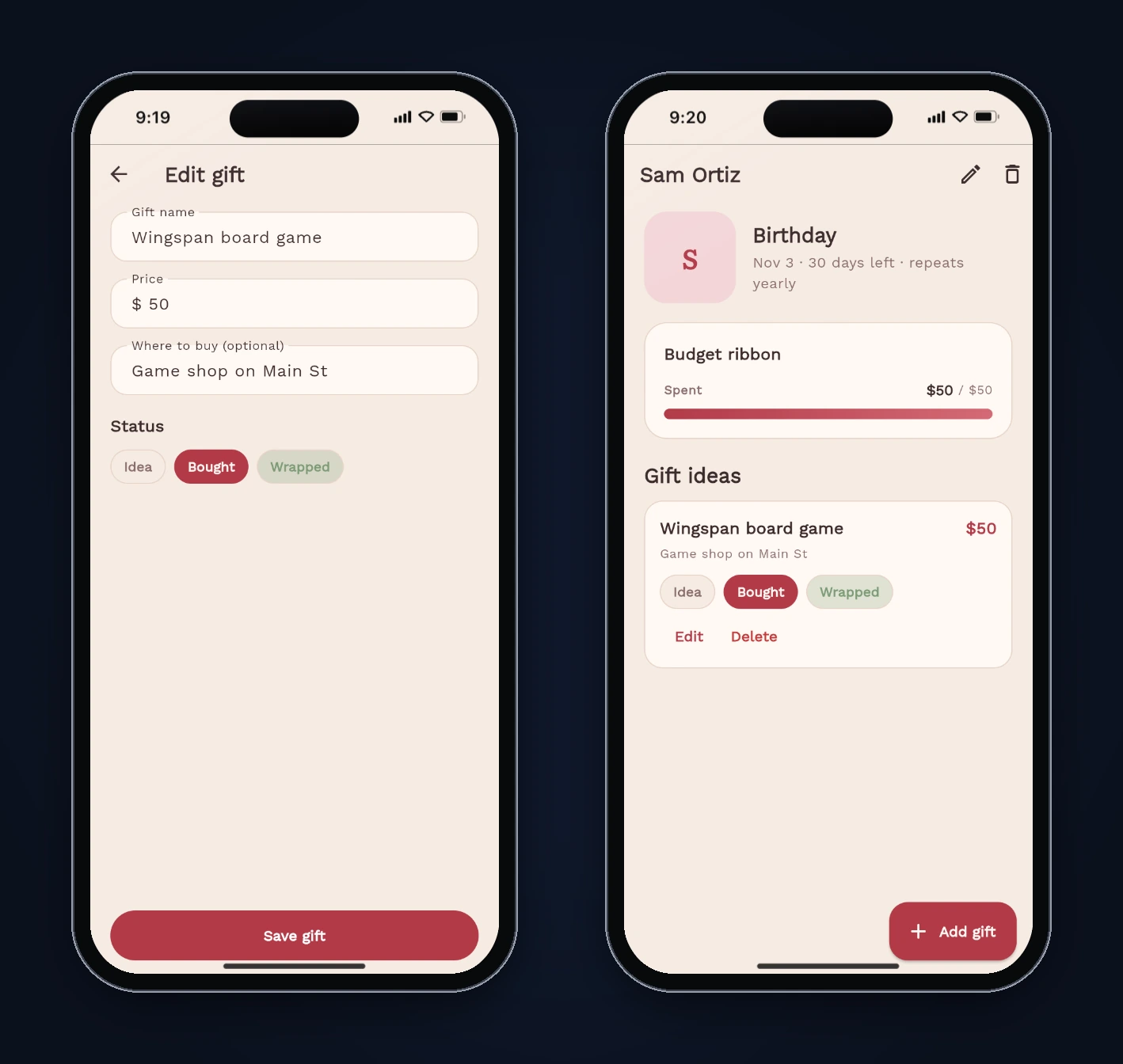
This is the bug worth remembering. The display rounding is cosmetic, but rounded display text feeding back into an edit form becomes data loss.
Bug 2: past one-off dates stuck at "Today"
Holidays and "other" occasions don't repeat, so their next date is just the stored date. The first build handled a past date like this:
return day.isBefore(today) ? today : day;
A date in the past was replaced with today. Home sorted it to the top with a "Today" badge, and the person page read "Oct 4 · Today" for an event on September 20. A seeded holiday on December 25 would do the same thing from December 26 onward.
Bug 3: no way back after adding a person
After saving a new person, the form called context.go('/person/$id'). The go_router docs say navigating with go "will replace the current stack of screens", so there was nothing to pop and the AppBar showed no back arrow. On a phone, that's a dead end.
Two smaller things showed up too: "1 gifts" on a person with one gift, and long names truncating next to the date badge.
Step 4: The fix prompt
We sent one follow-up, describing what we saw rather than how to code it:
Thanks! I tested it and found four things to fix. 1) Money is rounded to whole dollars everywhere. A $50.40 gift on a $50 budget shows "Over budget $50 / $50" and "You are $0 over". Opening that gift in Edit shows 50, so saving it without changing anything quietly turns $50.40 into $50. Store prices and budgets as whole cents (int), show cents whenever an amount isn't a whole dollar, and fill the edit forms with the exact saved amount. Keep data that's already saved working. 2) A one-off occasion (Holiday or Other) whose date has passed shows "Today" forever and sits at the top of Home. Show it as "Passed" with its real date, and list passed occasions after the upcoming ones. 3) After adding a person, their page has no back button, so there's no way back to Home. Keep normal back navigation to Home. 4) "1 gifts" should read "1 gift". Keep everything else as it is.
FlutterGo finished in 1m 48s.
Step 5: Read the fix
Money is now integer cents. GiftIdea.priceCents and GiftPerson.budgetCents are int, and totals are summed as integers. Display shows cents only when they aren't zero:
String formatMoneyCents(int cents) {
  final negative = cents < 0;
  final abs = cents.abs();
  final dollars = abs ~/ 100;
  final rem = abs % 100;
  final body = rem == 0
      ? '\$dollars'
      : '\$dollars.${rem.toString().padLeft(2, '0')}';
  return negative ? '-$body' : body;
}
The edit forms now use a separate formatMoneyInput that keeps the exact value, and parseMoneyInput turns "50.4" or "50.40" into 5040.
Old data was migrated, not dropped. New saves are wrapped as {"money": "cents", "people": [...]}. When the loader finds the old format (a plain list of people with dollar amounts), it converts each amount with (value * 100).round() and saves it in the new format. Our test data from the first build loaded correctly on the new build. One catch: Sam's gift had already been saved as $50 by Bug 1, so we had to re-enter $50.40. A migration can't recover what was already lost.
Passed occasions are explicit. GiftPerson.isPassed is true for a non-repeating occasion before today, the label reads "Passed · Sep 20, 2026", and the sort puts passed people after upcoming ones.
Navigation uses pushReplacement. Saving a new person now replaces the form with the person page, so Back returns to Home.
Step 6: Retest the fixed build
We ran the same checks on the new build:
| Test | Result |
|---|---|
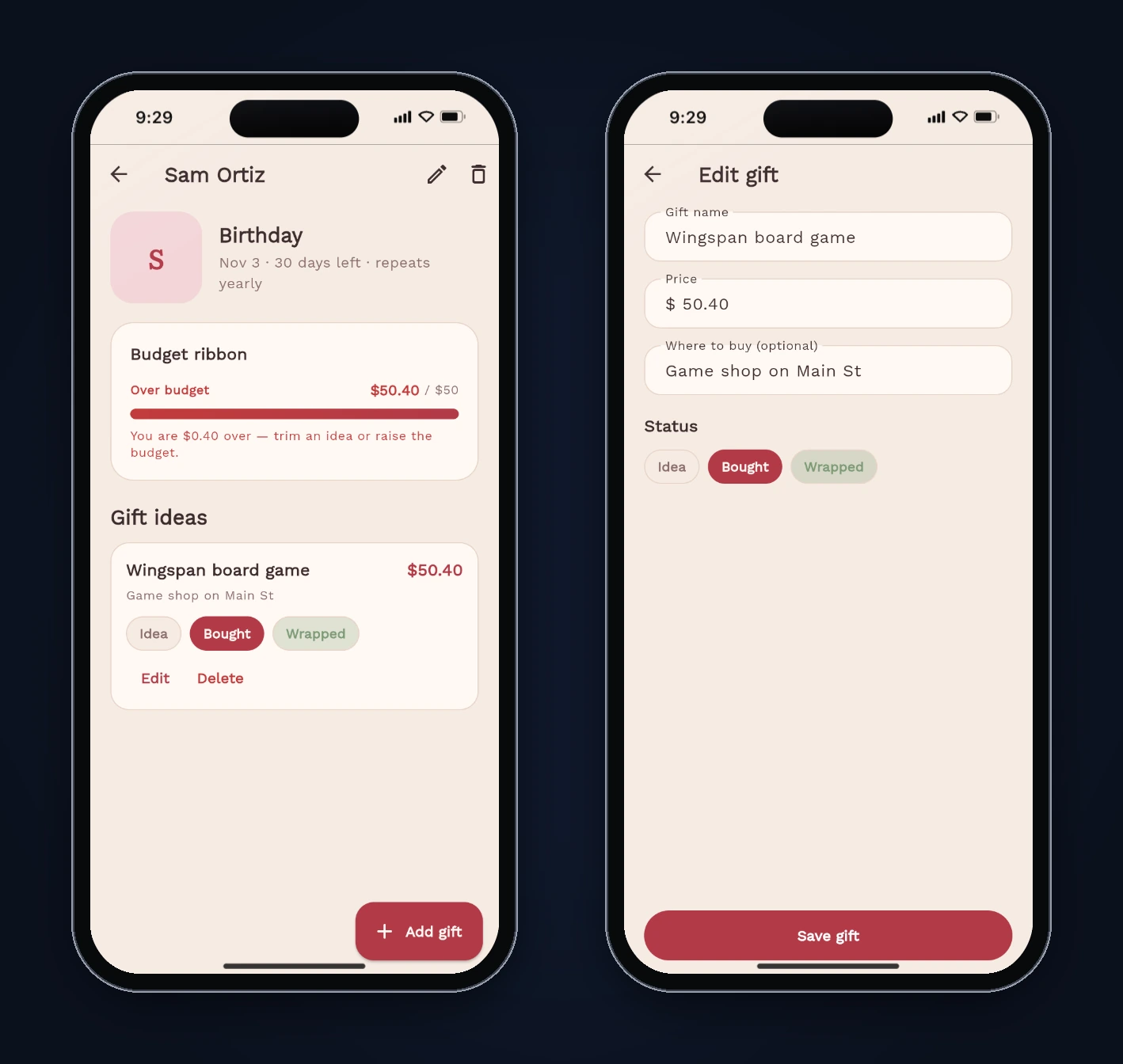
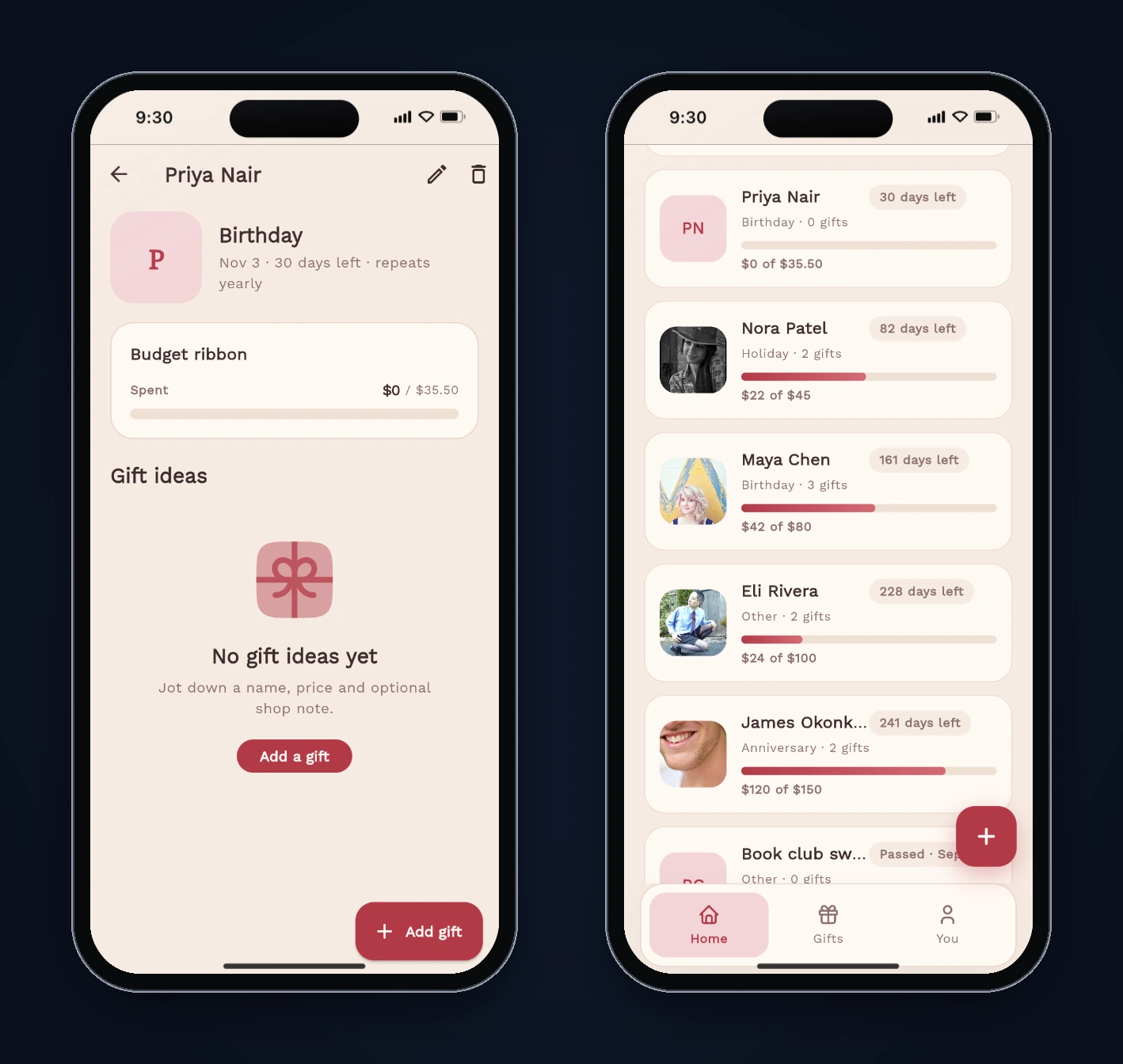
| Wingspan at $50.40 on a $50 budget | "Over budget $50.40 / $50", "You are $0.40 over" |
| Edit, change nothing, Save | Stays $50.40 (priceCents: 5040 in storage) |
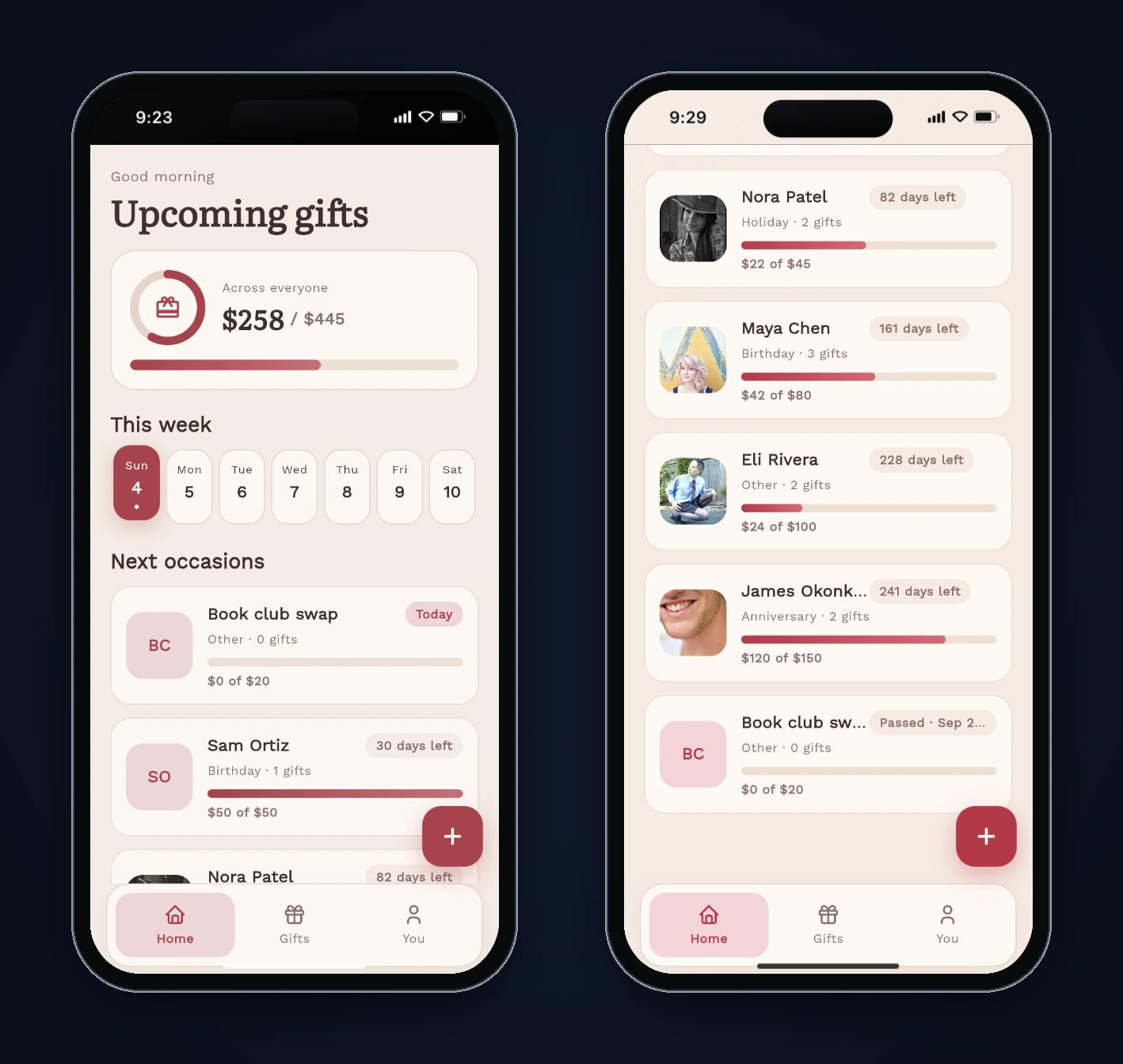
| Book club swap (Sep 20) | "Passed · Sep 2…" badge, listed after upcoming people |
| Add Priya, budget $35.50 | Shows "$35.50", back arrow on her page returns to Home |
| "1 gift" label | Correct |
| Data saved by the first build | Loaded and converted to cents |
What's still worth fixing
Three things we noticed but didn't ask FlutterGo to change. All three come from reading the code; we didn't test them in the preview.
- Comma decimals.
parseMoneyInputstrips commas before parsing, so someone who types "24,99" (the decimal comma used across much of Europe) would save $2,499. A locale-aware parser or a numeric keypad with a fixed separator would fix it. - Truncation. The "Passed · Sep 20, 2026" badge and long names are cut off on the iPhone 16 width. A two-line layout for passed items would read better.
- One currency. Every amount is a dollar sign. FlutterGo itself suggested "Use my own currency" as a next step.
Why integer cents
The rule behind the fix applies to any Flutter app that handles money. Store the smallest unit as an int, do all arithmetic on integers, and format only at the edge of the UI. Then a display choice can never change the stored value, totals don't drift, and comparisons like "over budget" mean the same thing on screen as in code. If you also store data locally, version the format the way this fix did, so the next change to your money model can migrate old data instead of misreading it. Our Flutter local database guide covers when shared_preferences stops being enough.
Try it
Ribbon took two prompts and about seven and a half minutes of build time. The testing took longer, and that's normal. If you want to try the same flow, describe your app in the AI Flutter app builder, then test it on the amounts, dates and paths a real user would hit. For more build-and-test walkthroughs, see the habit tracker and score keeper tutorials.
FAQ
Can FlutterGo build a gift planner from one prompt? Yes. Our prompt produced a working app with people, occasions, budgets, gift statuses, a Home countdown, a Gifts tab and local storage in 5 minutes 39 seconds. It needed one follow-up prompt to fix money rounding, past dates and navigation.
Why did the price change when we only opened and saved it? The edit form was filled with the price rounded to whole dollars, so saving wrote the rounded number back. The fix fills the form with the exact stored value and stores money as integer cents.
Does Ribbon work offline?
Yes. Everything is stored on the device with shared_preferences, and there's no backend.