Build a Board Game Score Keeper with FlutterGo, Then Find the Bug That Merged Two Players
We built Tally, a board game score keeper, from one FlutterGo prompt, play-tested it, and traced five bugs, including two players sharing one ID.
A score keeper looks like a weekend project: a few names, a few numbers, a plus button. It's also a good test for an AI app builder, because the bugs that matter are small and specific. Two players can't share a score. A tie can't crown one person at random. A finished game has to still be there after you close the app.
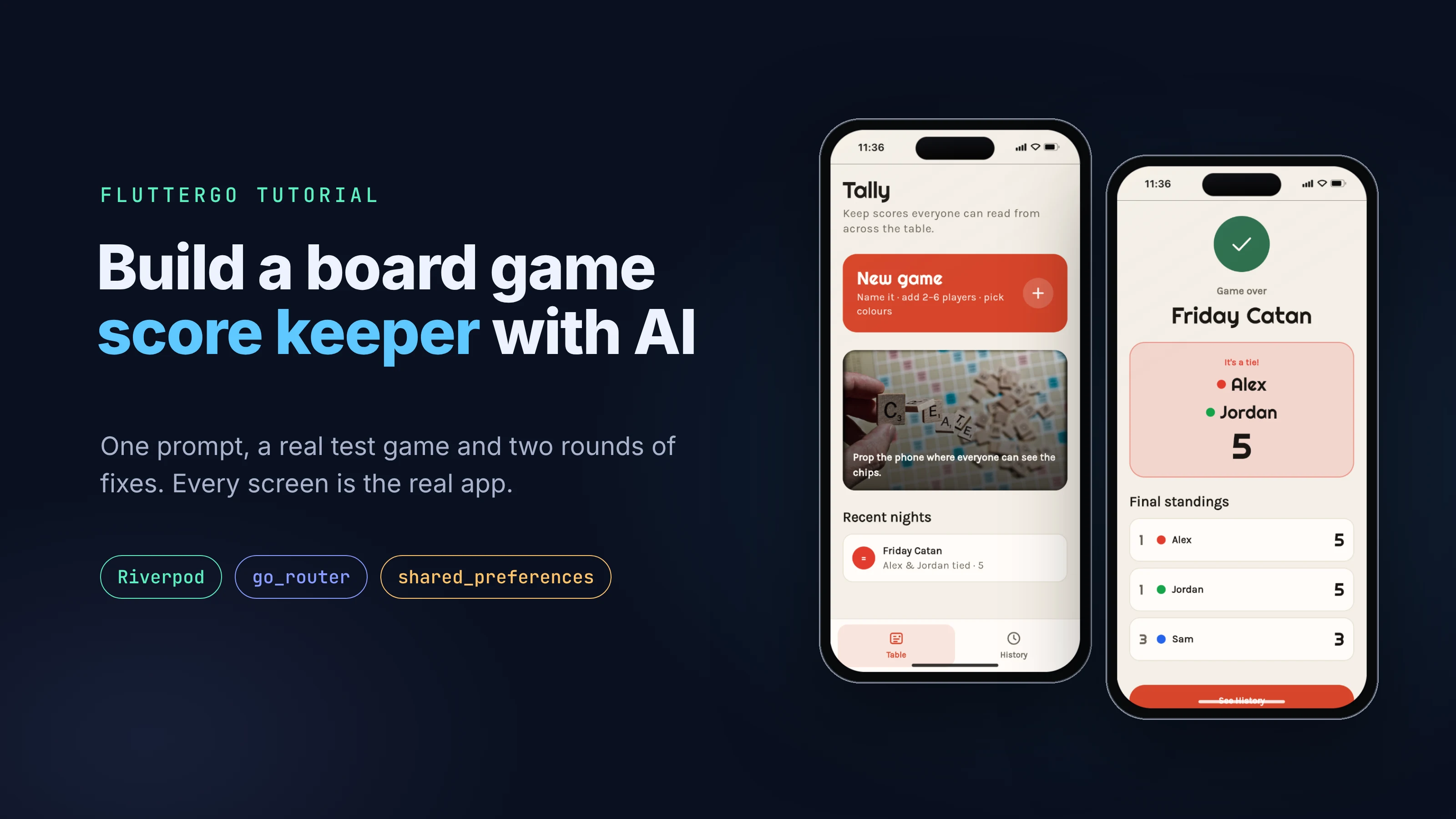
This tutorial builds Tally, a board game score keeper, in FlutterGo from one prompt. Then we play a test game in the preview, read the code it generated, and fix what we find with follow-up prompts. Every screen below is a real screenshot of the build, taken on October 3, 2026.
Key takeaways
- One prompt produced a working app in 5 minutes 9 seconds: game setup, a live scoreboard, custom amounts, a change log with undo, results and a History tab, all saved on the device.
- A test game exposed five problems. The worst: two players got the same ID, so points for one also went to the other.
- The cause was an ID built only from the clock. In the web preview, every timestamp we saw ended in
000microseconds, so two players created in the same millisecond collided. - One fix prompt (done in 1 minute 30 seconds) addressed all five, but its new ID code crashed on the web. A second, shorter prompt (done in 40 seconds) fixed that, and a full retest passed.
What you need
- A FlutterGo account. Everything here happens in the browser.
- About 20 minutes, most of it spent testing.
- Optional: the code export, if you want to run
flutter analyzeandflutter testyourself.
Step 1: Describe the app in one prompt
We typed this into the FlutterGo home screen, with Mobile app selected, and pressed Start building:
A board game score keeper called Tally. Start a new game: give it a name and add 2 to 6 players, each with a color. During the game, show every player's running total in big numbers with +1 and -1 buttons, plus a way to enter a custom amount for a round. Keep a round-by-round log with an undo for the last change. Ending the game shows the winner and the final standings, then saves the game to a History tab with the date, players and scores. Save everything on the device so it survives closing the app. Clean, friendly design that is easy to read from across a table.
The prompt names every rule we planned to test: the 2 to 6 player limit, undo, the winner, History and saving on the device. If a rule isn't in the prompt, you can't fairly blame the builder for missing it.
Step 2: See what FlutterGo built
The agent planned, designed and wrote the app, then reported Done 5m 09s and started the preview. It added 154 files to the project.
FlutterGo also writes its plan into the project at docs/app-plan.md. For Tally it chose a "warm parchment scorepad" look instead of a dark neon scoreboard, with Righteous for the big numbers and Karla for the interface, a tomato-red accent and a green secondary. Navigation is two bottom tabs, Table and History.
The screens it built:
- Splash and a three-card onboarding
- Table: start a new game, or resume the one in progress
- New game: a two-step form, game name, then players and colours
- Play: a tile per player with a large total and -1 / +1 buttons, plus Custom, Log and Undo
- Results: the winner and final standings
- History and a detail view for each finished game
The pubspec.yaml lists a fairly standard stack:
dependencies:
  flutter_riverpod: ^2.6.1
  go_router: ^14.6.2
  google_fonts: ^6.2.1
  flutter_svg: ^2.0.17
  lottie: ^3.3.2
  shared_preferences: ^2.5.3
State lives in a Riverpod StateNotifierProvider that holds the whole app state (onboarding flag, active game, history). It saves to shared_preferences as one JSON string after every change. For a small offline app that's a reasonable design. The state stays small, and you load it once at startup.
Step 3: Play a test game
Reading the generated code helps, but playing the app finds problems faster. We opened the preview's static page in its iPhone 16 frame and played a short game called "Friday Catan" with three players:
- On the players step, we added a third player and gave them green. The three name boxes read Alex, Sam and Jordan, so we left them as they were.
- We tapped +1 three times for the first player and twice for the second.
- We opened Custom, picked the third player and added 5.
- We opened Log, tapped Undo last, then reloaded the page.
- We opened the game again from Table and tapped End.
Here's what happened, in the order we noticed it.
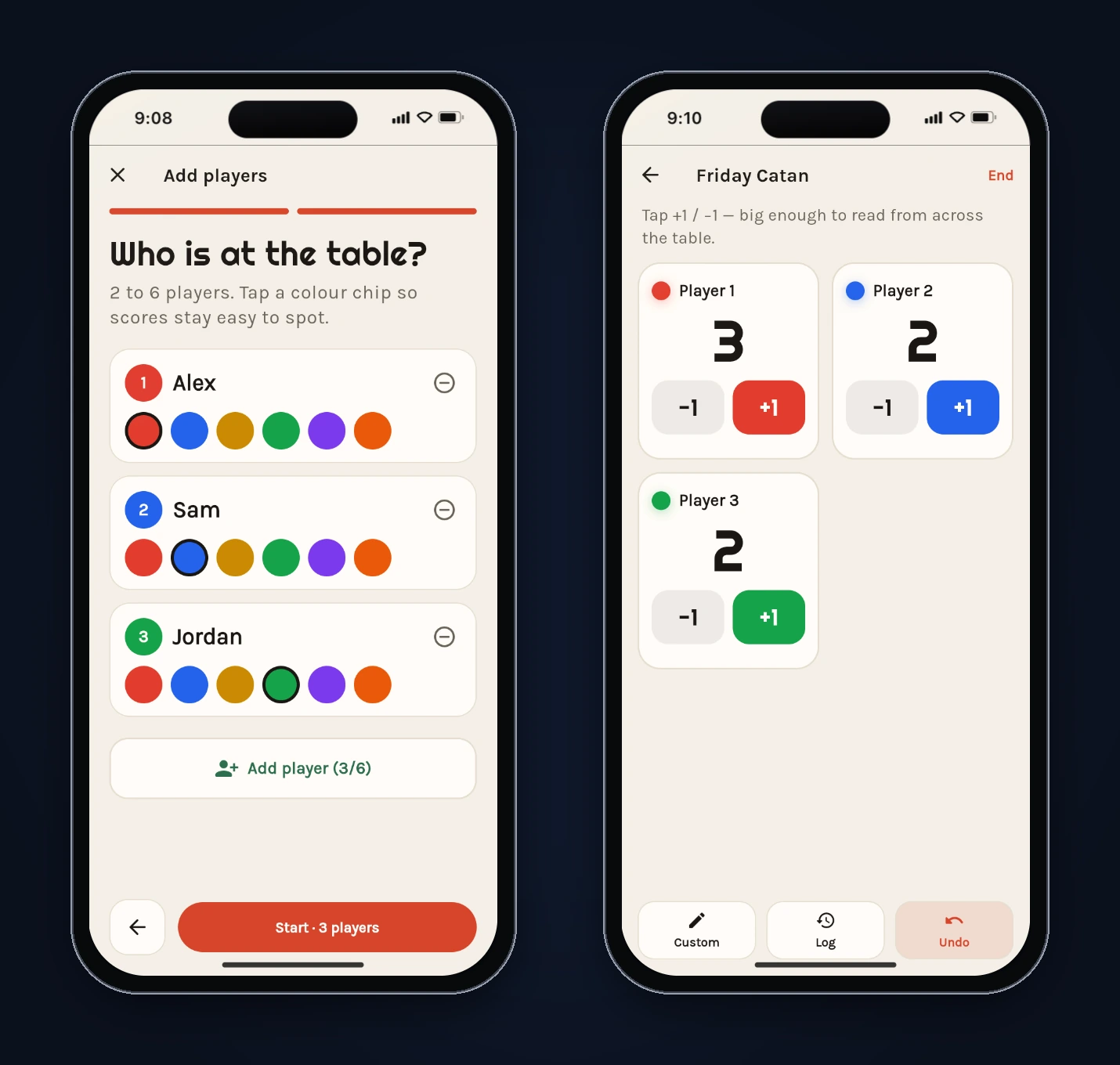
The names were never real. The game started with Player 1, Player 2 and Player 3. Alex, Sam and Jordan were hint text, the grey placeholder a TextField shows when it's empty. They looked like filled-in names, so we didn't type any.
Player 3 copied Player 2. After two taps on Player 2's +1, Player 3's tile also read 2, though nobody had touched it. Then the custom 5 we gave Player 3 showed up in the log as "Player 2 +5", and both tiles jumped to 7.
Undo worked. Undo last removed the +5, and both tiles dropped back to 2.
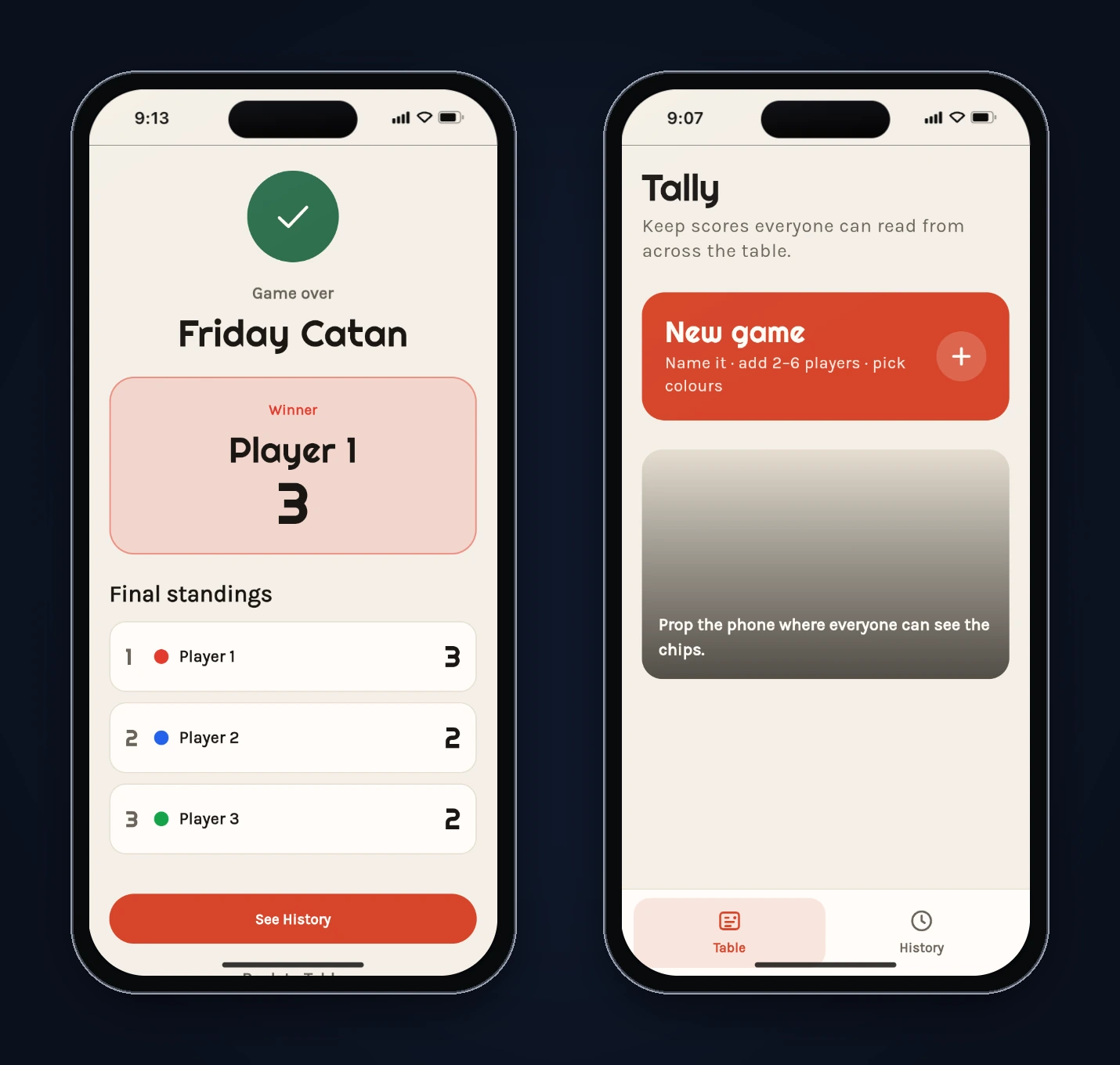
The onboarding came back. After the reload, the three onboarding cards showed again even though we'd finished them. Skipping through showed the game was still there, "In progress", with the right scores. Saving worked; the startup check didn't.
Ties weren't handled. The results screen named Player 1 the winner with 3, then ranked Player 2 second and Player 3 third. Both had 2.
The photos were missing. The Table screen's photo card was an empty grey gradient, and the onboarding cards were flat colour.
Step 4: Find the causes in the code
FlutterGo shows every generated file, so tracing each symptom took a few minutes.
Two players, one ID
Every player, score event and game got its ID from this function in lib/models/game_models.dart:
String newId() =>
    '${DateTime.now().microsecondsSinceEpoch}_${DateTime.now().hashCode.abs()}';
The app's saved state showed the problem directly. Player 2 and Player 3 both had the ID 1791000551264000_39953984. Every timestamp in those IDs ended in 000, meaning there were no microseconds, only milliseconds. The loop that creates players ran fast enough to make two of them in the same millisecond, and the hashCode of two equal DateTime values is equal too, so the "random" half didn't help.
Scoring looks players up by ID:
final players = game.players.map((p) {
  if (p.id != playerId) return p;
  return p.copyWith(score: p.score + delta);
}).toList();
With two matching IDs, every change hit both players. The custom-amount sheet had the same problem the other way round: selecting Player 3 also selected Player 2, and the log named the first match, Player 2.
We only saw this in the web preview and didn't test a native build. Even if a phone's clock is finer, an ID that depends on two things never happening in the same instant is fragile, and the fix is cheap.
Hint text that looked like names
In new_game_screen.dart, the player fields started empty, with hintText taken from a list of sample names. When a name was empty, GameSession.start fell back to 'Player ${i + 1}'. Each part makes sense on its own, but together they produced a form that looked filled in and wasn't.
A splash screen that didn't wait
The splash screen decided where to go like this:
final seen = async.value?.onboardingSeen ?? false;
context.go(seen ? '/table' : '/onboarding');
The saved state loads asynchronously. If the splash animation finishes first, async.value is still null, seen becomes false, and you see the onboarding again.
Ties picked a winner by accident
The winner was the first player after sorting by score. Dart's List.sort documentation says the sort "is not guaranteed to be stable", so when two players are level at the top, which one is "first" isn't something the app decides on purpose. The standings numbered positions 1, 2, 3 even for equal scores.
Photos in a subfolder
pubspec.yaml listed assets/images/sourced/, but the photos were in assets/images/sourced/home/. The Flutter docs on adding assets are specific: "Only files located directly in the directory are included." Subfolders need their own entry.
Step 5: Fix it with one prompt
We sent one message describing the symptoms and, where we knew it, the cause:
I played a test game in the preview and found four problems. 1) Player 2 and Player 3 share a score: tapping +1 for Player 2 also changes Player 3, and a custom amount for Player 3 went to Player 2. The saved state shows both players got the same id, because newId() is built from DateTime.now() and on the web the microseconds are always 000, so players created in the same millisecond collide. Make ids unique for players, events and games. 2) The player name boxes show Alex, Sam, Jordan as hint text, so the game starts with Player 1, Player 2, Player 3 even though it looked like the names were filled in. Pre-fill editable names or make the placeholder clearly a placeholder. 3) After a reload the onboarding shows again even though it was finished, because the splash reads the saved state before it has loaded. Wait for the state before deciding where to go. 4) Ties: if two or more players share the top score, show it as a tie with every tied player, and give tied players the same rank in the standings. Also the stock photos never appear (the Table card and onboarding cards are flat colour): pubspec lists assets/images/sourced/ but the files are in assets/images/sourced/home/, and Flutter does not include subfolders. Please fix all of these.
(It says four problems and lists five. We added the photo issue at the end and didn't update the count. FlutterGo addressed all five anyway.)
FlutterGo answered Done 1m 30s, ran its analyzer and rebuilt the preview. We checked each fix in the code before trusting it.
Unique IDs. newId() now adds a counter and a random number to the timestamp:
final Random _idRandom = Random();
int _idSequence = 0;

String newId() {
  _idSequence += 1;
  final time = DateTime.now().microsecondsSinceEpoch;
  final salt = _idRandom.nextInt(1 << 32);
  return '${time}_${_idSequence}_$salt';
}
The counter alone guarantees uniqueness within one run of the app. The timestamp and random salt keep IDs from different runs apart. Keep an eye on that 1 << 32, though. It comes back in Step 6.
Real default names. The player fields now start with editable text (TextEditingController(text: _seatNames[i])), and the hint is just "Player name" if you clear one.
Startup waits for data. The splash now records that its animation is done and navigates only once the saved state has loaded.
Ties and shared ranks. The model gained winners, isTie and rankedStandings, which gives equal scores the same rank and skips the next place (1, 1, 3):
List<Player> get winners {
  if (players.isEmpty) return const [];
  final top = standings.first.score;
  return standings.where((p) => p.score == top).toList();
}

bool get isTie => winners.length > 1;
The results screen shows "It's a tie!" and lists every tied player. The History list, the History detail and the Table's in-progress card use the same winners list, so the tie shows up everywhere.
Photos. assets/images/sourced/home/ is now listed in pubspec.yaml.
Step 6: Test it again, and fix what the fix broke
After the rebuild we cleared the old test data and opened the new preview. The photos now load: the onboarding cards show their pictures, and the Table card shows its photo of letter tiles. (FlutterGo recorded it in docs/asset-sources.md as a photo by derrickcollins on Flickr, CC BY-ND 2.0.)
Then we started a new game, and Start spun forever. The browser console showed an uncaught exception.
The cause was the new salt. The Dart API docs say Random.nextInt(max) supports max values from 1 up to 1 << 32, and on a native build 1 << 32 is exactly 2^32. On the web, Dart numbers are JavaScript numbers, and Dart's number representation guide says bitwise operands are truncated to 32 bits there. In the compiled main.dart.js for this build, the call read .Cs(0): nextInt(1 << 32) had become nextInt(0), which throws. The same compiled code showed Date.now() behind microsecondsSinceEpoch, which is why every timestamp in our first test ended in 000.
We sent a short follow-up:
The new build fails on Start: the button spins forever and the console shows an exception. newId() calls _idRandom.nextInt(1 << 32). On the web, ints use JavaScript numbers and shifts are 32-bit, so 1 << 32 becomes 0; the compiled main.dart.js literally calls nextInt(0), and Random.nextInt throws when max is 0. Use a max that is valid on every platform, for example nextInt(0x7fffffff), and keep the counter so ids stay unique.
FlutterGo answered Done 40s and changed one line:
// Web uses JS numbers; 1 << 32 is 0 there, so nextInt must stay in 31-bit range.
final salt = _idRandom.nextInt(0x7fffffff);
The rebuilt main.dart.js now calls .Cs(2147483647). Then we played the whole game again:
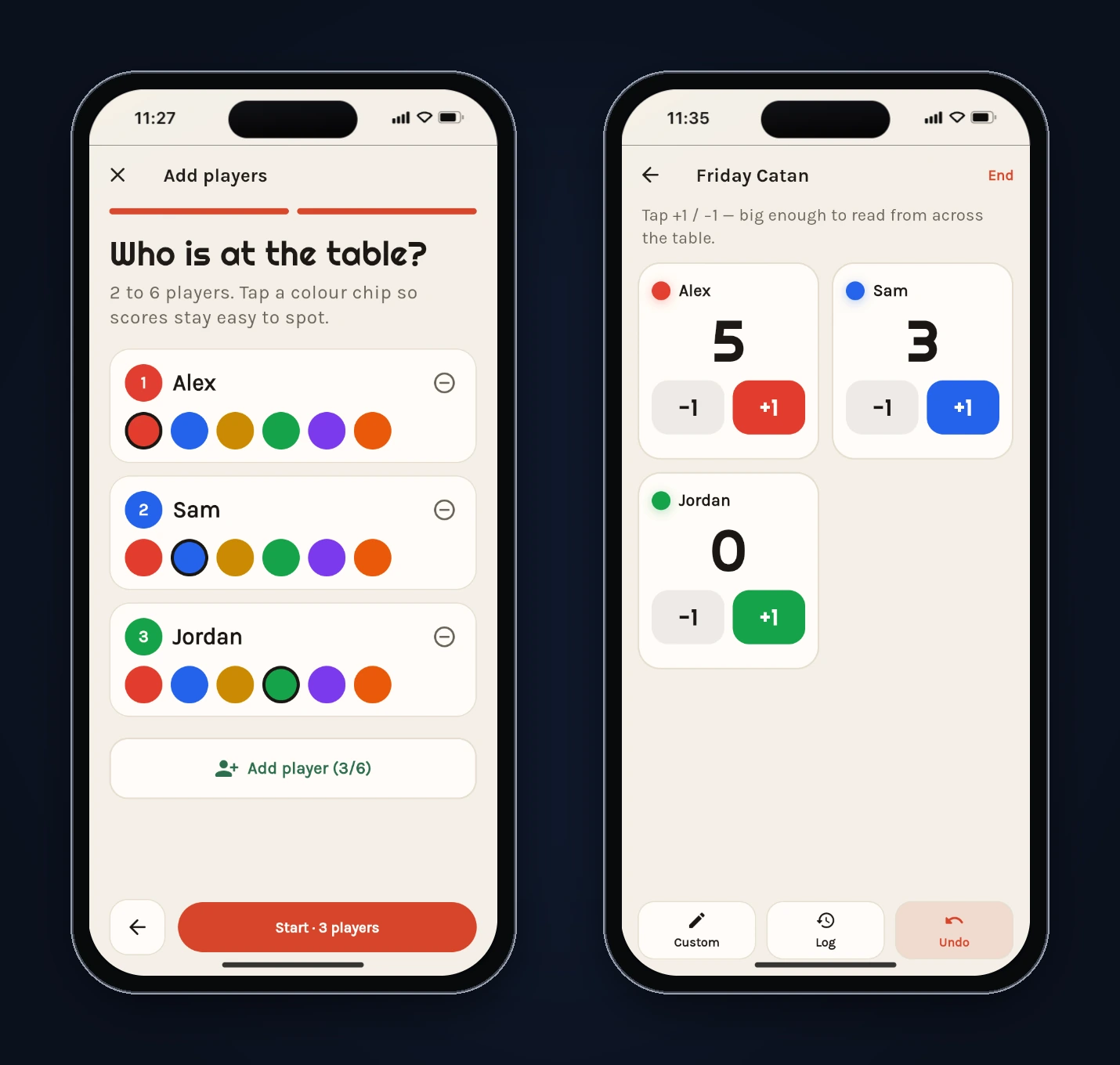
- The players step starts with Alex, Sam and Jordan as real, editable names, and the game starts with those names.
- Five taps for Alex and three for Sam left Jordan at 0. Each tile now moves on its own.
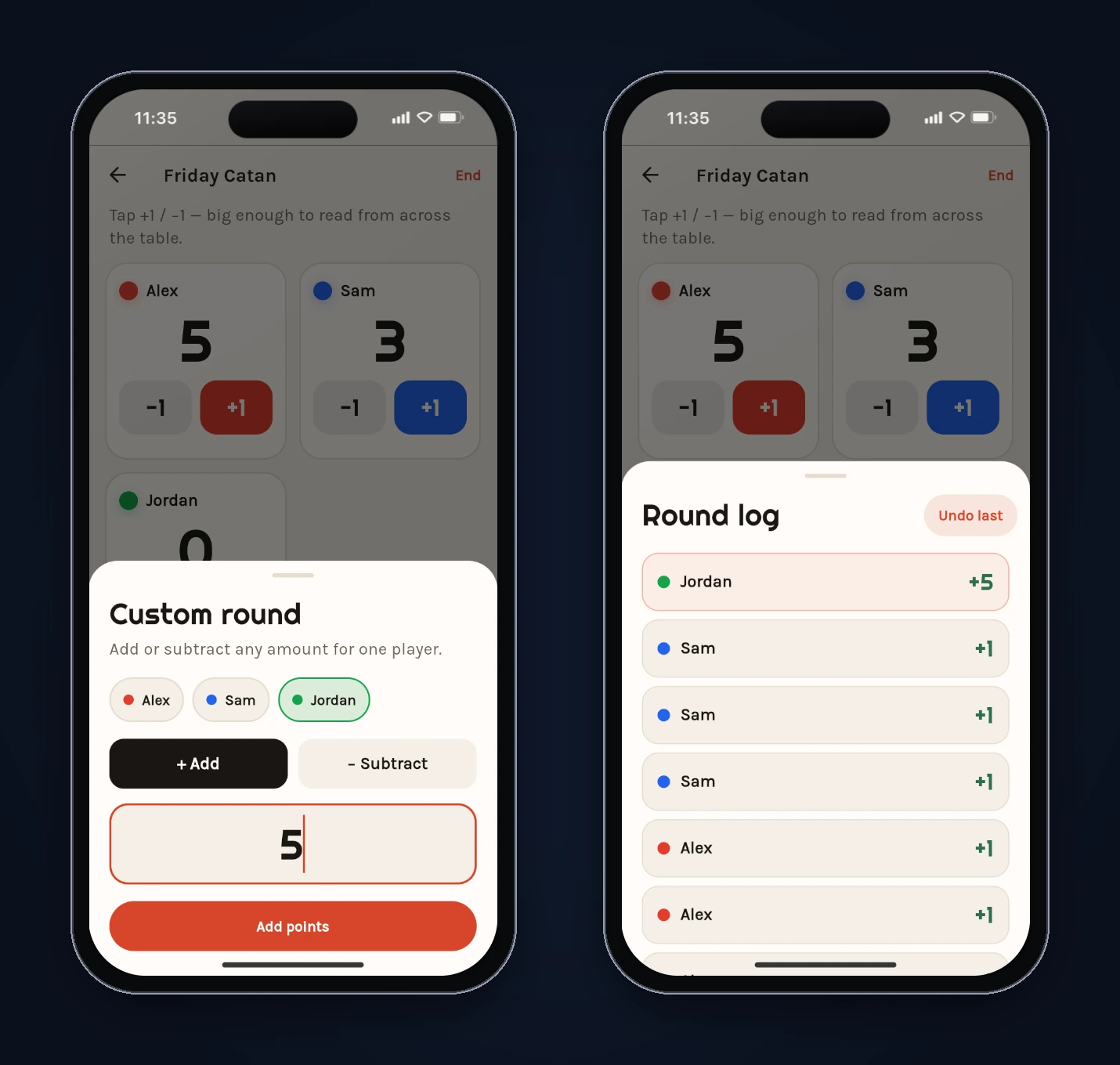
- A custom +5 for Jordan selected only Jordan, and the log shows "Jordan +5".
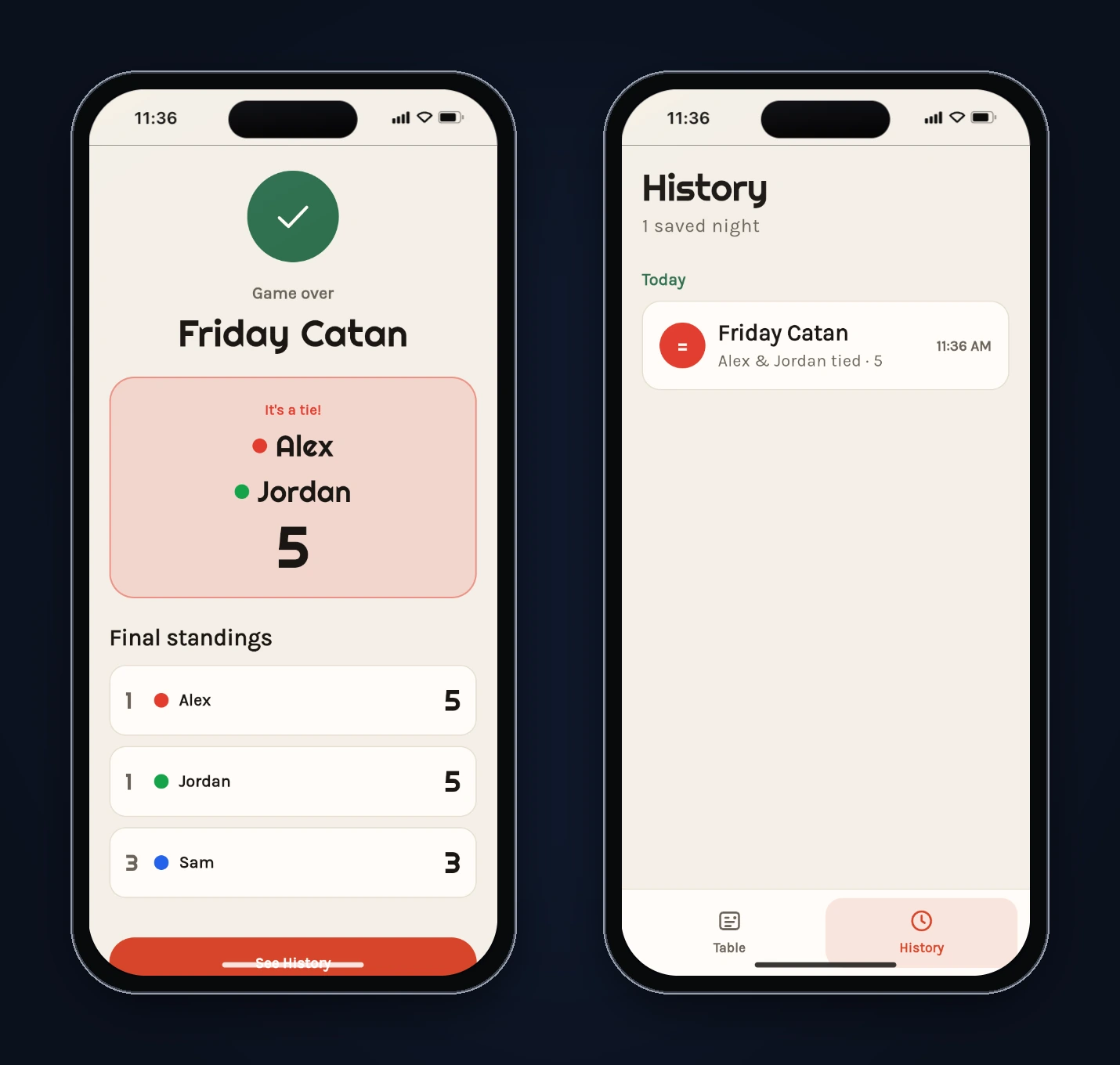
- Ending the game at Alex 5, Jordan 5 and Sam 3 shows "It's a tie!" with both names, and the standings read 1, 1, 3.
- History lists the game as "Alex & Jordan tied · 5".
- A reload opens straight on the Table screen, with the game under "Recent nights". No onboarding.
The saved data confirms the ID fix. Sam and Jordan were created in the same millisecond (both IDs start with 1791009258241000), but their counters, 2 and 3, keep them apart.
What we'd still change
The fixes covered what we asked for. A few things are worth doing before shipping Tally:
- Move to the newer preferences API.
GameStorecallsSharedPreferences.getInstance(), which the package README calls a legacy API. For one JSON blob,SharedPreferencesAsyncis a small change. Our Flutter local database guide covers when to go further, to drift for example. - Add the tests that would have caught this. The project ships only the default
test/widget_test.dart. A unit test that creates six players and checks that the IDs are unique would have caught the worst bug. A second should check thatrankedStandingsreturns 1, 1, 3 for scores 5, 5, 2. Run them on the web too (flutter test --platform chrome), because both ID bugs only showed up there. - Check the bottom padding on the results screen. In the iPhone 16 frame, the See History button sits partly under the home indicator.
- Decide what a "round" is. The prompt asked for a round-by-round log. Tally logs every change instead, which made undo simple but doesn't group a round. That's a product decision, not a bug, so we left it.
- Check the photo licences. FlutterGo recorded each stock photo's source and licence in
docs/asset-sources.md. The Table photo is CC BY-ND 2.0, which requires credit. Add an attribution screen before shipping, or swap in your own photos.
FAQ
Can FlutterGo build a score keeper app from one prompt?
Yes. In this test, one prompt produced a working Flutter app with game setup, a live scoreboard, custom amounts, a change log with undo, results and a saved History tab, in 5 minutes 9 seconds. Play-testing it found five bugs. One follow-up prompt fixed them, a second fixed a web-only crash that the first fix introduced, and a full retest passed.
Why did two players share a score?
Their IDs were built only from DateTime.now(). In the web preview, timestamps had no microseconds, so two players created in the same millisecond got the same ID, and every score change matched both. The fix adds a counter and a random number to each ID.
Does Tally work offline?
Yes. It stores everything on the device with shared_preferences, as one JSON string, and has no backend or account.
Try it yourself
The worst bug here is easy to miss in a quick demo. We found it with a three-player test game and one look at the saved data. Build your own version, play a real game with it, and read the code before you ship. FlutterGo is an AI Flutter app builder that writes real Flutter code and previews it live, so you can do both in the same place.