Android Developer Verification Is Live in Four Countries. Here's What Flutter Teams Should Do Before 2027
Android developer verification began September 30 in four countries and goes global in 2027. What it covers, what's exempt, and the Flutter steps to take now.
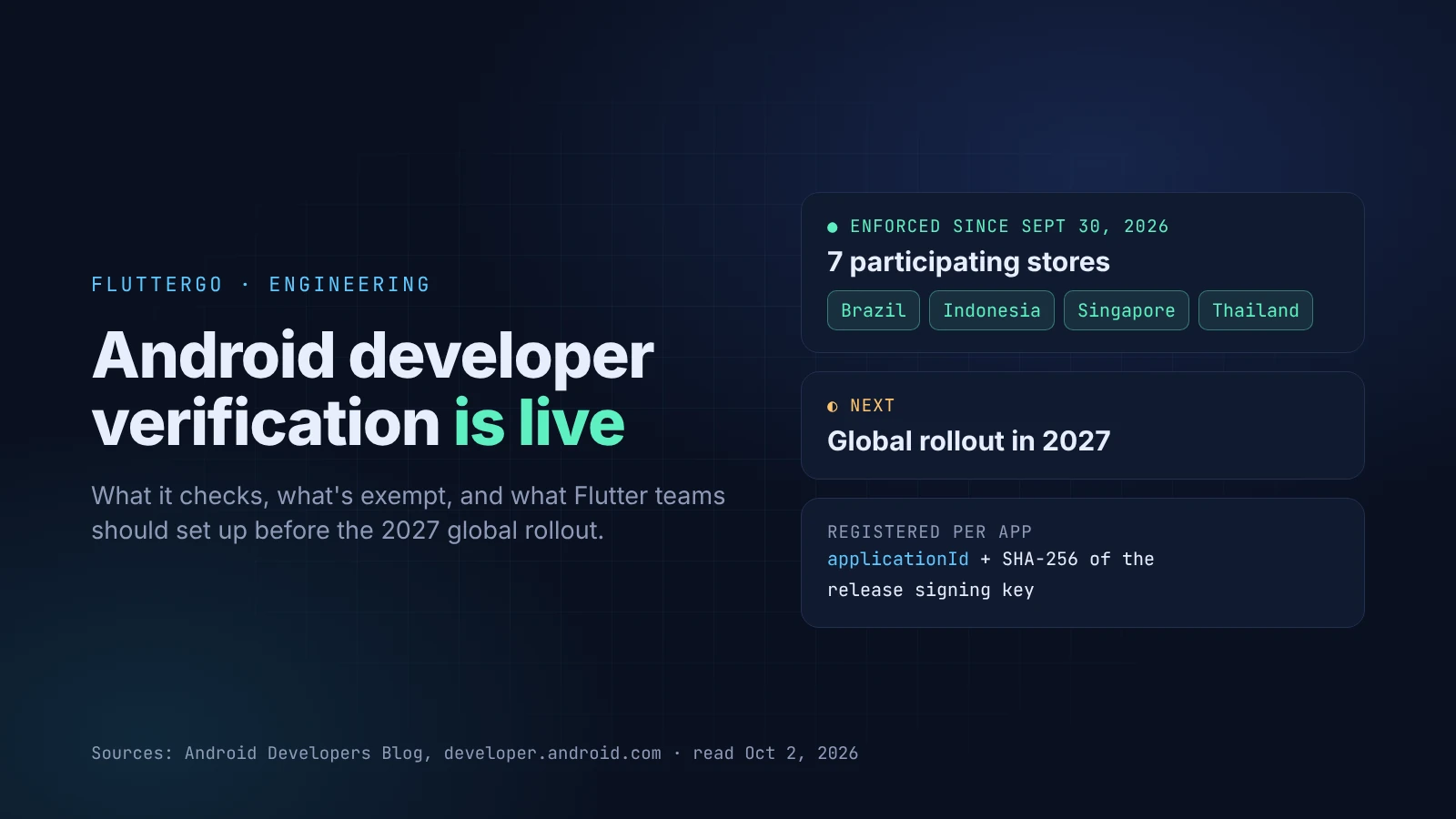
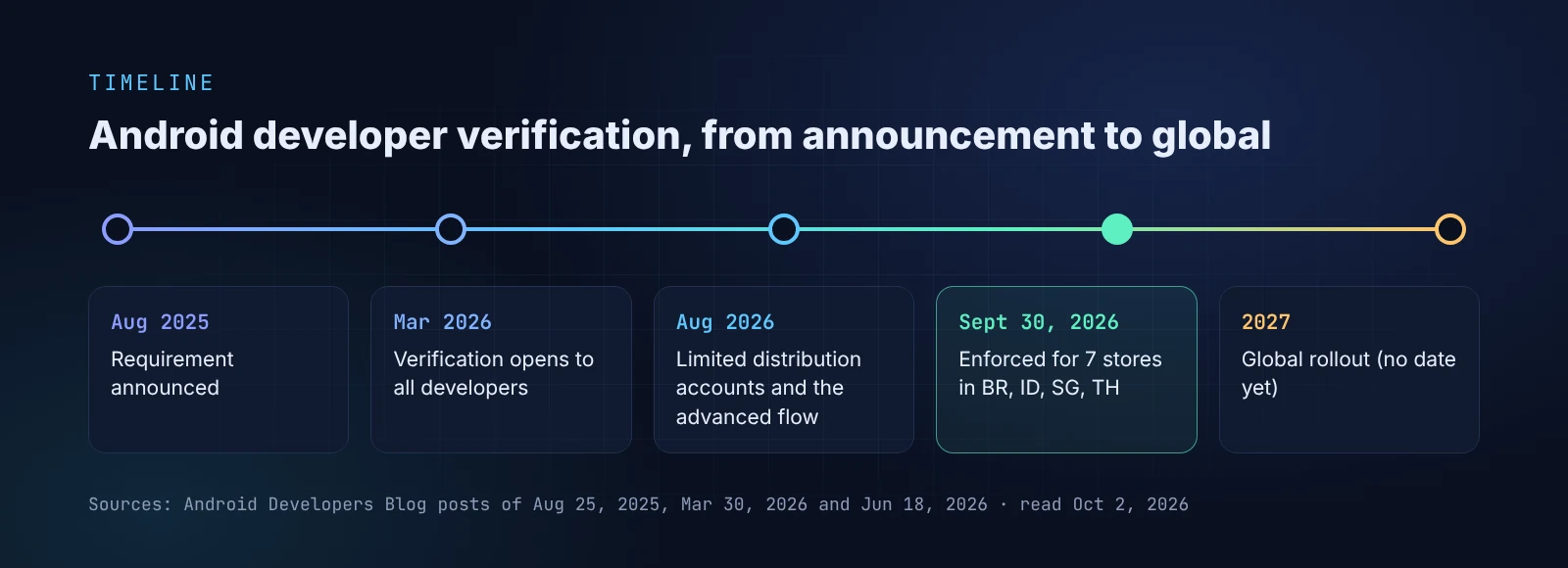
On September 30, 2026, Android started checking who made an app before letting it install. For now, the check covers apps installed from seven participating app stores on certified devices in Brazil, Indonesia, Singapore and Thailand. Google says the requirement will expand globally in 2027.
If you ship a Flutter app only through Google Play and you've completed Play's identity verification, you probably don't need to do anything today. If you also hand out APKs, distribute through another store, or run a beta outside Play, there's work to do before the global rollout. Most of that work happens in your android/ folder and your keystore.
This post covers what changed, what's exempt, and the Flutter-specific steps. Everything here comes from Google's developer documentation and the Android Developers Blog, as read on October 2, 2026.
Key takeaways
- Android now checks that an app's package name and signing key are registered to a verified developer. It's an identity check, not an app review
- Enforcement is limited to 7 participating stores in 4 countries for now. Direct APK installs and other stores aren't affected until the 2027 global rollout
adbinstalls are exempt, soflutter runandflutter installkeep working during development- For Flutter teams, the important parts are your
applicationIdand the SHA-256 fingerprint of your release signing key. If you lose that key, you can't register the package
What actually changed
Google announced the requirement in August 2025. Apps installed on certified Android devices must come from developers who have verified their identity. In that announcement, Google described the check as "confirming who the developer is, not reviewing the content of their app."
There are two parts:
- Verify yourself. Play developers do this in Play Console. Developers who distribute only outside Play use the new Android Developer Console.
- Register your apps. Each package name is tied to the SHA-256 fingerprint of the key that signs it. A device can then check that an APK claiming to be
com.yourco.appreally comes from the verified owner of that name.
According to the verification FAQ, the check applies to "all certified Android devices running Android 7 or higher" and is delivered through Google Play services.
What's enforced today, and what isn't
Google's June 18, 2026 update narrowed the first phase. Since September 30, app registration has been required for "participating stores in Brazil, Indonesia, Singapore, and Thailand." The participating stores are:
- Google Play
- Samsung Galaxy Store
- HONOR App Market
- OPPO App Market
- vivo V-Appstore
- Xiaomi GetApps
- Transsion Palm Store
Everything else is out of scope for now. The FAQ says that if you distribute through other stores, or users sideload your app directly, "these new verification requirements won't apply to your app yet." The same answer recommends finishing verification before the global rollout in 2027.
So today, a Flutter developer in Lagos, London or Lahore who emails an APK to testers sees no change. A developer whose app is in the Galaxy Store and has users in Indonesia already needs a registered package.
Who's exempt
Three paths stay open, and they matter for day-to-day Flutter work.
ADB installs. The FAQ says developers "are free to install apps without verification with ADB," to support development and testing. flutter run, flutter install and Android Studio's Run button all install through adb, so local development works as before. (That last step is our reading of how the Flutter tooling installs apps. Google's docs talk about ADB in general.)
Managed work devices. Google's Android Enterprise help says "private apps distributed only to EMM managed devices or Work Profiles don't require developer verification registration."
The advanced flow. Power users can still install apps from unverified developers. The FAQ describes the steps: turn on developer mode, confirm no one is coaching you, restart and reauthenticate, wait one day, then confirm with biometrics or the device PIN. After that, installs are allowed for 7 days or indefinitely. Users still see a warning and tap Install anyway. That's a lot of friction to ask of a beta tester, so plan on registration rather than this flow.
The account you need, by how you distribute
| How you ship | What you need |
|---|---|
| Google Play only, Play identity verification done | Usually nothing new. Google says it will automatically register eligible Play apps, including apps that use Play App Signing |
| Outside Play, to the public (website APK, other stores) | A full distribution account in the Android Developer Console: a $25 fee, ID verification, then package registration |
| Outside Play, to a small group (students, hobbyists, internal testing) | A limited distribution account: free, no government ID, and apps can go to "up to 20 specific devices for testing and personal use" |
| Private apps on managed work devices | Exempt |
For a full distribution account, individuals verify with a government photo ID and proof of address. Organizations also need a D-U-N-S number, which the FAQ says can take up to 28 days to get, and a website verified in Google Search Console. If you're an agency or a company, start the D-U-N-S request first.
The Flutter part: applicationId and the release key
Registration ties two things together, and in a Flutter project both live under android/.
1. Your package name is your applicationId
The package name you register is the applicationId in android/app/build.gradle.kts. Flutter's Android deployment guide already warns that once you upload to Play, "you cannot change the Application ID." Registration adds a second reason to settle it early. If you're still shipping com.example.something from flutter create, rename it before you register anything.
2. Register the release key, not the debug key
A new Flutter project's Android template signs release builds with the debug key. The template's build file says so in a comment: "Signing with the debug keys for now." Until you set up key.properties and a release signing config, flutter build apk gives you an APK signed with a key that exists only on your machine. That fingerprint is the wrong one to register, and it's different on every developer's machine.
Set up release signing as the Flutter guide describes, then get the SHA-256 fingerprint of that keystore:
keytool -list -v -keystore ~/upload-keystore.jks -alias upload
The output includes a SHA256: line. That's the value the Android Developer Console asks for. Its package registration guide says: "Enter the SHA-256 certificate fingerprint from your app's signing key pair."
3. Match the key to the channel
If your app is on Play with Play App Signing, Google signs the Play builds with the app signing key, and those apps are covered by automatic registration. If you also distribute an APK signed with your own upload key, that key has a different fingerprint. The console "lets you add and verify multiple signing keys for a single package," so register every key you actually ship with. One fingerprint covers all the per-ABI APKs from flutter build apk --split-per-abi, because they're signed with the same key.
4. Back up the keystore
The FAQ is blunt: "If you lose your signing key you won't be able to register your packages." Store the keystore and its passwords in a password manager or a secrets vault, and never commit key.properties. The Flutter guide gives the same warning.
5. Proving ownership of an existing package
For a package name that already has installs, the console asks you to sign an APK with your key and upload it. The console gives you a snippet to place in the APK's assets folder. In a Flutter project, Android assets live under android/app/src/main/assets/. That's separate from Flutter's own assets/ folder declared in pubspec.yaml. Follow the console's instructions for the exact file. If someone else already distributes an app under your package name, the guide's dispute rules give priority to the key with more than 50% of known installs.
Add a registration check to CI
Google provides the Android Developer ID Status API to check whether a package, or a package plus a certificate fingerprint, is registered. It returns REGISTERED, NOT_REGISTERED or REGISTERED_WITH_ANOTHER_CERTIFICATE_FINGERPRINT, with a default quota of 1,000 requests per day (status API guide):
curl -X GET "https://androiddeveloperidstatus.googleapis.com/v1/packages/com.yourco.app/packageRegistrationStatus:check?certificateFingerprint=$CERT_SHA256" \
  -H "X-Goog-Api-Key: $API_KEY"
REGISTERED_WITH_ANOTHER_CERTIFICATE_FINGERPRINT is the result to watch for. It means the package is registered, but not with the key this build was signed with, which is exactly the debug-key mistake above. Failing the release job on that status costs one HTTP call. If you already build without a Mac, our Flutter CI/CD guide shows where a step like this fits.
What we'd do this month
- Check your applicationId. Make sure it's final and isn't
com.example.*. - Confirm release signing. Check that release builds use your own key, and record its SHA-256 fingerprint.
- Back up the keystore and its passwords outside your laptop.
- List every channel that ships an APK: Play, other stores, your website, internal betas. Note which key signs each one.
- Pick the account type. Play-only teams should confirm Play identity verification is done. Everyone else should choose full or limited distribution in the Android Developer Console.
- If you sell through Galaxy Store or another participating store with users in Brazil, Indonesia, Singapore or Thailand, register now. That's already enforced.
- Add the status check to your release pipeline before 2027.
If you're new to Android release builds, our Google Play publishing walkthrough covers keystores and signing. Our AAB vs APK explainer covers which format goes where.
Where FlutterGo fits
FlutterGo builds standard Flutter projects and can produce signed builds for Google Play, so the same rules apply to apps you build with it. The applicationId and the signing key are what register your app, whichever tool wrote the Dart code. Before you send a FlutterGo-built APK outside Play, run the same checks: a final package name, your own release key, and a registered fingerprint.
Open questions
Google's pages don't yet answer everything:
- Android version. The FAQ says Android 7 or higher. A Google Help Center page for users says Android 8 and up. The FAQ is the more detailed developer source, but expect clarification.
- Scope wording. One guide says unregistered apps won't install "on certified Android devices" in the four countries. The FAQ and the June blog post limit the first phase to the participating stores. We've followed the FAQ and the blog post here.
- 2027 dates. Google has said 2027 for the global rollout but hasn't published a date. We'll update this post when it does.
Sources: Android Developers Blog (August 25, 2025; March 30, 2026; June 18, 2026), developer.android.com verification guides and FAQ, Google Help Center, and docs.flutter.dev. All read on October 2, 2026.