Build a Habit Tracker with FlutterGo, Then Check Its Streak Logic
A hands-on FlutterGo tutorial: one prompt to a Flutter habit tracker, four bugs found by testing and reading the code, and one prompt to fix them.
A habit tracker has one number users care about: the streak. If it's wrong by a day, people notice, and they stop trusting the app. That makes a habit tracker a good test for an AI app builder. The screens are easy. The date math underneath is where bugs hide.
In this tutorial we build Ember, a daily habit tracker, from one prompt in FlutterGo. Then we test it like a user, read the code it wrote, and fix what we found with one follow-up prompt. Everything below happened on October 2, 2026, in the FlutterGo studio.
Key takeaways
- One prompt produced a working Flutter habit tracker: a Today list with streaks, a habit detail screen with a 5-week calendar, an add/edit form and a stats screen
- Testing found two bugs a user would hit: the add and edit screens rendered blank, and every check-in vanished on reload
- Reading the code found two more that testing in our time zone couldn't: streaks that skip a day when daylight saving starts, and a weekly rate that counted today's unchecked habits as misses
- One follow-up prompt fixed all four in 1 minute 49 seconds, plus a preview rebuild
Try Ember yourself: open the live app. This is FlutterGo's public share link for the fixed build from this tutorial. It runs in the browser on a phone or a laptop, with no install or sign-in.
Time: about 30 minutes, most of it waiting on the first build. You need: a FlutterGo account. No local Flutter install is required.
Step 1: Describe the app, and spell out the rules
Open FlutterGo and describe the app in the box on the studio home screen. For a habit tracker, the screens matter less than the rules. So we wrote down exactly what counts as a streak.
Here's the prompt we sent, exactly as FlutterGo received it:
A daily habit tracker called Ember. Screens: Today (the habits scheduled for
today, each with a check-off button and its current streak in days next to a
flame icon); Habit detail (name, emoji, a 5-week calendar grid of completed
days, current streak, best streak and total check-ins); Add/Edit habit (name,
emoji, accent color and which days of the week it'A daily habit trackers
scheduled); and Stats (this week's completion rate and a 7-day bar chart).
Tapping the check marks today as done; tapping again undoes it. A streak counts
consecutive scheduled days that were completed: unscheduled days don't break
it, and today doesn't break it until the day is over. Start with three example
habits: Read 20 minutes (every day), Walk 8,000 steps (weekdays) and Stretch
(Mon, Wed, Fri). Warm, calm dark design.
You'll spot a glitch in the Add/Edit clause: "which days of the week it'A daily habit trackers scheduled." A slip while typing dropped a fragment of the prompt into the middle of a sentence, and we didn't catch it before sending. The agent read it as "which days of the week it's scheduled," and that's what it built. If you copy this prompt, fix that clause.
The last part of the prompt does the real work. "Unscheduled days don't break it" and "today doesn't break it until the day is over" are the two rules most streak bugs violate. Writing them down gives the agent something to implement and gives you something to test.
Click Start building. When FlutterGo asks where data should live, choose Skip for now. Ember keeps its data on the device, so it doesn't need a backend.
Step 2: Let it build
FlutterGo first proposed a design direction: a "Charcoal hearth" palette (#1E1A16) with ember coral and amber accents, and Fraunces for display type with Outfit for the UI. Then it planned the screens and wrote the code. The agent's part took 6 minutes 8 seconds. The preview was running about ten minutes after we clicked Start building.
The summary listed what we asked for, plus a few things we didn't:
- A three-question onboarding quiz ("When do you check in?", "What should stay warm first?", "How should Ember nudge you?") before the first screen
- A week strip on Today showing Monday to Sunday
- A stock photo on each habit's detail screen. FlutterGo recorded the source of every image in
docs/asset-sources.md. The photos are Creative Commons images from Flickr via Openverse, under CC BY 2.0 and CC BY-SA 2.0. Those licenses require attribution, so read the terms before you ship them, or swap in your own images
The generated project uses flutter_riverpod (a ChangeNotifierProvider wrapping a ChangeNotifier store) for state and go_router for navigation.
Step 3: Test it like a user
Skip the quiz, then work through the screens. Start with the numbers you can check by hand.
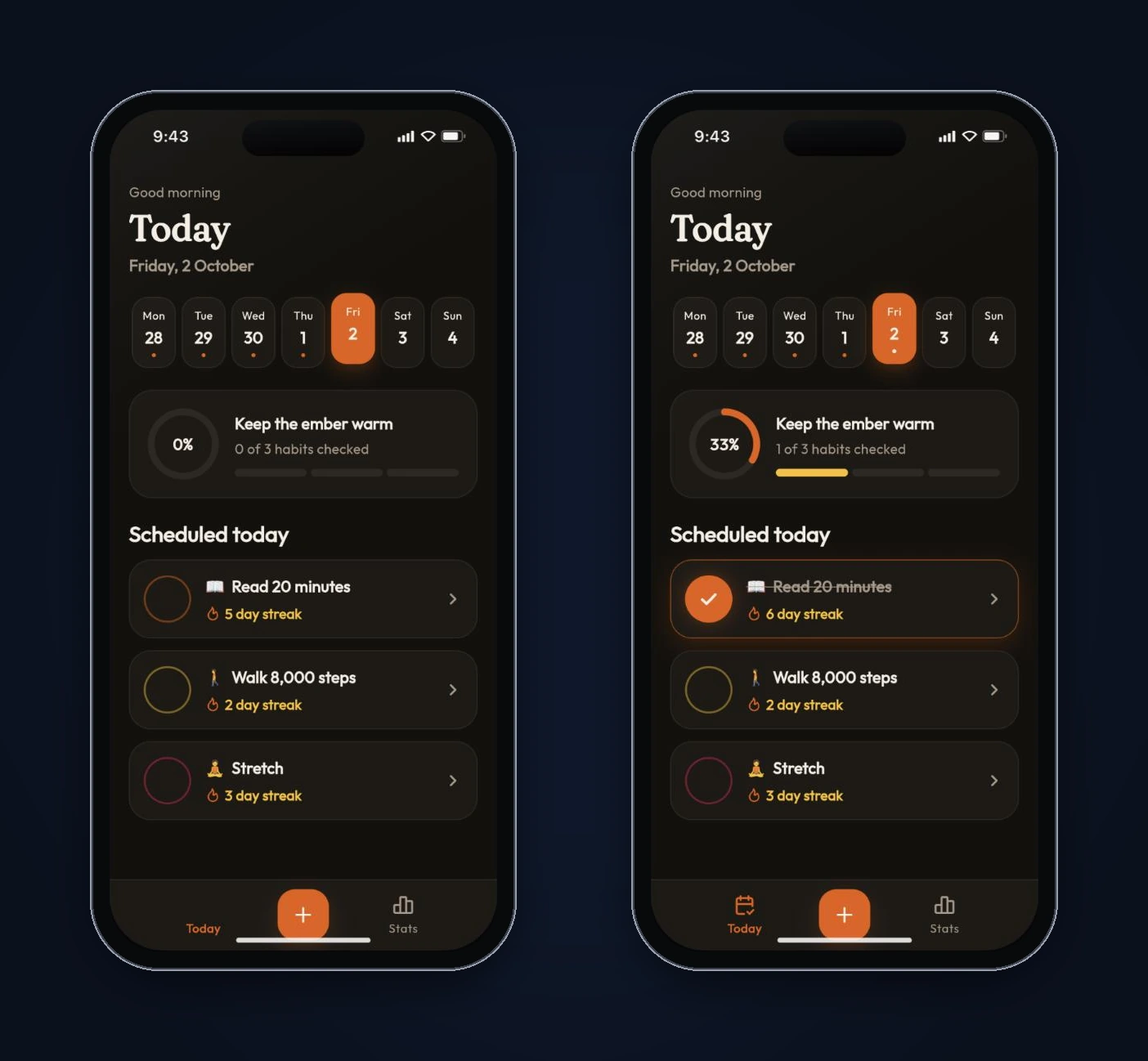
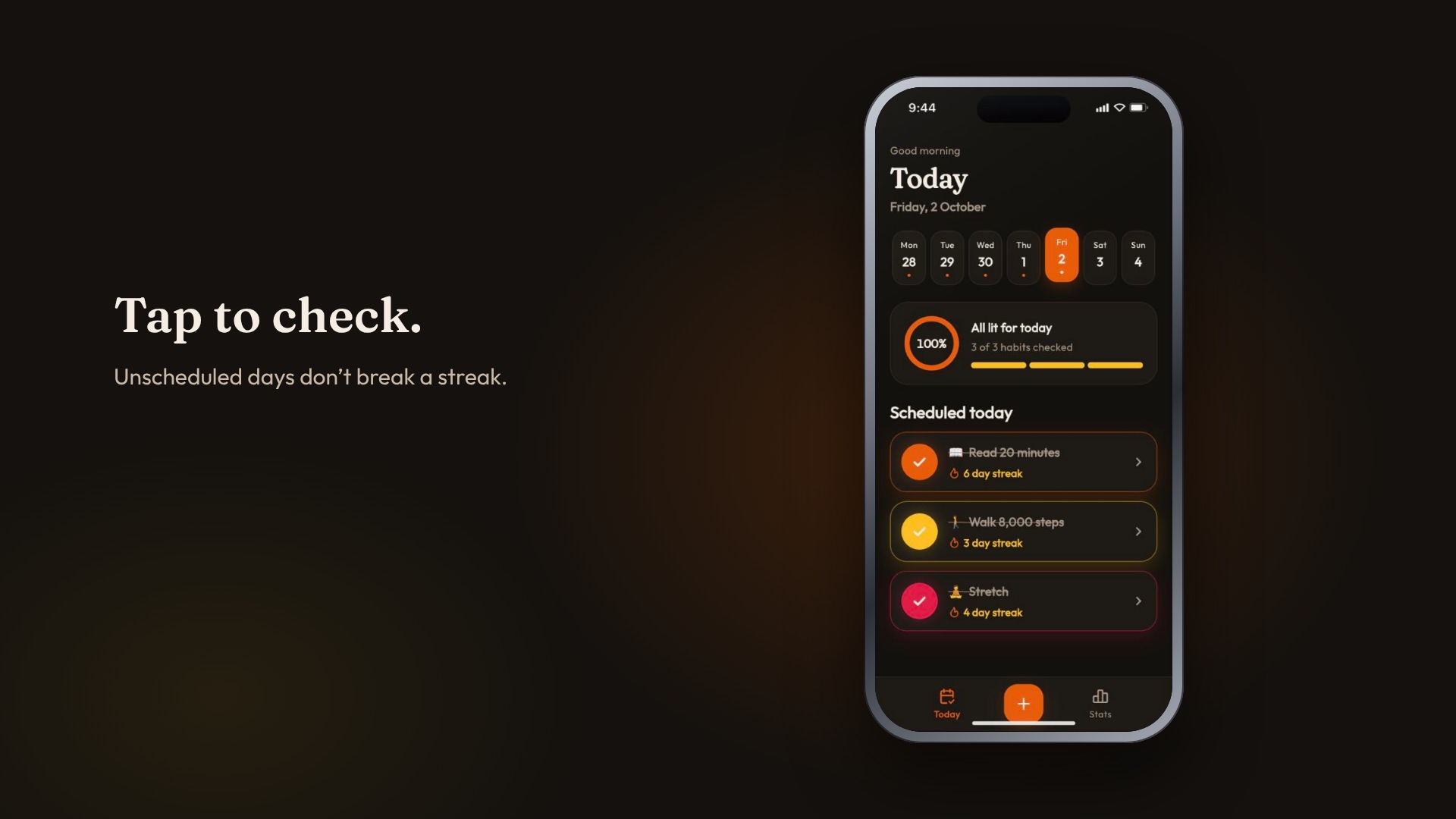
Streaks matched the rules. FlutterGo seeded each example habit with a few weeks of history. On Friday, October 2, Today showed Read 20 minutes at a 5-day streak, Walk 8,000 steps at 2 and Stretch at 3. None of them was checked yet for the day, and none had dropped to zero. That's the "today doesn't break it until the day is over" rule working. Checking off Read 20 minutes moved it to a 6-day streak and the header to 33% (1 of 3 habits).
The detail screen agreed. The Read 20 minutes detail showed Current 6, Best 6 and Total 12. The 5-week calendar had 12 filled days with one gap, on Saturday, September 26. We counted them by hand.
The stats math checked out. Stats showed 73% for the week. Across the last seven days there were 15 scheduled habit-days and 11 completions, which is 73.3%.
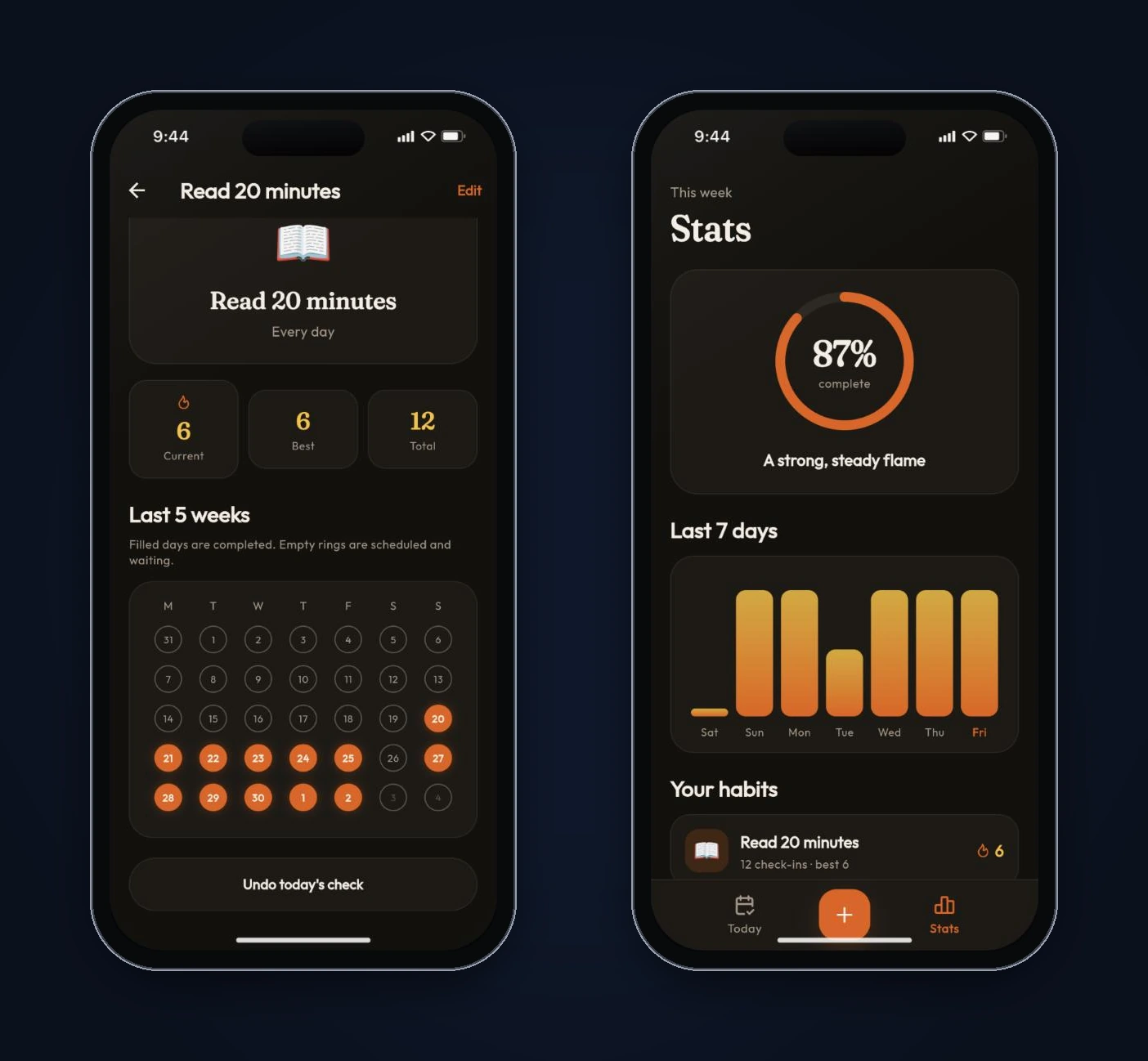
Then two things broke.
Bug 1: Add habit and Edit habit were blank. Tapping + opened a screen with the title and an Add habit button floating in the middle, and nothing else. No name field, no emoji picker, no days. Edit looked the same. You couldn't create a habit at all.
The code explained it. The save button sits in the Scaffold's bottomNavigationBar. FlutterGo's reusable AppStatusButton builds itself inside a LayoutBuilder that returns a Center:
return LayoutBuilder(
  builder: (context, box) {
    final full = box.hasBoundedWidth ? box.maxWidth : 240.0;
    return Center(
      child: Semantics(
        // ...the animated button
A Center expands to fill all the space its parent allows, and the bottom bar slot lets its child grow tall. So the button's bar grew to fill the screen and left the form no room. It's a classic Flutter layout trap, and it's easy to miss in code review because each widget looks reasonable on its own.
Bug 2: nothing survived a reload. We checked off a habit and reloaded the page. The onboarding quiz came back, and Read 20 minutes was back to a 5-day streak with nothing checked. The store held everything in memory. That's fine for a demo, but it doesn't work for an app whose whole job is remembering what you did yesterday.
Step 4: Read the date code
Bug 3: streaks skip a day when clocks change. Our test device's time zone doesn't use daylight saving time, so no amount of tapping would show this one. Reading the code did. The streak logic lived in lib/models/habit.dart, and it walked backwards through the days like this:
int currentStreak({DateTime? now}) {
  final today = dateOnly(now ?? DateTime.now());
  var day = today;
  // ...
  day = day.subtract(const Duration(days: 1));
dateOnly returns local midnight. Subtracting Duration(days: 1) subtracts exactly 24 hours, not one calendar day. Dart's DateTime.add documentation warns about this: if the daylight saving offset changes, the result "may not even hit the calendar date" you expected.
On the day clocks spring forward, there are only 23 hours. Step back 24 hours from midnight at the end of that day and you land at 11 p.m. the day before it, skipping a date entirely. We reproduced the same 24-hour arithmetic in Node.js with the time zone set to New York, starting from Tuesday, March 16, 2027:
24-hour steps:   2027-03-15 00:00 | 2027-03-13 23:00 | 2027-03-12 23:00
calendar steps:  2027-03-15       | 2027-03-14       | 2027-03-13
The 24-hour walk never visits Sunday, March 14, the day US clocks change in 2027. For a daily habit, a missed day there wouldn't break the streak, and a completed day wouldn't count. FlutterGo later counted 11 of these 24-hour steps across the project, in the streaks, the calendar grid, the week strip, the stats week and the seed data.
Bug 4: today counted against the weekly rate. The stats code had a comment saying "Today counts only when completed." The code counted every habit scheduled today as due, checked or not. So the weekly rate dropped every morning and climbed back as you checked things off. That contradicts the rule we gave for streaks.
Step 5: Fix all four with one prompt
We sent one follow-up prompt that described each problem and the fix we wanted:
Four fixes, please. 1) The Add habit and Edit habit screens are blank: only the
title and the button show. The AppStatusButton in the Scaffold's
bottomNavigationBar wraps itself in a Center, so it takes the whole screen
height. Give the bottom bar a fixed height so the form shows. 2) Nothing
survives a reload: habits, check-ins and the onboarding answers reset. Save
them locally with shared_preferences, using SharedPreferencesAsync, and load
them on startup. 3) Streak and calendar code steps back with
subtract(Duration(days: 1)) from local midnight, which skips a date when
daylight saving starts. Step by calendar date instead, e.g.
DateTime(d.year, d.month, d.day - 1). 4) Stats counts today's unchecked habits
as missed, but the comment says today only counts when completed. Make today
count only for completed habits.
FlutterGo finished the code in 1 minute 49 seconds, then rebuilt the preview from scratch because the project had a new package. Here's what changed, checked against the code:
The form is back. The bottom bar's button is now wrapped in a SizedBox(height: 52), so the Center has a fixed height to fill.
Data persists. main() creates a SharedPreferencesAsync, loads the saved habits and onboarding state before the first frame, and passes them into Riverpod with provider overrides. Every change writes the habit list back as JSON under one key. If saved data can't be read, the app falls back to the starter habits instead of crashing.
Dates step by calendar day. A single helper replaced all 11 24-hour steps:
static DateTime addDays(DateTime d, int days) =>
    DateTime(d.year, d.month, d.day + days);
This builds each date from calendar fields instead of counting hours, which is the "calendar steps" row in our Node check above. FlutterGo also removed a 400-day cap on the current-streak loop, and says the best streak now counts back to the first check-in instead of only the last year.
Stats ignores today's open habits. Today now adds only the habits you've already checked. FlutterGo pointed out a side effect itself: today's bar shows 100% as soon as anything is checked, and empty if nothing is.
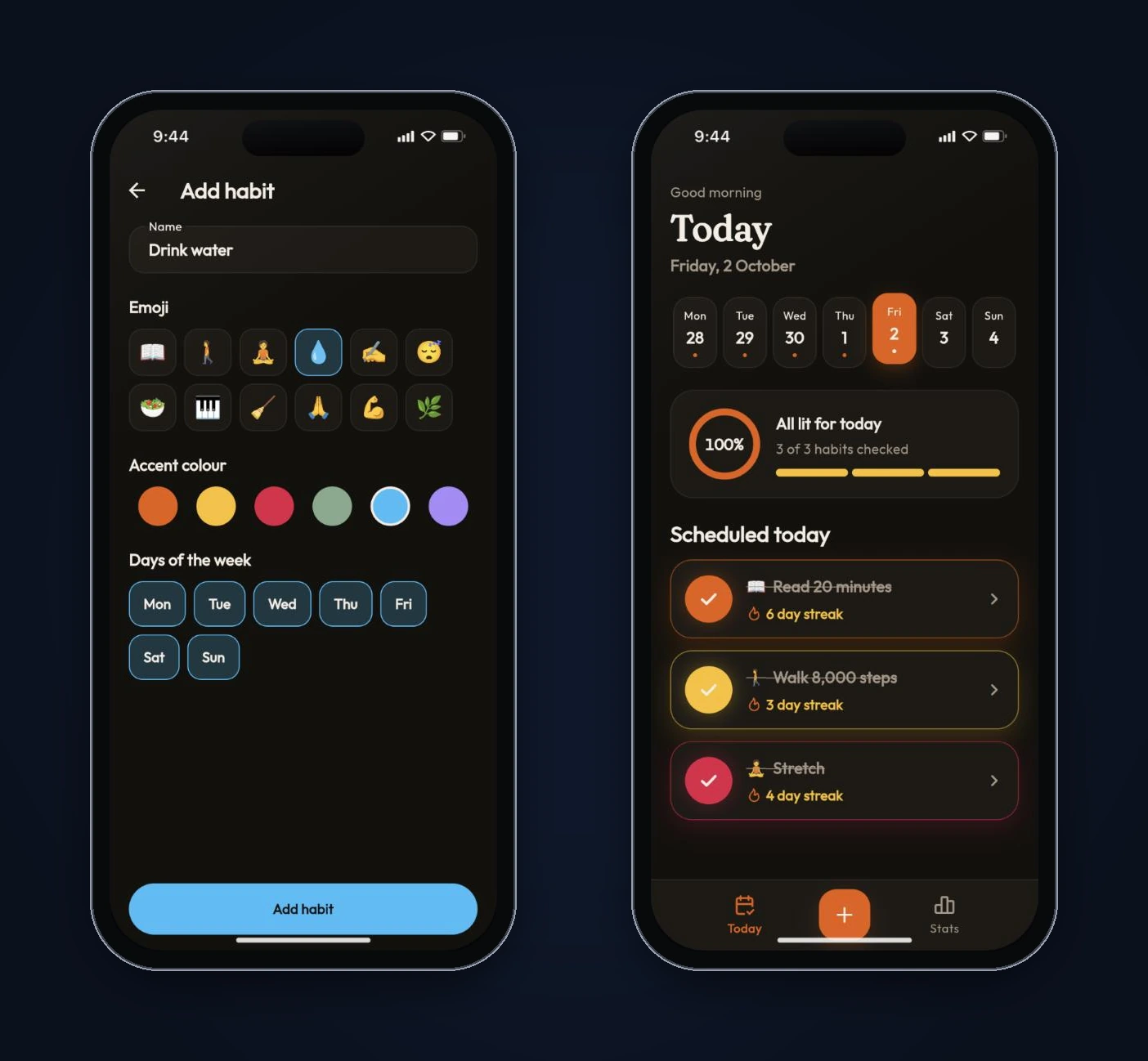
To check the fixes, we added a habit called Drink water with the 💧 emoji and the sky accent. The form worked. We checked off Read 20 minutes and Drink water, which put the header at 50% (2 of 4), and reloaded the page. The quiz didn't come back, Drink water was still in the list, and both check-ins were still there, with Read 20 minutes on a 6-day streak.
What we'd still change before shipping
The four fixes make Ember usable. A code review still turns up a few things we'd handle before release:
- The whole history lives in one shared_preferences key. That's fine for a few habits. The package's README also warns that it "must not be used for storing critical data," because writes can reach disk after the call returns. A habit history is the app's main data. For a production version we'd move check-ins into a database like drift. Our guide to Flutter local databases compares the options.
- Save errors are silent.
_persist()runs without being awaited and only logs failures withdebugPrint. If a write fails, the user never finds out. - Changing a schedule rewrites history. Streaks are computed from the habit's current days of the week. Switch Stretch from Mon/Wed/Fri to every day, and past days it was never scheduled for start counting as misses.
- The calendar legend is misleading for past days. It says "Empty rings are scheduled and waiting," but missed days in the past look the same.
- The demo data has to go. The seeded weeks of check-ins and the stock photos are there to make the preview look lived-in.
What this build tells you about AI-generated Flutter code
The agent got the rules right. Streaks skipped unscheduled days, and today didn't break a streak, exactly as the prompt asked. What it got wrong was underneath the rules: a layout constraint, a missing storage layer, and 24-hour arithmetic on calendar dates. Clicking through the preview catches the first two. Only reading the code catches the third, unless you happen to test across the one date a year when the clocks spring forward.
So test the screens, then open the files that do the math. In Ember, that's lib/models/habit.dart and lib/providers/habit_store.dart. Our interval timer tutorial found a similar split: the timer looked right on screen, and the drift only showed up in the code.
If you want to try it, describe your app in FlutterGo, write the rules down as carefully as the screens, and read the code before you trust the numbers.