Flutter Permissions in 2026: Request Camera, Location, Photos and Notifications the Right Way
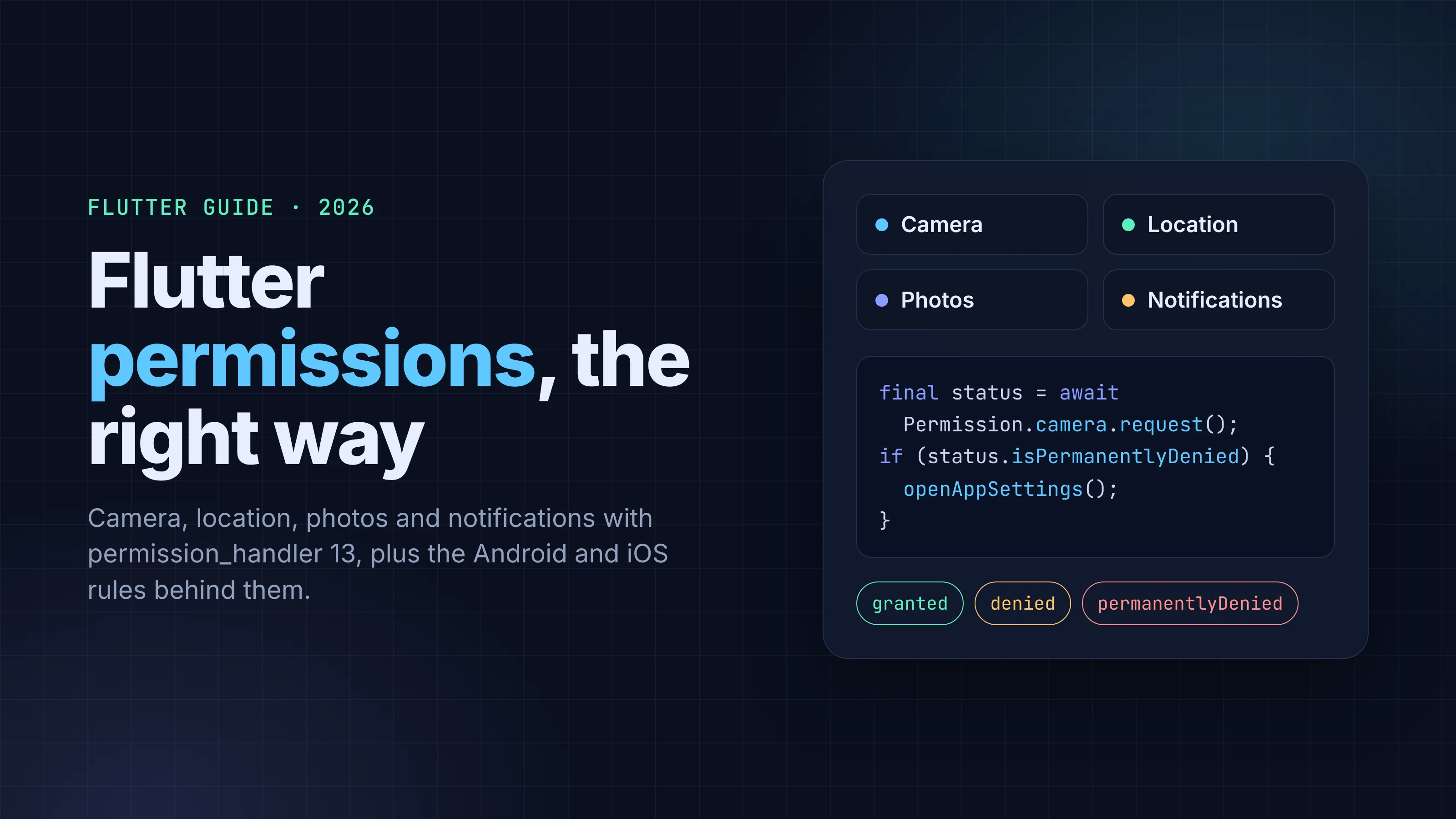
When a Flutter app needs a runtime permission, how to request it with permission_handler 13, and the Android 13 to 17 and iOS rules that trip people up.
A lot of Flutter permission code asks for access the app never needed. The photo picker is the usual case: apps still request full gallery access to let someone choose an avatar, and in 2026 neither Android nor iOS requires that.
When you do need a runtime permission, the way to ask for it with permission_handler changed in the package's latest release. If your code reads status.isPermanentlyDenied on Android, that branch stops firing once you upgrade to 13.0.2.
Everything below was checked against the package docs on pub.dev and GitHub, developer.android.com, docs.flutter.dev and developer.apple.com on October 3, 2026. The Dart snippets come from the package docs and were checked against them, not compiled.
Key takeaways
- Picking photos with
image_pickeruses the system Photo Picker on Android 13+ and PHPicker on iOS 14+, so letting users choose an image doesn't need a gallery permission. On iOS, passrequestFullMetadata: falseto avoid a photo library prompt. permission_handler13.0.2 is current. Its Android side (14.1.0) compiles against API 37, andstatusno longer returnspermanentlyDeniedon Android. Onlyrequest()can.- Always call
request()when a permission isn't granted, branch on the result, and only offeropenAppSettings()after apermanentlyDeniedresult. - Android 13 added
POST_NOTIFICATIONS, Android 14 added partial photo access, and apps targeting Android 17 needACCESS_LOCAL_NETWORKto reach LAN devices. - On iOS every protected resource needs a clear purpose string in Info.plist. Missing keys crash the app or get the build rejected.
Does your Flutter app need a runtime permission at all?
Check this first. Both platforms now offer system UIs that hand your app exactly what the user picked without granting broad access, and a prompt you never show is one the user can't deny.
| What the feature does | Android | iOS | Runtime permission? |
|---|---|---|---|
Let the user pick a photo (image_picker, gallery) |
System Photo Picker on Android 13+ | PHPicker on iOS 14+ | No. iOS still needs NSPhotoLibraryUsageDescription in Info.plist |
Take one photo (image_picker, camera) |
Camera app via intent | System camera UI | iOS: needs NSCameraUsageDescription. Android: see the note below |
Live camera preview in your UI (camera plugin) |
CAMERA |
NSCameraUsageDescription |
Yes |
| Read the whole gallery (a gallery app) | READ_MEDIA_IMAGES / READ_MEDIA_VIDEO |
Photos | Yes, and Google Play restricts it |
| Show notifications | POST_NOTIFICATIONS on Android 13+ |
Notification authorization | Yes |
| Location while the app is open | ACCESS_COARSE_LOCATION + ACCESS_FINE_LOCATION |
When In Use | Yes |
| Location in the background | ACCESS_BACKGROUND_LOCATION, granted in Settings |
Always | Yes, as a second step |
| Talk to devices on the local network | ACCESS_LOCAL_NETWORK when targeting Android 17 |
Not covered in this guide | Yes on Android 17 targets |
A few details from the image_picker docs (version 1.2.3) matter here:
- On Android 13 and above the package uses the Android Photo Picker. Android's own Photo Picker docs describe the picker as a way to grant access "to only selected images and videos, instead of their entire media library."
- On iOS 14 and higher it uses PHPicker.
pickImagehas arequestFullMetadataparameter that defaults totrue, and the API docs say full metadata "may require extra permission requests," such as the photo library permission on iOS. PassrequestFullMetadata: falseif you don't need EXIF data and want to avoid that prompt. The README still asks you to keepNSPhotoLibraryUsageDescriptionin Info.plist, because App Store policy requires it. - For the camera, the Android plugin launches the system camera through
MediaStore.ACTION_IMAGE_CAPTURE, and the README says Android needs no configuration. One catch from the Android reference: if your app declares theCAMERApermission in its manifest and it isn't granted, that intent throws aSecurityException. If another plugin addsCAMERAto your merged manifest, request it before opening the camera.
Google Play enforces the gallery row. Its photo and video permissions policy says only apps whose core functionality "revolves around broad access to Photos and Videos" may use READ_MEDIA_IMAGES and READ_MEDIA_VIDEO; everyone else should use a system picker. If you're preparing a release, our guide to publishing a Flutter app to Google Play covers where these declarations show up in Play Console.
Set up permission_handler in Flutter (13.0.2)
For everything that does need a prompt, permission_handler from Baseflow is the standard cross-platform API. As of October 2026 the current version is 13.0.2, which requires Dart ^3.6.0 and Flutter 3.24.0 or later.
dependencies:
  permission_handler: ^13.0.2
Android setup
Version 13.0.2 depends on permission_handler_android 14.1.0, and that implementation compiles against API 37 (the requirement arrived in 14.0.0). The package README's Android section still shows compileSdkVersion 35, but the changelog and the maintainers' upgrade guide both say 37:
android {
    compileSdk = 37
}
Then declare every permission you plan to request in android/app/src/main/AndroidManifest.xml. The plugin checks the manifest before it asks, so a missing entry means no dialog at all.
<uses-permission android:name="android.permission.POST_NOTIFICATIONS"/>
<uses-permission android:name="android.permission.ACCESS_COARSE_LOCATION"/>
<uses-permission android:name="android.permission.ACCESS_FINE_LOCATION"/>
<uses-permission android:name="android.permission.CAMERA"/>
Only add what you use. Each entry is something a reviewer can ask you to justify.
iOS setup: Swift Package Manager or CocoaPods
The README now documents two iOS paths.
Swift Package Manager (Flutter 3.24.0+ and Xcode 15.0+): the plugin's Package.swift reads your Info.plist and compiles in a permission only when its usage description key is present, so a single-flavor app needs no extra setup. Notifications are enabled by default (opt out with PERMISSION_NOTIFICATIONS=0). If your flavors need different permissions, the README describes a permission_handler.yaml file so a dev-only key can't leak into production, which it calls "grounds for App Store rejection (ITMS-90683)."
CocoaPods: enable each permission with a preprocessor macro in your Podfile's post_install block, and keep the matching Info.plist key. A trimmed version of the README's block:
post_install do |installer|
  installer.pods_project.targets.each do |target|
    flutter_additional_ios_build_settings(target)
    target.build_configurations.each do |config|
      config.build_settings['GCC_PREPROCESSOR_DEFINITIONS'] ||= [
        '$(inherited)',
        'PERMISSION_CAMERA=1',
        'PERMISSION_LOCATION_WHENINUSE=1',
        'PERMISSION_NOTIFICATIONS=1',
      ]
    end
  end
end
The README's own example lists every macro. Set the ones you don't need to 0 and delete their Info.plist keys. Then clean and rebuild.
How to request Flutter permissions: one flow for Android and iOS
Here's the change that will bite existing apps. In permission_handler_android 14.1.0, shipped with permission_handler 13.0.2, Permission.x.status no longer returns permanentlyDenied on Android. It returns denied for every denied runtime permission. Only the result of request() can be permanentlyDenied.
The maintainers explain why: Android doesn't let apps tell a permanently denied permission apart from one that was never requested, or one the user reset to Ask every time in Settings. The old guess got that last case wrong and sent people to Settings when the system was ready to show the dialog again. Requesting a permanently denied permission is cheap, because Android answers immediately without showing anything.
iOS is unchanged: status can still return permanentlyDenied there. Apple's docs say that once a person responds, "the system remembers the person's choice and doesn't prompt again," so after a denial the only way back is Settings.
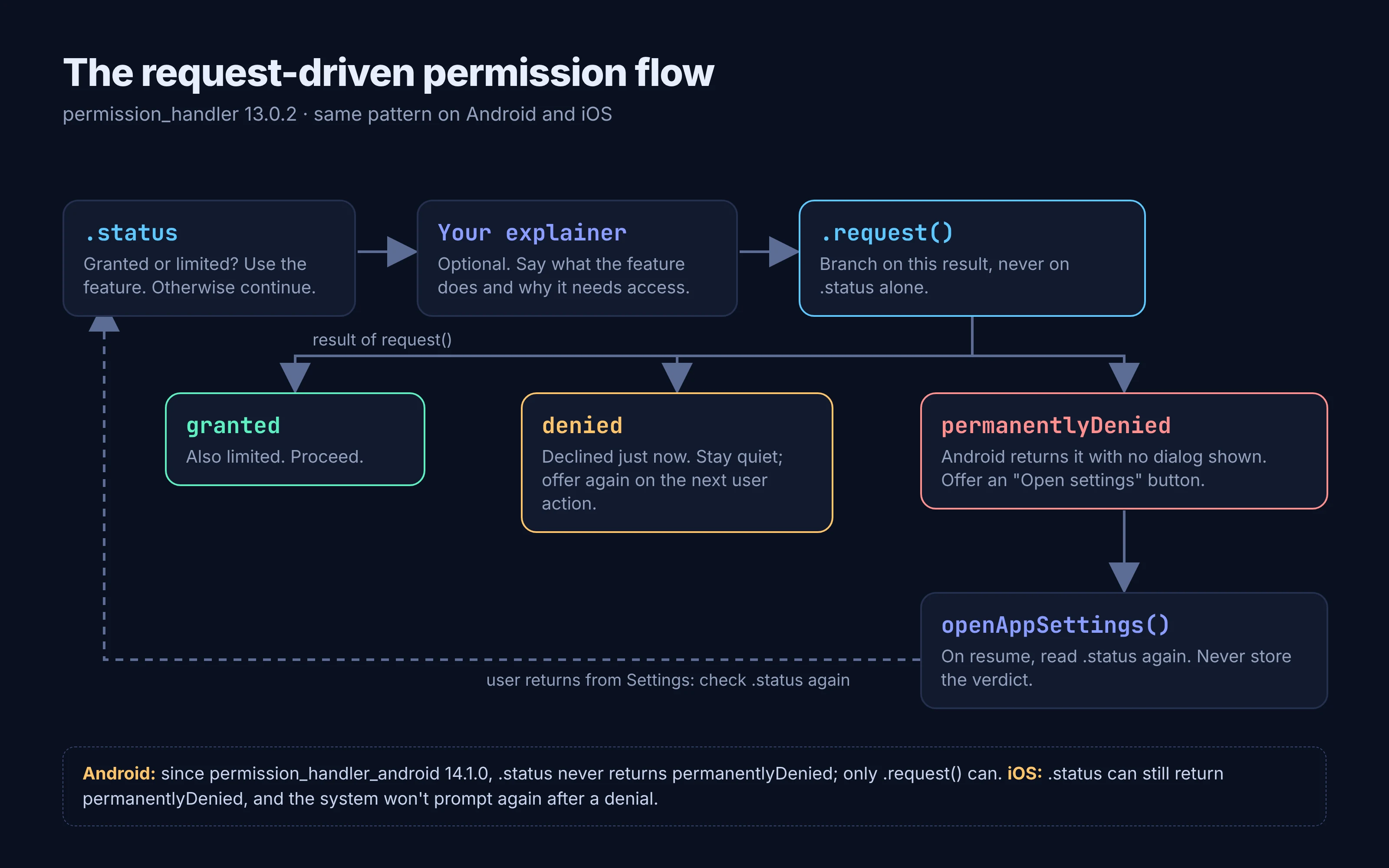
The pattern from the maintainers' Android "permanently denied" guide works on both platforms:
import 'package:permission_handler/permission_handler.dart';

Future<bool> ensureLocation() async {
  var status = await Permission.locationWhenInUse.status;
  if (status.isGranted || status.isLimited) return true;

  // Optionally show your own explainer here when status.isDenied.

  status = await Permission.locationWhenInUse.request();
  if (status.isGranted || status.isLimited) return true;

  if (status.isPermanentlyDenied) {
    // Offer "Open settings". Do not remember this decision.
    await showOpenSettingsPrompt();
    return false;
  }
  // Denied just now: stay quiet, let the user try again later.
  return false;
}
showOpenSettingsPrompt() is your own dialog. Its button should call openAppSettings(), a top-level function the package exports.
The guide's rules, condensed:
- Never derive "permanently denied" from
status. Usestatusto skip the request when you're alreadygrantedorlimited, and to decide whether to show your explainer. - Always call
request()when the permission isn't granted, and branch on its result. - On
denied, don't re-prompt right away. Offer the feature again on the next user action. - Never persist a
permanentlyDeniedverdict. When the app comes back from Settings, readstatusagain. - Don't use
shouldShowRequestRationaleto detect permanent denial. On Android it'sfalsefor "never asked", "Ask every time" and "permanently denied" alike. It's still useful for deciding when to explain.
If you have an old canRequest helper that excludes permanentlyDenied, that's the pattern the guide says keeps users stuck. Search your codebase for isPermanentlyDenied and keep only the uses that read a request() result.
Android and iOS rules by permission type
Notifications on Android 13 and later
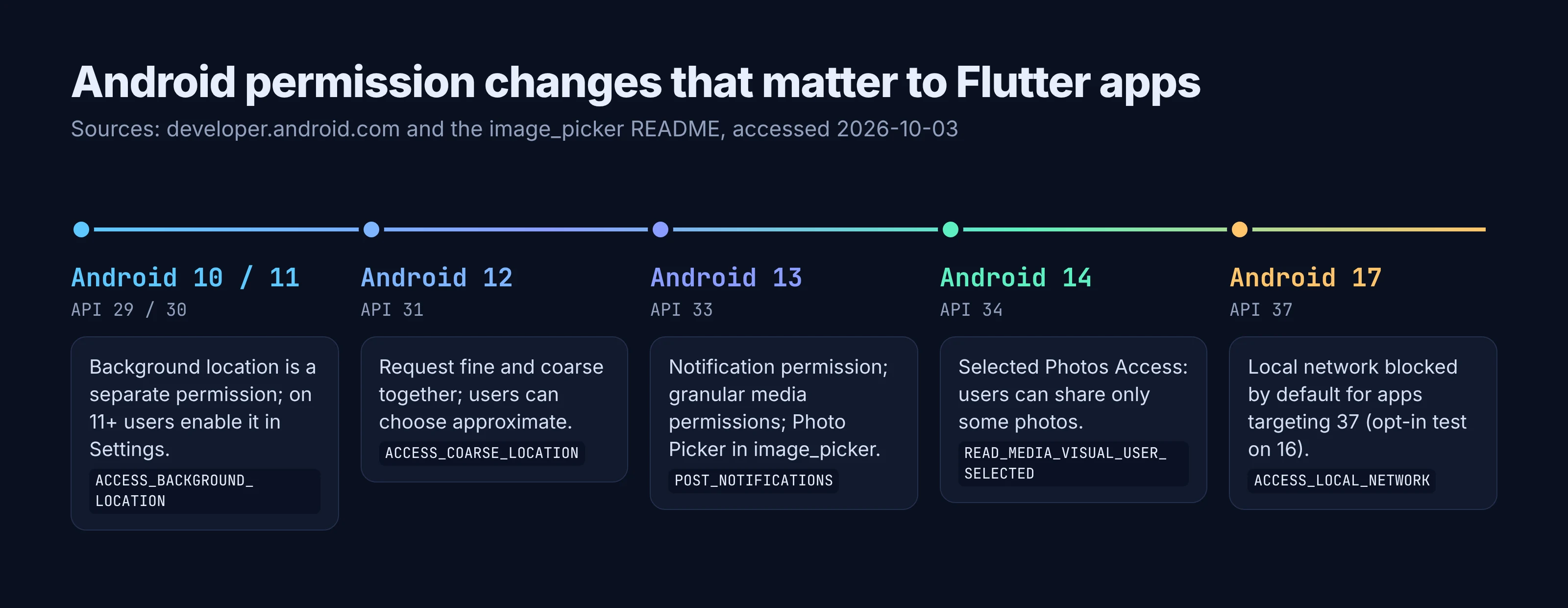
Android 13 (API 33) introduced the POST_NOTIFICATIONS runtime permission. For apps targeting Android 13 or higher, notifications are off by default on new installs, and you choose when the dialog appears. Ask after the user does something that implies they want notifications, like turning on a reminder, not on first launch.
final status = await Permission.notification.request();
Below Android 13 there's no runtime permission to ask for, and the plugin doesn't request one. If the user swipes the dialog away without choosing, Android leaves the state unchanged.
Photos: full, partial, or none
If you really need gallery access, request Permission.photos. On Android 13+ it maps to READ_MEDIA_IMAGES (use Permission.videos for READ_MEDIA_VIDEO). Permission.storage is the wrong tool on modern Android: the README's FAQ notes that READ_EXTERNAL_STORAGE and WRITE_EXTERNAL_STORAGE have been "fully removed/disabled since Android 13," which is why it always comes back denied.
Android 14 added Selected Photos Access, where users can grant access to only some of their photos. Apps that manage their own gallery can declare READ_MEDIA_VISUAL_USER_SELECTED; apps that don't are run in a compatibility mode. In the plugin's Android source, a grant of only READ_MEDIA_VISUAL_USER_SELECTED is reported as limited, the same status iOS uses for limited photo access. Treat limited as "proceed with what you have."
Location: foreground first, background later
Declare both ACCESS_COARSE_LOCATION and ACCESS_FINE_LOCATION. Android's location permission docs say that on Android 12+ you must request both in a single runtime request, and that "the system ignores the request on some releases of Android 12" if you ask for fine alone. The plugin's Android code adds both to one request when both are in your manifest. The user can still pick approximate; if they do, you only get approximate location.
Background location is a second step. The README says locationAlways can't be requested directly; request locationWhenInUse first. On Android 11 and higher, the system dialog doesn't include Allow all the time. The user has to turn it on in a Settings page, and Android asks you to show an educational screen first that names that option.
if (await Permission.locationWhenInUse.request().isGranted) {
  // Explain why you need background access, then:
  await Permission.locationAlways.request();
}
Also check the service, not only the permission: Permission.locationWhenInUse.serviceStatus.isEnabled tells you whether location is switched on at all.
Local network on Android 17
Android 17 (API 37) blocks local network access by default for apps that target it. If your app discovers or connects to LAN devices, declare ACCESS_LOCAL_NETWORK and request it with Permission.accessLocalNetwork.request(). Flutter's docs warn that without it, connecting to a local IP "fails and throws a SocketException." Google Play currently requires a target of Android 16 (API 36) for new apps and updates, so this bites when you move to 37.
iOS purpose strings and App Review
Every protected resource needs a usage description in Info.plist: NSCameraUsageDescription, NSPhotoLibraryUsageDescription, NSLocationWhenInUseUsageDescription, NSLocationAlwaysAndWhenInUseUsageDescription and so on. Apple's docs on protected resources say that without one, access attempts fail "and might cause your app to crash," and App Review rejects builds whose code touches those resources without a purpose string.
The text itself is reviewed too. App Review Guideline 5.1.1(ii) says: "Ensure your purpose strings clearly and completely describe your use of the data." "We need camera access" won't do. "Scan a receipt to add it to your expense report" will. We cover how this plays out in review in the eight App Store rejections we see most.
Explain before you ask: permission UX that passes review
You control very little of the system dialog. On iOS it shows your purpose string; on Android it shows nothing of yours at all. So the work happens in your own UI, before and after it.
Ask in context. Request camera access when the user taps "Scan," not on first launch, and check the current state each time: Apple's docs say to "always check the authorization status of a feature before accessing it."
When status.isDenied, show a short explainer first that says what the feature does and what happens if they decline. On Android, Google's background-location guidance treats shouldShowRequestPermissionRationale() returning true as the cue for an educational screen, and shouldShowRequestRationale is the plugin's wrapper for that call.
Give people a way around a "no." Guideline 5.1.1(iv) says apps must not "manipulate, trick, or force people to consent," and its own example is to "offer the ability to manually enter an address" when someone declines location.
Keep Settings as the last resort. Show that button only after request() returns permanentlyDenied, have it call openAppSettings(), and read status again when the app resumes.
Common Flutter permission errors and fixes
| Symptom | Likely cause | Fix |
|---|---|---|
request() returns denied instantly, no dialog (Android) |
Permission missing from AndroidManifest.xml | Add the <uses-permission> entry; the plugin only requests what's declared |
Every permission reports denied on iOS |
SPM build couldn't find your Info.plist, so all permissions were compiled out; or the CocoaPods macro is 0 |
Follow the README troubleshooting step (PERMISSION_HANDLER_VERBOSE=1), or fix the Podfile macro and rebuild |
| App crashes when checking or requesting on iOS | Missing Info.plist usage description | Add the key for that permission |
Permission.storage always denied on Android 13+ |
Storage permissions removed for media | Use Permission.photos, videos or audio, or better, the photo picker |
locationAlways always denied on Android 10+ |
Requested before foreground location | Request locationWhenInUse first |
| Users stuck in an "open Settings" loop | Code reads permanentlyDenied from status |
Upgrade to 13.0.2 and branch on the request() result |
ITMS-90683 email after upload |
Code references a protected API with no purpose string | Add the key, or disable the unused permission (macro 0, or remove the key under SPM) |
SecurityException when opening the camera intent |
CAMERA declared in the manifest but not granted |
Request Permission.camera first, or remove the declaration if nothing uses it |
FAQ
Does image_picker need permission_handler?
Usually not. On Android 13+ it uses the system Photo Picker, and on iOS 14+ it uses PHPicker. You still need the iOS Info.plist keys from its README, and on iOS, leaving requestFullMetadata at its default of true may trigger the photo library prompt.
Why does status never show permanentlyDenied on Android?
Since permission_handler_android 14.1.0, that's intentional. Android doesn't expose permanent denial, so status reports denied. Call request(): it returns permanentlyDenied immediately, without a dialog, when that's the real state.
What compileSdk does permission_handler need in 2026?
API 37 for permission_handler 13.0.2, according to the changelog and the maintainers' Android guide. The README's setup section still shows 35, so go by the changelog.
Ship it with fewer prompts
Go back to the avatar picker from the top of this post. It needs no gallery permission, and plenty of features can get by with fewer prompts than you'd first expect. When one is required, ask in context and let request() tell you what state you're in. If you'd rather start from a working project, FlutterGo is an AI Flutter app builder that writes real Flutter code and previews it live, so you can wire in these patterns yourself and ship to both stores.