3,500 Flutter Developers on AI Agents, Trust and the Upgrade Problem
Flutter's Q2 2026 survey: Claude Code at 32%, trust in Flutter at 83%, and upgrades as the top pain. What that means for judging AI coding tools.
Flutter's Q2 2026 developer survey landed in August, and two of its findings sit awkwardly next to each other. AI coding agents are now a normal part of how Flutter developers work. And the thing those developers still complain about most has little to do with writing code. It is upgrading it.
If you use AI tools on a Flutter codebase, or you're picking one, that gap matters.
Key takeaways
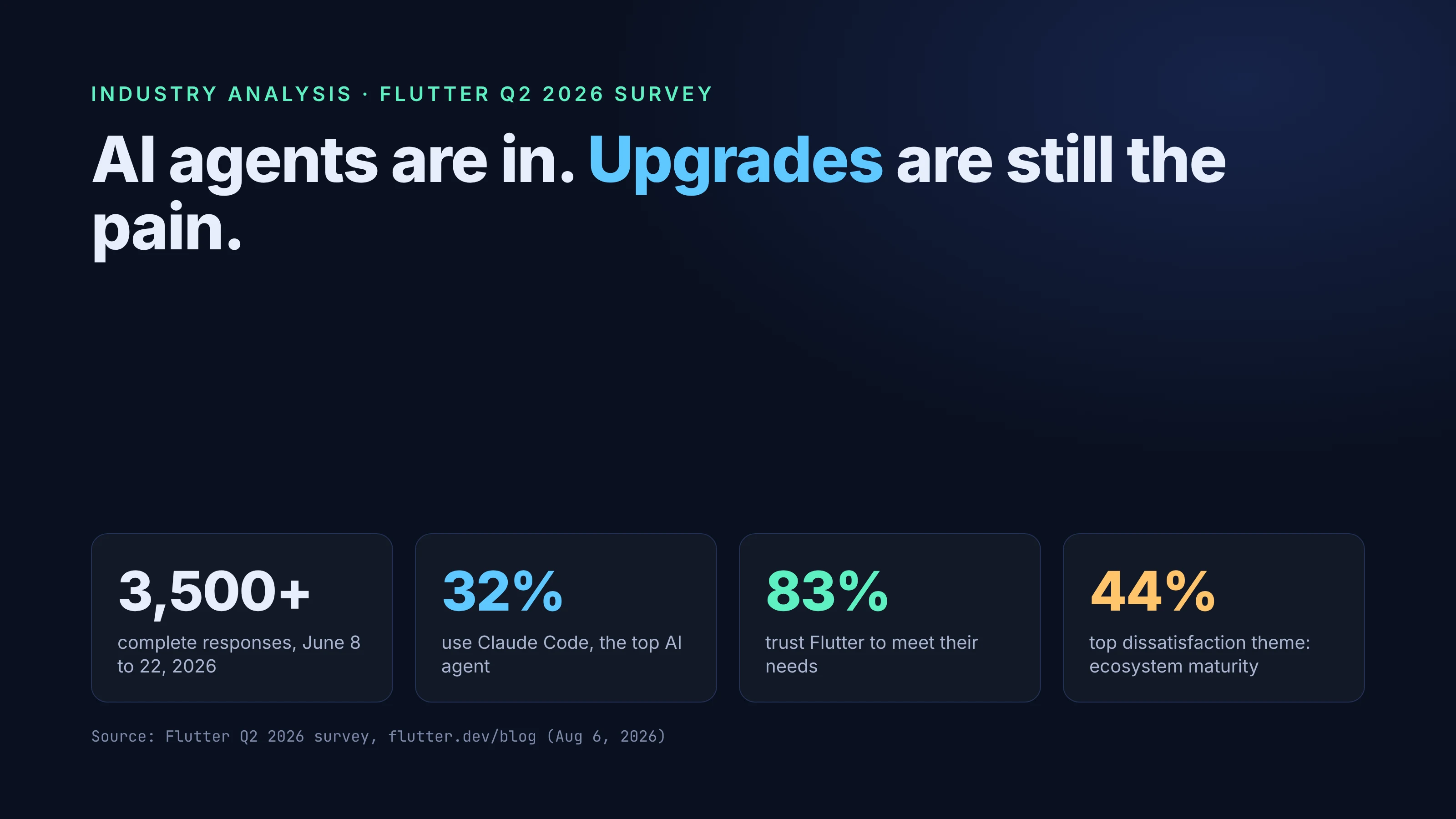
- The survey (June 8 to 22, 2026, 3,500+ complete responses) asked about editors and agents for the first time. Claude Code was used by 32% of respondents, Antigravity by 23%, GitHub Copilot by 19%, Cursor by 18% and Codex by 17%.
- Satisfaction and trust both rose: 58% were "very satisfied" (up from 52% in Q4 2025), and trust in Flutter to meet development needs rose from 77% to 83%.
- The largest dissatisfaction theme, platform and ecosystem maturity (44%), was about upgrade pain and "version-matrix guesswork," not getting started.
- Our read: the useful test for any AI coding tool is whether the code it leaves you is pinned, analyzable, testable and upgradeable.
What the survey measured, and what it can't tell you
The Flutter Q2 2026 survey, written up by Emma Twersky on August 6, 2026, ran from June 8 to June 22. According to the post, it collected "over 3,500 complete responses through Flutter's IDE plugins (VS Code, IntelliJ, Android Studio), X, and our website."
Keep two limits in mind.
First, the sample is self-selected. People who answer a prompt in their Flutter IDE plugin or follow Flutter on X are active, engaged Flutter developers. People who left Flutter are less likely to show up. The post doesn't describe weighting or a margin of error, so read the figures as a picture of the engaged community.
Second, the editor and agent question allowed several answers. The post notes that "respondents can use one or multiple editors, so these numbers add up way beyond 100%." A developer who uses VS Code with Copilot and runs Claude Code in a terminal counts toward all three.
Every number below comes from that post. It's Google's data, not ours, and we can't check it independently.
AI agents went from experiment to default
This was the first cycle to ask about editors and agents, so there's no trend line yet. The snapshot is still striking. VS Code led at 66% and Android Studio at 40%. Right behind them were AI coding agents: Claude Code at 32% and Antigravity at 23%, both ahead of GitHub Copilot (19%), Cursor (18%) and Codex (17%).
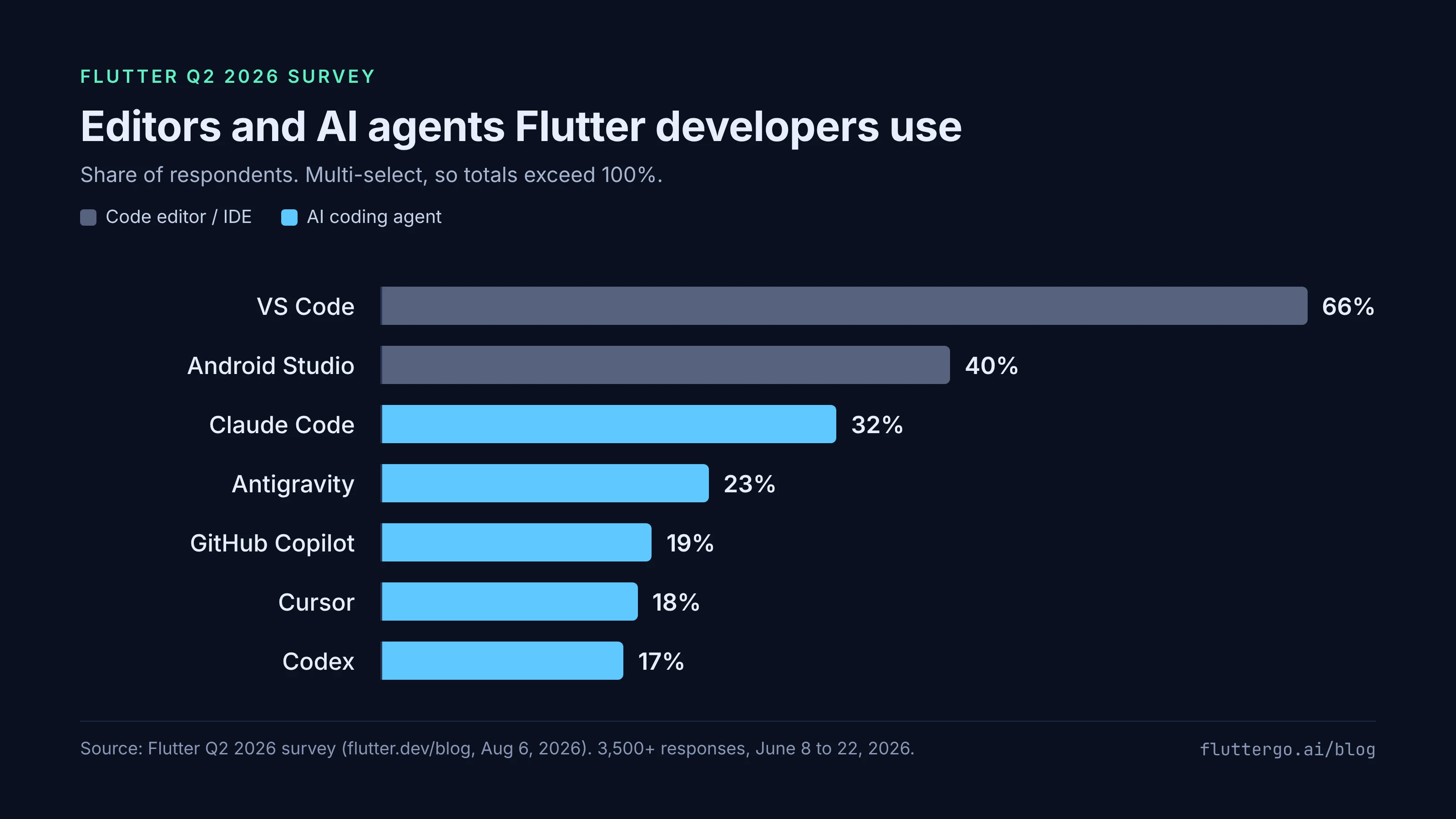
People like them, too. The post lists VS Code at 88% top-2 box satisfaction, Claude Code at 86% and Codex at 85%. The Flutter team titled the section "AI coding tools have moved from experiment to default," and for this audience the data backs that up.
Two weeks later, Andrew Brogdon published Building multi-agent dev teams on the Flutter blog. We'll come back to it, because it shows what makes agent output worth keeping.
Trust went up, and it rests on stability
Overall satisfaction held at 93% (top-2 box). Underneath it, the mix shifted: 58% said they were very satisfied, up 6 points from 52% in Q4 2025, while "somewhat satisfied" fell from 40% to 35%. Trust in Flutter to consistently meet development needs rose from 77% to 83%.
Two trust findings matter more here than the headline.
Asked what builds trust, "framework performance and stability topped the list at 26%, ahead of community size and activity (20%) and documentation quality (19%)." Stability came first.
And when evaluating a brand-new feature, more respondents said they'd trust it because it was "battle-tested" by the community (41%) than because Google engineers built it (26%). Trust in Flutter itself (83%) also outpaced trust in Google (62%) by 20+ points across every company-size segment.
This community trusts what has held up in real projects. A track record counts for more than a new feature.
The real pain is upgrades, not writing code
This is the finding that should change how we judge AI tools. The survey grouped dissatisfaction into four themes:
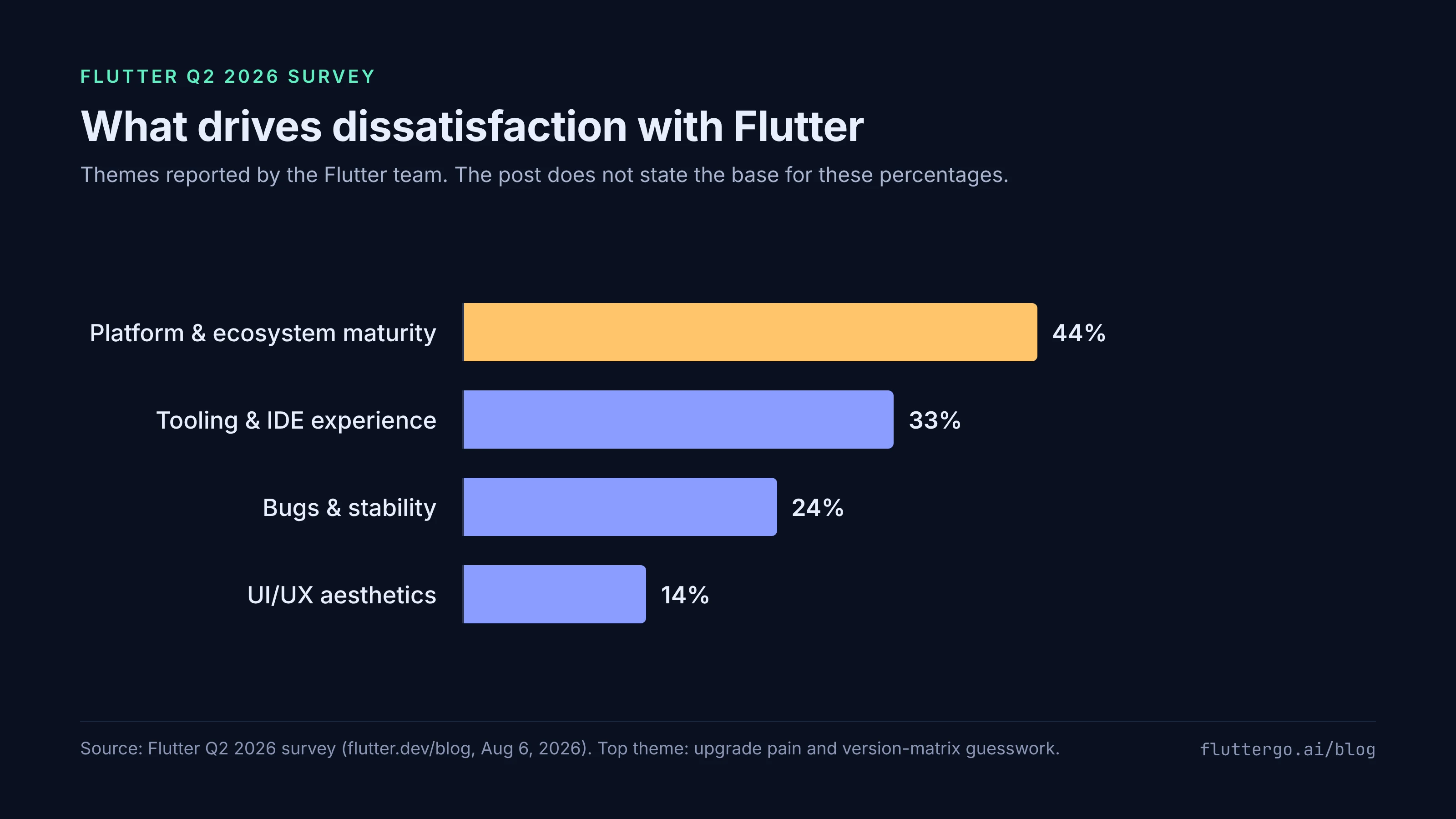
The largest, platform and ecosystem maturity at 44%, "centered on upgrade pain rather than getting started." The post continues: developers "described losing hours to version-matrix guesswork when upgrading older projects, especially on Android when juggling Flutter, Dart, Gradle, Kotlin, and JVM versions together."
If you've revived a two-year-old Flutter app, you know the afternoon this describes. The release notes show why it keeps happening: Flutter 3.47 is "verified against" Java 17 as the minimum, Kotlin Gradle Plugin 2.4.0 and Android Gradle Plugin 9.1.0, and it raised the minimum iOS version from 13 to 15. Each of those is a moving part a project has to line up.
One caution: the post doesn't say what the 44%, 33%, 24% and 14% are percentages of. Compare them with each other, not with the satisfaction figures.
A related finding: only 71% agreed that Flutter "is proactive about technical issues and responsive to developer feedback," which the post calls "a full 10+ points below every other statement we asked about reliability and safety."
Cupertino was the other low point. Cupertino widgets fell 6 points to 61% top-2 box, "the steepest decline anywhere in the survey." Separately, Material and Cupertino are moving into standalone material_ui and cupertino_ui packages, announced by Craig Labenz on September 9, with the in-SDK libraries scheduled for formal deprecation in the November stable release, per the 3.47 notes. That's one more upgrade step for every app. We covered it in our Material UI and Cupertino UI migration guide.
Judge AI tools by the code they leave behind
Flutter developers already have fast ways to produce code. Their main frustration is keeping that code alive across Flutter, Dart, Gradle and Kotlin versions. So generation speed is the wrong yardstick. What matters is the state of the code after the tool is done.
We'd check four things.
Pinned. Versions are explicit, not left to chance. For apps, the Dart team recommends committing pubspec.lock because "versioning the pubspec.lock file ensures changes to transitive dependencies are explicit." The Flutter version, Gradle wrapper and plugin versions the project was built with should be written down in the repo, not reconstructed from memory during an upgrade.
Analyzable. flutter analyze passes clean, with an analysis_options.yaml that the team actually agrees with. Deprecation warnings from the analyzer are usually the first notice that an API you depend on is going away.
Testable. There are tests, and they run with flutter test. Without them, an upgrade becomes a manual click-through of every screen.
Upgradeable. The code uses standard packages and current APIs, so dart pub outdated gives sensible advice and dart fix migrations, like the one for material_ui and cupertino_ui, can apply cleanly.
Brogdon's post shows these ideas at work inside the Flutter team. His setup fences each agent off from the others' files: the Architect can't write to lib/, test/ or example/, the Tester can't write to lib/ or specs/, and the Coder can't write to test/ or specs/. The Tester writes failing tests before the Coder writes implementation, and the coordinator agent runs dart analyze && dart test to check the work. He's open about what he hasn't solved, such as what happens "if a subagent gets stuck in a loop." You don't need four agents. You do need the analyzer and the tests, because they turn agent output into code you can keep.
The same logic applies to AI app builders, not only coding agents. We made that case in more detail in Judge an AI App Builder by the Repo It Leaves You.
The strongest counterargument
The fair objection goes like this: the survey doesn't connect AI agents to upgrade pain at all. Nobody said "my agent caused my version-matrix problem." Upgrade pain predates agents by years. And agents might be the best tool yet for the boring part of an upgrade, reading changelogs, bumping Gradle files and fixing the resulting analyzer errors one by one.
All true, and agents may well make upgrades less painful. But that supports the argument, because an agent can only do that work well on a project that is pinned, analyzable and tested. It needs a lockfile to know where it started, an analyzer to tell it what broke, and tests to tell it whether the fix worked. Hand it a project with floating versions and no tests, and it is guessing in the same version matrix as a human, only faster.
There's a second objection: for a prototype, speed really is the point. Fair enough. But the largest dissatisfaction theme in the survey was about keeping older projects current, and prototypes that work have a habit of becoming older projects.
What to do with this
If you maintain a Flutter app and use AI tools on it:
- Commit
pubspec.lockand record the Flutter version the project builds with. - Make
flutter analyzeandflutter testpart of every agent task, not an afterthought. - Run
dart pub outdatedbefore an SDK bump, not after the build breaks. - Plan the
material_ui/cupertino_uimove before the November deprecation. - When you evaluate an AI tool or app builder, open the repo it produces and run those same commands.
FAQ
How many developers took the Flutter Q2 2026 survey?
According to the Flutter team, the survey collected over 3,500 complete responses between June 8 and June 22, 2026, through Flutter's IDE plugins, X and the Flutter website.
Which AI coding agents do Flutter developers use most?
In the Q2 2026 survey, Claude Code was used by 32% of respondents, Antigravity by 23%, GitHub Copilot by 19%, Cursor by 18% and Codex by 17%. Respondents could pick several tools, so the figures add up to more than 100%.
What do Flutter developers dislike most?
The largest dissatisfaction theme was platform and ecosystem maturity (44%), which the Flutter team said centered on upgrade pain and version-matrix guesswork across Flutter, Dart, Gradle, Kotlin and JVM versions.
FlutterGo is an AI Flutter app builder, and the survey is a useful reminder for us too: the code has to hold up after the first build, not just during the demo. If you try it, run the same checks above on the project it gives you.