FlutterGo vs Rocket: Which AI Builder Fits a Flutter Project?
Rocket and FlutterGo both generate Flutter apps from a prompt. They differ on iOS builds, code sync and scope. A side-by-side from each vendor's own pages.
Rocket and FlutterGo both turn a prompt into a Flutter app. That is where most comparisons stop, and it is the least useful part. The questions that decide a project come later: can you get the app onto an iPhone without a Mac, can you keep editing the code outside the tool, and do you want an app builder or something broader?
We make FlutterGo, so read this with that in mind. Every Rocket fact below comes from rocket.new or docs.rocket.new, checked on 5 October 2026, and every FlutterGo fact comes from fluttergo.ai on the same day. Where a vendor page doesn't say something, we leave it out rather than guess.
The short answer
- Pick Rocket if you want one product for market research, a Next.js web app, landing pages and a Flutter mobile app, and you have a Mac (or someone with one) for the iOS release.
- Pick FlutterGo if the project is a Flutter app first and you want signed iOS and Android builds sent to TestFlight and Google Play from the browser, without a Mac.
Both let you keep the code. How you keep it differs, and that is covered below.
What each product is
Rocket describes itself as "the world's first Vibe Solutioning platform" with three parts: Solve (research and recommendations), Build (apps) and Intelligence (tracking competitors' pricing, messaging and launches). Build covers "Web apps, Mobile apps, Landing pages, SaaS, Internal tool, Dashboard". Its docs say Rocket uses Flutter "for iOS and Android generation" and Next.js "for all web app generation". Rocket says 1.5 million people have tried it across 180 countries.
FlutterGo is an AI Flutter app builder. It does one thing: Flutter apps for iOS and Android. The homepage says it generates "Dart with Riverpod and go_router", Material 3, with a hot-reloading iPhone preview, and ships "Release APK, AAB and IPA, no Mac required".
One honest note on that Riverpod line: in our own published builds the generated state layer has varied. The habit tracker used Riverpod, while the reading list and interval timer builds used a single ChangeNotifier store. Check what your build produced before you plan around it.
Side by side
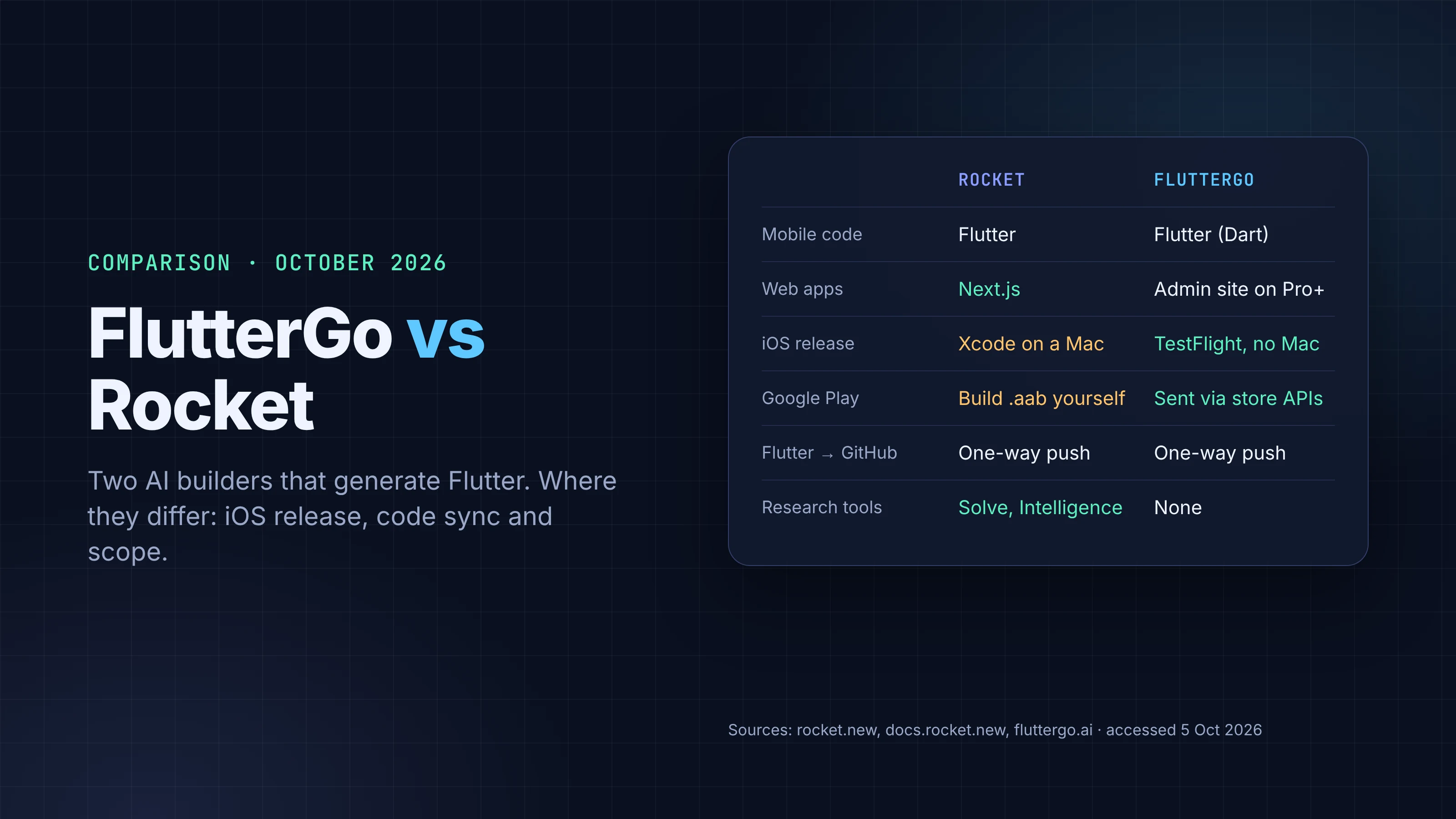
| Rocket | FlutterGo | |
|---|---|---|
| Mobile framework | Flutter | Flutter (Dart) |
| Web apps | Yes, Next.js | Pro and Business plans add a "Website & admin panel for your app" |
| Research / competitor tracking | Yes (Solve, Intelligence) | No |
| Android APK | Built in Rocket, "signed Android APK" (Pro plan or above) | "Android APK builds" on Starter and above |
| Google Play (AAB) | Download the code and build the .aab yourself "with Flutter command-line tools on a computer" |
Signed builds sent to Google Play "through the official store APIs" |
| App Store (iOS) | "Publishing to the App Store requires Xcode on a Mac" | IPA built and sent to TestFlight, "no Mac required" |
| Code download | .zip from the Code tab, paid plan required |
"Export source code" on Starter and above |
| GitHub | Two-way sync for Next.js TypeScript projects; other frameworks get a one-way manual push | Push from the studio to your repo: "GitHub sync" (Starter), "GitHub private repo sync" (Pro and above) |
| Backend connectors | Supabase (Postgres, auth, storage, edge functions), Stripe, Razorpay, Netlify, Figma | Firebase, Supabase, Stripe, GitHub, Figma |
| Code ownership | "Everything Rocket generates ... belongs to you" | "You own the source code, and it stays yours even if you cancel" |
| Free plan | $0, 20 credits | $0, 5 credits a month, up to 2 projects |
| Paid plans | Pro $25, Rocket $50, Booster $250 a month | Starter $19, Pro $49, Business $99 a month |
Sources: rocket.new, rocket.new/pricing, docs.rocket.new; fluttergo.ai, fluttergo.ai/pricing. All accessed 5 October 2026.
Credits don't compare one-to-one. Rocket charges credits for "every message you send in a Build or Solve task" and gives relative costs (low, moderate, high) rather than numbers. FlutterGo charges "1 credit per AI command, and 2.5 credits per store deploy (5 for both stores; once per project per 24 hours)". A dollars-per-credit comparison would mislead, so we don't make one.
Where they really differ
Getting to the App Store
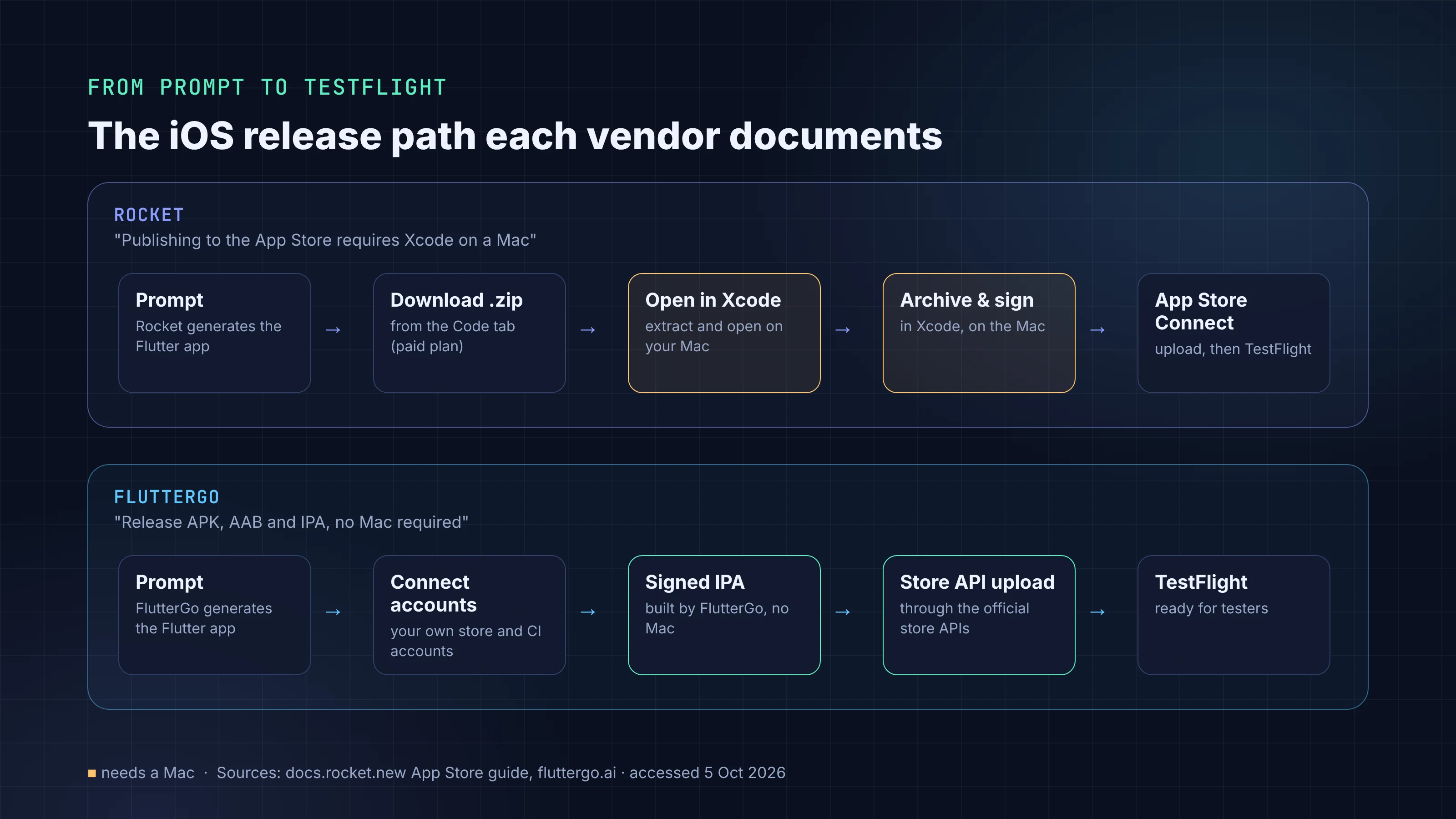
This is the biggest practical gap for a mobile project. Rocket's own App Store guide walks you through downloading the Flutter project, extracting it on your Mac, opening it in Xcode, archiving and uploading. It is clear that "Publishing to the App Store requires Xcode on a Mac." Google Play is similar: you export the code and run Flutter's release build yourself.
FlutterGo produces the release APK, AAB and IPA, and its homepage says "Signed builds go to TestFlight and Google Play through the official store APIs." The pricing page adds that this runs on "your own connected store and CI accounts". You still need an Apple Developer Program membership and a Google Play registration, and FlutterGo's pricing page says store and CI accounts "may have their own charges". What you skip is the Mac. If you have never set up signing, our guides on CI/CD with no Mac in the loop and publishing to Google Play cover what happens underneath.
Keeping the code in GitHub
Both let you leave with your code, and for Flutter projects they work the same way. Rocket's two-way GitHub sync is for Next.js TypeScript projects; for other frameworks, which includes its Flutter output, the docs describe a one-way manual push. So if a developer edits the Flutter code in GitHub, those edits don't flow back into Rocket.
FlutterGo works the same way. Changes happen in the studio, and you push the code to your GitHub repo when you want to (GitHub sync on Starter, private-repo sync on Pro and above). Edits made directly in GitHub don't flow back into the studio. For either tool, the practical rule is the same: once a developer starts editing the repo by hand, treat the repo as the source of truth.
Scope
Rocket is broader on purpose. If you are a founder who wants to research a market, see what competitors changed this week, ship a web app and a mobile app, and do it from one account, Rocket covers ground FlutterGo doesn't try to. FlutterGo's bet is narrower: Flutter, both stores, code a Flutter developer can read. Whether narrow is a strength depends on your project.
What we couldn't compare
We left out anything neither vendor states on its own pages: the quality of generated code on a like-for-like prompt, build times, how each handles a failing compile, and Rocket's choice of state management in its Flutter output. A fair head-to-head on those needs the same app built in both tools, and we haven't run that test. If we do, we'll publish the prompt and both repos.
How to decide in ten minutes
- Write the one-paragraph prompt for your app.
- Run it on each free plan (20 credits on Rocket, 5 a month on FlutterGo).
- Open the generated code. Look at the state layer, the folder structure and whether data survives a reload. Our post on judging a builder by the repo it leaves you has a checklist.
- Decide how you will ship iOS. If the answer is "I don't have a Mac", that settles a lot.
For a wider field, see our comparison of AI app builders for mobile and FlutterGo vs FlutterFlow. If you are new to building with AI, start with How to Build a Flutter App with AI in 2026.
FAQ
Does Rocket build Flutter apps? Yes. Rocket's docs say it uses Flutter for iOS and Android generation and Next.js for web apps.
Can I publish a Rocket app to the App Store without a Mac? Not according to Rocket's docs, which say App Store publishing "requires Xcode on a Mac".
Do I own the code in both? Both say so. Rocket: everything it generates "belongs to you". FlutterGo: "You own the source code, and it stays yours even if you cancel." Downloading code needs a paid plan on Rocket; FlutterGo lists source export from Starter up.
Which is cheaper? Entry paid plans are $25 a month (Rocket Pro) and $19 a month (FlutterGo Starter), but credits are counted differently, so the cheaper option depends on how many prompts and store deploys your project takes.