
Flutter Deep Linking in 2026: App Links and Universal Links, Set Up and Debugged
Set up Flutter deep linking with Android App Links, iOS Universal Links and go_router, then test and debug them with adb, simctl and DevTools.
Flutter deep linking on mobile takes three things that have to agree with each other: routes in your app that can handle the URL, platform config that claims the domain (an intent filter on Android, the Associated Domains entitlement on iOS), and a file on your website that proves you own both. Since Flutter 3.27, the built-in deep link handler is on by default, so for a new app you don't need a plugin at all. When a link opens the browser instead of your app, the first thing to check is whether those three pieces still agree.
Below is each piece with minimal config you can copy, then how to test and debug it on both platforms. Everything was checked on October 1, 2026 against the Flutter docs, Android and Apple developer docs, and pub.dev. The code targets Flutter 3.47 and go_router 18.0.2.
Key takeaways
- A deep link that opens your app on Android is an App Link; on iOS it's a Universal Link. Both use ordinary
http/httpsURLs and both are verified against a file hosted on your domain. - Flutter handles incoming links itself since 3.27. Only set
flutter_deeplinking_enabled/FlutterDeepLinkingEnabledto false if you use a third-party plugin such asapp_links. - Firebase Dynamic Links shut down on August 25, 2025, and its links now return HTTP 404. Firebase points to App Links and Universal Links for post-install deep linking.
- Test the app and the website separately.
adb shell am startandxcrun simctl openurlprove your routing works. Onlypm get-app-linkson Android, or tapping a real link on iOS, proves the domain is verified.
How does Flutter deep linking work?
A deep link opens your app on a specific screen, like a sneaker ad that opens the product page for those shoes (Flutter docs). On Android and iOS, Flutter's job starts only after the operating system decides the link belongs to your app. It decides by checking your domain:
- Your app declares the domain. On Android this is an intent filter with
android:autoVerify="true". On iOS it's anapplinks:entry in the Associated Domains entitlement. - The system fetches a file from that domain. Android reads
https://<domain>/.well-known/assetlinks.json. iOS readshttps://<domain>/.well-known/apple-app-site-association, through an Apple-managed CDN. - If the file names your app (package name and signing certificate fingerprint on Android, team ID and bundle ID on iOS), the domain is verified and matching links open your app.
- Flutter receives the path and hands it to your router, which builds the right screen.
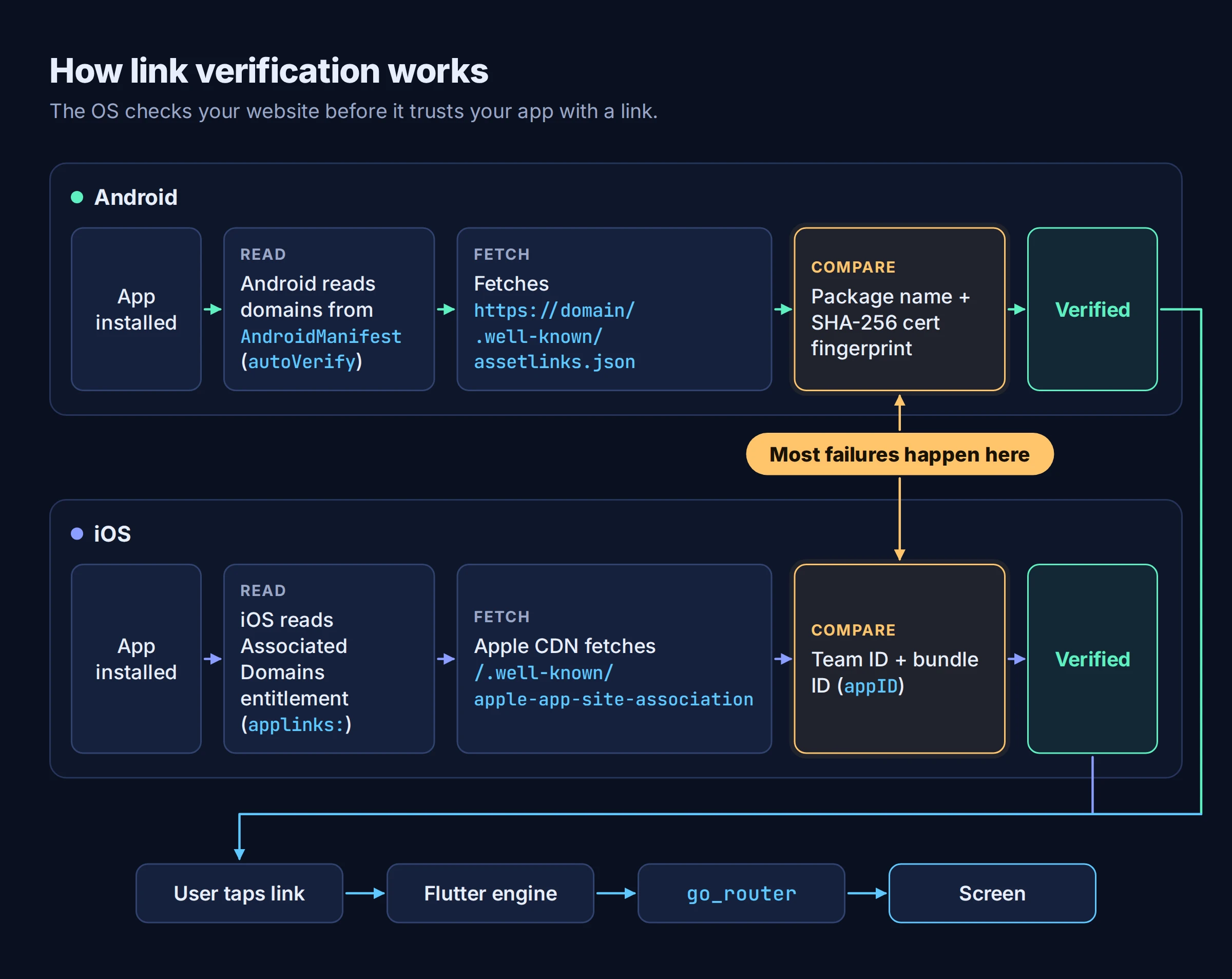
One platform difference matters when you debug. If the app isn't running, Android passes the link path as the initial route, while iOS starts at / and gets the link a moment later. With the Router API, which go_router uses, a link that arrives while the app is open replaces the current pages. On the web there's nothing to configure: paths work the same way, read from the URL fragment (/#/path) unless you change the URL strategy.
What changed recently
Three changes catch people who learned deep linking from older tutorials.
The default deep link flag flipped in Flutter 3.27. Flutter's deep linking option changed from false to true, according to the deep links flag breaking-change page. It landed in 3.25.0-0.1.pre and reached stable in 3.27. If you use Flutter's own handling, nothing breaks. If you use a plugin that reads links itself, such as app_links, uni_links or flutter_branch_sdk, you now have to opt out explicitly:
<!-- android/app/src/main/AndroidManifest.xml, inside <activity> -->
<meta-data android:name="flutter_deeplinking_enabled" android:value="false" />
<!-- ios/Runner/Info.plist -->
<key>FlutterDeepLinkingEnabled</key>
<false/>
On Flutter versions earlier than 3.27 it was the other way round: you had to add these keys with true to opt in.
Firebase Dynamic Links is gone. The Firebase Dynamic Links FAQ says the service shut down on August 25, 2025, and that "all links clicked will return a HTTP 404 status response to end users." For deep linking after install, Firebase recommends App Links and Universal Links. If you need full feature parity with Dynamic Links, it lists third-party providers including Adjust, Airbridge, AppsFlyer, Bitly and Branch. If you used Firebase Authentication's email link sign-in, older app versions without the updated Auth SDK lost that feature at shutdown.
The official samples now import material_ui. Material is moving out of the Flutter SDK into a standalone material_ui package that you can opt in to from Flutter 3.47 (migration guide). The Flutter deep linking cookbooks already import package:material_ui/material_ui.dart, and go_router 18.0.0 migrated to it and raised its minimum to Flutter 3.44 (changelog). If your project still imports package:flutter/material.dart, swap the import in the examples below.
Step 1: Route incoming links with go_router
Start with routing, because platform setup is useless if the app can't read the URL. The Flutter cookbooks use go_router, which the Flutter team maintains. Version 18.0.2 was published on September 28, 2026.
flutter pub add go_router material_ui
Here's a minimal router that handles / and /products/<id>, plus an error screen for paths you don't support:
import 'package:go_router/go_router.dart';
import 'package:material_ui/material_ui.dart';
void main() => runApp(MaterialApp.router(routerConfig: router));
final router = GoRouter(
  routes: [
    GoRoute(
      path: '/',
      builder: (context, state) => const HomeScreen(),
      routes: [
        GoRoute(
          path: 'products/:id',
          builder: (context, state) =>
              ProductScreen(id: state.pathParameters['id']!),
        ),
      ],
    ),
  ],
  errorBuilder: (context, state) => NotFoundScreen(uri: state.uri),
);
HomeScreen, ProductScreen and NotFoundScreen are your own widgets. Path parameters use the :name syntax and come back through state.pathParameters. Query parameters are in state.uri.queryParameters. Because products/:id is nested under /, a cold-start link to /products/42 builds the home screen underneath it, so the back button has somewhere to go.
Some links need a guard. A link to /orders/123 from an email shouldn't show an order to a signed-out user. A top-level redirect can send them elsewhere first:
redirect: (context, state) {
  final signedIn = AuthState.of(context).isSignedIn;
  if (!signedIn && state.uri.path.startsWith('/orders')) {
    return '/signin?from=${Uri.encodeComponent(state.uri.toString())}';
  }
  return null; // no redirect
},
Return null to let navigation through. After redirectLimit redirects (5 by default) go_router shows the error screen, so watch for loops between guards. go_router also has an onEnter callback that runs once per navigation, before any redirect, and can block it. Where auth state lives is a separate choice; we compared the options in our Flutter state management guide.
One gotcha: a deep link wins over initialLocation on launch. Setting overridePlatformDefaultLocation: true flips that and ignores the link that opened the app, so only set it on purpose.
Step 2: Set up Android App Links
An App Link is an http or https deep link verified for your domain. The Flutter App Links cookbook has three steps.
Add the intent filter
In android/app/src/main/AndroidManifest.xml, inside the <activity> for .MainActivity:
<intent-filter android:autoVerify="true">
    <action android:name="android.intent.action.VIEW" />
    <category android:name="android.intent.category.DEFAULT" />
    <category android:name="android.intent.category.BROWSABLE" />
    <data android:scheme="http" android:host="example.com" />
    <data android:scheme="https" />
</intent-filter>
Replace example.com with your domain. The VIEW action, both categories and an http/https scheme are what make Android attempt automatic verification.
Get your SHA-256 fingerprint
Android checks the certificate that signed the installed app, so the fingerprint you publish must match it:
- Google Play App Signing: Google re-signs your app with the app signing key before distribution. Copy that key's SHA-256 from Play Console under Release > Setup > App Integrity > App Signing. Your upload key isn't what Play-installed copies are signed with.
- Local keystore: run
keytool -list -v -keystore <path-to-keystore>. - Debug builds: these are signed with the debug keystore, which Android creates at
$HOME/.android/debug.keystore(app signing docs). That fingerprint is different again.
sha256_cert_fingerprints is a list, so you can include release and debug fingerprints, or one per flavor. If you haven't set up Play App Signing yet, our Google Play publishing walkthrough covers it.
Host assetlinks.json
[{
  "relation": ["delegate_permission/common.handle_all_urls"],
  "target": {
    "namespace": "android_app",
    "package_name": "com.example.deeplink_cookbook",
    "sha256_cert_fingerprints": [
      "FF:2A:CF:7B:DD:CC:F1:03:3E:E8:B2:27:7C:A2:E3:3C:DE:13:DB:AC:8E:EB:3A:B9:72:A1:0E:26:8A:F5:EC:AF"
    ]
  }
}]
Use your application ID as package_name. Then serve the file the way Android expects (Android: configure website associations):
- at
https://<domain>/.well-known/assetlinks.json, over HTTPS, even if your intent filter also listshttp - with no redirects (no 301 or 302)
- as
application/json - on every host your intent filters declare
That last point bites on older devices. On Android 11 and lower, the app becomes the default handler only if verification passes for all hosts in the manifest (Android: verify App Links). On those versions, one broken subdomain is enough to stop the app becoming the default handler for any of your links.
Tip: On Android 15 and later (with Google services), assetlinks.json can also carry dynamic rules in a relation_extensions field to include or exclude paths and query parameters without shipping an app update. Older versions ignore those fields, and the rules can't add domains your manifest doesn't declare.
Step 3: Set up iOS Universal Links
A Universal Link is the iOS equivalent: an http or https link verified against your domain. The Flutter Universal Links cookbook and Apple's Supporting associated domains cover the details.
Add the Associated Domains entitlement
In Xcode, open ios/Runner.xcworkspace, select the Runner target, go to Signing & Capabilities, add Associated Domains, and add applinks:example.com. Or edit ios/Runner/Runner.entitlements directly:
<?xml version="1.0" encoding="UTF-8"?>
<!DOCTYPE plist PUBLIC "-//Apple//DTD PLIST 1.0//EN" "http://www.apple.com/DTDs/PropertyList-1.0.dtd">
<plist version="1.0">
<dict>
  <key>com.apple.developer.associated-domains</key>
  <array>
    <string>applinks:example.com</string>
  </array>
</dict>
</plist>
Enter only the host, with no path, query or trailing slash. Each subdomain (example.com, www.example.com) needs its own entry and serves its own file. In the entitlement, a *. prefix such as *.example.com matches all subdomains. The Flutter cookbook warns that personal development teams don't support the Associated Domains capability. If you're heading for App Review afterwards, our post on the App Store rejections we see most is worth a read.
Host apple-app-site-association
Name the file apple-app-site-association with no .json extension:
{
  "applinks": {
    "details": [
      {
        "appIDs": ["S8QB4VV633.com.example.deeplinkCookbook"],
        "components": [
          { "/": "/products/*" },
          { "/": "/orders/*" }
        ]
      }
    ]
  }
}
Each appIDs entry is <team ID>.<bundle ID>. The components array limits which paths open the app, and you can add "exclude": true to an entry to keep a path in the browser. { "/": "/*" } sends every path to the app, which is rarely what you want for a site with marketing or help pages.
Host it at https://<domain>/.well-known/apple-app-site-association, using HTTPS with a valid certificate and no redirects.
Warning: Since iOS 14, devices don't fetch this file from your server. They ask Apple's CDN, which requests your file within 24 hours, and devices check for updates about once a week after install. A file you fixed five minutes ago may not be what the device sees. For development, add ?mode=developer to the entitlement (applinks:example.com?mode=developer) to bypass the CDN. That only works for apps signed with a development profile, on devices where you've opted in to developer mode.
How do you test Flutter deep links?
Test in two layers. First prove the app routes the URL correctly, then prove the OS has verified the domain. Mixing them up is how people spend an afternoon fixing JSON that was never the problem.
Android
Install the app first (flutter run once is enough), then fire the intent directly:
adb shell 'am start -a android.intent.action.VIEW \
    -c android.intent.category.BROWSABLE \
    -d "https://example.com/products/42"' \
    com.example.deeplink_cookbook
The Flutter cookbook warns that this launches the app even if your web files are missing, so it only tests the app side. To check verification itself, use the package manager. From Android 12 you can trigger and inspect verification manually:
# Reset verification state for the app
adb shell pm set-app-links --package com.example.deeplink_cookbook 0 all
# Ask the system to verify again
adb shell pm verify-app-links --re-verify com.example.deeplink_cookbook
# Read the result (Android suggests waiting at least 20 seconds)
adb shell pm get-app-links com.example.deeplink_cookbook
You want each domain to show verified. none means verification hasn't finished or nothing was recorded. legacy_failure means the legacy verifier rejected the domain. A number of 1024 or higher is a device-specific verifier error code.
You can also ask Google's Digital Asset Links API what it reads from your site:
https://digitalassetlinks.googleapis.com/v1/statements:list?source.web.site=https://example.com&relation=delegate_permission/common.handle_all_urls
If you sideload a debug build instead of installing from Play, the Flutter cookbook notes you might need to turn on Supported web addresses for the app manually in system settings.
iOS
On the Simulator, after flutter run:
xcrun simctl openurl booted https://example.com/products/42
On a physical device, type the URL into the Notes app and tap it. Remember the CDN delay above. If the link opens Safari, check whether Apple's CDN has your current file before you change anything else.
DevTools deep link validator
Flutter DevTools has a Deep Links tab that imports your project, checks everything from website files to manifest config, and tells you how to fix what it finds. Since Flutter 3.27 it covers both Android and iOS. Run it before you read adb output line by line.
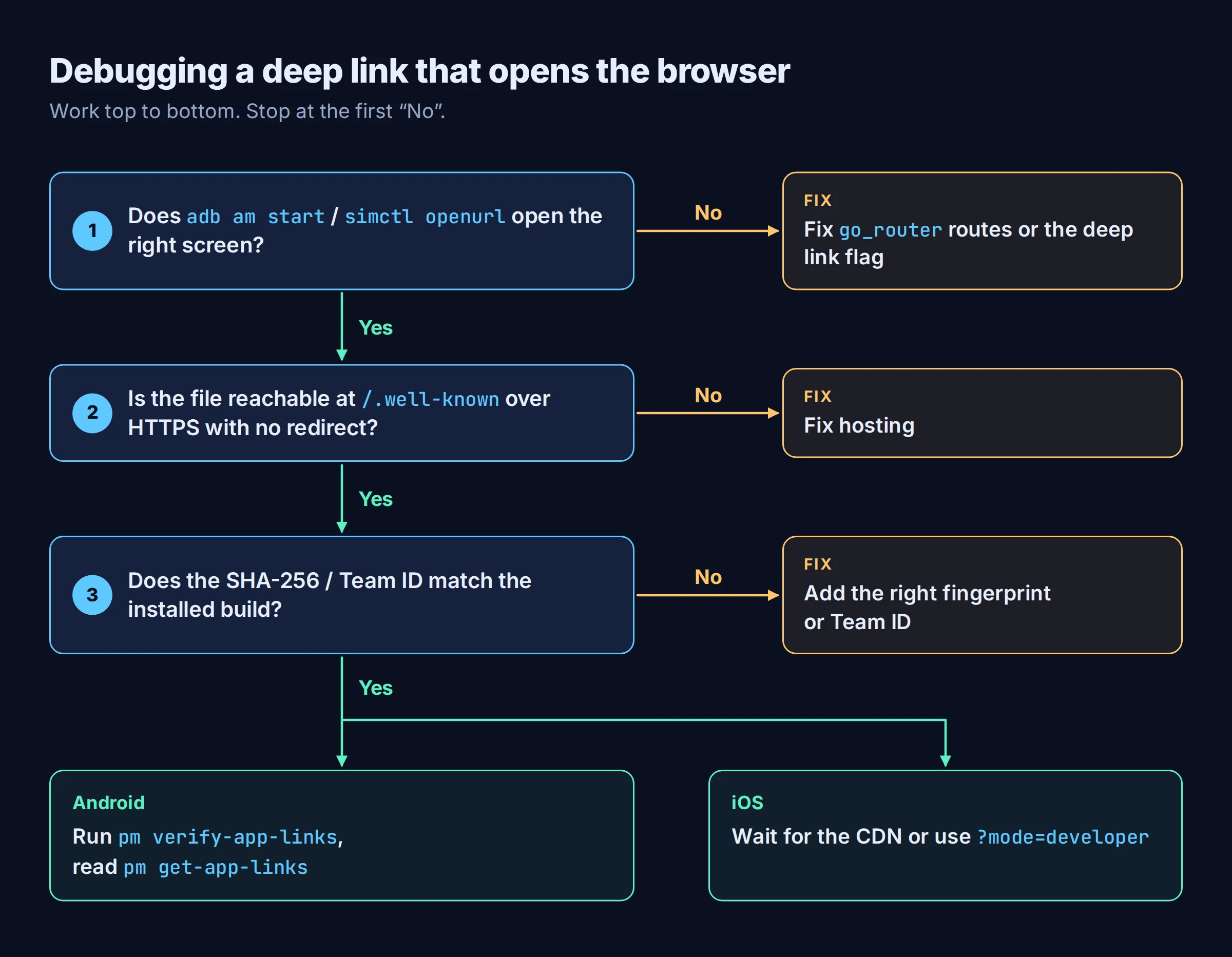
Common failure modes and fixes
| Symptom | Likely cause | Fix |
|---|---|---|
| Link opens the app but lands on the home screen or an error page | The path isn't defined in go_router | Add the route; test with adb am start or simctl openurl |
Link handling broke after a Flutter upgrade, with a plugin like app_links |
Flutter's handler is on by default since 3.27 and competes with the plugin | Set flutter_deeplinking_enabled / FlutterDeepLinkingEnabled to false |
| Android opens the browser for Play installs, but debug builds work (or the reverse) | assetlinks.json lists the upload or debug key, not the key that signed the installed app |
Add the Play app signing key's SHA-256, and the debug one if you want it |
pm get-app-links shows a failure on one host |
That host serves no file, redirects, or returns the wrong content type | Serve the file on every declared host over HTTPS, no redirect, application/json |
| iOS opens Safari even though the file is correct | Apple's CDN still has the old file (or none) | Wait, or use ?mode=developer while developing |
| iOS never verifies | appIDs uses the wrong team ID or bundle ID, or the file has a .json extension |
Use <team ID>.<bundle ID> exactly and drop the extension |
| Old Firebase Dynamic Links return 404 | The service shut down on August 25, 2025 | Move to App Links and Universal Links on your own domain, or a third-party provider if you need full Dynamic Links parity |
Frequently asked questions
Do I need a package like app_links for Flutter deep linking?
Usually not. Flutter's built-in handler passes the URL to your router, and the official cookbooks use only go_router. Reach for app_links when you want the raw URI yourself, and turn off Flutter's handler if you do.
What replaced Firebase Dynamic Links?
For opening an installed app, Firebase recommends Android App Links and iOS Universal Links. For full feature parity, it lists third-party providers including Adjust, Airbridge, AppsFlyer, Bitly and Branch.
Do I need my own domain?
Yes. Both App Links and Universal Links are verified against a file on a domain you control. The Flutter cookbooks suggest Firebase Hosting or GitHub Pages as a temporary option while you test.
Can I use the same domain for Android and iOS?
Yes, and you usually should. Serve both files from the same /.well-known/ directory, and keep the paths in go_router, the intent filter and the AASA components in sync.
Using this in a FlutterGo project
FlutterGo generates a standard Flutter project that you own. When we built a reading list app in FlutterGo on September 30, 2026, it used go_router for navigation. FlutterGo doesn't set up deep links for you, though: you still add the intent filter, the Associated Domains entitlement and the two .well-known files yourself, exactly as described here. The routes you'd link to are plain GoRoute entries in your own code, so you can see exactly which screen each URL opens.
What to do next
If you're adding links to an app this week, do it in this order: routes, then Android, then iOS, and publish the two .well-known files a day before you need iOS links to work, so Apple's CDN has them. Then open DevTools' Deep Links tab and fix whatever it flags before a user finds it for you.
Checked October 1, 2026 against Flutter 3.47 docs, go_router 18.0.2, material_ui 1.5.0, and the Android, Apple and Firebase developer docs linked above. Code follows the official documentation; it was checked against the docs but not compiled for this article.