
Flutter State Management in 2026: setState, Provider, Riverpod or Bloc?
A current guide to Flutter state management: when setState is enough, and how Provider 6, Riverpod 3 and Bloc 9 compare, with working code and a decision guide.
Most "which state management should I use?" articles were written for a Flutter that no longer exists. They show StateNotifierProvider as modern Riverpod, quote a docs page that has since been rewritten, and pin package versions from 2023. If you pick a tool from that advice, you'll end up learning APIs that the maintainers have already moved into a legacy import.
This guide is dated on purpose. Everything below was checked on September 30, 2026, against the official Flutter docs, pub.dev, riverpod.dev and bloclibrary.dev. The code targets Flutter 3.47, Riverpod 3.4.3, flutter_bloc 9.1.1 and provider 6.1.5+1.
Key takeaways
- The official Flutter docs no longer name a winner. They say
setStateis all you need for state that lives in one widget, and they useproviderin the beginner tutorial and for dependency injection in the architecture guide. - Riverpod 3 changed a lot: legacy providers moved to
legacy.dart, there's oneNotifierclass, failed providers retry automatically, and offline persistence and mutations exist but are still experimental. - Bloc 9 is stable and conservative. Start with
Cubitand move toBlocwhen you need event traceability or transformers such as debounce. - Pick by the shape of your state and your team, not by popularity charts. Download counts on pub.dev include transitive installs and don't tell you how many apps use a package.
What does "state management" mean in Flutter?
State management is how your app decides where data lives, who can change it, and which widgets rebuild when it changes. Flutter's docs split state into two kinds, and that split is still the most useful place to start (Flutter docs: ephemeral vs app state).
Ephemeral state is state "you can neatly contain in a single widget": the current page of a PageView, the selected tab in a BottomNavigationBar, the progress of an animation. For this, the docs say, "there is no need to use state management techniques... All you need is a StatefulWidget."
App state is state you "want to share across many parts of your app, and that you want to keep between user sessions": login info, preferences, a shopping cart, read/unread flags.
The docs admit the boundary is fuzzy. There is "no clear-cut, universal rule," and the rule of thumb they quote is "Do whatever is less awkward." That's more honest than most comparison posts, and it's the lens this guide uses.
If you're curious how an AI builder makes this decision for a whole app, we wrote about how FlutterGo plans screens, models and state before it generates code.
What do the official Flutter docs recommend in 2026?
As of September 2026, the Flutter docs don't recommend a single package. Many ranking articles still say "Flutter officially lists Provider, Riverpod, Bloc…". The state management options page now lists only the built-in approaches (setState, ValueNotifier/InheritedNotifier, InheritedWidget/InheritedModel) and sends you to the pub.dev state-management topic for community packages, noting that "the best choice for your app often depends on the app's complexity, your team's preferences, and the specific problems you need to solve."
Where the docs do show a preference, it's for plain Flutter plus provider:
- The simple app state tutorial uses
providerand says that if you're new to Flutter and don't have a strong reason to choose something else, "this is probably the approach you should start with." - The architecture recommendations mark "Use
ChangeNotifiersandListenablesto handle widget updates" as Conditional, "strongly recommend" dependency injection, and name theproviderpackage for it. They also recommend the Command pattern for handling user actions. - The architecture case study builds view models that extend
ChangeNotifierand rebuilds views withListenableBuilder.
Riverpod and Bloc aren't mentioned on the recommendations page at all. That doesn't make them second-class. It means the choice beyond the basics is yours, and the docs say so plainly.
The four options, with the same counter in each
A counter is a small example, but it's the fastest way to see how much ceremony each approach needs. All four versions below do the same thing: show a number and increment it.
1. setState: the right answer more often than people admit
import 'package:flutter/material.dart';

class CounterPage extends StatefulWidget {
  const CounterPage({super.key});

  @override
  State<CounterPage> createState() => _CounterPageState();
}

class _CounterPageState extends State<CounterPage> {
  int _count = 0;

  @override
  Widget build(BuildContext context) {
    return Scaffold(
      body: Center(child: Text('$_count')),
      floatingActionButton: FloatingActionButton(
        onPressed: () => setState(() => _count++),
        child: const Icon(Icons.add),
      ),
    );
  }
}
setState tells the framework that this State object changed and schedules a rebuild of the widget (State.setState API). Two rules matter in practice: the callback must be synchronous, and calling it after dispose() is an error, so async work needs a mounted check or, better, cancellation.
Use it when the state belongs to one widget: form field focus, an expanded/collapsed panel, a tab index that nothing else reads. The docs point out that the Flutter team uses setState for all state in many simple samples, including the flutter create starter app.
Move on when you find yourself passing callbacks three widgets deep or lifting state up just so a sibling can read it.
2. Provider: the docs' default for shared state
import 'package:flutter/material.dart';
import 'package:provider/provider.dart';

class Counter extends ChangeNotifier {
  int _count = 0;
  int get count => _count;

  void increment() {
    _count++;
    notifyListeners();
  }
}

void main() {
  runApp(
    ChangeNotifierProvider(
      create: (_) => Counter(),
      child: const MyApp(),
    ),
  );
}

class MyApp extends StatelessWidget {
  const MyApp({super.key});

  @override
  Widget build(BuildContext context) {
    return MaterialApp(
      home: Scaffold(
        body: Center(child: Text('${context.watch<Counter>().count}')),
        floatingActionButton: FloatingActionButton(
          onPressed: () => context.read<Counter>().increment(),
          child: const Icon(Icons.add),
        ),
      ),
    );
  }
}
Provider is a thin layer over InheritedWidget. You put a model above the widgets that need it, then watch it to rebuild or read it inside callbacks. The provider README is explicit that read doesn't cause a rebuild and can't be called inside build.
Strengths: very little code, it's what the official tutorial teaches, and it doubles as the dependency-injection tool the architecture guide recommends.
Known limits, from the README's own FAQ: you get a ProviderNotFoundException if a widget asks for a provider that isn't above it in the tree, and you can't have two providers of the same type visible to one widget; only the closest ancestor wins.
The latest release is 6.1.5+1, published August 19, 2025. It's mature and stable, not abandoned.
3. Riverpod 3: Provider's successor, now with async built in
Riverpod comes from the same author as Provider and describes itself as its "spiritual successor" (riverpod.dev). Providers are global declarations instead of widgets in the tree, so there's no ProviderNotFoundException and no same-type limit.
Here's the counter using the current Notifier API, without code generation:
import 'package:flutter/material.dart';
import 'package:flutter_riverpod/flutter_riverpod.dart';

class Counter extends Notifier<int> {
  @override
  int build() => 0;

  void increment() => state++;
}

final counterProvider = NotifierProvider<Counter, int>(Counter.new);

void main() {
  runApp(const ProviderScope(child: MyApp()));
}

class MyApp extends ConsumerWidget {
  const MyApp({super.key});

  @override
  Widget build(BuildContext context, WidgetRef ref) {
    final count = ref.watch(counterProvider);
    return MaterialApp(
      home: Scaffold(
        body: Center(child: Text('$count')),
        floatingActionButton: FloatingActionButton(
          onPressed: () => ref.read(counterProvider.notifier).increment(),
          child: const Icon(Icons.add),
        ),
      ),
    );
  }
}
If you use code generation (riverpod_annotation 4.0.7 and riverpod_generator 4.0.9, run with dart run build_runner watch -d), the notifier shrinks to an annotated class, as in the official counter example:
@riverpod
class Counter extends _$Counter {
  @override
  int build() => 0;

  void increment() => state++;
}
Codegen is optional. The generator's own page calls it "entirely optional," though it recommends it if you don't mind the build step.
What changed in Riverpod 3.0
Riverpod 3.0 shipped on September 10, 2025, and the 3.x line has kept moving since (3.4.3 landed on September 3, 2026). The changes that matter most, from What's new in Riverpod 3.0 and the changelog:
- Legacy providers moved, not removed.
StateProvider,StateNotifierProviderandChangeNotifierProvidernow live inpackage:flutter_riverpod/legacy.dart. If a tutorial imports them from the main library, it predates 3.0. - One
Notifierclass.AutoDisposeNotifier,FamilyNotifierand their combinations are gone. Family arguments go through the notifier's constructor. - Automatic retry. Providers that fail during initialization retry by default, starting at 200 ms and doubling up to 6.4 s. You can configure or disable it.
- Pause and resume. Listeners pause when their widgets aren't visible, so off-screen streams stop doing work.
Ref.mounted, for checking whether a provider was disposed during anawait.==filtering on every provider, so identical values no longer trigger rebuilds.- Sealed
AsyncValue, which enables exhaustiveswitchstatements.valueOrNullis nowvalue. - Testing helpers such as
ProviderContainer.test(), which disposes itself after the test. - Offline persistence and mutations. Both are real features, and both are still marked experimental. No 3.x release through 3.4.3 declares them stable, so treat them as previews in production code.
A test for the counter is short:
test('counter starts at 0 and increments', () {
  final container = ProviderContainer.test();
  expect(container.read(counterProvider), 0);
  container.read(counterProvider.notifier).increment();
  expect(container.read(counterProvider), 1);
});
Strengths: async data is a first-class citizen through AsyncValue, providers can be read without a BuildContext, and dependency overrides make testing easy.
Costs: a bigger mental model than Provider, an optional-but-common codegen step, and real API churn. The 3.0 migration touched notifiers, observers and AsyncValue. One practical warning: the example tab on pub.dev still shows a StateProvider counter imported from legacy.dart, so don't copy it as the modern pattern.
4. Bloc and Cubit: predictable by design
import 'package:flutter/material.dart';
import 'package:flutter_bloc/flutter_bloc.dart';

class CounterCubit extends Cubit<int> {
  CounterCubit() : super(0);

  void increment() => emit(state + 1);
}

class CounterPage extends StatelessWidget {
  const CounterPage({super.key});

  @override
  Widget build(BuildContext context) {
    return BlocProvider(
      create: (_) => CounterCubit(),
      child: const CounterView(),
    );
  }
}

class CounterView extends StatelessWidget {
  const CounterView({super.key});

  @override
  Widget build(BuildContext context) {
    return Scaffold(
      body: Center(
        child: BlocBuilder<CounterCubit, int>(
          builder: (context, state) => Text('$state'),
        ),
      ),
      floatingActionButton: FloatingActionButton(
        onPressed: () => context.read<CounterCubit>().increment(),
        child: const Icon(Icons.add),
      ),
    );
  }
}
That's a Cubit: methods emit new states. A full Bloc replaces methods with events, as in the bloc README:
sealed class CounterEvent {}

final class CounterIncrementPressed extends CounterEvent {}

class CounterBloc extends Bloc<CounterEvent, int> {
  CounterBloc() : super(0) {
    on<CounterIncrementPressed>((event, emit) => emit(state + 1));
  }
}
The Bloc docs give a clear answer on which to pick: "If you are unsure about which to use, start with Cubit and you can later refactor or scale-up to a Bloc as needed." Cubit wins on simplicity. Bloc wins on traceability, because you can see which event caused each state change, and on event transformers such as debouncing a search field.
Testing has its own package, bloc_test:
blocTest(
  'emits [1] when CounterIncrementPressed is added',
  build: () => CounterBloc(),
  act: (bloc) => bloc.add(CounterIncrementPressed()),
  expect: () => [1],
);
Strengths: one enforced way to change state across the whole app, no code generation, and a testing story that reads like a spec. Current versions: bloc 9.2.1 (May 12, 2026) and flutter_bloc 9.1.1 (May 2, 2025). One detail worth knowing: flutter_bloc depends on provider under the hood.
Costs: more files per feature once you move from Cubit to Bloc, since events and states become classes.
How do they compare side by side?
| setState | Provider 6 | Riverpod 3 | Bloc 9 / Cubit | |
|---|---|---|---|---|
| Best fit | State owned by one widget | Small-to-medium apps, teams new to Flutter | Async-heavy apps: APIs, caching, refresh | Large teams that want strict, auditable state flow |
| Extra packages | None | provider |
flutter_riverpod (+ optional codegen) |
bloc, flutter_bloc |
| Code generation | No | No | Optional | No |
| Async loading/error handling | Manual | Manual | Built in (AsyncValue) |
Modeled as states |
| Testing | Widget tests | Widget tests with providers | ProviderContainer.test(), overrides |
bloc_test |
| Official docs mention | Yes, for ephemeral state | Yes, tutorial + DI | Not on recommendations page | Not on recommendations page |
| Latest stable (Sept 30, 2026) | Flutter 3.47 | 6.1.5+1 | 3.4.3 | bloc 9.2.1 / flutter_bloc 9.1.1 |
What pub.dev numbers do and don't tell you
pub.dev metrics are the numbers people cite most, and the ones most often misread. As of September 30, 2026:
| Package | Likes | Pub points | Downloads (last 30 days) |
|---|---|---|---|
| provider | 11,004 | 150 / 160 | about 1.11M |
| flutter_bloc | 8,079 | 160 / 160 | about 1.96M |
| flutter_riverpod | 2,910 | 140 / 160 | about 3.28M |
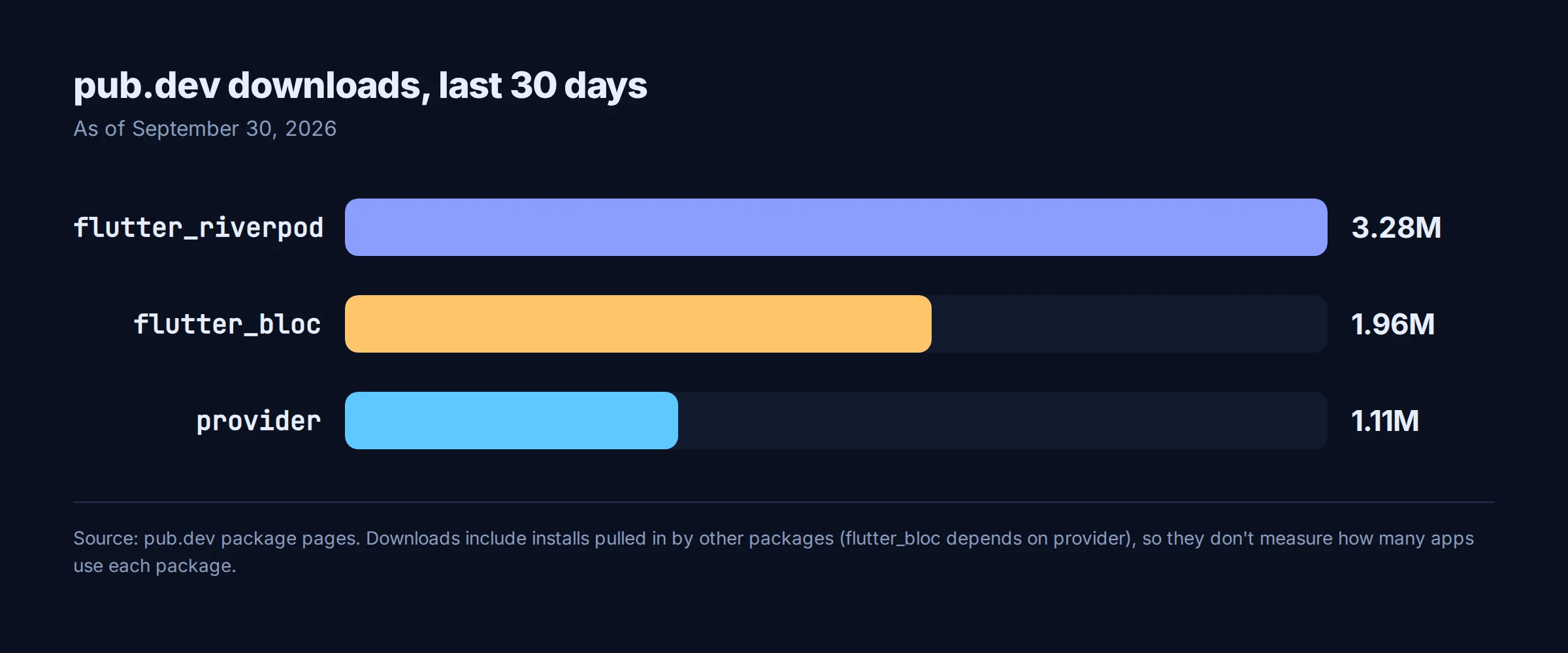
Read these carefully. Likes accumulate over a package's lifetime, and provider is the oldest of the three. Download counts include installs pulled in by other packages. flutter_bloc, for example, depends on provider, so every flutter_bloc install also counts as a provider download. None of these numbers tell you how many shipped apps use a package. They show that all three are widely used and actively maintained, and not much more than that.
Which should you choose? A decision guide
This is our recommendation, not a rule from the docs:
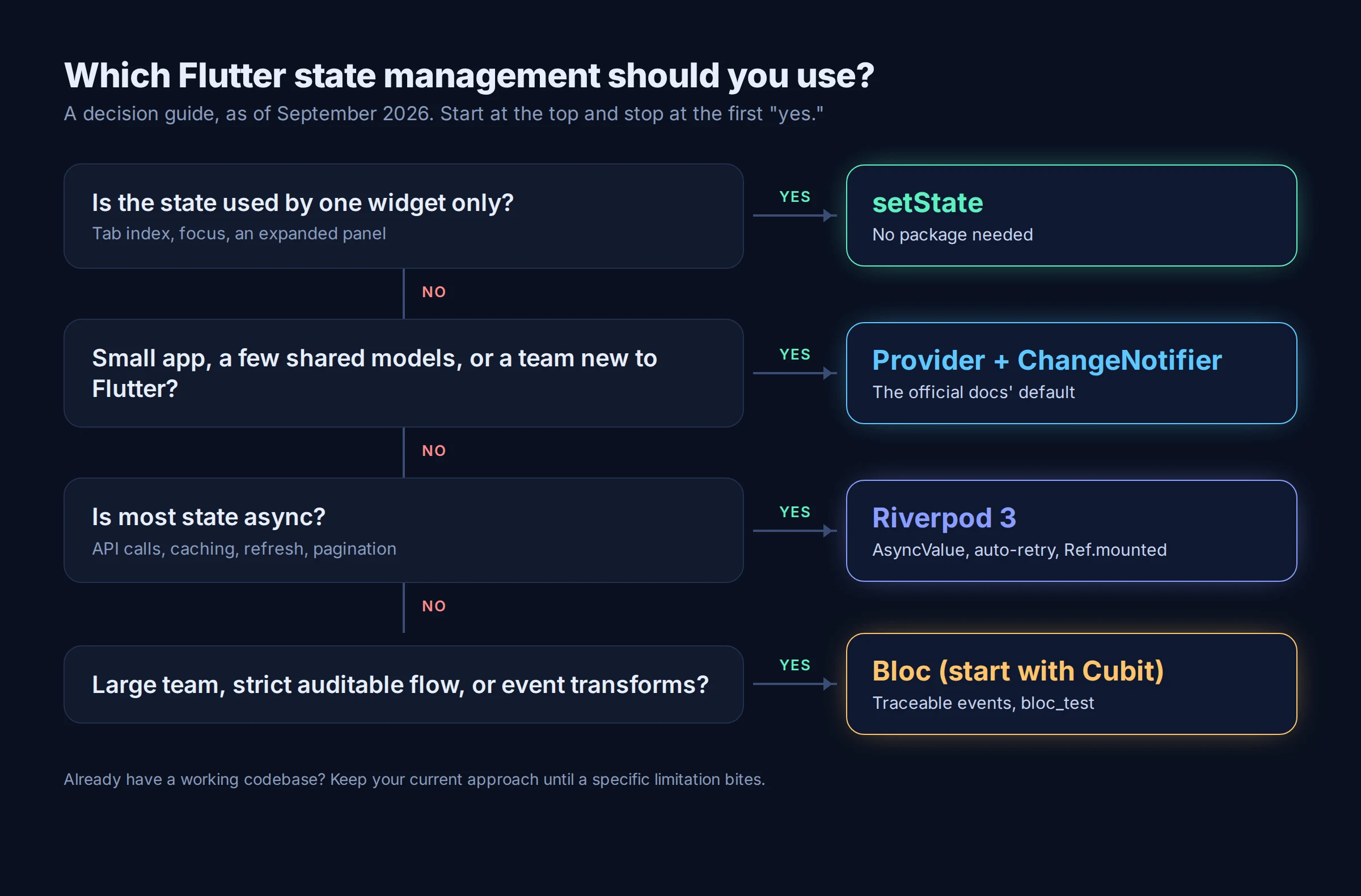
- Is the state used by one widget only? Use
setState. The docs back you here, and adding a package would be pure overhead. - Is it a small app with a few shared models, or a team new to Flutter? Use
ChangeNotifierwithprovider. It's the path the official tutorial and architecture guide take, and it scales further than its reputation suggests. - Is most of your state async (API calls, caching, pull-to-refresh, pagination)? Use Riverpod 3.
AsyncValue, automatic retry andRef.mountedremove a lot of hand-written loading/error plumbing. Leave persistence and mutations alone until they're stable, or use them knowing they may change. - Is it a larger team that needs a strict, reviewable flow, or do you need event transformations? Use Bloc, and start with Cubit, as the Bloc docs suggest.
- Do you already have a working codebase? Keep what you have. Migrate only when a specific limitation bites, such as Provider's same-type limit or legacy Riverpod APIs you want to move off.
Most real apps mix levels: setState for a text field's focus, and one of the other three for everything shared. That's normal, not a smell.
Frequently asked questions
Is Provider deprecated in 2026?
No. provider 6.1.5+1 was released in August 2025, and the Flutter docs still use it in the beginner tutorial and recommend it for dependency injection. Riverpod calls itself Provider's successor, but that's the Riverpod docs' framing, not a deprecation notice.
Is Riverpod 3 stable enough for production?
The core (providers, Notifier, AsyncNotifier, AsyncValue) is stable and has had four minor releases since 3.0. Offline persistence and mutations are still labeled experimental as of 3.4.3, so avoid building critical flows on them until that label is removed.
Riverpod vs Bloc: which is easier to learn?
Cubit is usually the gentler start: a class with methods that emit states, and no codegen. Riverpod asks you to learn providers, refs, notifiers and AsyncValue, but it pays that back in async-heavy apps. If your team already knows Provider, Riverpod will feel familiar.
Do I need code generation for Riverpod?
No. Every Riverpod feature works without riverpod_generator. Codegen shortens declarations and is recommended by its maintainers, at the cost of running build_runner.
Which state management does FlutterGo use?
It depends on what you ask for. When we built a reading list app in FlutterGo on September 30, 2026 without naming a package, it generated a single ChangeNotifier controller, go_router for navigation, and ListenableBuilder in the screens, which is the pattern the Flutter architecture guide uses. We walk through that build in our FlutterGo reading list tutorial. The output is standard Dart in your own repo, so you can ask for Riverpod or Bloc in your prompt, refactor later, or mix in setState where it's the simpler tool.
Where to go from here
If you're starting a new app this week, the choice is less dramatic than the internet makes it sound. All four approaches are maintained, documented and used in production. Match the tool to the state: setState for local, Provider for simple shared state, Riverpod 3 when async dominates, Bloc when you want a strict, traceable flow.
If you'd rather see a real feature wired up than a counter, describe your app in FlutterGo, name the state management approach you want in the prompt, and read the generated code side by side with the live preview. It's a quick way to see how your chosen approach holds up across real screens, async data and navigation.
Related reading: how FlutterGo turns a simple prompt into a working Flutter app and building full-stack Flutter apps with Supabase.
Versions and metrics checked September 30, 2026. Code examples follow each package's official documentation for the versions listed; they were checked against the docs but not compiled for this article.