Build a Notes App with FlutterGo, Then Fix the Search Bug One Letter Caused
We built Margin, a notes app with multi-word search, from one FlutterGo prompt, found the letter that broke its highlight, and fixed it with one more prompt.
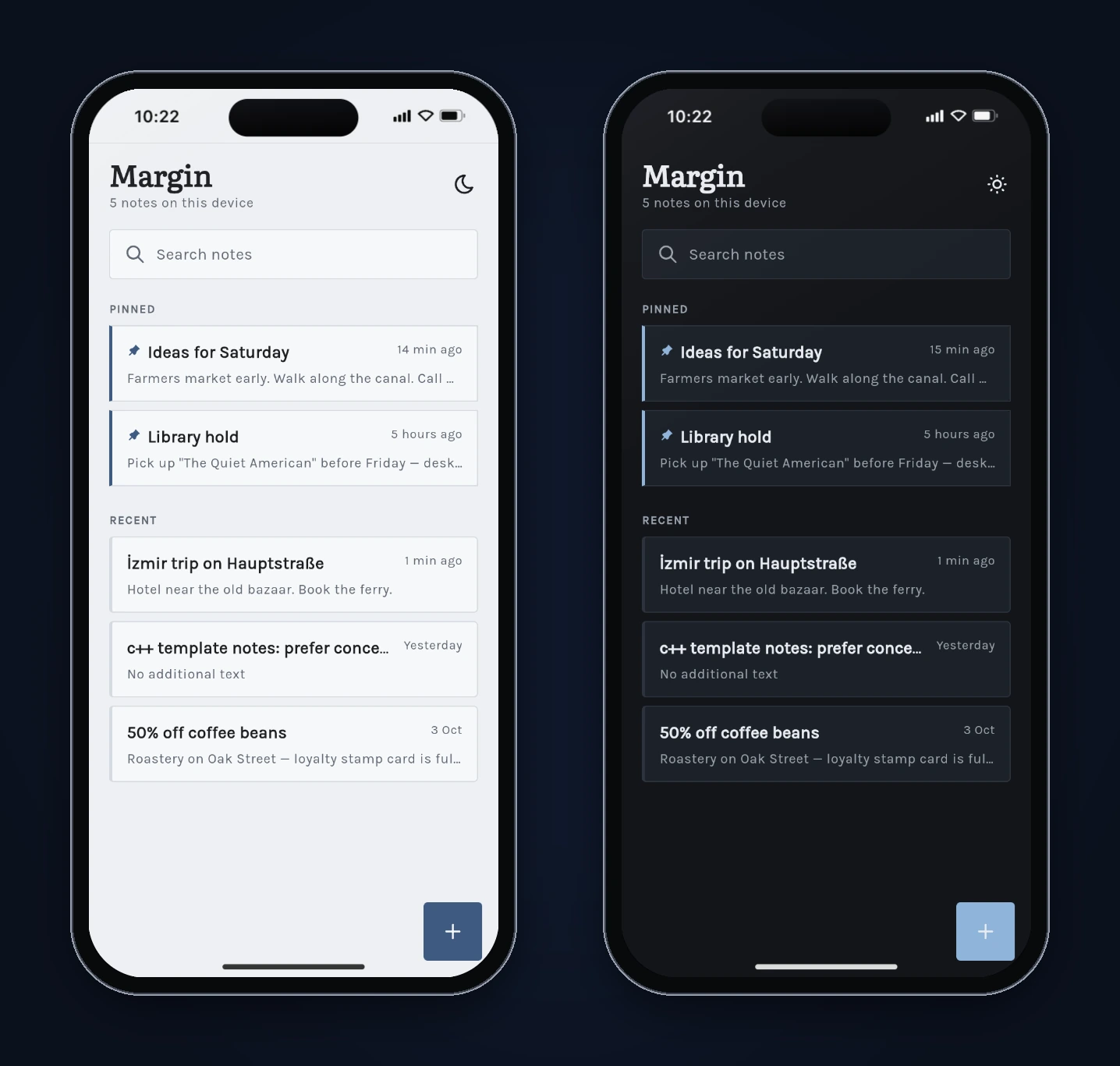
A notes app sounds like the easiest thing you could build. A list, an editor, a search box. The hard part is the search box: it has to match words in any order, ignore upper and lower case, cope with symbols like "c++" and "50%", and highlight exactly what matched.
We asked FlutterGo, our AI Flutter app builder, for a notes app called Margin and then tried to break its search. Most of it held up. One note didn't: a title that starts with the Turkish capital İ made the highlight land one letter late, and a second search turned the whole row into a grey box. This tutorial covers the prompt, what FlutterGo built, the tests we ran, the code behind the bug, and the one follow-up prompt that fixed it. Every screen below is a real screenshot from the build, taken on October 7, 2026.
Key takeaways
- One prompt produced a working notes app in 13 minutes 5 seconds: pinned notes, autosave, a search that matches every word in any order, highlighted matches, delete with Undo, light and dark mode, and on-device storage.
- Search passed the tests we expected to be hard: "c++", "50%", "([\" and two words in reverse order all worked without a crash.
- The highlight code searched a lowercased copy of the text and used those positions on the original. In a browser, "İ" lowercases to two characters, so every position after it was off by one.
- One fix prompt (2 minutes 37 seconds) made the highlight map each match back to the original letters. We re-ran the searches on the new build.
What you'll build
Margin is a local-only notes app:
- Notes: pinned notes first, then the rest by last edited, each row with a title, a one-line preview and a relative time ("5 hours ago", "Yesterday", "3 Oct").
- Search at the top of the list: every word you type must appear in the title or body, in any order, ignoring case. Matching words are highlighted.
- Editor: title and body, saved as you type, with pin and delete buttons. Deleting asks first and offers Undo.
- Light and dark mode, and everything saved on the device.
FlutterGo generated it with Riverpod (flutter_riverpod 2.6.1) for state, go_router 14.6.2 for navigation and shared_preferences 2.5.3 for storage. The prompt didn't name any packages.
Step 1: The prompt
We started from Studio Home with Mobile app selected and pasted this prompt:
Build a Flutter app called Margin for writing quick notes and finding them again.

Screens
1. Notes: a list of notes, pinned notes first, then the rest by last edited (newest first). Each row shows the title (or the first line of the body if there's no title), a one-line preview, and when it was last edited ("2 min ago", "Yesterday", "3 Oct"). A search field at the top and a + button to add a note.
2. Editor: title field and a multi-line body. It saves automatically as I type and when I go back. A pin toggle and a delete button in the app bar. Deleting asks for confirmation; after deleting, the Notes list shows an Undo snackbar.
3. Search results (inside the Notes screen): as I type, filter notes whose title or body contains every word I typed, in any order, ignoring upper/lower case. Highlight the matching words in the title and preview. Show "No notes match 'xyz'" when nothing matches.

Rules
- A new note that is left completely empty is discarded when I go back. It never appears in the list.
- "Last edited" changes only when the title or body actually changes. Opening a note, or pinning/unpinning it, does not change it.
- Search treats every character literally, so queries like "c++", "(draft)" or "50%" work and never crash.
- Search must not slow down typing: wait about 200 ms after the last keystroke before filtering.
- Save everything on the device so notes are still there after closing the app.

Style: clean and quiet, light and dark mode, comfortable reading text.
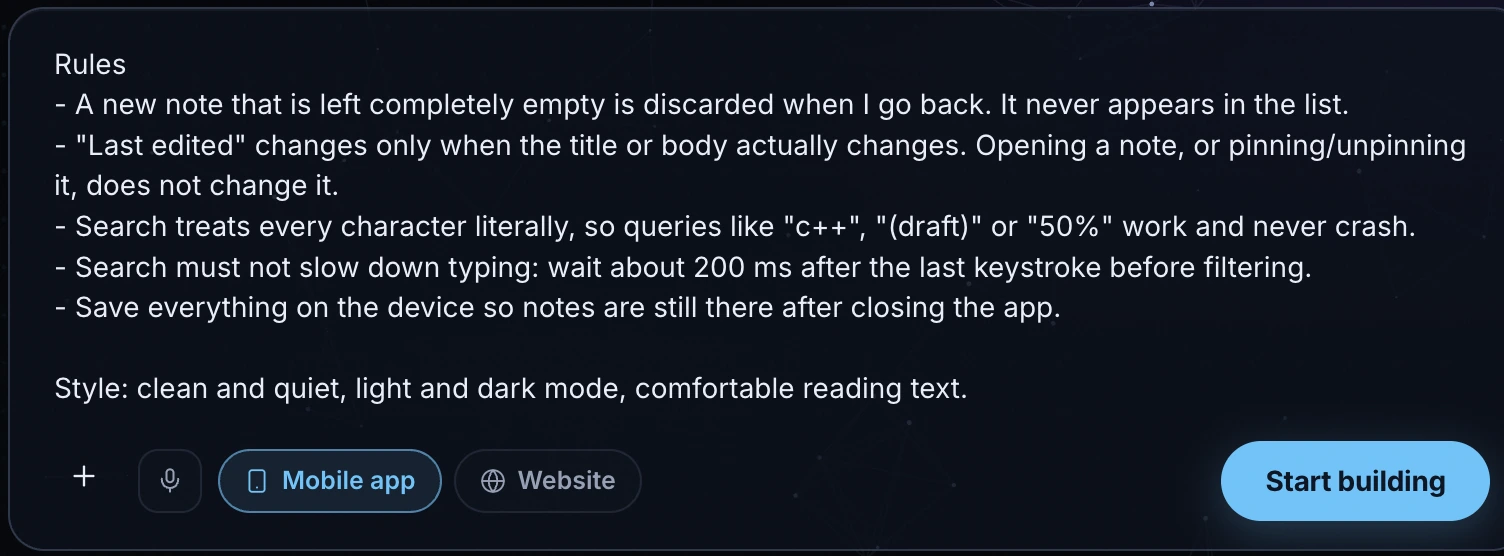
The prompt describes behaviour, not code. The rules section matters most for a notes app. It says what "last edited" means, what happens to an empty note, and which awkward queries must work. Those rules became our test plan.
Step 2: What FlutterGo built
The build finished in 13 minutes 5 seconds after 73 logged steps, with 161 files added. It came with an onboarding flow and four sample notes, including one titled "c++ template notes" and one called "50% off coffee beans", so the awkward searches had something to find.
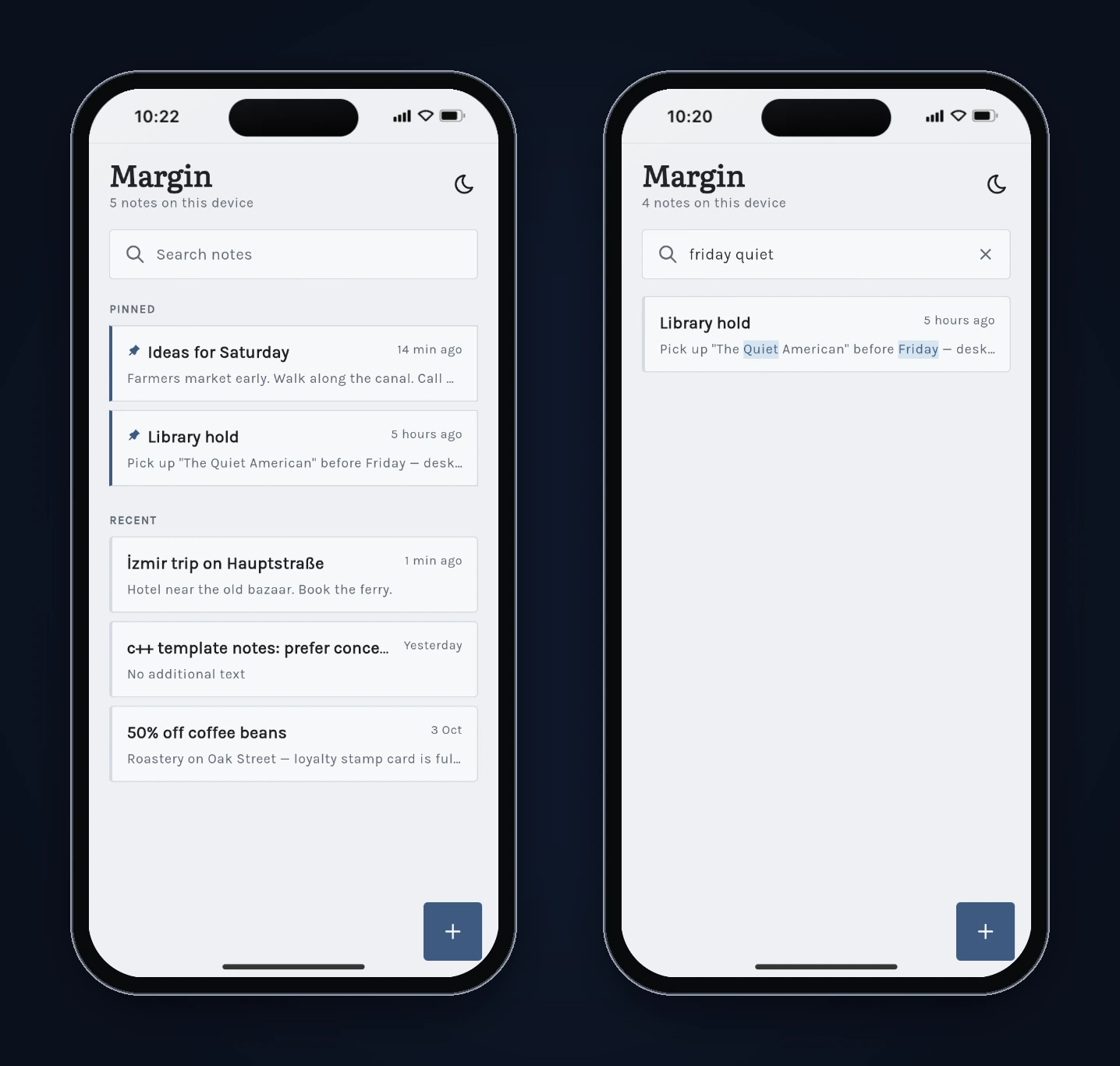
The matching rule lives in lib/shared/widgets/highlight_text.dart. It splits the query on whitespace and checks that every word appears in the lowercased title and body:
bool noteMatchesQuery(String title, String body, List<String> words) {
  if (words.isEmpty) return true;
  final hay = '$title\n$body'.toLowerCase();
  for (final w in words) {
    if (!hay.contains(w.toLowerCase())) return false;
  }
  return true;
}
contains takes a plain string, not a regular expression, so "c++" and "(draft)" are matched literally. That's why the symbol tests below pass.
Step 3: Test the search like a real notebook
We ran the tests in the static preview of the build (an iPhone 16 frame in Chrome).
| Test | Result |
|---|---|
| Search "COFFEE" for "50% off coffee beans" | Pass: found, "coffee" highlighted |
| Two words in reverse order ("friday quiet") | Pass: found, both highlighted |
| "c++", "50%" | Pass: found the right note, symbols highlighted |
| "([\" and "xyz" | Pass: no crash, "No notes match '…'" shown |
| New note left empty, then back | Pass: discarded |
| New note with only spaces, then back | Discarded (the prompt didn't say; we noted it) |
| Open a note, pin it, go back | Pass: it moved to Pinned, "5 hours ago" unchanged |
| Delete, then Undo | Pass: confirmation dialog, then the note came back with its date |
| Reload the preview | Pass: notes and pins still there |
| Dark mode | Pass: no layout problems in the list |
| A note titled "İzmir trip on Hauptstraße" | Fail: see below |
The last test is the one in our test plan for case-folding. We wrote a note titled İzmir trip on Hauptstraße, with a Turkish dotted capital İ and a German ß, then searched it.
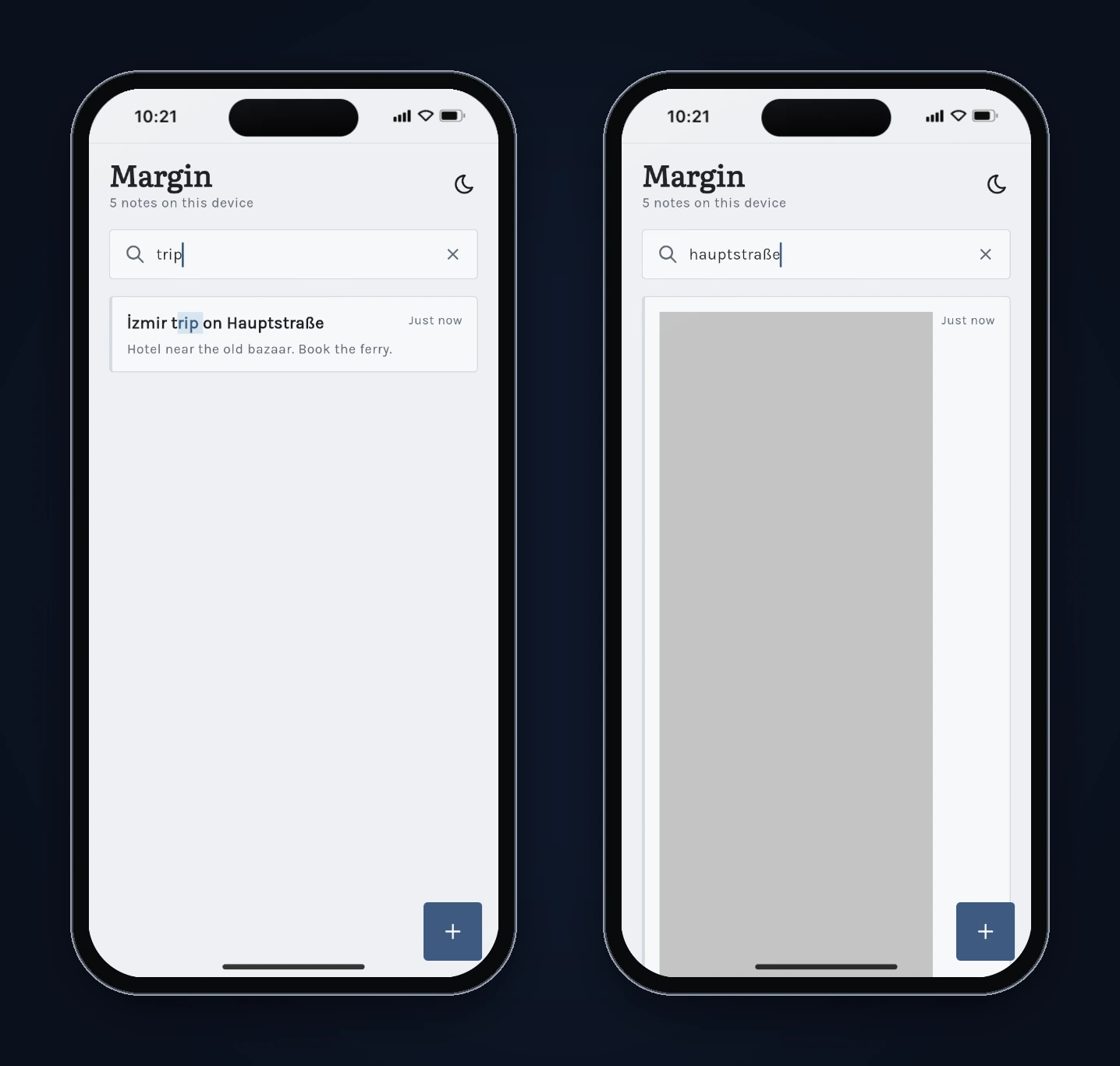
Searching trip found the note but highlighted "rip " instead of "trip". Searching hauptstraße found it too, and the row turned into a grey box. In a release Flutter build, a grey box is what you see when a widget throws an error while it builds.
Step 4: Read the code behind the bug
The highlight widget lowercases the text once, finds each word in the lowercased copy, and then cuts the original text at those positions:
final lower = text.toLowerCase();
// ...
final at = lower.indexOf(word.toLowerCase(), i);
// ...
spans.add(TextSpan(
  text: text.substring(matchStart, matchStart + matchLen),
  style: highlightStyle,
));
That only works if toLowerCase() never changes the length of the string. Usually it doesn't. "İ" (U+0130) is the exception we hit. We checked on October 7, 2026:
- In JavaScript,
"İ".toLowerCase()returns two characters (we checked in Node.js), and the browser preview behaved the same way: "i" followed by a combining dot. Our 25-character title became 26 characters when lowercased, so "trip" was found at position 7 instead of 6. The highlight started one letter late. - "hauptstraße" was found at the end of the lowercased title. Cut at the same positions, the original string is one character too short, so
substringthrew aRangeErrorand the row failed to build. - On the Dart VM (Dart 3.13.5; Android and iOS release builds run compiled Dart rather than JavaScript), we checked every Unicode code point and found none whose
toLowerCase()changes length. So on a phone this title probably wouldn't break the row. The code still depends on an assumption a platform doesn't promise, and the web build shows what happens when it fails.
There's a second, smaller effect. Because "İ" lowercases to "i" plus a dot in the browser, searching izmir finds nothing in the preview. Our fix prompt didn't ask about that, and the fixed build behaves the same way, so treat it as a known limit.
Step 5: Fix it with one prompt
We described the symptom and the rule, not the code:
Search highlighting breaks on some notes. I made a note titled "İzmir trip on Hauptstraße" (capital İ with a dot, as in Turkish). Searching "trip" highlights "rip " instead of "trip", one letter too late. Searching "hauptstraße" turns that whole row into a grey box. Highlighting must mark exactly the letters that match, in any language, and a search must never break a row. Everything else about search should stay the same.
FlutterGo finished in 2 minutes 37 seconds. The new highlight_text.dart adds a CaseFoldMap that builds the lowercase copy one character at a time and records, for each position in it, where that character came from in the original. A match in the lowercase copy is turned back into an original range before the text is cut, and anything out of bounds returns null instead of throwing:
(int, int)? originalRange(int foldStart, int foldLength) {
  if (foldLength <= 0 || foldStart < 0) return null;
  final foldEnd = foldStart + foldLength;
  if (foldEnd > folded.length) return null;
  final start = _origStart[foldStart];
  final end = _origEnd[foldEnd - 1];
  if (start < 0 || end < start) return null;
  return (start, end);
}
FlutterGo's summary also said "ß" changes length when lowercased. It doesn't in Dart or JavaScript ("ß" stays "ß"), so don't take that part of the explanation as a fact. The fix doesn't depend on it.
Step 6: Re-test
We opened the new build's static preview and repeated the searches. The notes from the first build were still there, because both builds run from the same preview origin and read the same saved data.
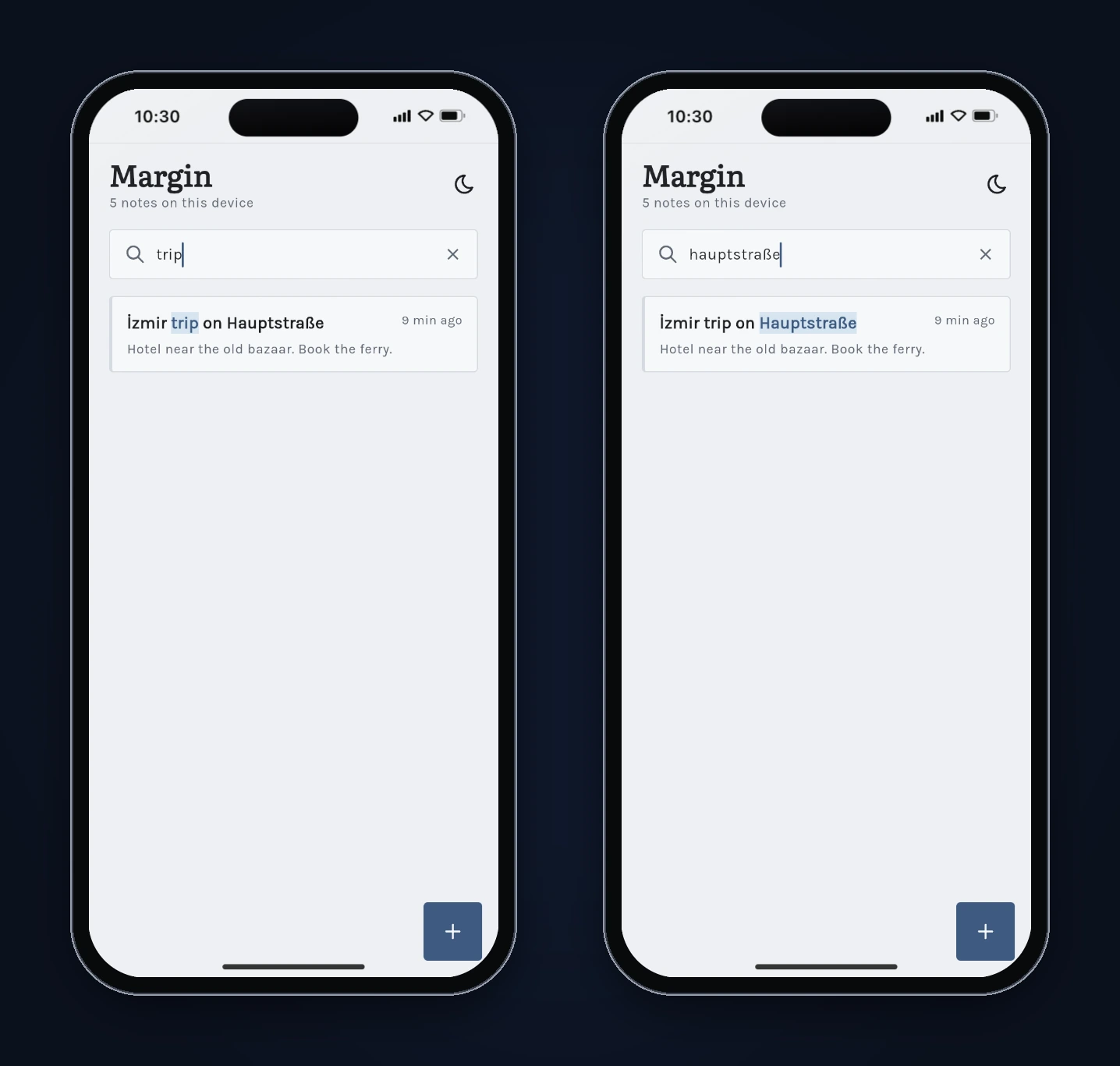
| Search | First build | Fixed build |
|---|---|---|
| trip | Highlighted "rip " | Highlights "trip" |
| hauptstraße | Grey box | Highlights "Hauptstraße" |
| friday quiet | Both words | Both words (unchanged) |
| c++ | Highlighted | Highlighted (unchanged) |
| izmir | No match | No match (known limit) |
What we'd check before shipping it
- Test on a phone, not only the browser. The bug we found depends on how the platform lowercases text. Run the same searches on Android and iOS builds.
- Decide what "ignore case" means for your users. If you expect Turkish text, searching "izmir" should probably find "İzmir". That needs a normalisation step on both the query and the text, and it's a product decision as much as a code one.
- Look at large notebooks. Margin filters every note on each search. That's fine for hundreds of notes. For thousands, a local database with full-text search, such as SQLite FTS through
sqfliteor Drift, is the next step. Our guide to local databases in Flutter compares the options. - We didn't check every rule in the code. We confirmed the 200 ms search delay only by typing quickly in the preview, not by reading the debounce code, and we didn't test a very long note or 200% text size.
FAQ
Can FlutterGo build a notes app with search from one prompt? Yes. One prompt produced Margin in 13 minutes 5 seconds, with pinned notes, autosave, multi-word search with highlighting, delete with Undo, dark mode and local storage. The highlight bug needed one more prompt.
Why did one letter break the search highlight? The highlight positions came from a lowercased copy of the text. In JavaScript, "İ" lowercases to two characters, so the positions no longer lined up with the original string. Mapping each match back to the original characters fixed it.
Does the bug affect Android and iOS? Probably not for this title. On the Dart VM we found no character whose lowercase form changes length. It showed up in the browser preview, where lowercasing followed JavaScript's rules. Test your own web build if you ship one.
Where are the notes stored?
On the device, with shared_preferences. There's no account or sync in this build.
Can I get the code? Yes. FlutterGo projects are standard Flutter projects. You can download the code or connect GitHub from the studio. New to this? Our list of where AI app builders still fail shows the kinds of bugs worth testing for in any generated app.