AI Mobile App Builder for Startups: From Idea to Store Listing
How a startup gets from app idea to a live store listing with an AI mobile app builder: what to check in a builder, the real waits, and every listing field.
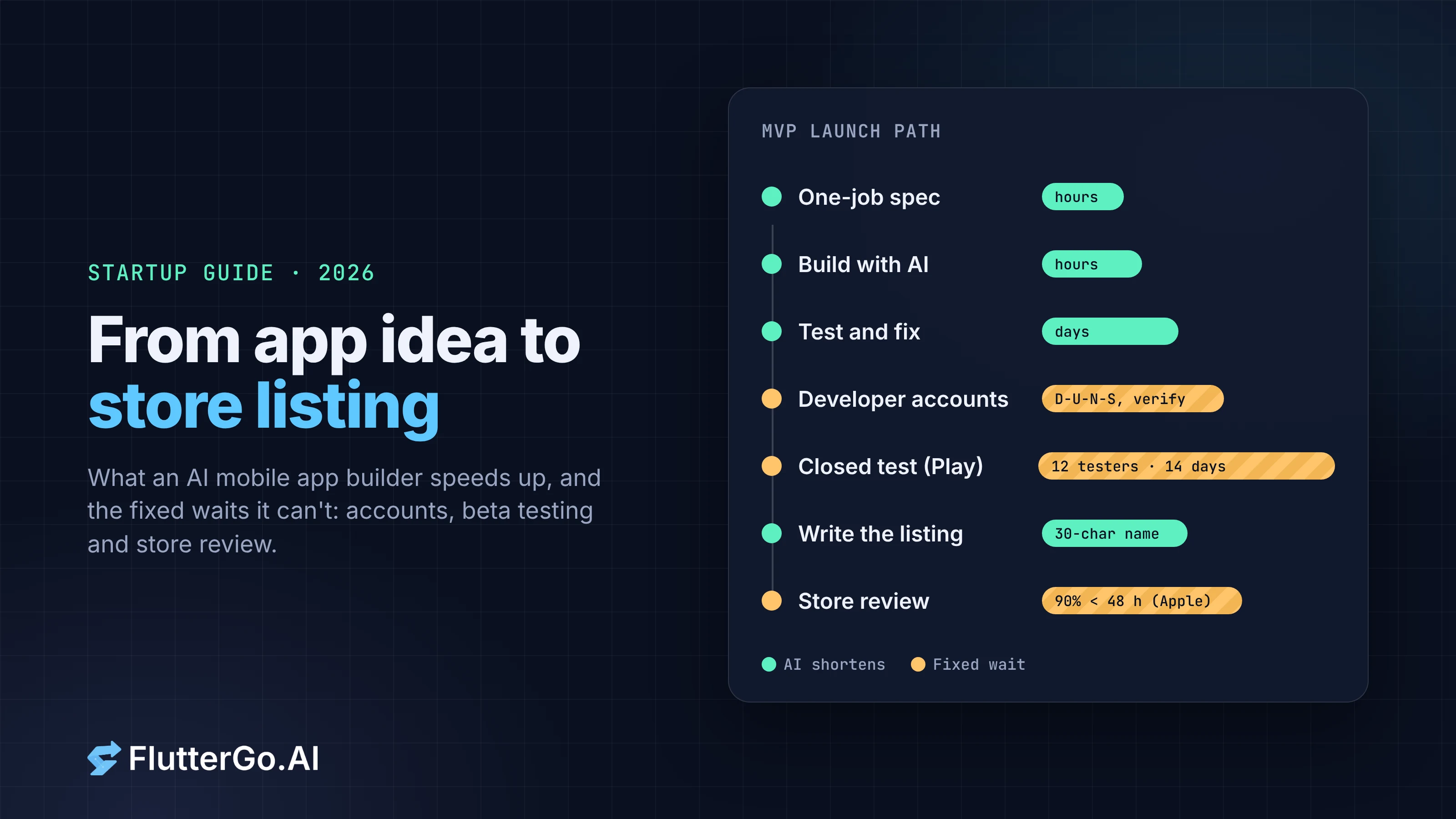
An AI mobile app builder can take a startup from a written idea to an app running on iPhone and Android in an afternoon. The code is no longer the slow part. The slow parts are the ones with fixed waits: account verification, beta testing rules, store review, and a listing that has to fit into 30-character boxes.
This guide follows an MVP from idea to submitted listing and puts dates and limits on each step, so you can plan a launch around the parts an AI can't speed up.
Key takeaways
- Judge an AI mobile app builder on four things a startup will need later: native output for both stores, source code you own, a real backend option, and store builds.
- Building is now fast. Calendar time goes to fixed waits: a new personal Google Play account needs a closed test with at least 12 testers for 14 days before production, and Apple says it typically reviews 90% of submissions in under 48 hours.
- Enrol as an organization if you want the company name, not a founder's name, shown as the seller. Both Apple and Google ask organizations for a D-U-N-S Number.
- Write the listing early. Both stores cap the app name at 30 characters; Google's short description is 80 characters, Apple's keyword field 100 bytes.
- Use screenshots of the real app. One set at the largest iPhone size covers smaller iPhones on the App Store; Google Play needs at least two.
What a startup should check in an AI mobile app builder
Most builders demo well. The differences show up when you need to hire a developer, add payments or pass store review. Before you pick one, check the following.
| Question | Why it matters for a startup | Where to look |
|---|---|---|
| Does it output a native app for iOS and Android? | A web wrapper can struggle with Apple's minimum functionality rule (Guideline 4.2) and limits device features | The builder's docs; ask what framework it generates |
| Do you get the source code? | Your first engineering hire, or an agency, has to be able to take over without a rewrite | Export, GitHub sync, and what happens to the code if you cancel |
| What backend does it support? | Sign-in, sync and payments need one; local-only apps can't share data between users | Named integrations (Firebase, Supabase, Stripe) |
| Can it produce signed store builds? | Otherwise you need a Mac, Xcode and your own pipeline before you can ship | Release builds, TestFlight, Google Play upload |
| How is usage priced? | Every round of changes costs something; MVPs take many rounds | Credits or messages per plan |
For FlutterGo, here is what our own site states (checked 7 October 2026). It generates Flutter apps for iOS and Android from one codebase. "You own the source code, and it stays yours even if you cancel", and you can export a Flutter project or push to a private GitHub repo. Firebase, Supabase and Stripe are listed integrations. Release APK, AAB and IPA builds are produced "no Mac required", and "Signed builds go to TestFlight and Google Play through the official store APIs." We wrote more about why code ownership matters in judge an AI app builder by the repo it leaves you.
Hold every builder to the same test, including us: if the claim isn't on the vendor's own site or docs, ask before you rely on it.
Step 1: Cut the idea down to one job
A startup MVP exists to answer one question: will this group of people use this thing? Everything that doesn't help answer it waits.
Write down one user, one job and one number you'll watch. "Independent dog walkers log each walk and see what each client owes this week. We watch how many walks get logged in week two." That sentence decides the screens, the data and the rules the AI needs, and it becomes the core of your first prompt.
Decide one more thing now: does data stay on the phone, or does it sync to an account? Sync means a backend and sign-in, and it changes what you'll declare in the store privacy forms later.
Step 2: Build, test, and budget the rounds
The first version arrives quickly. The rounds after it are where the time and money go, because each bug you find becomes another prompt.
On FlutterGo's pricing page (checked 7 October 2026) the free plan is 5 credits a month with no card, up to 2 projects. Our homepage says those 5 credits "are enough to build a first app and preview it running", and "Shipping it to both stores costs 5 more." Paid plans are $19, $49 and $99 a month for 50, 150 and 500 credits. Check the pricing page for the current numbers and what each plan includes before you budget.
Plan for testing to take longer than building. Every app we've built for a tutorial on this blog had at least one bug a quick tap-through would miss, such as a gift planner that rounded every price and a score keeper that scored two players at once. We collected them in where AI app builders still fail. Test with real data, close and reopen the app, and try the odd values your users will type.
Step 3: Open the accounts in the company's name
Do this in week one. It doesn't depend on the app, and verification can take days.
| Apple Developer Program | Google Play Console | |
|---|---|---|
| Fee | US$99 per membership year | US$25, one time |
| Seller name shown | Individual: your legal name. Organization: the organization's legal name | Developer name you choose |
| Organizations need | A D-U-N-S Number, a legal entity (no DBAs or trade names), a public website on the company's domain, and someone with authority to sign agreements | A D-U-N-S Number, organization name and address, phone number and website |
| Extra rule | None | Personal accounts created after 13 November 2023 must run a closed test with at least 12 testers, opted in for 14 days, before production |
Sources: Apple enrolment, Google Play account types, Google Play fee, Google Play testing requirement. Checked 7 October 2026.
If you're incorporated, enrol as an organization so the App Store shows the company as the seller. If you don't have a D-U-N-S Number yet, request one from Dun & Bradstreet first; both stores need it before they'll verify an organization.
Step 4: Put real people on it before the stores do
Beta testing is where the calendar fills up, so start recruiting testers while the app is still being built.
- iOS: TestFlight lets you invite up to 100 internal testers from your team and up to 10,000 external testers, including through a public link. The first build you send to external testers has to be approved by App Review for TestFlight first (Apple TestFlight, checked 7 October 2026).
- Android: if your Play Console account is a personal one created after 13 November 2023, the 12-tester, 14-day closed test is required before you can apply for production. Fourteen days is the minimum, so plan on about three weeks once you add recruiting and review.
Treat the beta as your first round of user research, not a formality. Ask testers to do the one job from Step 1 and watch the number you picked.
Step 5: Write the store listing, field by field
The listing is where your positioning meets hard character limits. Write it while testers are using the app, not the night before you submit.
| Field | App Store | Google Play |
|---|---|---|
| App name | 2–30 characters | 30 characters |
| Second line | Subtitle, 30 characters | Short description, 80 characters |
| Description | 4,000 characters, plain text | Full description, 4,000 characters |
| Keywords | 100 bytes; names of other apps or companies aren't allowed | No keyword field |
| Promotional text | 170 characters, can change without a new version | No equivalent |
| Screenshots | 1–10 per device size; no transparency | At least 2; 320–3,840 px per side; long side no more than twice the short side; no transparency |
| Icon | From your app's icon set | 512 × 512 px, 32-bit PNG with alpha, up to 1,024 KB |
| Extra graphic | None | Feature graphic, 1,024 × 500 px |
| Video | Up to 3 app previews per device size and language | A YouTube URL; only the first 30 seconds autoplay |
| Required URLs | Privacy policy, support URL with real contact details | Privacy policy (in Play Console and in the app) |
Sources: Apple's App Store Connect reference for app information, platform version information, screenshot specifications and previews and screenshots; Google Play's store listing limits and preview assets. Checked 7 October 2026.
Both stores want the privacy policy inside the app too. Google's User Data policy says "All apps must post a privacy policy link in the designated field within Play Console, and a privacy policy link or text within the app itself", even apps that don't touch personal data.
A few things that save a resubmission:
- Spend the name and subtitle on what the app does. "Walkbook: Dog Walk Log" says more in 22 characters than a clever one-word name.
- Don't stuff keywords. Google warns that "Repetitive or irrelevant use of keywords in the app name, description, or promotional description" can get an app suspended. Apple's keyword field already bars other apps' and companies' names.
- Make screenshots once, at the largest size. On the App Store, if your UI is the same across iPhones, upload the highest-resolution set and App Store Connect scales it down. The large iPhone size accepts 1320 × 2868 px portrait, among others. For Google Play, the "highly recommended" set is at least four screenshots at 1080 px or more.
- Show the real app. Screenshots and preview videos are captured from the build you're submitting. Apple's Guideline 2.1 asks for final versions without placeholder content, and that includes the sample data the AI added while building.
- Have the support page ready. Apple says the support URL "must lead to actual contact information", so a landing page with only a waitlist form won't do.
Before you take screenshots, replace the default app icon and launch screen. Every Flutter project starts with placeholder ones, and they show up in screenshots and on testers' home screens. Our guide to replacing Flutter's default app icon and splash screen covers both platforms.
Step 6: Submit, and plan the launch around review
Apple says App Review typically handles "at least 50% of submissions in less than 24 hours and 90% in less than 48 hours", and that incomplete submissions take longer (App Review, checked 7 October 2026). Use manual release for version 1.0 so an approved build doesn't go live before your launch post does.
Our list of the eight App Store rejections we see most covers the common reasons for a bounce. On the Android side, publishing a Flutter app to Google Play, start to finish walks through the Play Console, and AAB vs APK explains the file Google wants.
A realistic MVP timeline
| Week | Building | Fixed waits running in parallel |
|---|---|---|
| 1 | Write the one-job spec, build the first version, test it yourself | Request a D-U-N-S Number; enrol with Apple and Google |
| 2 | Fix what testing found; replace the icon and launch screen | Recruit 12+ Android testers; TestFlight review for the first external build |
| 3–4 | Iterate on beta feedback; write the listing; capture screenshots | Android closed test runs its 14 days |
| 5 | Submit both apps | App Review (most within 48 hours); Google production access request and review |
An AI builder can shorten the left column. Nothing shortens the right one, so start it on day one.
When to bring in a developer
An AI mobile app builder is a good fit for an MVP with clear screens, data and rules. Bring in an engineer, at least to review, before real users trust the app with payments, health data or anything regulated, or when the backend needs logic of its own. If the builder gave you the code, that engineer starts from a working Flutter project instead of a rewrite. Who should use FlutterGo covers how founders, developers and agencies tend to split that work.
FlutterGo is an AI Flutter app builder: describe the app, test it in a live preview, keep the code, and send signed builds to TestFlight and Google Play from the same workspace. The free plan needs no card.
FAQ
What is an AI mobile app builder? A tool that turns a written description of an app into working mobile app code, usually with a live preview so you can test as it builds. Some generate native code for iOS and Android; others produce web apps or wrappers, so check what yours outputs.
How long does it take a startup to get an app into the stores? Building can take hours. Plan for about four to five weeks overall, mostly because of fixed waits: account verification, a 14-day closed test on Google Play for new personal accounts, and store review.
Should a startup register as an individual or an organization? If the company is a legal entity, enrol as an organization so its name appears as the seller on the App Store. Both Apple and Google ask organizations for a D-U-N-S Number.
Do I need a Mac to publish an iOS app built with AI? Not with every builder. FlutterGo produces signed IPA builds and uploads them to TestFlight through Apple's official APIs, so no Mac is needed. Otherwise you'd use Xcode on a Mac or a cloud CI service running macOS.
What are the App Store and Google Play name limits? Both cap the app name at 30 characters. Apple adds a 30-character subtitle; Google adds an 80-character short description.
Store requirements and FlutterGo plan details checked on the official pages on 7 October 2026. Stores change their rules; check the linked pages before you set a launch date.