Build a Packing List App with FlutterGo, Then Fix the Trip You Couldn't Leave
We built a packing list app with FlutterGo from one prompt, then fixed two real bugs: a new trip with no way back, and nights miscounted at a clock change.
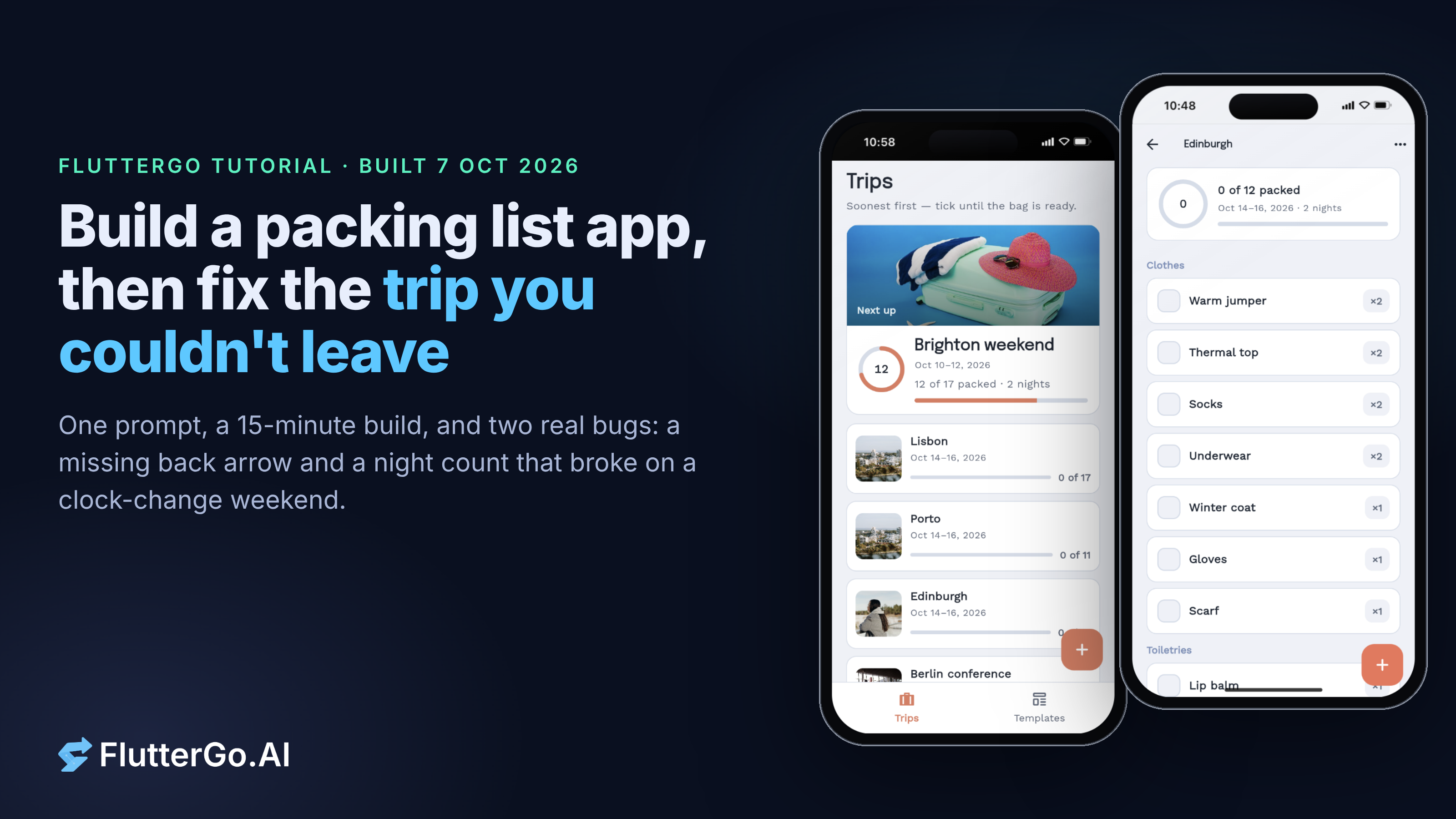
We built Packwell, a packing-list app with trips, reusable templates and "per night" quantities, from one prompt in the FlutterGo studio. The first build ran after 14 minutes 43 seconds. Testing it turned up one bug you hit within a minute of using the app, and reading the generated Dart turned up a second one that only shows on a clock-change weekend. Both took one plain-English fix prompt each.
This walkthrough shows the exact prompts, what we tested and what we didn't, the two bugs, and the code behind them.
What you need
- A FlutterGo account. We built this on 7 October 2026.
- About 20 minutes, most of it waiting for the build.
- Optional: the Dart SDK if you want to rerun our date check (we used Dart 3.13.5).
The generated project uses flutter_riverpod 2.6.1 for state, go_router 14.6.2 for navigation and shared_preferences 2.5.3 for storage, with sdk: ^3.12.2 in its pubspec.yaml. That's what this build produced. Another build from the same prompt could differ.
Step 1: Describe the app
This is the prompt we pasted into the studio, unchanged:
Build a Flutter app called Packwell for packing for trips.

Screens
1. Trips: a list of upcoming trips (name, dates, "18 of 32 packed" and a progress bar), soonest first. Past trips in a collapsed "Past" section. A + button to add a trip.
2. New trip: name, start date, end date, and pick one or more templates to start from (Weekend, Beach, Business, Cold weather). Show "2 nights" under the dates.
3. Trip checklist: items grouped by category (Clothes, Toiletries, Tech, Documents, Other). Tap an item to tick it. Each item has a name and a quantity. Swipe to delete, + to add an item to this trip only. A "Reset ticks" action in the menu for reusing the list.
4. Templates: list of templates; open one to add, rename or delete its items. Items can have a fixed quantity (e.g. 1 passport) or "per night" (e.g. 1 pair of socks per night).

Rules
- Creating a trip COPIES the template items into the trip. Editing, ticking or deleting items in a trip never changes the template or any other trip. Editing a template never changes trips that already exist.
- Nights = number of days between start and end date (Friday to Sunday is 2 nights). "Per night" quantities use nights, with a minimum of 1.
- If two chosen templates contain the same item (same name, ignoring case), merge them into one item and keep the larger quantity.
- The progress text and bar count items, not quantities.
- End date can't be before the start date.
- Save everything on the device so it's still there after closing the app.

Style: calm and friendly, light and dark mode, large tap targets on checklist rows.
The rules section matters more than the screen list. "Copies" and "never changes" tell the generator that a trip owns its own items, which is the part packing apps most often get wrong: tick a sock in one trip and it's ticked everywhere.
Step 2: First run
The studio reported the build done after 14 minutes 43 seconds, then built a web preview. We tested in the static preview page, which shows the app in an iPhone 16 frame.
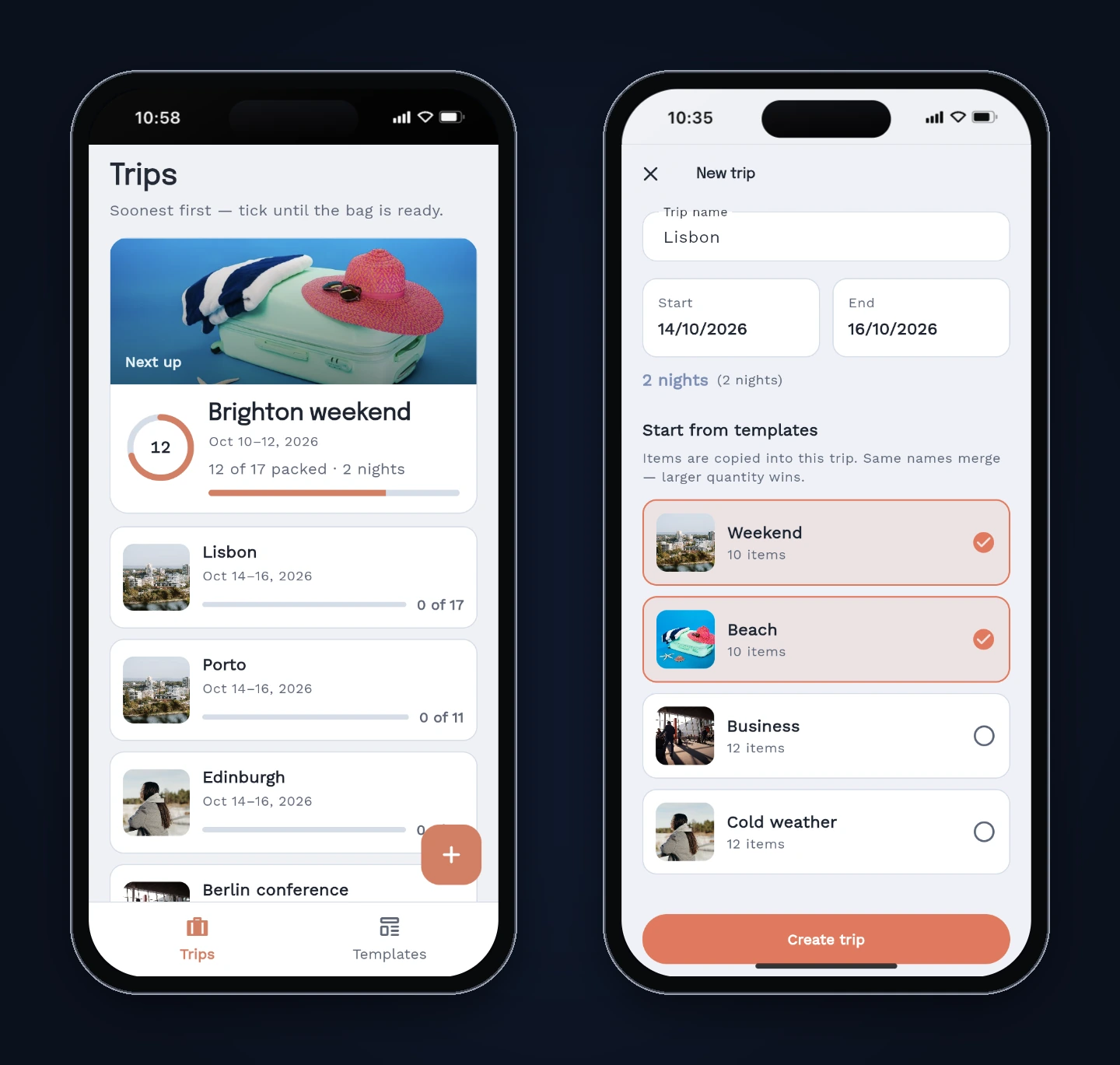
Two things we didn't ask for: the app opened with a three-page onboarding and with four sample trips already in the list (Brighton weekend, Berlin conference, Alps cabin and one past trip). That's fine for a demo, but a real release would start empty. In the web preview the onboarding also came back after every page reload, so the "seen" flag didn't seem to stick there. We didn't chase that further.
Step 3: Test against the rules
We created our own trips and checked the rules one by one. Here's what we actually ran:
| Check | Result |
|---|---|
| Create "Lisbon", Wed 14 – Fri 16 Oct, from Weekend + Beach | 2 nights; per-night items show ×2. Weekend (10 items) + Beach (10 items) became 17 items, so 3 duplicates were merged |
| Tick 3 items in Lisbon | "3 of 17 packed", ring and bar update |
| Add "Sunscreen" to the Weekend template | Weekend now 11 items; Lisbon still 17 (existing trip unchanged) |
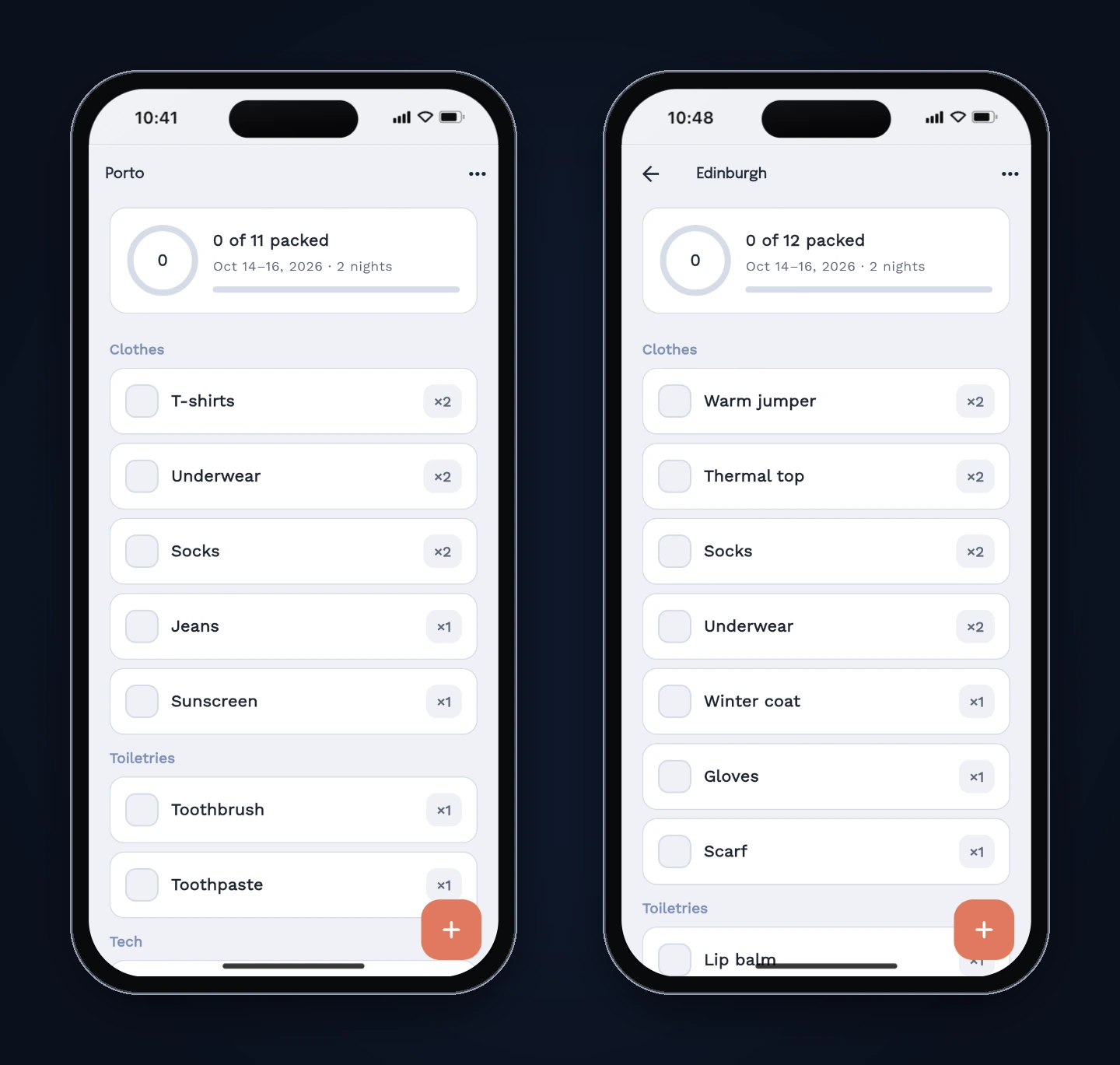
| Create "Porto" from Weekend | 0 of 11, nothing ticked, Sunscreen included |
| Reload the preview | Trips and ticks still there, also after the app was rebuilt |
| "Reset ticks" on Lisbon | 0 of 17, quantities unchanged |
| Back from a newly created trip | No back arrow, no tab bar: stuck (Bug 1) |
Not tested: renaming or swipe-deleting items inside a trip, an end date before the start date, a trip moving into "Past", a same-day trip, long trips, dark mode and large text sizes. The copy rule held in every case we tried, and the code explains why (see Step 6).
The New trip screen also shows the night count twice, as "2 nights (2 nights)". It's cosmetic, so we left it.
Step 4: Bug 1, the trip you couldn't leave
After tapping Create trip, the new trip's checklist opened with no back arrow and no bottom tab bar. The only way back to the Trips list was reloading the app. Opening the same trip later from the Trips list did show a back arrow, which is the clue.
We described the symptom, not a solution:
After I tap Create trip, the new trip's checklist opens with no back arrow and no bottom tab bar, so there's no way back to the Trips list without reloading the app. When I open the same trip later from the Trips list, it does have a back arrow. Creating a trip should open its checklist with the same back arrow, and back should return to the Trips list.
The agent changed one file, new_trip_screen.dart, ran flutter analyze, and finished in 47 seconds. After rebuilding the preview we created a new trip ("Edinburgh"): the back arrow was there and returned to the Trips list.
Why it happened
The router puts the Trips and Templates tabs inside a StatefulShellRoute, but the trip checklist is a separate top-level route:
GoRoute(
  path: '/trips/:tripId',
  pageBuilder: (context, state) {
    final id = state.pathParameters['tripId']!;
    return AppMotion.page(
      state: state,
      motion: PageMotion.sharedAxisX,
      child: TripChecklistScreen(tripId: id),
    );
  },
),
go_router's docs explain the rest: navigating with go "will replace the current stack of screens with the screens configured to be displayed for the destination route" (go_router navigation docs). Because /trips/:tripId isn't nested under /trips, going to it leaves a stack with just the checklist on it, and there's nothing to go back to. Opening a trip from the list pushed it on top of the Trips screen, which is why that path had a back arrow.
The fix keeps the Trips screen underneath. This is the line the agent wrote, with its own comment:
// Replace New trip (not go) so Trips stays under the stack — back arrow works.
context.pushReplacement('/trips/${trip.id}');
pushReplacement swaps the New trip screen for the checklist, so back goes to Trips rather than to the form you just submitted. Nesting :tripId under /trips in the router would also work. If you build anything with go_router, this go versus push difference is worth checking on every "create, then open" flow.
Step 5: Bug 2, one night short on a clock-change weekend
Testing only covered October dates, so we also read the night calculation in pack_models.dart:
int nightsBetween(DateTime start, DateTime end) {
  final a = DateTime(start.year, start.month, start.day);
  final b = DateTime(end.year, end.month, end.day);
  final diff = b.difference(a).inDays;
  return diff < 1 ? 1 : diff;
}
It strips the time of day, which looks right. But DateTime(y, m, d) is local midnight, and Dart's docs warn that in local time the difference between two midnights "may not be a multiple of 24 hours" around daylight saving changes, while inDays only counts whole days (DateTime.difference).
We copied the function into a Dart file and ran it with the time zone set to London, on Dart 3.13.5. UK clocks go forward on 28 March 2027 (GOV.UK):
| Trip (London time) | Hours between midnights | nightsBetween |
Correct |
|---|---|---|---|
| Sat 27 – Mon 29 Mar 2027 | 47 | 1 | 2 |
| Sat 24 – Mon 26 Oct 2026 | 49 | 2 | 2 |
| Fri 9 – Sun 11 Oct 2026 | 48 | 2 | 2 |
So a spring weekend trip in the UK gets one pair of socks instead of two. With the time zone set to New York or Karachi, the same March dates gave 2, because their clocks don't change that weekend. (The US changes on a different date, so US users would hit it then.)
The fix prompt, again describing only the symptom:
On a phone set to UK time, a trip from Saturday 27 March 2027 to Monday 29 March 2027 shows 1 night instead of 2, so the per-night items (socks, T-shirts, underwear) get 1 instead of 2. That weekend is when the UK clocks go forward. Night counts should always be the number of calendar days between the dates, whatever the time zone or clock change.
It finished in 54 seconds. The agent switched both dates to UTC midnight:
int nightsBetween(DateTime start, DateTime end) {
  final a = DateTime.utc(start.year, start.month, start.day);
  final b = DateTime.utc(end.year, end.month, end.day);
  final diff = b.difference(a).inDays;
  return diff < 1 ? 1 : diff;
}
UTC has no daylight saving, so two UTC midnights are always a whole number of days apart. We reran the same three cases against the new function in London time and got 2, 2 and 2. The trip's nights getter calls this same function, so the header and the quantities now agree. The agent also pointed out that trips created before the fix keep the quantities they were created with.
We didn't check this one in the app's UI, because the preview runs in the browser's time zone and our test machine wasn't set to London. The function-level test is what we're reporting.
Step 6: What the generated code got right
The copy rule held in testing, and the code shows why. When you create a trip, mergeTemplateItems builds brand-new TripItem objects with their own IDs from the template items, merging names case-insensitively and keeping the larger resolved quantity. Ticking an item maps over that one trip's items with copyWith. Nothing is shared between a template and a trip, or between two trips, so there's nothing to leak.
The "per night" quantity is resolved once, at creation time. That's why editing a template later doesn't touch existing trips, as the prompt asked. It also means that if you later add a way to change a trip's dates, the quantities won't follow on their own. Decide which behaviour you want before you add it.
What we'd check next
- Run the untested rows above, especially an end date before the start date and the "Past" section with your own trips.
- Remove the sample trips and decide whether onboarding should show more than once.
- Add widget tests for "create trip, then back" and a unit test for
nightsBetweenacross a clock change, so neither bug can come back quietly.
The date bug has a cousin in an earlier tutorial: our warranty tracker build had an expiry date that came out three days off. Date arithmetic is the first thing we read in any generated app now.
If you want to try this yourself, FlutterGo is an AI Flutter app builder: paste the prompt above, run the same checks, and read the router and date code before you trust it. For more on the state layer this build used, see our Flutter state management guide.