Build a Shift Hours Tracker with FlutterGo, Then Fix the Week the Clocks Went Back
We built an hourly shift and overtime tracker with FlutterGo, checked its pay maths by hand, then fixed two daylight-saving bugs with one prompt.
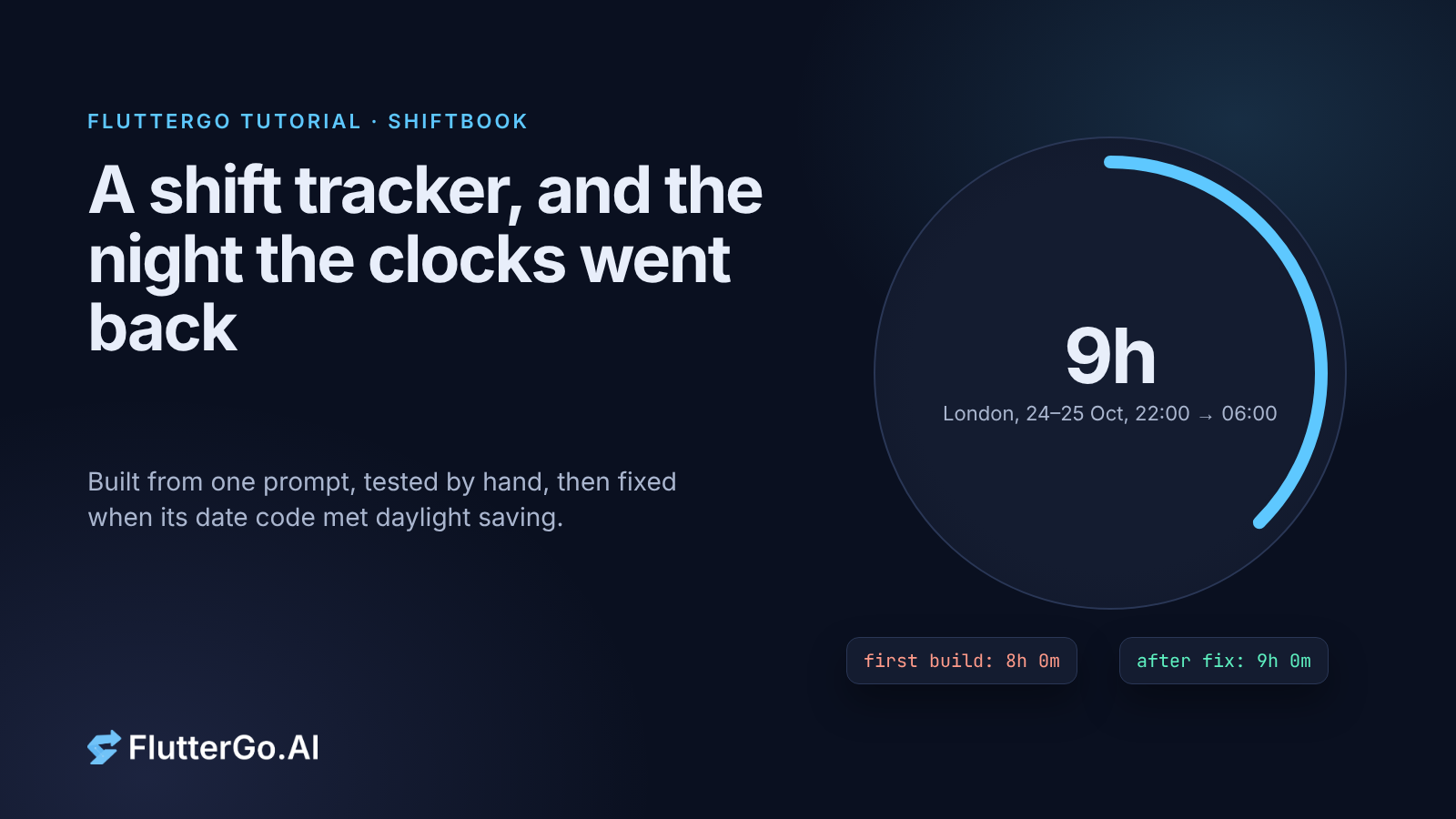
If you're paid by the hour, an overnight shift on the night the clocks change is a small test of any timesheet. The clock on the wall says you worked 22:00 to 06:00. In London on the night of 24 to 25 October 2026 that is nine hours, not eight, because the hour from 01:00 to 02:00 happens twice.
We asked FlutterGo for a shift tracker called Shiftbook: jobs with hourly rates, overnight shifts, unpaid breaks, a Monday-to-Sunday week and overtime at 1.5× after 40 hours. The first build was ready in 18 minutes 19 seconds, and its pay and overtime maths checked out to the cent against our hand calculation. Then we ran its date code in a London time zone, and two things went wrong: an overnight shift that crossed the clock change was paid as 8 hours, and the "next week" arrow labelled a week one day off. One fix prompt and 2 minutes 5 seconds later, both were right.
This tutorial walks through the prompt, what we tested, the two bugs, the fix and how to check date code yourself before your users find it.
models.dart file with flutter test on Flutter 3.47.7 under TZ=Europe/London, TZ=America/New_York and TZ=Asia/Karachi. We didn't run the app on a phone.
What you'll build
Shiftbook is a timesheet for one person who works one or more hourly jobs:
- Jobs with a name, an hourly rate and a colour.
- Shifts with a date, start and end time, an unpaid break and a note. A shift that ends earlier than it starts ends the next day.
- A week view from Monday to Sunday with total paid hours, overtime and estimated pay, plus previous and next arrows.
- Overtime for any time past 40 paid hours in the week, across all jobs, paid at 1.5× the rate of whichever job you were working when you crossed 40 hours.
- Local storage, a currency setting, and light and dark mode.
You need a FlutterGo account and nothing else. You don't need Flutter installed to follow along. To repeat our time-zone check you'll want the Flutter SDK on a machine where you can set the TZ environment variable (macOS or Linux).
Step 1: Write the prompt
Here's the prompt we pasted into the studio, unchanged:
Build a shift hours tracker app called Shiftbook for people paid by the hour. Users add jobs (name, hourly rate, colour) and log shifts against a job: date, start time, end time, unpaid break in minutes and an optional note. One currency for the whole app, picked in Settings (default USD).

A shift whose end time is earlier than its start time ends the next day (for example 22:00 to 06:00 is 8 hours). A shift belongs to the week of the day it starts. Paid hours = (end - start) - break. Reject a shift whose break is as long as or longer than the shift.

Weeks run Monday to Sunday. Home screen: the selected week with previous/next arrows, total paid hours, overtime hours and estimated pay at the top, then the week's shifts grouped by day. Overtime is any time past 40 paid hours in a week (all jobs combined), paid at 1.5x the rate of the job worked when the overtime happens (count shifts in start-time order).

Shift detail: edit and delete with a confirmation. Jobs screen: add, edit and delete jobs.

Store everything locally so it survives a restart. Seed 2 example jobs and a week of example shifts on first launch, including one overnight shift. Clean Material 3 design that works in light and dark mode.
Three choices in that prompt matter more than the rest:
- It spells out the edge cases. Overnight shifts, which week a shift belongs to, what counts as overtime and in what order. If you leave these out, the AI has to guess, and its guess may not match your payroll.
- It asks for seed data with an overnight shift. That means the first thing you see already exercises the trickiest path.
- It contains a mistake. "22:00 to 06:00 is 8 hours" is true on 363 nights a year in London. We didn't notice until later. Keep reading.
Step 2: Check what the first build got right
FlutterGo reported "Done 18m 19s". The generated project uses Riverpod for state, go_router for navigation and shared_preferences for storage. The seed data put seven shifts in the current week across a café job at $18.50 an hour and a night desk job at $22.00, including two overnight shifts.
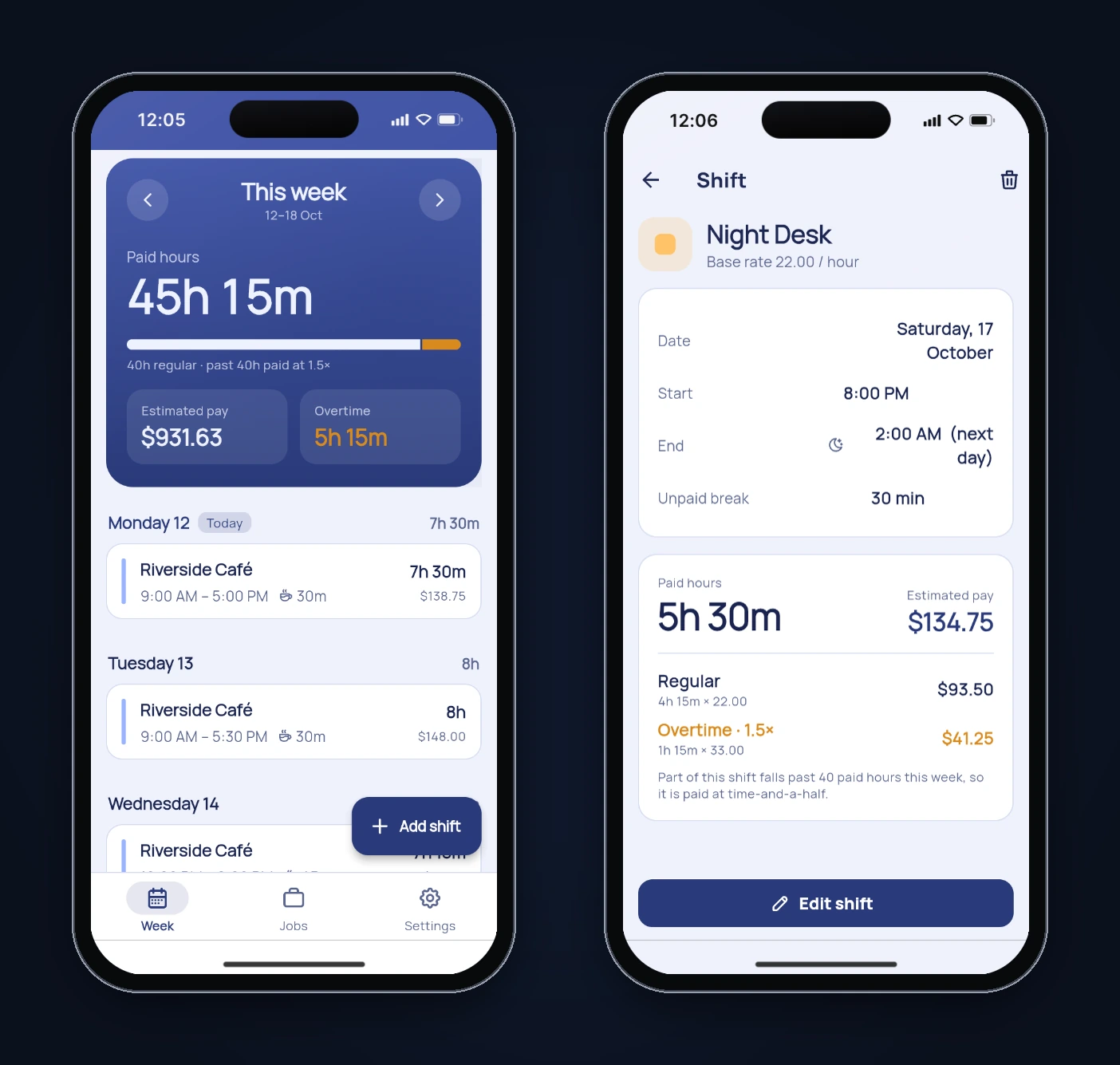
We checked the seeded week by hand before trusting any of it. The shifts add up to 45 hours 15 minutes. In start-time order, the week passes 40 hours during Saturday's 20:00 to 02:00 night desk shift, 4 hours 15 minutes into its 5.5 paid hours. So that shift is 4h 15m regular and 1h 15m overtime, and Sunday's 4-hour café shift is all overtime. That gives $931.625 for the week, and the app showed $931.63. The detail screen split Saturday exactly the same way.
Then we tapped through the app in the preview:
| Test | What we did | Result |
|---|---|---|
| Seeded totals | Compared the week card with a hand calculation | Pass: 45h 15m, 5h 15m overtime, $931.63 |
| Overtime split | Opened the Saturday night shift | Pass: 4h 15m × 22.00 and 1h 15m × 33.00, $134.75 |
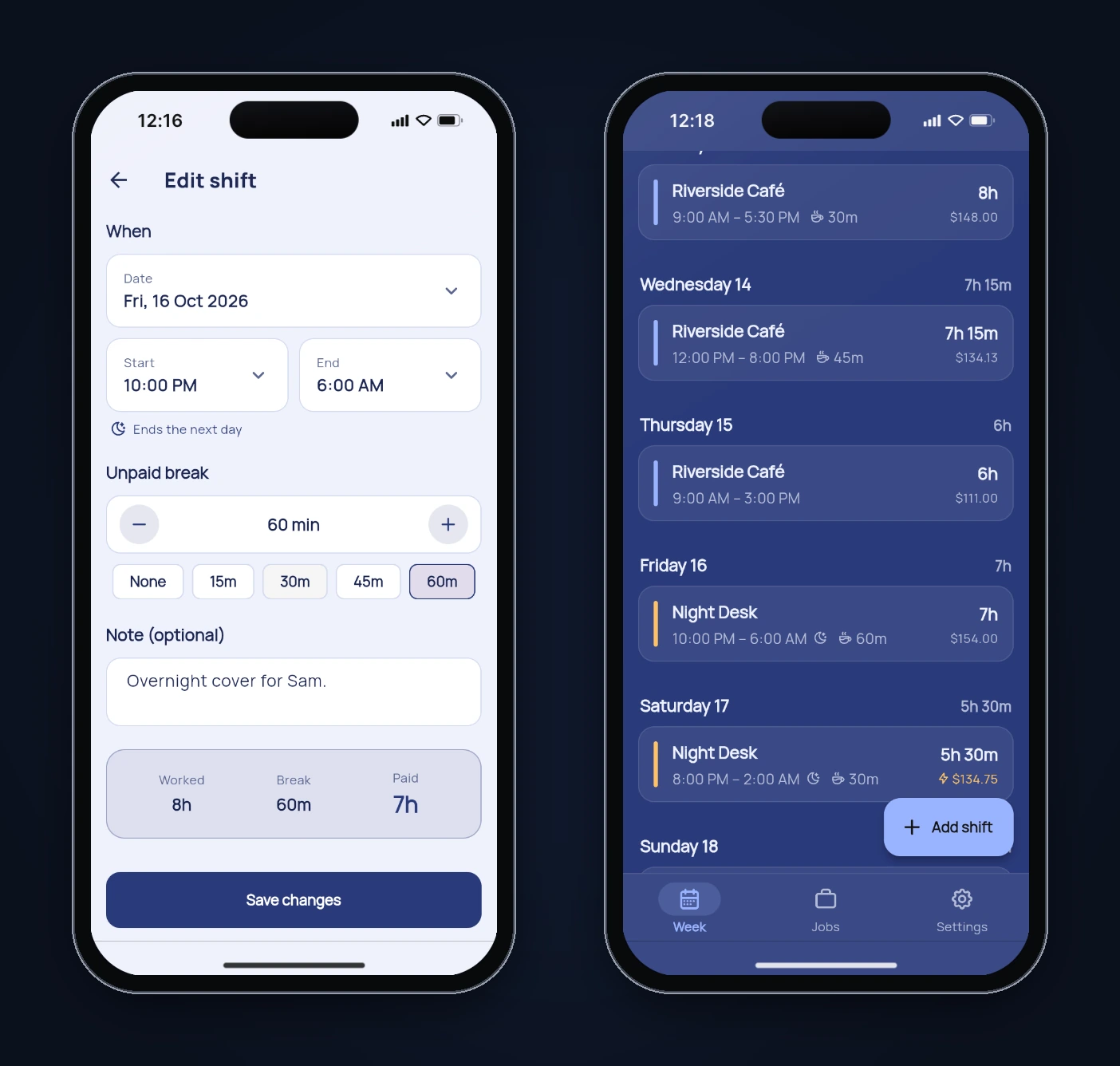
| Overnight entry | Added a Monday Night Desk shift, 10:00 PM to 6:00 AM, 30 min break | Pass: "Ends the next day" hint, 7h 30m, $165.00 |
| Totals after adding | Re-checked the week card | Pass: 52h 45m, 12h 45m overtime, $1,179.13 (hand calculation $1,179.125) |
| Break validation | 9:00 to 9:30 AM with a 30 min break | Pass: save refused with "The unpaid break must be shorter than the 30m worked." |
| Empty week | Pressed the next-week arrow | Pass: "No shifts this week" with an add button |
| Persistence | Reloaded the preview | Pass: the added shift was still there |
Two small things we noticed but didn't fix. On the iPhone 16 frame, the break error appears below the fold, so you have to scroll to see why Save did nothing. And a shift whose end time equals its start time is treated as a 24-hour shift rather than rejected. That follows from "ends the next day when the end is earlier" plus the generated rule that "at or before" counts as overnight, so it's worth deciding on deliberately if you build this for real.
Step 3: Read the code that does the maths
Most of the app is screens. The part worth reading is lib/models/models.dart, which holds the shift and week calculations. The overtime code was clean:
for (final shift in weekShifts) {
  final job = jobsById[shift.jobId];
  final rate = job?.hourlyRate ?? 0;
  final hours = shift.paidHours;

  final before = cumulative;
  final after = cumulative + hours;
  final regular =
      (kOvertimeThresholdHours - before).clamp(0.0, hours).toDouble();
  final overtime = hours - regular;
  final shiftPay = regular * rate + overtime * rate * kOvertimeMultiplier;
  // ...
  cumulative = after;
}
It sorts the week's shifts by start time, keeps a running total, and splits each shift at the 40-hour line. That is what the prompt asked for, and it's why the Saturday shift split correctly.
The date handling is where we slowed down. Here is how the first build worked out a shift's length and stepped between weeks:
// lib/models/models.dart (first build)
int get spanMinutes {
  final span = endMinute - startMinute;
  return span <= 0 ? span + 1440 : span;
}

DateTime mondayOf(DateTime d) {
  final day = DateTime(d.year, d.month, d.day);
  return day.subtract(Duration(days: day.weekday - DateTime.monday));
}

// lib/features/week/week_screen.dart (first build)
void _shiftWeek(WidgetRef ref, int deltaDays) {
  final current = ref.read(selectedWeekProvider);
  ref.read(selectedWeekProvider.notifier).state =
      current.add(Duration(days: deltaDays));
}
Two things stand out. The shift length is minutes-on-the-dial arithmetic: it never looks at a real date, so it can't know that one night was 25 hours long. And the week arrows add Duration(days: 7), which in Dart is exactly 168 hours, not "the same time next week". The DateTime.add documentation warns that when the result has a different daylight-saving offset, it may not even land on the calendar date you expect.
Step 4: Test the date code on a clock that changes
You can't see either problem in Karachi, which hasn't used daylight saving in years. So we copied the generated models.dart into a scratch Flutter package and wrote a small test that prints what the app computes for overnight shifts on clock-change nights, and what happens when you press "next week" five times from the week of 19 October. The heart of the test compares what the app pays with the real time between the two wall-clock moments:
final d = DateTime(2026, 10, 24); // the night UK clocks go back
final s = Shift(id: 'x', jobId: 'j', date: d,
    startMinute: 22 * 60, endMinute: 6 * 60, breakMinutes: 0);
final realEnd = DateTime(d.year, d.month, d.day + 1, 6);
final real = realEnd.difference(s.startDateTime).inMinutes;
print('app paid=${s.paidMinutes} min, real=$real min');
Then we ran it three times with different time zones:
TZ=Europe/London    flutter test test/dst_check_test.dart
TZ=America/New_York flutter test test/dst_check_test.dart
TZ=Asia/Karachi     flutter test test/dst_check_test.dart
The clocks go back on 25 October 2026 in the UK, according to GOV.UK, and on 1 November 2026 in the US, according to NIST. Here is the London output from the generated code, trimmed to the relevant rows:
TZ=Europe/London
Sat 24 Oct 22:00  app paid=8h 0m  endDateTime=Sun 25 Oct 05:00  clock-on-the-wall elapsed=9h 0m
Sat 27 Mar 22:00  app paid=8h 0m  endDateTime=Sun 28 Mar 07:00  clock-on-the-wall elapsed=7h 0m

selected=Mon 19 Oct 00:00  header="19 Oct - 25 Oct"  shifts shown for week of Mon 19 Oct
selected=Sun 25 Oct 23:00  header="25 Oct - 31 Oct"  shifts shown for week of Mon 19 Oct
selected=Sun 1 Nov 23:00   header="1 Nov - 7 Nov"    shifts shown for week of Mon 26 Oct
That output shows two separate bugs.
Bug 1: the night the clocks go back is paid as 8 hours. A 22:00 to 06:00 shift on Saturday 24 October lasts nine real hours in London, and the app paid eight. In March it goes the other way: seven real hours, paid as eight. New York shows the same thing a week later, on 31 October. Part of this is on us. Our prompt literally said "22:00 to 06:00 is 8 hours", and the AI did what we asked. The rule we actually wanted was "the real time between start and end".
Bug 2: the week arrows drift by a day. Pressing next from the week of 19 October in London adds 168 hours to Monday midnight. Because that week is an hour longer, you land on Sunday 25 October at 23:00. The data underneath snaps back to the week of 19 October, but the header says "25 Oct - 31 Oct", and "Add shift" prefills Sunday. Every later press stays one day off. In New York the drift starts one week later. On Karachi time, every row is correct, which is why we never saw it in the preview.
Step 5: Send one fix prompt
We described both bugs with the evidence and asked for nothing else to change:
Two daylight-saving bugs, please fix only these and change nothing else.

1. Week stepping adds Duration(days: 7) to a local midnight. Across a clock change that lands at 23:00 the day before, so in London pressing next from the week of 19 Oct shows "25–31 Oct" above the 19 Oct shifts, and Add shift prefills a Sunday. Do all calendar-day stepping with DateTime(year, month, day + n) instead of adding Durations: the week arrows, mondayOf, the week's day list and end date, the seed dates and the overnight end date, so every week start stays a local Monday at midnight.

2. Paid hours should be the real time worked. An overnight 22:00–06:00 shift on the night the clocks go back is 9 hours, and 7 hours on the night they go forward. Build the start and end as local DateTimes (end on the next calendar day when it is at or before the start) and use end.difference(start) for the worked time, in the model, the week totals and the shift form's Worked/Paid summary and break check.
FlutterGo reported "Done 2m 05s". We downloaded the changed files and diffed them against the first build. The changes touched four files and nothing else. The core of it:
// lib/models/models.dart (after the fix)
int get spanMinutes => endDateTime.difference(startDateTime).inMinutes;

DateTime get endDateTime {
  final day = isOvernight ? date.day + 1 : date.day;
  return DateTime(
      date.year, date.month, day, endMinute ~/ 60, endMinute % 60);
}

DateTime mondayOf(DateTime d) {
  final day = DateTime(d.year, d.month, d.day);
  return DateTime(day.year, day.month, day.day - (day.weekday - DateTime.monday));
}

// lib/features/week/week_screen.dart (after the fix)
ref.read(selectedWeekProvider.notifier).state =
    DateTime(current.year, current.month, current.day + deltaDays);
DateTime(year, month, day + 1, ...) asks for "the next calendar day at this wall-clock time", and Dart normalises day overflow such as 32 October into 1 November. difference then measures real elapsed time between two local times, so the extra hour is counted. The shift form got the same change, so its Worked and Paid summary agrees with the week view.
Step 6: Re-test on all three clocks
We ran the same test against the fixed models.dart, with the week arrow test using the new calendar-day stepping:
TZ=Europe/London
Sat 24 Oct 22:00  app paid=9h 0m  endDateTime=Sun 25 Oct 06:00  clock-on-the-wall elapsed=9h 0m
Sat 27 Mar 22:00  app paid=7h 0m  endDateTime=Sun 28 Mar 06:00  clock-on-the-wall elapsed=7h 0m

selected=Mon 19 Oct 00:00  header="19 Oct - 25 Oct"  shifts shown for week of Mon 19 Oct
selected=Mon 26 Oct 00:00  header="26 Oct - 1 Nov"   shifts shown for week of Mon 26 Oct
selected=Mon 2 Nov 00:00   header="2 Nov - 8 Nov"    shifts shown for week of Mon 2 Nov
New York now pays 9 hours on 31 October and 7 hours on 13 March, and its weeks stay on Mondays too. Karachi output didn't change: every row was correct before and after, as you'd expect.
Back in the preview, the rebuilt app kept the data we had entered, and the edit form, week view and dark mode all behaved as before.
What we didn't test
Being clear about the gaps matters more in a pay app than in most:
- The UI in a daylight-saving time zone. Both bugs and both fixes were checked by running the generated model code under different
TZvalues, not by changing the preview's clock. The week arrow test copies the stepping line from the screen rather than tapping the real arrow. - Shifts that start inside the skipped hour, such as 02:30 on the night the clocks go forward. That time doesn't exist locally, and we didn't decide what the app should do with it.
- Jobs and settings: adding, editing and deleting jobs, deleting a shift, and changing the currency weren't tested.
- Real devices, large text sizes and screen readers.
- Payroll rules. Shiftbook estimates pay with one overtime rule. Real overtime rules depend on the country, the contract and sometimes the day of the week, so treat the number as an estimate, not a payslip.
A date checklist for AI-generated Flutter code
This isn't the first FlutterGo tutorial where the interesting bug was in date code. The subscription tracker moved a weekly renewal to Sunday in London, and the warranty tracker added three days to an expiry date. Before you trust any app that counts days, hours or weeks:
- Search the code for
Duration(days:. Adding days as aDurationis fine for elapsed time and wrong for calendar steps. For "the same time on another day", useDateTime(y, m, d + n). - Decide what an hour means. Wall-clock arithmetic and real elapsed time give different answers twice a year. Write the rule you want into the prompt, not an example that's only usually true.
- Run the date code under a time zone that changes.
TZ=Europe/LondonandTZ=America/New_Yorkwith dates around late October and March catch most of it. - Check the labels, not just the totals. Bug 2 left the totals right and the header wrong.
If you want this baked into your own tests, our guide to widget tests for AI-generated Flutter code covers the patterns, and where AI app builders still fail lists the other bug types we keep seeing.
Try it yourself
Paste the prompt from Step 1 into the AI Flutter app builder, then change the one line we got wrong before you send it: say that paid hours are the real time between start and end. You'll still want to run the date check from Step 4, because the week arrows were a separate bug that the prompt didn't cause.