CocoaPods Goes Read-Only on 2 December: What Flutter iOS Teams Should Check Now
CocoaPods trunk goes read-only on 2 December 2026. What still builds, what freezes, how Flutter 3.44+ uses Swift Package Manager, and which plugins are ready.
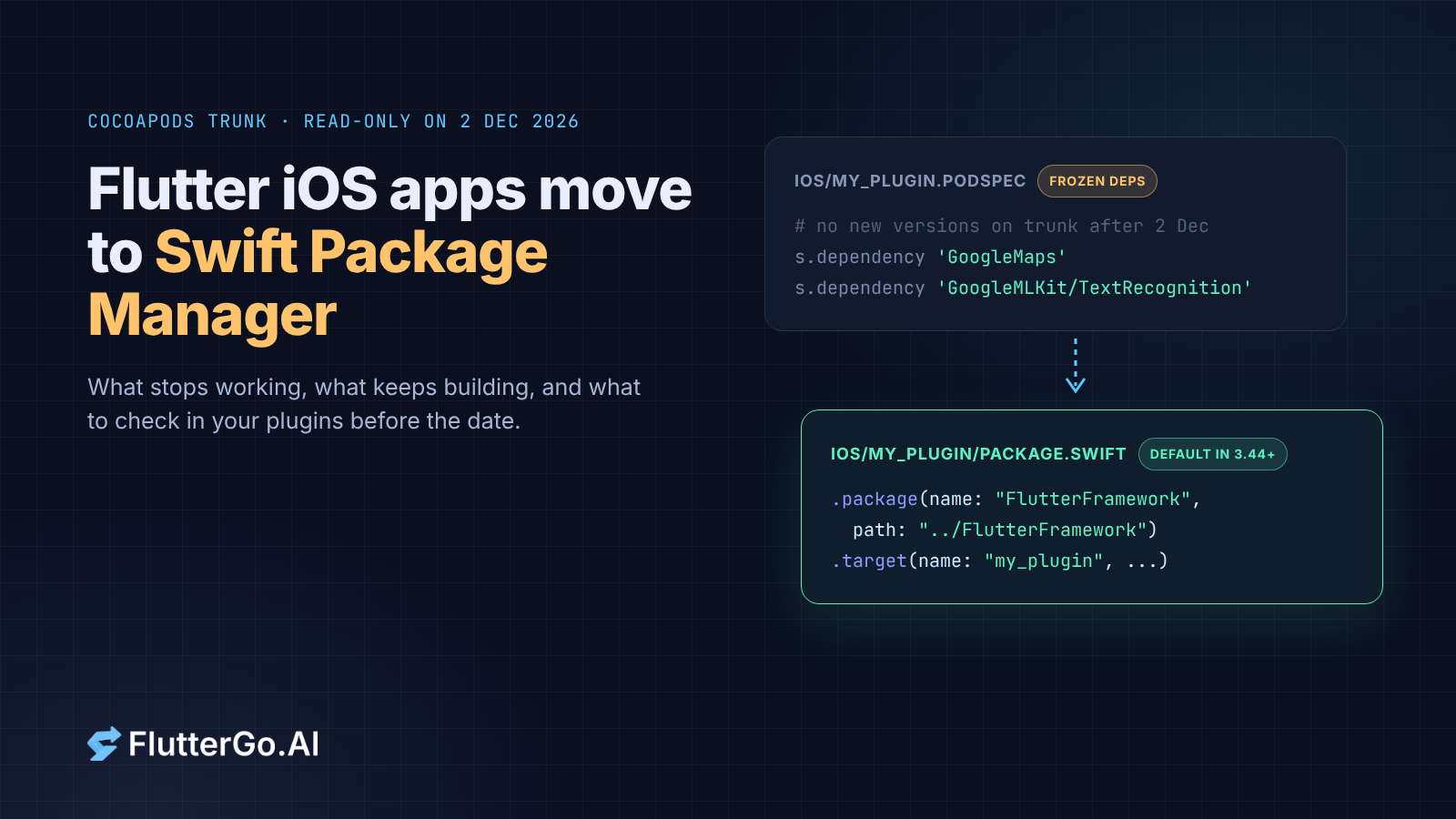
On 2 December 2026, CocoaPods trunk stops accepting new podspecs, so no new pods or pod versions can be published there (CocoaPods Trunk Read-only Plan). Your existing Flutter iOS and macOS builds won't break that day. Pods that are already published keep installing. What changes is that any native SDK still shipped only as a CocoaPod stops getting updates.
Flutter has been getting ready for this. Since Flutter 3.44, Swift Package Manager (SwiftPM) has been the default dependency manager for iOS and macOS. Flutter falls back to CocoaPods only for plugins that don't ship a Package.swift yet. So the question for most teams isn't "will my app build on 3 December?" It's "which of my plugins, or the SDKs under them, are still CocoaPods-only, and what's my plan for each one?"
To answer that for real code, we checked 35 popular plugins for a Package.swift at their latest release. The results are below, after the dates and a table of what breaks, and before checklists for app teams and plugin authors.
- CocoaPods trunk goes read-only on 2 December 2026, with a test run planned for 1 to 7 November. Existing pods still install. New pods and new versions can't be published.
- Flutter 3.44 and later (current stable: 3.47.7) use SwiftPM by default and fall back to CocoaPods per plugin, printing a warning that names each CocoaPods-only plugin.
- Your Flutter plugins don't come from trunk, so they keep updating through pub. What freezes is the native SDKs that some plugins pull in from trunk, such as Firebase and Google Maps, when your app still resolves them through CocoaPods.
- In our file check on 11 October 2026, 30 of 34 popular plugins with native code shipped a
Package.swiftat their latest release. The four that didn't weregoogle_maps_flutter_ios,flutter_tts,open_filexandgoogle_mlkit_text_recognition.
When does CocoaPods trunk become read-only?
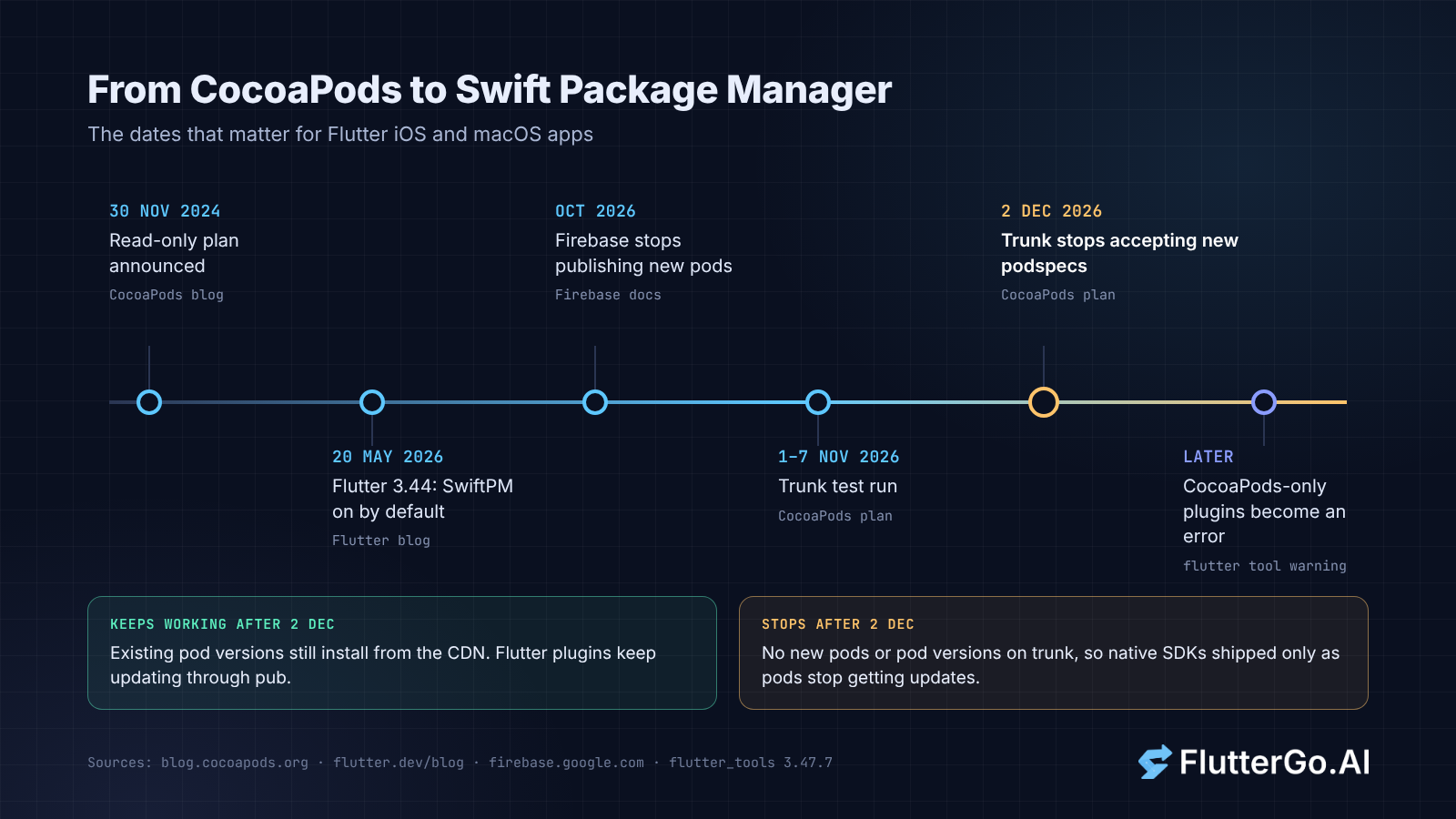
CocoaPods trunk becomes read-only on Wednesday, 2 December 2026. From that day it accepts no new pods and no new versions of existing pods, after a test run planned for 1 to 7 November 2026. Pods already published stay installable through the Specs repo and CDN.
The plan comes from CocoaPods maintainer Orta Therox. He published it on 30 November 2024 and updated it in May 2025 (CocoaPods blog). The full timeline:
- May 2025: new podspecs that use
prepare_commandare blocked. - Mid to late 2025: podspec contributors get an email about the switch.
- September to October 2026: a second email, about a month before a test run.
- 1 to 7 November 2026: a test run, "giving automation a chance to break early".
- 2 December 2026: trunk permanently stops accepting new podspecs.
The post says the dates "are not set in stone", and that they could move later for a good reason, but not earlier. As of 11 October 2026 the date still stands. The cocoapods.org banner counts down to it ("there are 3 months to go" when we checked), and Flutter's own docs repeat 2 December 2026 (Flutter docs).
None of this came out of nowhere. In August 2024 the team said openly that CocoaPods is in maintenance mode, and that framework maintainers "will (and should) be migrating to Swift Package Manager with time" (CocoaPods Support & Maintenance Plans).
What read-only trunk breaks, and what keeps working
The short version: nothing that works today stops working on 2 December. What stops is anything new arriving through trunk.
| After 2 December 2026 | Status | Why |
|---|---|---|
pod install for pod versions already published |
Keeps working | The Specs repo and CDN stay up, and CocoaPods says the switch "will not break builds" (plan) |
| Flutter plugins installed through CocoaPods | Keep working and keep updating | Flutter adds each plugin as a local path pod (pod plugin_name, path: ... in Flutter's podhelper.rb), so plugin updates come from pub, not trunk (flutter_tools 3.47.7) |
The Flutter engine pod (Flutter / FlutterMacOS) |
Keeps working | Also a local path pod in podhelper.rb |
| Private spec repos and vendored pods | Unaffected | The plan says people using their own spec repos should be fine |
Publishing a new pod or a new pod version to trunk (pod trunk push) |
Stops | Trunk rejects new podspecs |
| New versions of native SDKs shipped only as trunk pods | Stop arriving | Your Podfile can only resolve versions that were published before the switch |
| The CocoaPods/Specs GitHub repo | Archived | Per the plan |
That second-to-last row is the real cost, and some vendors have already acted on it. Firebase says it will stop publishing new versions to CocoaPods in October 2026, that Firebase 12 is the last major version published there, and that pipelines running pod install keep working for existing versions but "will not pull any new Firebase library updates released after October 2026" (Firebase: CocoaPods deprecation). Google's Maps SDK for iOS went into CocoaPods maintenance mode in August 2025, and its 11.0.0 release notes say CocoaPods is deprecated (Maps SDK for iOS release notes).
So a Flutter app that stays on CocoaPods keeps building. Its iOS Firebase and Maps SDKs, though, stop moving forward from here.
Flutter's Swift Package Manager support in 3.44 and later
The Flutter 3.44 announcement (20 May 2026) says SwiftPM "replaces CocoaPods as the default dependency manager for iOS and macOS apps". It adds that the CLI handles the migration automatically, and that "CocoaPods support will eventually be removed entirely" (What's new in Flutter 3.44). The current stable release is Flutter 3.47.7, released 8 October 2026 (Flutter release archive). The 3.47.7 tool source still ships the feature as on by default on every channel (features.dart).
Here's what that means in practice:
- Upgrading migrates you. "Upgrading Flutter and running your app automatically adds SwiftPM integration" (for app developers). The tool edits
ios/Runner.xcodeproj/project.pbxprojand the Runner scheme. It adds a local package,FlutterGeneratedPluginSwiftPackage, plus a scheme pre-action called "Run Prepare Flutter Framework Script". The same goes formacos/. - Mixed mode is automatic. The tool counts your plugins. If even one plugin lacks a
Package.swift, it keeps the Podfile and runs CocoaPods for those plugins only (darwin_dependency_management.dart). - It names the stragglers. When it falls back, the tool prints: "The following plugins do not support Swift Package Manager for ios: ... This will become an error in a future version of Flutter. Please contact the plugin maintainers to request Swift Package Manager adoption."
- It tells you when CocoaPods can go. Once every plugin is a Swift package, it says so and lists the removal steps. If your Podfile has custom logic, it tells you to migrate by hand instead.
- It needs Xcode 15 or later. On older Xcode the project stays on CocoaPods (
compatibleWithSwiftPackageManagerin xcode_project.dart).
You can still opt out. Use flutter config --no-enable-swift-package-manager for your user account, or add this to pubspec.yaml for everyone on the project:
flutter:
  config:
    enable-swift-package-manager: false
The docs' advice is blunt: "In general, don't do this. Remember that the CocoaPods registry becomes read-only on December 2, 2026 and disabling SwiftPM won't be allowed in the future." Opting out has a second catch. If a plugin ever ships only a Package.swift, with no podspec, the build stops with "The following plugin(s) are only compatible with Swift Package Manager" until you turn SwiftPM back on.
Add-to-app projects have their own path. Since 3.44 they use flutter build swift-package --platform ios, which needs Xcode 15 or later (add-to-app iOS setup).
If you're also handling Apple's Xcode 27 scene changes this autumn, that's a separate migration with its own checks. We covered it in Flutter UIScene migration for Xcode 27.
Which popular Flutter plugins support Swift Package Manager?
To see how much of a typical app still depends on CocoaPods, we checked the iOS code of 35 widely used Flutter plugins on 11 October 2026.
url_launcher_ios). We read its version from GitHub and fetched files at that version's release tag from raw.githubusercontent.com. Then we looked for ios/<package>/Package.swift, macos/<package>/Package.swift or darwin/<package>/Package.swift, and the matching .podspec. That's the same path the flutter tool checks in 3.47.7 (supportSwiftPackageManagerForPlatform in plugins.dart). Seven packages had no matching tag. For those we checked the default or development branch and confirmed that its pubspec version matched the latest release on pub.dev. A Package.swift being present doesn't prove it builds cleanly in your app.
First-party and most-installed plugins (21 checked):
| Plugin (package with the iOS code) | Version checked | Package.swift | Podspec |
|---|---|---|---|
shared_preferences (shared_preferences_foundation) |
2.5.7 | Yes (darwin) | Yes |
path_provider (path_provider_foundation) |
2.6.0 | n/a: no native plugin code (calls Foundation through FFI) | n/a |
url_launcher (url_launcher_ios) |
6.4.2 | Yes | Yes |
image_picker (image_picker_ios) |
0.8.13+10 | Yes | Yes |
local_auth (local_auth_darwin) |
2.0.4 | Yes (darwin) | Yes |
google_maps_flutter (google_maps_flutter_ios) |
2.18.6 | No | Yes |
webview_flutter (webview_flutter_wkwebview) |
3.27.0 | Yes (darwin) | Yes |
camera (camera_avfoundation) |
0.11.0 | Yes (darwin) | Yes |
video_player (video_player_avfoundation) |
2.12.1 | Yes (darwin) | Yes |
in_app_purchase (in_app_purchase_storekit) |
0.4.13+1 | Yes (darwin) | Yes |
| firebase_core | 4.15.0 | Yes | Yes |
| firebase_messaging | 16.7.0 | Yes | Yes |
permission_handler (permission_handler_apple) |
9.6.1 | Yes | Yes |
geolocator (geolocator_apple) |
2.3.14 | Yes (darwin) | Yes |
sqflite (sqflite_darwin) |
2.4.4* | Yes (darwin) | Yes |
| mobile_scanner | 7.4.2 | Yes (darwin) | Yes |
flutter_secure_storage (flutter_secure_storage_darwin) |
0.4.2 | Yes (darwin) | Yes |
| connectivity_plus | 7.3.2 | Yes | Yes |
| share_plus | 13.3.1 | Yes | Yes |
| package_info_plus | 10.2.2 | Yes | Yes |
| flutter_local_notifications | 22.3.1 | Yes | Yes |
Longer tail (14 checked):
| Plugin (package with the iOS code) | Version checked | Package.swift | Podspec |
|---|---|---|---|
| just_audio | 0.10.6 | Yes (darwin) | Yes |
audioplayers (audioplayers_darwin) |
6.5.0 | Yes (darwin) | Yes |
google_sign_in (google_sign_in_ios) |
6.3.6 | Yes (darwin) | Yes |
| device_info_plus | 13.3.0 | Yes | Yes |
| image_cropper | 12.2.1 | Yes | Yes |
| in_app_review | 2.0.12* | Yes | Yes |
| wakelock_plus | 1.8.1* | Yes | Yes |
workmanager (workmanager_apple) |
0.9.11 | Yes | Yes |
geocoding (geocoding_darwin) |
1.0.3 | Yes (darwin) | Yes |
| sign_in_with_apple | 8.2.0* | Yes (darwin) | Yes |
| flutter_contacts | 2.6.0 | Yes | Yes |
| flutter_tts | 4.2.5* | No | Yes |
| open_filex | 4.7.0* | No | Yes |
| google_mlkit_text_recognition | 0.17.1* | No | Yes |
* No matching release tag on GitHub. Checked on the default branch (the develop branch for google_mlkit_text_recognition), whose pubspec version matched the latest pub.dev release.
What the check shows. The most-installed plugins are basically ready. Of the 20 big-name plugins with native code, 19 ship a Package.swift next to their podspec. The gaps sit in two places:
- A deliberate holdout in a big plugin.
google_maps_flutter_ios, the default iOS implementation thatgoogle_maps_flutterpulls in, "cannot support Swift Package Manager". SwiftPM can't pick a Maps SDK version based on your deployment target, and the README says Google won't release Maps SDK versions beyond 10.x through CocoaPods (google_maps_flutter_ios README). The fix is to addgoogle_maps_flutter_ios_sdk10(iOS 16+) orgoogle_maps_flutter_ios_sdk9(iOS 15+). Both shipped aPackage.swiftat version 2.19.0 in our check. We walk through that choice in Flutter maps in 2026. - The long tail. Three of the 14 smaller plugins had no
Package.swift.open_filex's latest release dates from March 2025 (pub.dev), which suggests slow maintenance.flutter_ttsships a podspec for iOS and macOS but no Swift package.google_mlkit_text_recognition's podspec depends on theGoogleMLKit/TextRecognitionpod, so whether it can move depends on how ML Kit itself is distributed. We didn't check that.
Our sample leans toward well-maintained packages, because popular plugins usually are. The plugins most likely to be missing a Package.swift are the small, single-maintainer ones in your own pubspec.yaml. That's why your own check matters more than our table.
Checklist for app teams before 2 December
- Get on Flutter 3.44 or later. 3.47.7 is current. Run your iOS and macOS builds once so the tool can add SwiftPM integration, then commit the
project.pbxprojand.xcschemechanges. - Make sure nobody turned it off. Check
flutter configoutput on dev machines and CI for a disabledenable-swift-package-manager. Checkpubspec.yamlforenable-swift-package-manager: false, and check CI for theFLUTTER_SWIFT_PACKAGE_MANAGERenvironment variable, which the tool also reads. - Get your list of CocoaPods-only plugins. Run
flutter build ios --config-only(andflutter build macos --config-onlyif you ship macOS) on a Mac with Xcode 15 or later. Copy the "do not support Swift Package Manager" list from the output. In 3.47.7 the check runs before the config-only step exits, but it needs Xcode, so do this on a Mac or a macOS CI runner. We read this from the tool source and haven't run it ourselves. - Decide per plugin. For each name on the list, run
flutter pub outdatedto see whether a newer version already ships aPackage.swift. If not, look for an alternative implementation, like the Maps SDK-specific packages. Check the plugin's issue tracker and file a request if nobody has, since that's what the warning asks you to do. If the plugin looks abandoned, plan to fork or replace it. - Move hand-added pods. If you edited the
Podfileto add pods that aren't Flutter plugins, Flutter won't migrate them. Add their Swift package equivalents in Xcode under Package Dependencies, then remove the pod lines. - Remove CocoaPods once the list is empty. The tool prints the steps:
pod deintegrate, delete thePodfile,Podfile.lock,Pods/and.symlinks/, and remove thePods/Target Support Filesincludes fromDebug.xcconfigandRelease.xcconfig. Flutter says doing this "will improve the project's build time". - Update CI. Runners need Xcode 15 or later, and the first SwiftPM resolve downloads packages. Flutter 3.44 added a warning for slow SwiftPM downloads and a shared SwiftPM cache (3.44 release notes), so the cache is worth keeping between CI runs. If your iOS builds run on hosted macOS runners, our notes on Flutter CI/CD with no Mac in the loop cover that setup.
- Don't panic about release day. If you can't finish, your app still builds on 3 December with the pods it resolves today. Keep
Podfile.lockcommitted so CI resolves exactly those versions.
Checklist for plugin authors
Flutter's guide for plugin authors is specific (for plugin authors):
- Create
ios/<plugin_name>/Package.swift(ormacos/ordarwin/) with sources inSources/<plugin_name>/. Swift plugins moveios/Classesthere. Objective-C plugins put public headers inSources/<plugin_name>/include/<plugin_name>/. - Depend on the local
FlutterFrameworkpackage (path: "../FlutterFramework"). If your plugin name has underscores, use dashes in the library product name. - Move
PrivacyInfo.xcprivacyand other resources underSources/<plugin_name>, and load them withBundle.module(Swift) orSWIFTPM_MODULE_BUNDLE(Objective-C) inside#if SWIFT_PACKAGE. - Turn every
s.dependencyin your podspec into a SwiftPM dependency. If that dependency only exists as a pod, this is where you'll get stuck, so check early. - Keep the podspec. Update its paths to the new locations. The docs say plugins "should support both SwiftPM and CocoaPods until further notice" and that "plugins without SwiftPM support are not usable by projects that have migrated."
- Test both ways. Run
flutter config --no-enable-swift-package-managerwithpod lib lint, thenflutter config --enable-swift-package-managerwithflutter runon the example app. Migrating the example app raises its Flutter SDK floor to 3.24.
One thing the read-only switch does not do is block your plugin releases. Flutter plugins are published to pub.dev and wired in as local pods, so you can ship a Package.swift in a normal pub release after 2 December too. The pressure comes from your users' builds and from the tool's "future error", not from trunk.
Exported and AI-generated Flutter projects
A Flutter project from a template, a teammate or an AI Flutter app builder has the same ios/ folder as any other Flutter app, so all of the above applies. FlutterGo, for example, lets you export the generated Dart as a regular Flutter project. Once it's on your machine, open it with Flutter 3.44 or later, run the config-only build, and read the plugin warning before you add more native dependencies.
Sources
All accessed 11 October 2026.
- CocoaPods: Trunk Read-only Plan, Support & Maintenance Plans, cocoapods.org
- Flutter: SwiftPM for app developers, SwiftPM for plugin authors, add-to-app iOS setup, What's new in Flutter 3.44, 3.44 release notes, flutter_tools source at tag 3.47.7
- Vendors: Firebase CocoaPods deprecation, Maps SDK for iOS release notes, google_maps_flutter_ios README
- Plugin data: package repositories on GitHub at the versions listed in the tables, fetched through raw.githubusercontent.com