Best AI Tools for Flutter Developers in 2026, by Job
AI tools for Flutter, sorted by job: the Dart and Flutter MCP server, agent skills, Gemini and other assistants, app builders, Firebase AI Logic, Genkit.
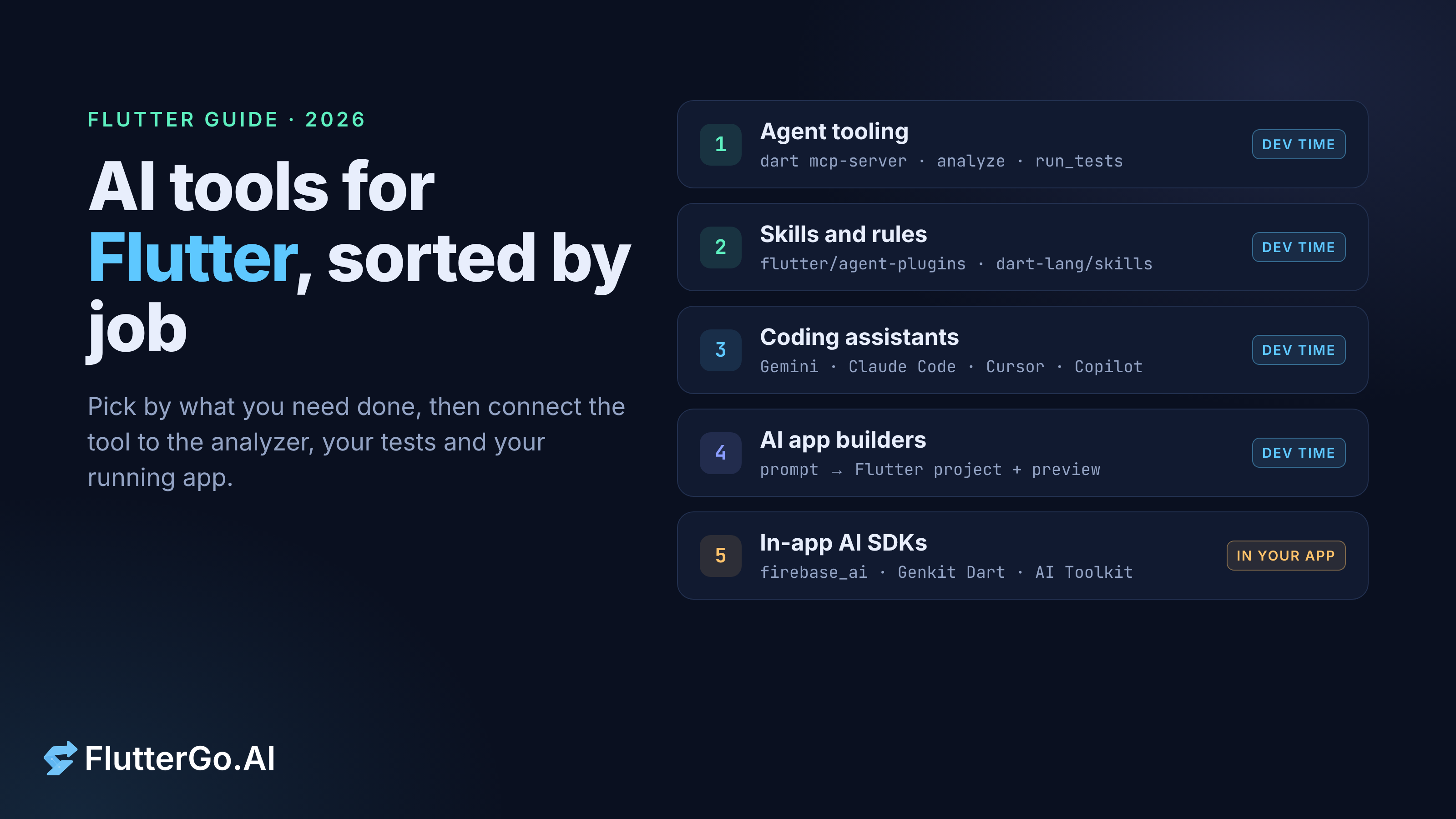
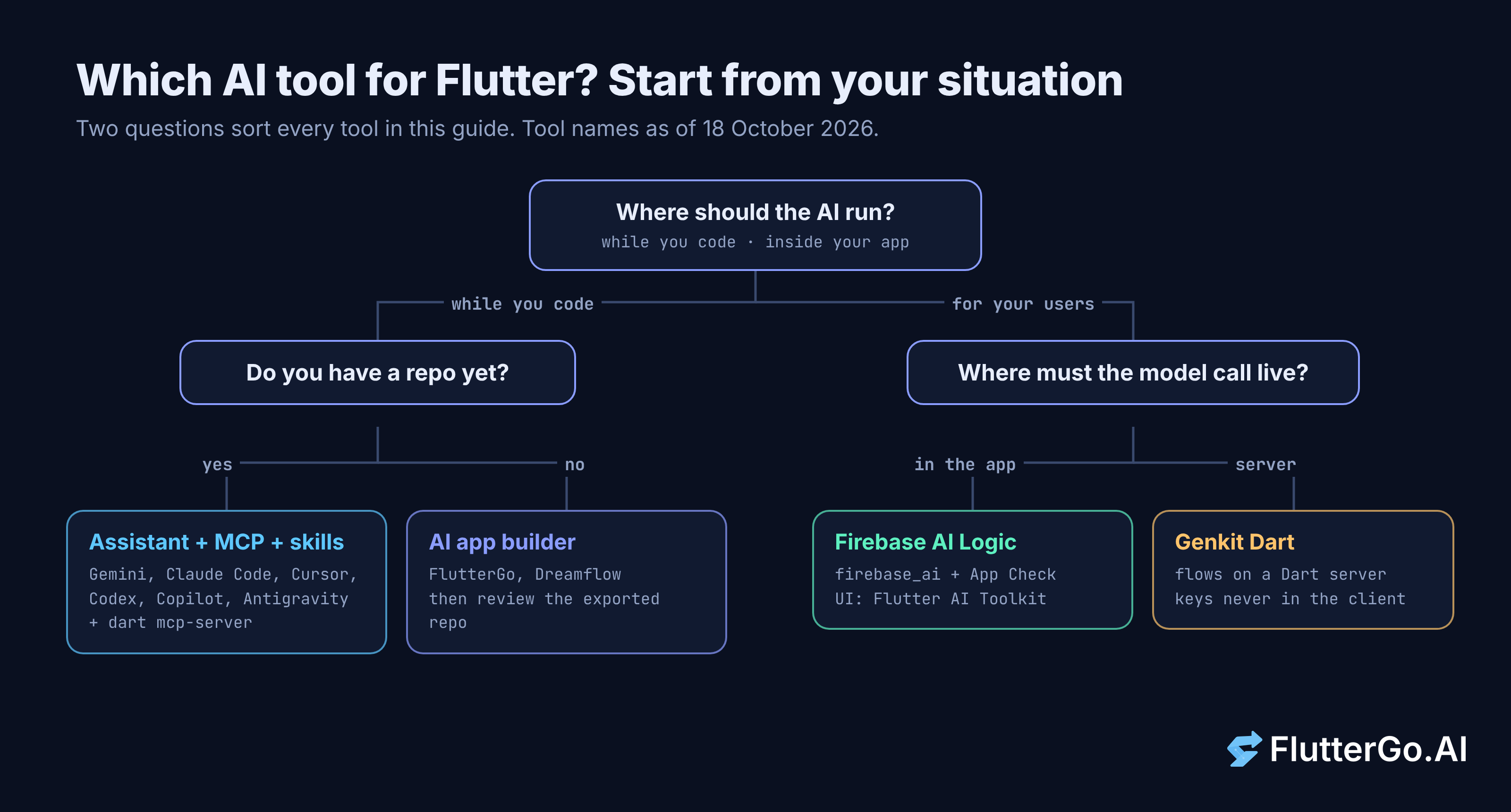
The best AI tools for Flutter depend on the job. For an existing repo, connect the assistant you already use (Gemini in Android Studio, Gemini Code Assist, Claude Code, Cursor, Codex, GitHub Copilot or Antigravity) to the official Dart and Flutter MCP server and agent skills. To start from an idea, use an AI app builder and review the code it exports. To put AI inside your app, use Firebase AI Logic for direct calls or Genkit Dart when keys and prompts belong on a server.
This guide covers each of those jobs, how to set up the tools, and the mistakes to avoid. We checked every tool on its own official page on 18 October 2026.
How we chose these AI tools for Flutter
We didn't score or rank tools, and there's no hidden winner. A tool made the list only if its maker or the Flutter team documents Flutter or Dart support, and if we could confirm its current name, status and setup on an official page. Names change fast here: Firebase's docs now say "Agent Platform Gemini API (formerly Vertex AI)", for example.
If a tool you use isn't listed, it may still edit Dart well. We left it out because we couldn't find Flutter setup docs from its maker or from the Flutter team.
| The job | Tool type | Examples (checked 18 Oct 2026) |
|---|---|---|
| Let an assistant run the analyzer, tests and your app | MCP server | Dart and Flutter MCP server (dart mcp-server) |
| Teach the assistant Flutter patterns and your packages | Agent skills, package skills, rules | flutter/agent-plugins, dart-lang/skills, dart run skills@ get |
| Write, refactor and test code in an existing repo | IDE and agent assistants | Gemini in Android Studio, Gemini Code Assist, Claude Code, Cursor, Codex, GitHub Copilot, Antigravity |
| Start a new app from a description | AI app builder | FlutterGo, Dreamflow |
| Add chat, generation or agents to your app | In-app AI SDKs | Firebase AI Logic (firebase_ai), Genkit Dart, Flutter AI Toolkit, GenUI |
Give your assistant Flutter tooling: the MCP server, skills and rules
A general-purpose assistant can read your Dart files, but it can't see analyzer errors or run your tests on its own. The Flutter docs fill that gap with an official agent plugin made of four parts: the Dart and Flutter MCP server, agent skills, agent rules and specialized agents (docs.flutter.dev). Set this up first, whichever assistant you use.
The Dart and Flutter MCP server
The Dart and Flutter MCP server gives the assistant "real-time access to analyzer diagnostics, symbol resolution, test runners, and runtime inspection." It can also search pub.dev, manage pubspec.yaml and format code. Its README lists tools such as analyze_files, run_tests, hot_reload, widget_inspector and get_runtime_errors.
The README asks for Dart 3.9.0-163.0.dev or later and still calls the package experimental ("WIP... likely to evolve quickly"), so expect tool names to change. For most MCP clients, the Flutter docs give this config entry:
{
  "mcpServers": {
    "dart": {
      "command": "dart",
      "args": ["mcp-server"]
    }
  }
}
VS Code with GitHub Copilot uses .vscode/mcp.json, where the top-level key is servers:
{
  "servers": {
    "dart": {
      "command": "dart",
      "args": ["mcp-server"]
    }
  }
}
What we saw when we ran it. On Dart 3.13.5 (stable), dart mcp-server doesn't appear in dart --help, but dart help mcp-server explains: "This command is a wrapper around the dart_mcp_server package." In our cloud sandbox, which blocks pub.dev, dart mcp-server --help stopped with a pub.dev connection error before printing anything. Our reading is that the wrapper fetches that package from pub.dev, so the first launch needs pub.dev access.
Agent skills, package skills and rules
The MCP server gives the assistant tools, and skills give it instructions. An agent skill is an on-demand guide: the assistant reads only its name and description at first, then loads the full SKILL.md when a task needs it (docs.flutter.dev). The official sets live in the flutter/agent-plugins repo (widgets, navigation, responsive layout, state management) and the dart-lang/skills repo (unit tests, dependency resolution, analyzer fixes).
Rules work differently. They're persistent instructions loaded into every session, such as triggering hot reload after widget edits. If your assistant doesn't use the official plugin, the docs install the skills from your project root:
# Install Flutter skills
npx skills add flutter/agent-plugins --skill '*' --agent universal --yes

# Install Dart skills
npx skills add dart-lang/skills --skill '*' --agent universal --yes
Package authors can also ship skills inside their pub packages. After you add a dependency, dart run skills@ get copies its skills into your agent's folder, such as .agents/skills/, and tracks them in .config/dart_skills/ (dart.dev). The trailing @ is Dart's syntax for running a package straight from pub.dev, available since Dart 3.12.
Pick a coding assistant and connect it
You probably already have an assistant. For Flutter work, which one you pick matters less than whether it's connected to the tooling above, and each option below has a documented way to do that.
Gemini in Android Studio
The Flutter team announced "first-class support for Dart and Flutter development" in Gemini in Android Studio in May 2025. That covers Flutter UI generation, layout-error fixes, Dart refactoring, test generation and completion for Dart, widgets and pubspec.yaml (flutter.dev).
Android's docs, updated 25 August 2026, list an Agent Mode that can add MCP servers, read AGENTS.md and use skills. A free individual edition has a small context window, and you can add a Gemini API key (paid per token) or a Google One plan for higher rate limits. Gemini is only available in the latest stable Android Studio and major versions from the previous 10 months (developer.android.com).
Gemini Code Assist
Gemini Code Assist lists Dart as a "verified" language. It's built into Android Studio and available as an extension for VS Code and several JetBrains IDEs (Google Cloud docs). The MCP server README says its Agent mode uses the Gemini CLI config in .gemini/settings.json, notes that this "currently requires the 'Insiders' channel", and suggests typing /mcp in Agent mode to check the connection.
Claude Code, Cursor, Codex, GitHub Copilot and Antigravity
The Flutter docs give a setup for each of these. Most install the official "Dart and Flutter" plugin, which bundles the skills, rules and MCP server:
| Assistant | Official Flutter setup (docs.flutter.dev) | Rules |
|---|---|---|
| Claude Code | claude plugin marketplace add flutter/agent-plugins then claude plugin install dart-flutter@dart-flutter |
Not loaded automatically; copy into CLAUDE.md |
| Cursor | Add the Dart and Flutter plugin from the Cursor Marketplace, or run /add-plugin dart-flutter in chat |
.mdc files in .cursor/rules/ |
| Codex | codex plugin marketplace add flutter/agent-plugins then codex plugin add dart-flutter@dart-flutter |
Not bundled; .agent/rules/ or CODEX.md |
| GitHub Copilot (VS Code) | .vscode/mcp.json (above) plus the npx skills add commands |
.github/copilot-instructions.md |
| Antigravity | Settings, Customizations, then download Dart and Flutter under "Build with Google Plugins" (IDE); MCP config plus skills for the agy CLI |
See the docs page |
Windsurf, Zed and Cline have no plugin, so the docs point them to the generic MCP config, the skills CLI and their own rules files. To choose, start with the editor your team already uses. Then check whether plugin rules load automatically, because they don't in Claude Code or Codex.
Start a new app from a prompt: AI app builders
An assistant edits a repo you already have. An AI app builder creates the repo: you describe the app, and it generates a Flutter project with a running preview. We compared builders in Flutter AI code generators compared, and you can test any of them with our checklist for judging a builder by its repo.
FlutterGo is our product, so here's only what its own pages say. You describe an app, its agent writes the Dart, and the app runs in a live browser preview with hot reload and a shareable link. It targets iOS and Android from one codebase. The homepage says paid plans include "a standard Flutter project you can download" and that you can push the code to a private GitHub repo.
FlutterGo also runs its own MCP server at https://fluttergo.ai/api/mcp/remote. The integration page names ChatGPT, Claude, Cursor, VS Code and Windsurf as clients that can create, preview and build apps in a FlutterGo account from chat. Plan limits differ between FlutterGo's pages, so check its pricing page before you pick a plan.
Ship AI features inside your Flutter app
The tools above help you write code. The next four are SDKs you add to the app itself, so they run for your users.
Firebase AI Logic
Firebase AI Logic lets your app call Gemini models directly through the firebase_ai plugin. You pick the Gemini Developer API, which Firebase says lets you start at no cost, or the Agent Platform Gemini API (formerly Vertex AI), which needs billing. Because the app talks to the model directly, Firebase calls App Check "a critical service", and its install command adds both packages:
flutter pub add firebase_ai firebase_app_check
Genkit Dart
Use Genkit Dart when the AI logic belongs on a server. Version 1.0 was announced as stable on 8 October 2026, with one API for Gemini, Anthropic Claude, OpenAI and OpenAI-compatible models. Flows can run on a Dart server that your app calls with defineRemoteAction. The announcement is direct about keys: "never embed private API keys in a published client app."
Flutter AI Toolkit and GenUI
The Flutter AI Toolkit (flutter_ai_toolkit) gives you a ready-made LlmChatView with streaming, voice input, attachments and function calling. It supports Firebase AI Logic out of the box, accepts other LLM providers, and runs on Android, iOS, web and macOS.
The GenUI SDK lets an agent build screens from your own widget catalog at runtime. The docs say the genui package "is in alpha and is likely to change." Our GenUI explainer covers when that risk is worth taking.
Common mistakes and limitations
Most problems with AI tools for Flutter come from setup details rather than from the models. These are the ones the official docs and our own run point to:
- Wrong config key in VS Code. Pasting the generic
mcpServersblock into.vscode/mcp.jsondoesn't match theserverskey VS Code expects. - Blocked pub.dev. If the Dart server fails to start on a locked-down network, check pub.dev access before you debug the config.
- Rules that never load. Claude Code and Codex don't load plugin rules automatically, so copy them into
CLAUDE.mdorCODEX.md. - API keys in the client. Firebase AI Logic relies on App Check for protection, and Genkit tells you to keep private keys on a server.
- Experimental parts. The MCP server is experimental and
genuiis alpha, so pin versions and re-check the docs when you upgrade. - Unreviewed output. No tool here replaces
flutter analyze, your tests and a read of thepubspec.yamldiff. Our guide to widget tests for AI-generated Flutter code shows six tests that caught real bugs.
Treat skills like any other dependency. A skill exists to change what your agent writes, so read it before you install it.
FAQ
Do I still need the MCP server if my assistant already knows Flutter?
Yes, if your assistant supports MCP. Training gives it general Flutter knowledge, but the server lets it check its own work in your project by running the analyzer and tests and inspecting your running app. Connecting it takes one config entry.
Which AI tools for Flutter can I try without paying?
The MCP server, skills, AI Toolkit and GenUI come from the Flutter and Dart teams at no charge, and Genkit is open source. Gemini in Android Studio has a free individual edition, and Firebase says the Gemini Developer API lets you start at no cost. Hosted model usage and plan limits change often, so check each vendor's pricing page.
Can I use an app builder and a coding assistant on the same project?
Yes. Generate the first version in a builder, get the project into Git, then keep working in your editor with an assistant connected to the Dart MCP server. Run the same analyzer and test checks on the builder's code and on the assistant's changes.
Where to start this week
If you already have a Flutter repo, add the official Dart and Flutter plugin (or the MCP config and skills) to the assistant you use. Then ask it to fix one real analyzer warning and run your tests. That single task shows whether the setup works.
If you're starting from an idea instead, try FlutterGo, our AI Flutter app builder. It generates a first version you can preview in the browser, and you can review the downloaded code with the same tools.