Flutter AI Code Generators Compared: Chat Assistants vs App Builders
Flutter AI code generators compared: coding assistants that edit your repo vs app builders that generate one, with export, checks and iOS builds.
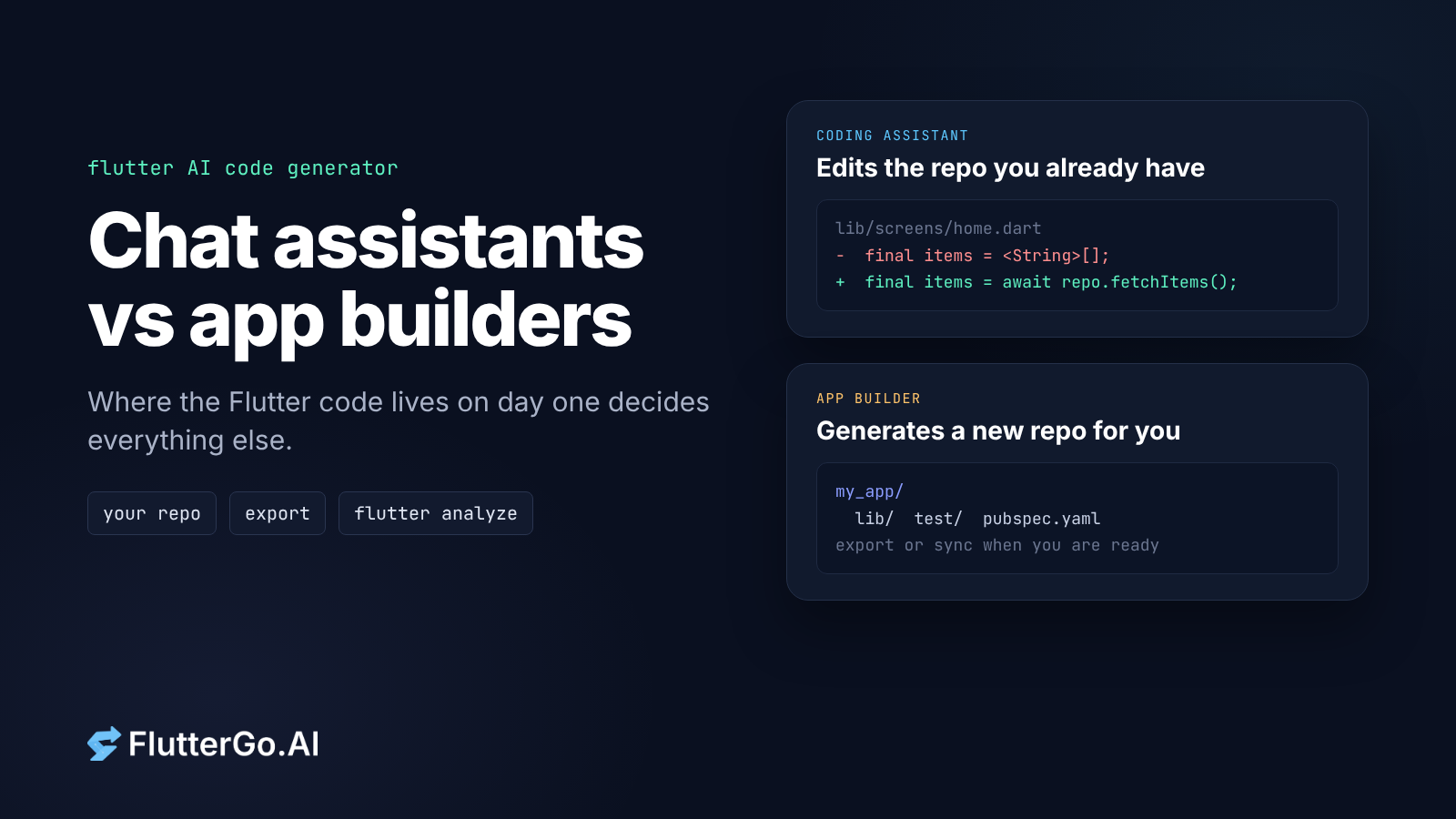
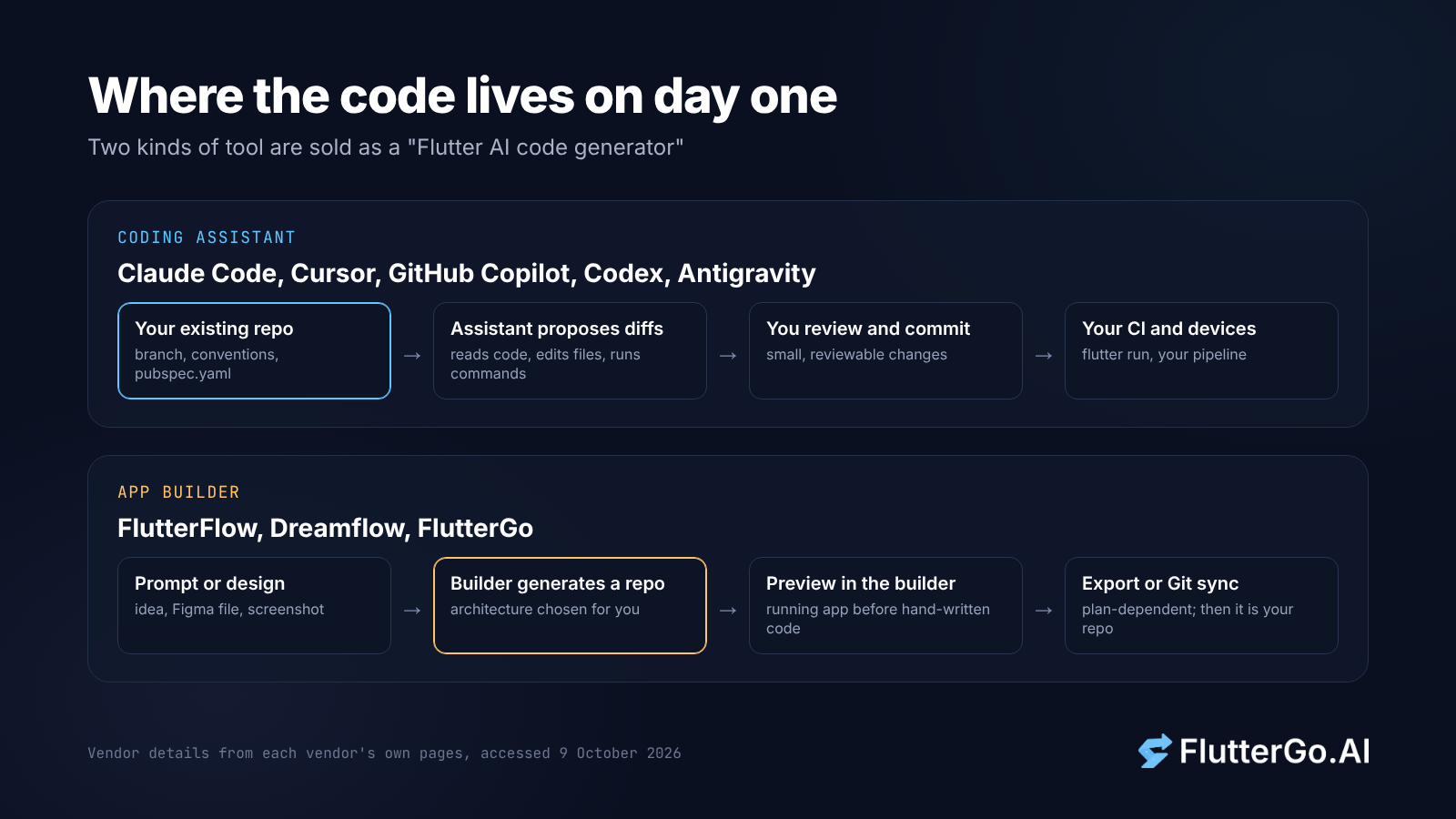
If you search for a "Flutter AI code generator", you get two different kinds of tool under the same label. The first kind is a coding assistant that works inside a Flutter project you already have: Claude Code, Cursor, GitHub Copilot, Codex or Antigravity. The second kind is an app builder that writes the whole project for you from a prompt or a design: FlutterFlow, Dreamflow or FlutterGo.
The simplest way to tell them apart is to ask where the code lives on day one. An assistant edits your repo. A builder generates the repo, and you decide when to take it out. Everything else in this comparison (checks, previews, packages, store builds) follows from that one difference.
This guide sticks to tools that actually produce Flutter and Dart code. Every vendor detail below comes from that vendor's own site or docs, read on 9 October 2026. We don't score or rank anything. Where a page didn't say something, we say so instead of guessing.
Key takeaways
- Coding assistants change a Flutter repo you already own. Flutter now publishes official agent plugins and a Dart and Flutter MCP server that give them analyzer, test and pub.dev access.
- App builders generate a full Flutter project from a prompt or design. Code export, GitHub sync and store builds depend on the plan, so read the pricing page before you commit.
- Neither kind removes the review step. Run
flutter analyze,flutter testand apubspec.yamlreview on anything an AI wrote.
The short answer
Pick a coding assistant if you already have a Flutter codebase, a team with conventions, and a CI pipeline. You keep full control of architecture and packages, and the AI works in small, reviewable diffs.
Pick an app builder if you are starting from nothing (an idea, a Figma file, a screenshot) and want a running app with a preview before you write code by hand. The trade-off is that the builder makes the first architecture decisions for you, and you need to check the repo it hands over.
You can also use both: generate a first version in a builder, export it, and keep working on it with an assistant in your own editor. If you go that way, the export quality is what matters most. We made that argument at length in judge an AI app builder by the repo it leaves you.
Family 1: coding assistants inside your Flutter project
A coding assistant is a general-purpose agent that reads your code, edits files and runs commands in your environment. None of these tools is Flutter-specific, but each vendor describes the same basic loop:
- Claude Code "reads your codebase, edits files, runs commands, and integrates with your development tools," and is available in the terminal, IDEs, a desktop app and the browser (Claude Code docs).
- Cursor's Agent "can complete complex coding tasks independently, run terminal commands, and edit code" (Cursor docs).
- GitHub Copilot agent mode decides which files to change, "offers code changes and terminal commands to complete the task," and "iterates to remediate issues until the original task is complete" (GitHub Docs).
These are also the tools Flutter developers actually report using. In Flutter's Q2 2026 developer survey, published on 6 August 2026 with over 3,500 complete responses, Claude Code was used by 32% of respondents, Antigravity by 23%, GitHub Copilot by 19%, Cursor by 18% and Codex by 17%. Respondents could pick more than one tool. Our write-up of the Flutter developer survey looks at what else it found.
What makes any of these a Flutter code generator is the context you give it. Until recently that meant pasting docs into a chat. Now the Flutter team publishes the context itself.
What Flutter now ships for AI assistants
The Get started developing with AI page on docs.flutter.dev describes an official agent plugin that "bundles the tools and knowledge that an AI assistant needs to understand and modify your Flutter codebase." It has four parts:
- Agent skills: on-demand guides from the official Flutter and Dart repositories for tasks such as responsive layouts, state management and widget tests.
- Agent rules: persistent instructions, for example proactively triggering hot reload after widget edits.
- The Dart and Flutter MCP server: connects the assistant to the Dart SDK for "analyzer diagnostics, symbol resolution, test runners, and runtime inspection."
- Specialized agents: for example, an accessibility (
a11y) agent for audits and fixes.
The page gives setup steps for Antigravity, Claude Code, Cursor, Codex and GitHub Copilot in VS Code, and says other MCP-compatible tools such as Windsurf, Zed and Cline can use the same pieces. For Claude Code, setup is two commands:
claude plugin marketplace add flutter/agent-plugins
claude plugin install dart-flutter@dart-flutter
For Copilot and other MCP clients, you register the server that ships with the Dart SDK (dart mcp-server) in the client's MCP config and install the skills with npx skills add.
The companion page, How Flutter AI tools work, lists what the MCP server exposes: static analysis and diagnostics, symbol resolution, runtime introspection of a running app, pub.dev search and pubspec.yaml management, and running unit and widget tests plus dart format. That's the difference between an assistant that guesses at Flutter APIs and one that checks its work against your SDK.
What you get from an assistant
- Starting point: your existing repo, branch and conventions.
- Code location: your working tree, as diffs you review and commit.
- Package and state management choices: yours. The assistant follows your
pubspec.yamland your rules file (for exampleCLAUDE.md,.cursor/rules/or.github/copilot-instructions.md, all named in the Flutter setup guide). - Checks: whatever you let it run. With the MCP server connected, that includes analyzer diagnostics and tests.
- Preview: your own emulator, simulator or device, through
flutter run. - iOS builds: your own pipeline. Flutter's iOS release guide says "Xcode is required to build and release your app" and that you need a macOS device to follow it (Build and release an iOS app).
The weak spot is the blank page. An assistant can scaffold a new app, but it won't give you a visual screen designer or a hosted preview link. You set the structure. The assistant fills it in.
Family 2: Flutter app builders that generate the project
An app builder takes a description, design or image and produces a Flutter project, usually with a visual editor and an in-browser preview. These three state on their own sites that they produce Flutter code you can take with you.
FlutterFlow
FlutterFlow calls itself a visual development platform with "200+ pre-designed UI elements" and a visual Action Flow Editor for logic (flutterflow.io). The site says you can "Export your code with the click of a button" and "Deploy to App Store, Play Store & Web with a few clicks."
Two details matter for developers. On the pricing page, Code Download starts on the Basic plan ($39/month) and GitHub Integration on Growth ($80 for the first seat). And the Push to GitHub docs say FlutterFlow "always pushes changes to a branch named flutterflow," and warn: "Avoid making direct changes to this branch, as your changes will be overwritten by the next push." You keep hand edits on a separate branch and merge FlutterFlow's updates in through pull requests.
For a deeper look, see our FlutterGo vs FlutterFlow comparison.
Dreamflow
Dreamflow describes itself as a "Visual AI builder for production mobile apps" and says it comes "From the team behind FlutterFlow" (dreamflow.app). You describe the app in plain language, then edit through what it calls "Tri-Surface Editing": AI prompts, a visual canvas and code, kept in sync.
Per the same page, full Flutter project export, store deployment and running locally on simulators and devices are listed on the Hobby plan ($20/month). Git version control is listed on Pro ($90/month). The Free plan covers web deployment.
FlutterGo
FlutterGo is our product, so we've held it to the same rule: only what fluttergo.ai says. The homepage describes the flow as "Describe it, preview it live, edit the Dart, connect Firebase or Supabase, sync GitHub and ship to iOS and Android." You can start from a chat prompt or from Figma, files, photos, a ZIP, a GitHub repo or a URL.
On output, the homepage says you "get Dart with Riverpod and go_router." Treat that as the stated target rather than a guarantee for every screen. Open the generated lib/ folder and confirm which state management the project actually uses before you build on it. The page also says "You own the source code, and it stays yours even if you cancel," and lists Download code, GitHub and Build APK in the ship menu. GitHub sync is listed from the Starter plan ($19/month).
For builds, the homepage lists "release APK, AAB and IPA, no Mac required," with signed builds sent "to TestFlight and Google Play through the official store APIs." Our engineering posts describe how generated code is checked: the engine reads compiler output, applies targeted patches, and recompiles in a sandbox (how FlutterGo detects and fixes errors).
If you want a broader picture of where builders in general still struggle, read where AI app builders fail.
Side-by-side comparison
All vendor details are from each vendor's own pages, accessed 9 October 2026. "Not stated" means we didn't find it on the pages listed in our sources, not that the feature is missing.
| Coding assistants (Claude Code, Cursor, Copilot, Codex, Antigravity) | FlutterFlow | Dreamflow | FlutterGo | |
|---|---|---|---|---|
| Starting point | Your existing repo | Visual editor, new project | Prompt, canvas or code | Prompt, Figma, files, photos, ZIP, GitHub or URL |
| Where code lives | Your working tree | In FlutterFlow until downloaded or pushed | In Dreamflow until exported | In FlutterGo until downloaded or synced |
| Code access | Always yours | Code Download from Basic; GitHub from Growth | Full export from Hobby; Git from Pro | Download code; GitHub sync from Starter |
| Git workflow | Your normal branches | Pushes to a flutterflow branch that you don't edit directly |
"Version control (Git)" on Pro | "GitHub sync" |
| Analyzer and tests | Via Dart and Flutter MCP server, or commands you allow | Not stated | Not stated | Compiler-output repair loop described on our blog |
| Preview | Your emulator or device | Not stated | Device previews; local run on Hobby | iPhone hot-reload preview; live preview link on Pro |
| State management and packages | Whatever your project uses | Not stated | Not stated | Homepage says Riverpod and go_router; verify per project |
| iOS build path | Your Mac and Xcode, or your CI | "Deploy to App Store, Play Store & Web" | Store deployment on Hobby | APK, AAB and IPA, "no Mac required" |
| Entry paid plan (vendor page) | Varies by vendor | Basic, $39/month | Hobby, $20/month | Starter, $19/month |
Which one should you pick?
You maintain a production Flutter app. Use a coding assistant with the official agent plugin installed. Your architecture, CI and review process stay as they are, and the MCP server lets the assistant run the analyzer and tests before it hands you a diff.
You have an idea and no code yet. Start in a builder. You get screens and a preview quickly, which is the part assistants are weakest at. Before you choose one, check which plan includes code export and GitHub, because that decides whether you can leave.
You're a designer, founder or PM who doesn't write Dart. A builder with a visual editor or chat-first flow fits better. Plan for the day a developer takes over the export: they will judge it by its structure, not by the demo.
You need iOS builds without a Mac. An assistant alone won't change Apple's requirement for Xcode on macOS. You either set up cloud CI yourself or pick a builder that states it produces IPA files without one. Our post on Flutter CI/CD with no Mac in the loop walks through the cloud CI route.
You want to generate first and then own it. Generate in a builder, export early, and continue in your editor with an assistant. Check that Git sync works both ways for your builder of choice, or accept that the builder becomes read-only once you move on.
How to check any AI-generated Flutter code
It doesn't matter whether a chat assistant or a builder wrote the code. Run the same checks before you trust it. Every command here is from the official Flutter and Dart docs.
- Run the analyzer. In a Flutter project, use
flutter analyze, which the Flutter CLI reference says to use instead ofdart analyze. By default the analyzer fails on errors and warnings but not on info-level issues. Add--fatal-infosif you want those to fail too (dart analyze). - Run the tests, and check that there are any.
flutter testruns the tests in your package (unit testing recipe). An exported project with no tests is a gap to note, not a pass. Ask for at least one widget test per main screen. - Check formatting.
dart format -o none --set-exit-if-changed .exits with code 1 if anything would change, which makes it easy to use in CI (dart format). - Read
pubspec.yamlline by line. Is every dependency used? Do you recognize the state management and routing packages? Then runflutter pub outdatedto see current, upgradable, resolvable and latest versions (pub outdated). - Look for secrets. Search for API keys, Firebase or Supabase credentials, and service account files before the first push to a shared repo.
- Build a release for each target. A debug preview can hide problems. Run
flutter build appbundleorflutter build apkfor Android (Android release guide), andflutter build ipaon a Mac for iOS. - Read the structure. Would a new teammate find the screens, the state and the data layer without asking? If not, fix that now, while the codebase is small.
Tip: If you use an assistant, make the agent run steps 1 to 3 itself. With the Dart and Flutter MCP server connected, it can see analyzer diagnostics and test results directly instead of you pasting them in.
Frequently asked questions
Is there an official Flutter AI code generator?
Not a standalone generator. The Flutter team publishes official agent plugins, skills, rules and the Dart and Flutter MCP server, so general-purpose assistants such as Claude Code, Cursor, Codex, Copilot and Antigravity can work with Flutter projects more accurately.
Can ChatGPT-style chat write a whole Flutter app?
It can write the files, but a plain chat window doesn't run the analyzer, tests or a build in your project. An agent connected to your repo and the Dart and Flutter MCP server can. Builders run checks inside their own environment, and how much of that they document varies by vendor.
Do app builders lock me in?
It depends on the plan and the Git workflow. FlutterFlow, Dreamflow and FlutterGo all state on their sites that you can export Flutter code, but on FlutterFlow and Dreamflow export starts on paid plans. Check the pricing page and test an export before you commit real work.
Which state management will the generated code use?
With an assistant, whatever your project already uses. With a builder, the builder decides. FlutterGo's homepage states Riverpod and go_router. FlutterFlow and Dreamflow don't say on the pages we read. Either way, check the export. Our Flutter state management guide explains the main options.
Where to start
If you have a repo, install Flutter's official agent plugin in the assistant you already use and let it work in small diffs. If you have an idea and no code, try a builder, export on day one, and run the checklist above on what comes out. FlutterGo is our AI Flutter app builder: it generates a Flutter project from a prompt or design, previews it live, and lets you download or sync the code whenever you want.