Google Play's January 2027 Permission Changes: What Flutter Apps Should Check
Google Play changes four permission rules on 27 January 2027. How to audit a Flutter app's merged manifest and fix contacts, location, geofencing and call log.
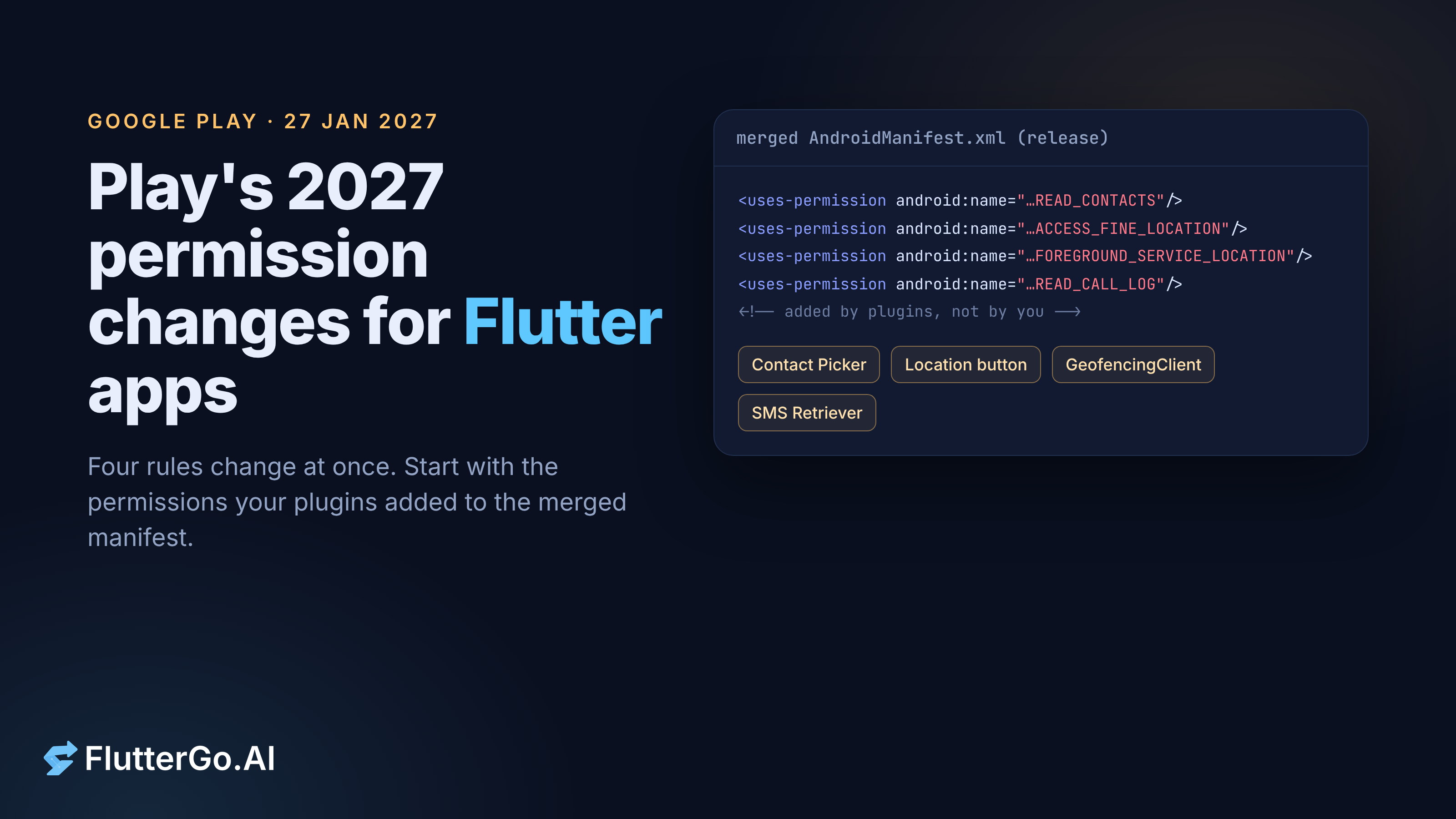
On 27 January 2027, four Google Play policy changes take effect, and a Flutter app can be caught by them through permissions it never asked for directly. Geofencing stops being an approved reason to run a location foreground service. READ_CALL_LOG can no longer be justified by verifying accounts with a phone call. Apps that target Android 17 (API level 37) may only request READ_CONTACTS when the new Android Contact Picker can't do the job, and must use the new location button when they only need precise location for one-off actions. Google lists all four on its Android and Google Play policy timeline (checked 15 October 2026).
The quickest way to know where you stand is to build a release APK and read the permissions in its merged manifest. Plugins can add permissions and services to that manifest without you writing a line. This article covers that audit first, then each change: what Google's own pages say, which common plugins are involved (with the manifest lines we found at their release tags), and what you can do in Flutter today.
What this covers and what it doesn't. Policy pages and Android docs as of 15 October 2026; Flutter 3.47.7 stable. The target API deadline itself is covered in our Android 16 / API 36 guide, developer registration in Android developer verification for Flutter apps, and how to request runtime permissions in Flutter permissions in 2026.
Key takeaways
- Two changes apply on 27 January 2027 whatever your target SDK: no geofencing in a location foreground service, and no
READ_CALL_LOGfor phone-call account verification. - The contacts and location-button rules are written for apps that target API 37. Flutter 3.47.7 still defaults to
targetSdkVersion36, so they bite when you raise it. - Google's location help page also says every app requesting
ACCESS_FINE_LOCATIONmust fill in a Play Console declaration, which opens in November 2026. - The
locationplugin (10.0.2) mergesACCESS_FINE_LOCATIONandFOREGROUND_SERVICE_LOCATIONinto your app.flutter_contacts,geolocatorandpermission_handlerdeclare nothing; you add those lines yourself. - For "pick one contact" features, Android documents
ACTION_PICKas returning the picked contact data withoutREAD_CONTACTS. Apps that target API 37 get the new picker UI through the same intent.
The four changes at a glance
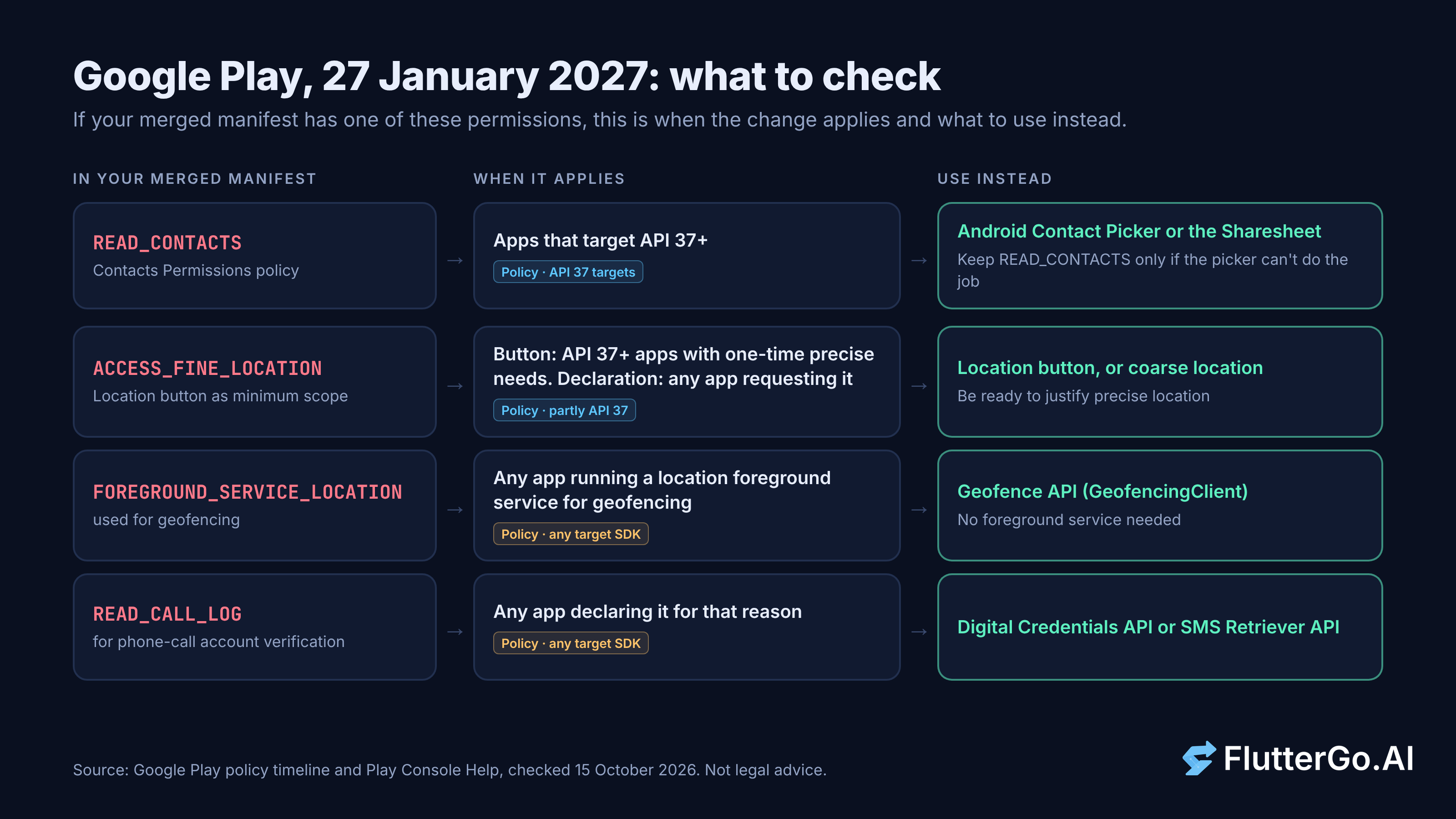
The policy timeline lists four items for 27 January 2027. They are not all the same kind of deadline, so it helps to separate them before you touch any code.
| Change | Applies to | Use instead | Kind of deadline |
|---|---|---|---|
| Geofencing removed as an approved foreground service use case | Any app running a location foreground service for geofencing | Geofence API (GeofencingClient) |
Policy, any target SDK |
| New Contacts Permissions policy | Apps that target API 37+ and request READ_CONTACTS |
Android Contact Picker, Sharesheet | Policy, API 37 targets |
| Location button as minimum scope for precise location | Button: API 37+ apps with one-time precise needs. Declaration: apps requesting ACCESS_FINE_LOCATION |
Location button, coarse location | Policy, partly API 37 targets |
Phone-call account verification no longer a READ_CALL_LOG use case |
Any app declaring READ_CALL_LOG for that reason |
Digital Credentials API, SMS Retriever API | Policy, any target SDK |
Each section below links the Google page the row comes from.
A few details on the dates, because they're easy to blur:
- These are Play policy deadlines, not Android platform changes. Your app keeps running on devices. What changes is whether Play accepts your updates and whether it enforces against the listing. Google's contacts article says that after 27 January, "all apps in scope are subject to enforcement if not compliant", and both the contacts and location articles mention a 30-day self-extension in Play Console.
- Where they were announced: the contacts, location and geofencing changes came with the April 15, 2026 policy announcement. Only the
READ_CALL_LOGchange is in the July 15, 2026 announcement. - Some pages haven't caught up. On 15 October 2026 the foreground service types help page still listed geofencing under the location type, with no removal note. The timeline is the newer statement, so plan by it.
- There's an earlier checkpoint. Google's April 2026 blog post says "new pre-review checks in the Play Console will be available starting October 27". The year isn't stated; read in context it's most likely 27 October 2026.
Step 1: audit your merged manifest
Your android/app/src/main/AndroidManifest.xml is not what ships. At build time, Gradle merges in the manifest of every Android library your plugins pull in, and those can add permissions and services. Check the merged result, not the file you wrote.
Build a release APK and dump its permissions with aapt2, which ships in the Android SDK build tools:
flutter build apk --release

# aapt2 lives in <android_sdk>/build-tools/<version>/
"$ANDROID_HOME"/build-tools/<version>/aapt2 dump permissions \
  build/app/outputs/flutter-apk/app-release.apk \
  | grep -E 'READ_CONTACTS|ACCESS_FINE_LOCATION|ACCESS_BACKGROUND_LOCATION|FOREGROUND_SERVICE_LOCATION|READ_CALL_LOG'
If you have the command-line tools package installed, apkanalyzer manifest permissions build/app/outputs/flutter-apk/app-release.apk gives the same list, and apkanalyzer manifest print prints the whole merged manifest so you can look for services with foregroundServiceType="location" (apkanalyzer reference, aapt2 reference).
To find out which plugin added a permission, read the merger log. Android writes it to the module's build/outputs/logs/ folder as manifest-merger-<variant>-report.txt (Manage manifest files). Flutter's Android template points the app module's build directory at build/app/ in the project root, so for a release build look here:
grep -nE 'READ_CONTACTS|ACCESS_FINE_LOCATION|FOREGROUND_SERVICE_LOCATION|READ_CALL_LOG' \
  build/app/outputs/logs/manifest-merger-release-report.txt
Each permission is listed next to the manifest it came from. In Android Studio, the Merged Manifest tab on android/app/src/main/AndroidManifest.xml shows the same thing.
We couldn't run these commands for this article. Our cloud workspace can't download the Android SDK, so the paths come from Flutter 3.47.7's tool source and the Android docs linked above. Running them on your machine takes a few minutes.
If the merged manifest has a permission you don't use, remove it in your app manifest. Your app's manifest outranks library manifests, and tools:node="remove" drops an element the merger would otherwise keep:
<manifest xmlns:android="http://schemas.android.com/apk/res/android"
    xmlns:tools="http://schemas.android.com/tools">

    <uses-permission
        android:name="android.permission.FOREGROUND_SERVICE_LOCATION"
        tools:node="remove" />
    ...
</manifest>
Only remove what the plugin doesn't need for the features you call. If a plugin starts a location foreground service and you strip its permission, that code path will fail at runtime.
Contacts: READ_CONTACTS and the Android Contact Picker
For apps that target Android 17 or higher, Google's policy says they "may only request the READ_CONTACTS permission" when the Contact Picker "is not sufficient for your app to provide core functionality" (permissions preview). Apps that still need it file a Play Console declaration. Google's minimum-scope article on restricted permissions puts the compliance date as 27 January 2027 "for all apps that target Android 17 or later", with a 30-day self-extension.
The Android Contact Picker is a system screen where the user chooses specific contacts and your app names the fields it wants, such as phone numbers or emails. It's "available on devices running Android 17 (API level 37) or higher". You launch it with ContactsPickerSessionContract.ACTION_PICK_CONTACTS and get back a session URI that grants temporary read access to the selected data only. There's no backport to older Android versions.
One detail matters a lot for Flutter apps: if your app targets API 37, "the system automatically upgrades the existing Intent.ACTION_PICK intent to use the new Contact Picker interface." Code that already uses ACTION_PICK gets the new UI without changes.
The apps this hits are the ones that hold READ_CONTACTS only to let someone pick a friend to invite, a number to call or an email to share with. Contact backup, dialer and CRM-style apps that need the whole address book can keep it, with a declaration.
We read the Android manifests of the common contacts plugins at each package's latest release tag on 15 October 2026:
| Package (tag) | What its Android manifest adds | What that means |
|---|---|---|
flutter_contacts 2.6.0 |
Nothing: an empty <manifest> |
Its README tells you to add READ_CONTACTS and WRITE_CONTACTS yourself, so they're in your manifest, not the plugin's |
contacts_service (repo lukasgit/flutter_contacts, no release tags; read master) |
A <queries> block only, no permissions |
Same: if READ_CONTACTS is in your build, you added it |
permission_handler_android 14.1.0 |
Nothing | Permission.contacts only works for permissions you declared |
So for contacts, the permission is almost always a line in your own AndroidManifest.xml, which makes it easy to find and easy to remove.
flutter_contacts 2.6.0 also has a picker. Its Android showPicker() starts Intent.ACTION_PICK with ContactsContract.Contacts.CONTENT_TYPE, and its README says showPicker() needs "no contacts permission". The catch is in the same README: showPicker(properties: …) "requires READ_CONTACTS" on Android. Without the permission you get the contact's name, not their phone number.
Replacing READ_CONTACTS in Flutter
If you only need one phone number or email, ask the system picker for that data type. Android's common intents guide shows ACTION_PICK with CommonDataKinds.Phone.CONTENT_TYPE and says the response grants "temporary permissions to read that contact data even if your app doesn't include the READ_CONTACTS permission." That works on today's Android versions and, once you target API 37, opens the new picker.
We didn't find a plugin among the ones we checked that returns a phone number this way, so here's a small platform channel. The Dart side:
import 'package:flutter/services.dart';

class PickedPhone {
  const PickedPhone({required this.name, required this.number});

  final String? name;
  final String number;
}

class ContactPicker {
  ContactPicker({MethodChannel? channel})
      : _channel = channel ?? const MethodChannel('app/contact_picker');

  final MethodChannel _channel;

  /// Returns null when the user backs out of the picker.
  Future<PickedPhone?> pickPhoneNumber() async {
    final result =
        await _channel.invokeMapMethod<String, String?>('pickPhoneNumber');
    final number = result?['number'];
    if (number == null || number.isEmpty) return null;
    return PickedPhone(name: result?['name'], number: number);
  }
}
And the Android side, in android/app/src/main/kotlin/<your/package>/MainActivity.kt:
import android.app.Activity
import android.content.ActivityNotFoundException
import android.content.Intent
import android.provider.ContactsContract
import android.provider.ContactsContract.CommonDataKinds.Phone
import io.flutter.embedding.android.FlutterActivity
import io.flutter.embedding.engine.FlutterEngine
import io.flutter.plugin.common.MethodChannel

class MainActivity : FlutterActivity() {
    private val pickPhoneRequest = 4201
    private var pendingResult: MethodChannel.Result? = null

    override fun configureFlutterEngine(flutterEngine: FlutterEngine) {
        super.configureFlutterEngine(flutterEngine)
        MethodChannel(flutterEngine.dartExecutor.binaryMessenger, "app/contact_picker")
            .setMethodCallHandler { call, result ->
                if (call.method != "pickPhoneNumber") {
                    result.notImplemented()
                    return@setMethodCallHandler
                }
                if (pendingResult != null) {
                    result.error("busy", "The contact picker is already open", null)
                    return@setMethodCallHandler
                }
                // No READ_CONTACTS needed: the result grants temporary access
                // to the picked row. Per the Android 17 docs, apps targeting API 37+
                // get the new Contact Picker UI for ACTION_PICK.
                val intent = Intent(Intent.ACTION_PICK).setType(Phone.CONTENT_TYPE)
                try {
                    pendingResult = result
                    startActivityForResult(intent, pickPhoneRequest)
                } catch (e: ActivityNotFoundException) {
                    pendingResult = null
                    result.error("no_picker", e.message, null)
                }
            }
    }

    @Deprecated("Deprecated in Java")
    override fun onActivityResult(requestCode: Int, resultCode: Int, data: Intent?) {
        super.onActivityResult(requestCode, resultCode, data)
        if (requestCode != pickPhoneRequest) return
        val result = pendingResult ?: return
        pendingResult = null

        val uri = data?.data
        if (resultCode != Activity.RESULT_OK || uri == null) {
            result.success(null)
            return
        }
        val projection = arrayOf(ContactsContract.Contacts.DISPLAY_NAME, Phone.NUMBER)
        contentResolver.query(uri, projection, null, null, null)?.use { cursor ->
            if (cursor.moveToFirst()) {
                result.success(
                    mapOf("name" to cursor.getString(0), "number" to cursor.getString(1))
                )
                return
            }
        }
        result.success(null)
    }
}
Testing status: the Dart class passed flutter analyze and three unit tests against a mocked channel (success, cancel, platform error) on Flutter 3.47.7. The Kotlin is untested: we couldn't compile it or run it on a device, so treat it as a starting point and try it on an Android 17 device before you ship.
If you need several contacts at once or several fields per contact, you'll want ACTION_PICK_CONTACTS itself, which means compiling against API 37. Google's sample catches ActivityNotFoundException for devices without the picker. On older devices you'd fall back to ACTION_PICK.
Precise location and the location button
The location button is "a customizable system UI element" for "session-scoped precise location access". The user taps it to share precise location for the current session, which saves them from repeated "Only this time" prompts. Google's minimum scope article for location makes two rules:
- Apps targeting API 37+ that need precise location only for one-time, user-initiated actions (search nearby, share my location once, fill in an address) must use the button and declare
ACCESS_FINE_LOCATIONwith theonlyForLocationButtonflag. - "All apps requesting precise location (
ACCESS_FINE_LOCATION) must complete a declaration in the Play Console." The page says that declaration will be available in November 2026 and that on 27 January 2027 "Policy compliance is mandatory for all apps." Elsewhere the same page frames enforcement around apps that target Android 17, so watch Play Console for the form rather than assuming you're exempt.
The manifest line from Google's page looks like this:
<uses-permission
    android:name="android.permission.ACCESS_FINE_LOCATION"
    android:usesPermissionFlags="onlyForLocationButton" />
The flag is new in API 37. The one_tap_location README reports an AAPT build error with compileSdk 36, so plan to raise compileSdk to 37 before adding it. Flutter 3.47.7's default compileSdkVersion is still 36.
This reaches any app whose merged manifest has ACCESS_FINE_LOCATION. In Flutter apps that's often more apps than you'd think, because one popular plugin adds it for you.
| Package (tag) | What its Android manifest adds |
|---|---|
location 10.0.2 |
ACCESS_COARSE_LOCATION, ACCESS_FINE_LOCATION, FOREGROUND_SERVICE, FOREGROUND_SERVICE_LOCATION, and a FlutterLocationService with foregroundServiceType="location" |
geolocator_android 5.1.1+1 |
No permissions; a GeolocatorLocationService with foregroundServiceType="location" |
geolocator_android 5.1.1 |
Declared FOREGROUND_SERVICE_LOCATION (removed again in 5.1.1+1) |
permission_handler_android 14.1.0 |
Nothing |
These are the lines from location 10.0.2's AndroidManifest.xml:
<uses-permission android:name="android.permission.ACCESS_COARSE_LOCATION" />
<uses-permission android:name="android.permission.ACCESS_FINE_LOCATION" />
<uses-permission android:name="android.permission.FOREGROUND_SERVICE" />
<uses-permission android:name="android.permission.FOREGROUND_SERVICE_LOCATION" />
If you use location only to show a rough position, every build still asks Play for precise location and a location foreground service until you remove them.
geolocator shows how quickly this can change. geolocator_android 5.1.1 started declaring FOREGROUND_SERVICE_LOCATION. Version 5.1.1+1 rolled it back within a week (the tag commits are dated 27 September and 2 October 2026); its changelog says adding it by default "results in automatic rejections by Google". Meanwhile the geolocator 14.1.1 README still says the plugin's manifest "already declares it". If your lockfile resolved geolocator_android 5.1.1, the permission is in your build. Check pubspec.lock, and flutter pub upgrade geolocator_android if needed.
Precise location in Flutter today
- Ask whether you need precise location at all. The policy says to use
ACCESS_COARSE_LOCATIONwhen a feature "does not strictly require fine-grained accuracy". Weather, store locators and regional content usually don't. Declare only coarse and stripACCESS_FINE_LOCATIONwithtools:node="remove"if a plugin adds it. - For one-off precise actions, plan for the button. Google's own library is
androidx.core:core-locationbutton, documented as "an experimental Jetpack library and is subject to change", with a ComposeLocationButton. On Android 16 and lower it "falls back to a locally rendered component" that shows the normal permission prompt. - In Flutter, the button needs a platform view. We found one package that does this,
one_tap_location, a 0.1.x package (its latest tag is v0.1.3, and pub.dev showed 0.1.1 published on 3 October 2026). Its source shows a platform view that reaches the API 37 button through reflection rather than the Jetpack library, plus a fallback below Android 17. We read the source but didn't run it. It is new, so test it hard or write your own platform view around the Jetpack library. - Watch for the declaration in November. If you keep
ACCESS_FINE_LOCATION, be ready to explain which feature needs it and why the button or coarse location won't do.
How to request location at runtime (rationale, "approximate" vs "precise", background location) is in the permissions guide linked at the top, and map setup is in Flutter maps in 2026.
Geofencing in a location foreground service
Geofencing is no longer an approved use case for a location foreground service. The timeline says "Developers can instead use the Geofence API for this use case", and Android's foreground service types guide already says, under the location type: "If your app needs to be triggered when the user reaches specific locations, consider using the geofence API instead."
This affects apps that keep a location foreground service running so they can compare the current position with stored areas and fire an "arrived" or "left" event. Since Android 14, Play has asked apps that target API 34+ to declare each foreground service type and pick a use case in Play Console, on the same foreground service help page mentioned above. If you picked geofencing there, you're affected.
To find out, look in the merged manifest for FOREGROUND_SERVICE_LOCATION and any <service> with foregroundServiceType="location". In Flutter apps that usually comes from location (its enableBackgroundMode) or geolocator (a position stream with ForegroundNotificationConfig). The service itself isn't the problem. What matters is what you use it for. Navigation and user-started location sharing are still listed use cases.
Some geofencing plugins don't use the platform API at all. The geofence_service README says it "does not use the Geofence API implemented on the platform" and instead checks your position on a timer while the app is alive. That's fine in the foreground, but if you wrapped it in a location foreground service to keep it alive in the background, that's the pattern being removed.
Moving geofences off the foreground service
Move geofence logic to Google Play services' GeofencingClient (Create and monitor geofences). It delivers transitions to a BroadcastReceiver through a PendingIntent, so there's no foreground service. Know its limits before you migrate:
- 100 active geofences "per app, per device user".
- It needs
ACCESS_FINE_LOCATION, plusACCESS_BACKGROUND_LOCATIONwhen you target Android 10 or higher. That brings you back to the precise-location declaration above. - Latency is "usually" under 2 minutes, and can stretch to 6 minutes on a device that has been stationary.
- Geofences are dropped on reboot, so re-register them on
BOOT_COMPLETED.
Running Dart from a BroadcastReceiver means starting a background Flutter engine, which is more work than a method channel. If you write your own, keep the receiver logic in Kotlin and call into Dart only when you must.
READ_CALL_LOG and phone-call account verification
The SMS and Call Log permissions policy still lists "Account verification via phone call" as an exception for READ_CALL_LOG, but the page now notes that the policy "will no longer permit account verification via phone call as a use case for the READ_CALL_LOG permission (effective January 27, 2027)". This is the change announced in July 2026.
It affects apps that verify a phone number by placing or receiving a phone call and reading the call log to match the number. The other call log rules haven't moved: apps generally need to be the default phone, SMS or assistant handler, and file a Permissions Declaration Form.
To check, search the merged manifest for READ_CALL_LOG. If a verification SDK or plugin added it, the merger log names it.
Replacing call-log verification
Google lists two replacements:
- The Digital Credentials API for phone number verification. The app asks Credential Manager for a carrier-issued TS.43 token, and your backend swaps it for the verified number through "an aggregator or mobile carrier". It runs on Android 10 (API 29) and up, and the sample uses
androidx.credentials1.7.0-alpha03. Google describes aggregators as "usually" a "billable cloud API endpoint" (Firebase Phone Number Verification is one option), so budget for that as well as an alpha library. - The SMS Retriever API for one-time codes. It listens for up to five minutes for an SMS "that contains a unique string that identifies your app". If you use a Flutter OTP package for this, we didn't audit those for this article, so check it in the merged manifest too.
There's no drop-in Flutter plugin for the Digital Credentials flow that we verified, so for now it's a platform channel to Credential Manager plus your backend.
A pre-deadline checklist for Flutter apps
- Build a release APK and dump its permissions. Write down every match for
READ_CONTACTS,ACCESS_FINE_LOCATION,ACCESS_BACKGROUND_LOCATION,FOREGROUND_SERVICE_LOCATIONandREAD_CALL_LOG, and the plugin each came from. - Remove what you don't use with
tools:node="remove", then rebuild and dump again. - Before 27 January 2027 (any target SDK): stop using a location foreground service for geofencing, and stop using
READ_CALL_LOGfor call-based verification. - From November 2026: if you keep
ACCESS_FINE_LOCATION, complete the precise-location declaration in Play Console when it appears. - When you raise
targetSdkVersionto 37: replaceREAD_CONTACTSwith the picker where you can, adopt the location button for one-off precise location, and compile against API 37 for the new flags. - Keep an eye on Play Console from 27 October, the date Google gave for new pre-review checks.
If you're shipping your first Android release, the order of the Play Console steps is in publishing a Flutter app to Google Play, start to finish.
How we checked this
- Policy text: read on Google's pages listed above on 15 October 2026. Where the timeline summary and a help article differ, we went with the help article and say so.
- Plugin manifests: read at release tags fetched from GitHub with
giton 15 October 2026 (location-v10.0.2,geolocator_android_v5.1.1+1,v2.6.0forflutter_contacts,permission_handler_android_v14.1.0;one_tap_locationat its default branch, commit 42b8980 of 11 October 2026). pub.dev was blocked from our workspace, so we didn't confirm each version is the newest on pub.dev. - Code: the Dart wrapper was analyzed and unit-tested. The Kotlin and the build commands weren't run.
Plugins change quickly, and geolocator showed how fast a permission can arrive and leave. Your merged manifest is the only list that counts, so make the dump in step 1 part of every release.
If you're building a new app rather than auditing an old one, FlutterGo is an AI Flutter app builder that writes real Flutter code from a plain-English description and publishes signed builds to Google Play and the App Store.