Build a Sudoku App with AI, Then Check the Grid Is Really Random
Build a Sudoku app with AI in FlutterGo: one prompt, a 9-minute build, then the check that found every grid came from one pattern, and the fix prompt for it.
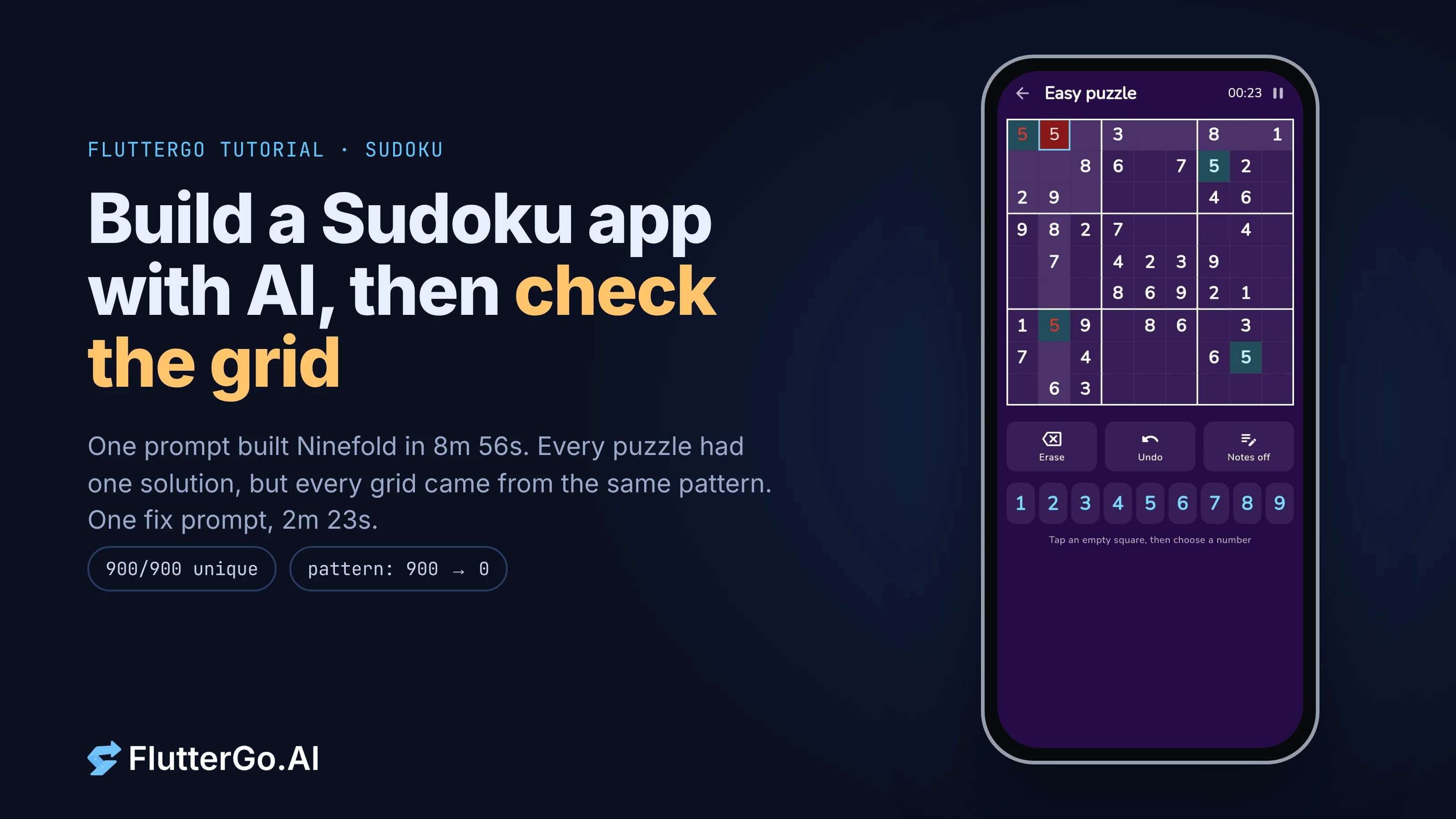
To build a Sudoku app with AI, describe the screens and, more importantly, the puzzle rules: how a grid is generated, how clues are removed, and what proves a puzzle has exactly one solution. We gave FlutterGo one prompt for an offline Sudoku app called Ninefold, and it built a working Flutter app in 8 minutes 56 seconds. Every puzzle we checked had exactly one solution. The bug was quieter than that: every finished grid came from the same fixed pattern, so all its puzzles shared a structure a player can learn. Below is the exact prompt, what we tested in the preview, how we found the pattern, and the fix prompt that removed it in 2 minutes 23 seconds.
What we tested, and how: built in the FlutterGo studio on 25 October 2026, tested in the web preview at iPhone 16 size (393×852). We copied the generated puzzle engine unchanged (SHA-256 checked) and ran it 300 times per difficulty on Dart 3.13.7, before and after the fix, and checked every puzzle with our own independent solver in Python. The app's engine tests ran on plain Dart with package:test. We did not run the app on a phone.
What does the finished app do?
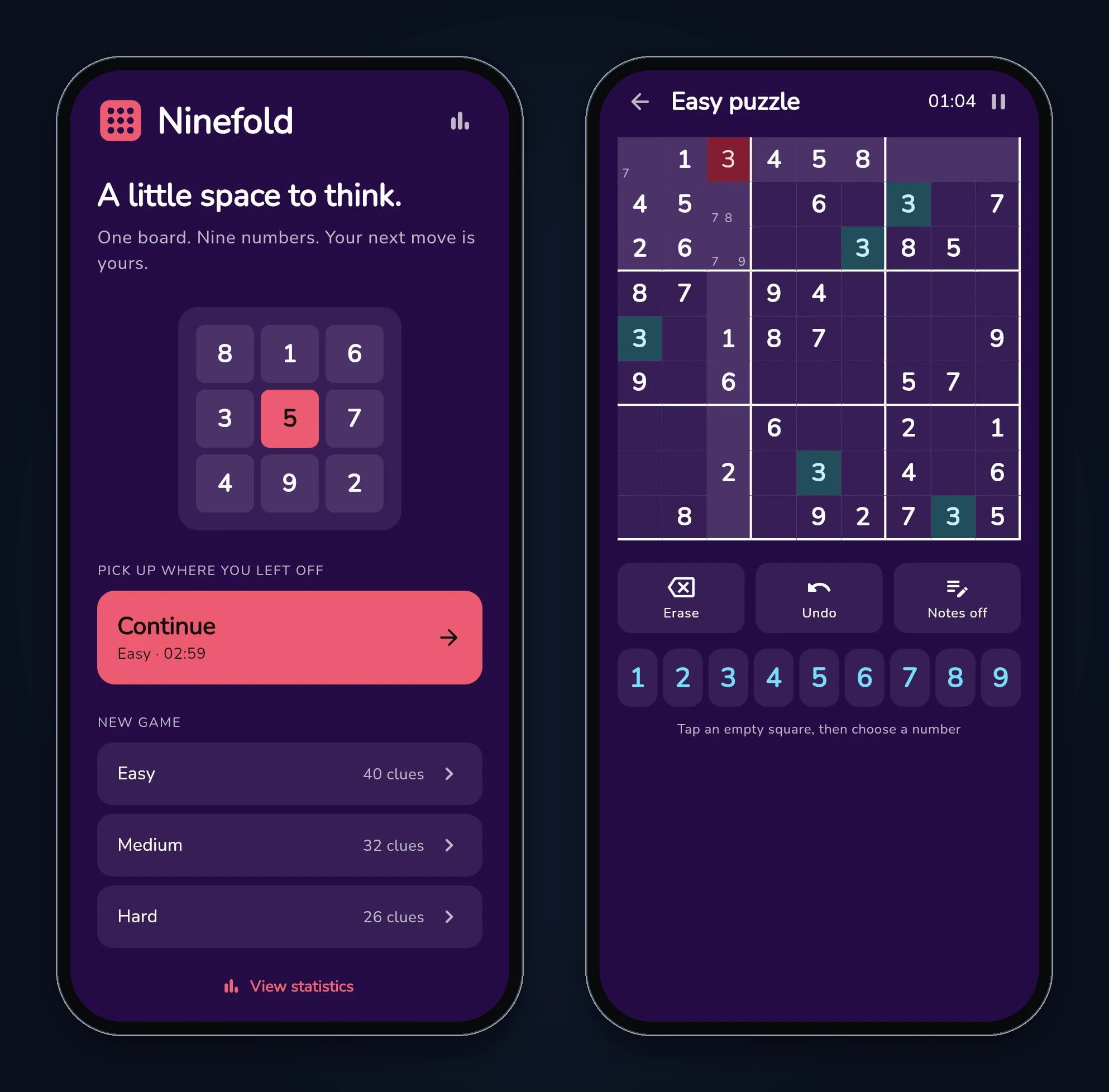
Ninefold is an offline Sudoku game with three screens: Home (Continue, plus Easy, Medium and Hard), the Game board, and Stats. The board has notes (pencil marks), Erase, Undo, a timer with a pause button, highlights for the selected row, column, box and matching digits, and red digits for clashes. Games and stats are saved on the device, so closing the app doesn't lose a puzzle.
Step 1: Write the prompt around the puzzle rules
Most Sudoku prompts describe the board. The part that decides whether the app is any good is generation, so half of our prompt is about that. This is the text we pasted into the studio, unedited:
Build a Flutter Sudoku app called Ninefold. It works fully offline: no accounts, no backend, no ads. Save everything on the device so it survives closing the app.Screens:
- Home: "Continue" (only if a game is in progress, showing its difficulty and time), "New game" with Easy, Medium and Hard, and a Stats button.
- Game: a 9x9 board with thicker lines around the 3x3 boxes. Given numbers (clues) are bold and can't be changed. Tap a cell to select it; highlight its row, column and box, and every cell holding the same number. Below the board: a 1-9 number pad, Erase, Undo, and a Notes toggle (pencil marks: small numbers inside a cell). When a number is placed, remove that number from the notes in the same row, column and box. A number that clashes with the same number in its row, column or box is shown in red (check the rules, don't compare against the stored solution). A timer runs while playing and pauses when the app goes to the background. When all 81 cells are filled and there are no clashes, show a "Solved" screen with the time.
- Stats: games solved and best time for each difficulty.
Puzzle generation (on the device):
- Start from a random complete valid grid, then remove clues one at a time in random order. After each removal, run a solver that counts solutions and stops at 2; if the puzzle no longer has exactly one solution, put the clue back.
- Target clue counts: Easy 40, Medium 32, Hard 26. If the target can't be reached without losing uniqueness, stop at the lowest count that keeps exactly one solution.
- Every puzzle must have exactly one solution. Generation must not freeze the screen; show a short loading indicator while it runs.
Use Material 3 with a calm colour scheme, and make the board and number pad work at large text sizes. Add unit tests for: the solver solves a known puzzle; every generated puzzle (try 20 of each difficulty) has exactly one solution; clash detection; placing a number clears matching notes; undo restores the previous state.
Three lines in it carry most of the weight:
- "Counts solutions and stops at 2." You don't need every solution to know a puzzle is ambiguous. Stopping at two keeps the check fast.
- "Check the rules, don't compare against the stored solution." Comparing against the answer tells players they're wrong before they've made a real mistake. Checking rows, columns and boxes only flags real clashes.
- Clue targets are a floor, not a promise. Every Sudoku with a unique solution needs at least 17 clues, a result proved by an exhaustive computer search (McGuire, Tugemann and Civario). 26 is well above that, but a random removal order can still get stuck a little higher, so the prompt says what to do then.
Step 2: Let FlutterGo build it
The build finished in 8 minutes 56 seconds and produced a project with 142 files. The studio's own summary said the solver, generation, clash, notes and undo tests were "added but could not run here", which is worth taking literally: the tests existed, but nothing had run them yet.
The generated code uses Riverpod (flutter_riverpod 2.6 with a ChangeNotifierProvider for the game store), go_router for the four screens and shared_preferences for saving. The puzzle logic sits in one pure-Dart file, sudoku_engine.dart, with a bitmask solver that always branches on the empty cell with the fewest candidates. Puzzles are generated with compute(). On the web that doesn't move work off the main thread (compute runs the callback "on the current eventloop" there), but generation took 1.8 to 3.6 ms per puzzle at the median in our Dart VM runs, so nothing froze.
Step 3: Test it in the preview like a player
We played the app in the preview at iPhone 16 size and read its saved state from browser storage to confirm what each tap did. Results:
- New Easy puzzle: 40 clues. Our separate solver found exactly one solution. Pass.
- Notes: pencilled 3 and 7 in a cell, then placed a 3 in the same row. The 3 disappeared from the note; the 7 stayed. Pass.
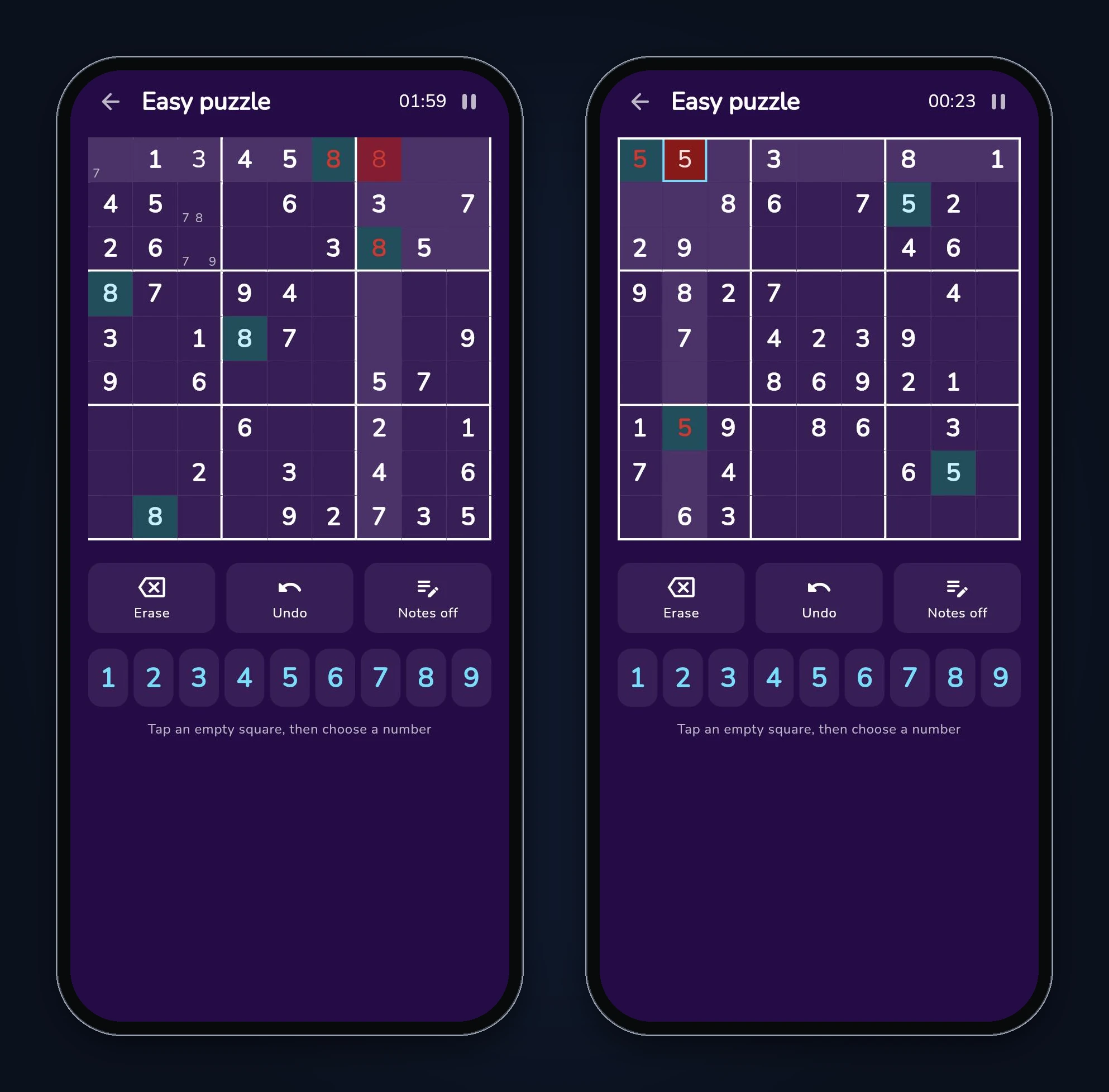
- Clash: placed an 8 that repeated an 8 in its row and box. All three 8s turned red, without the app consulting the stored answer. Pass.
- Undo: a wrong 1 typed over an 8 came back as the 8. Pass.
- Timer in the background: we signalled the page as hidden for 28 seconds (a browser visibility event, which Flutter web treats as the app going to the background); the timer moved by one second. Pass.
- Close and reopen: after a reload, Home showed "Continue · Easy · 02:59". Pass.
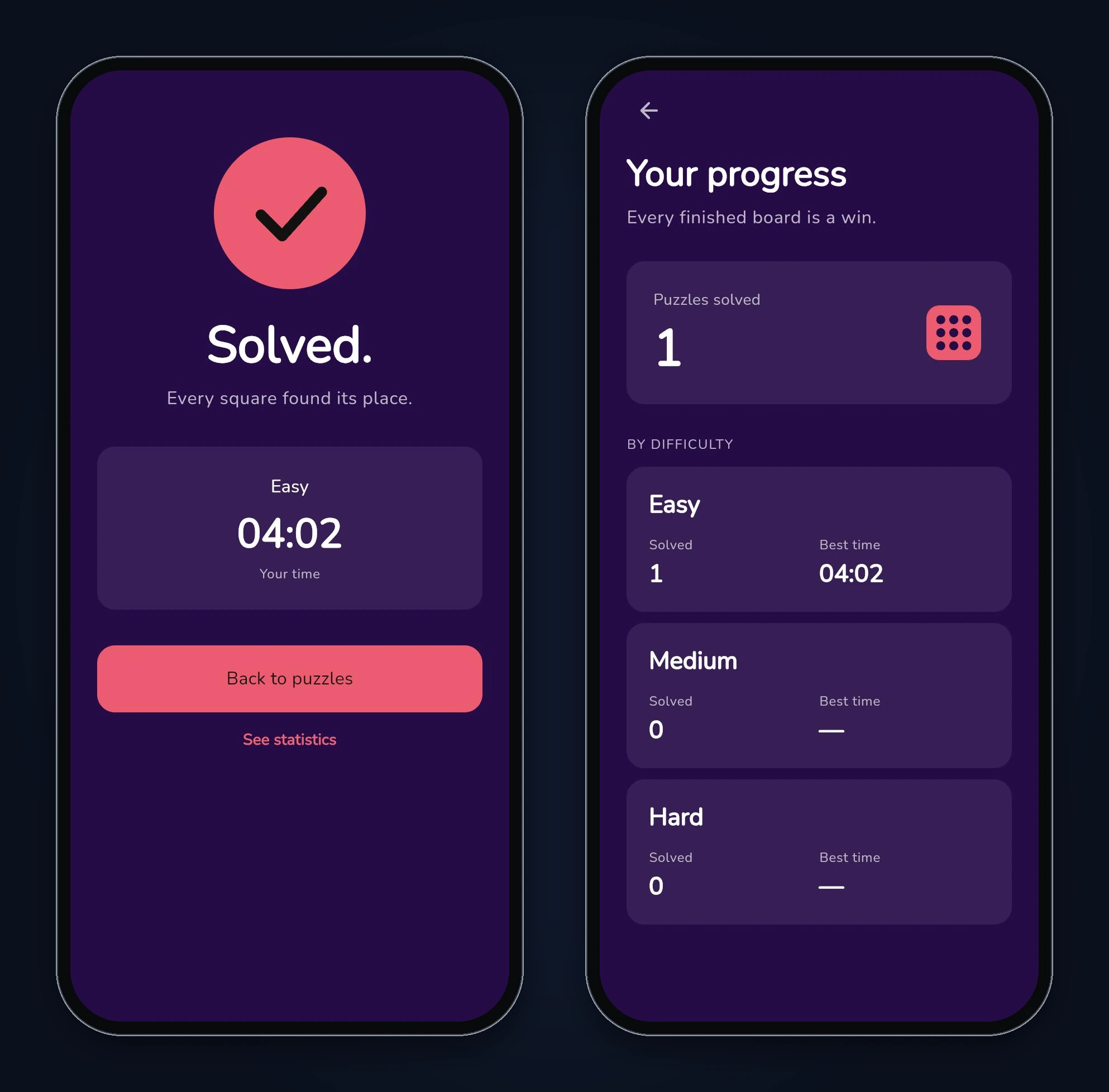
- Finish a puzzle: filling the last cell opened "Solved." with 04:02, and Stats showed 1 Easy solve with a best time of 04:02. Pass.
- Hard puzzle: 26 clues, one solution. Pass.
- The board itself: the thick outer border was missing on the top and left edges, and a clashing digit in the selected cell was red on a red background. Fail (minor).
Everything a player touches worked. If we had stopped here, we'd have shipped it.
Step 4: Check the generator, not just the board
A Sudoku app can pass every test above and still hand out weak puzzles, because the tests look at one board at a time. So we looked at the code that builds the full grid before clues are removed:
final solution = [
  for (final row in rows)
    for (final col in cols) digits[(row * 3 + row ~/ 3 + col) % 9],
];
That line fills the grid from one fixed formula, then shuffles the digits, the rows within each band and the columns within each stack. The result is always a valid grid, and the clue removal after it correctly keeps exactly one solution. But the prompt asked for "a random complete valid grid", and this is one grid in disguise.
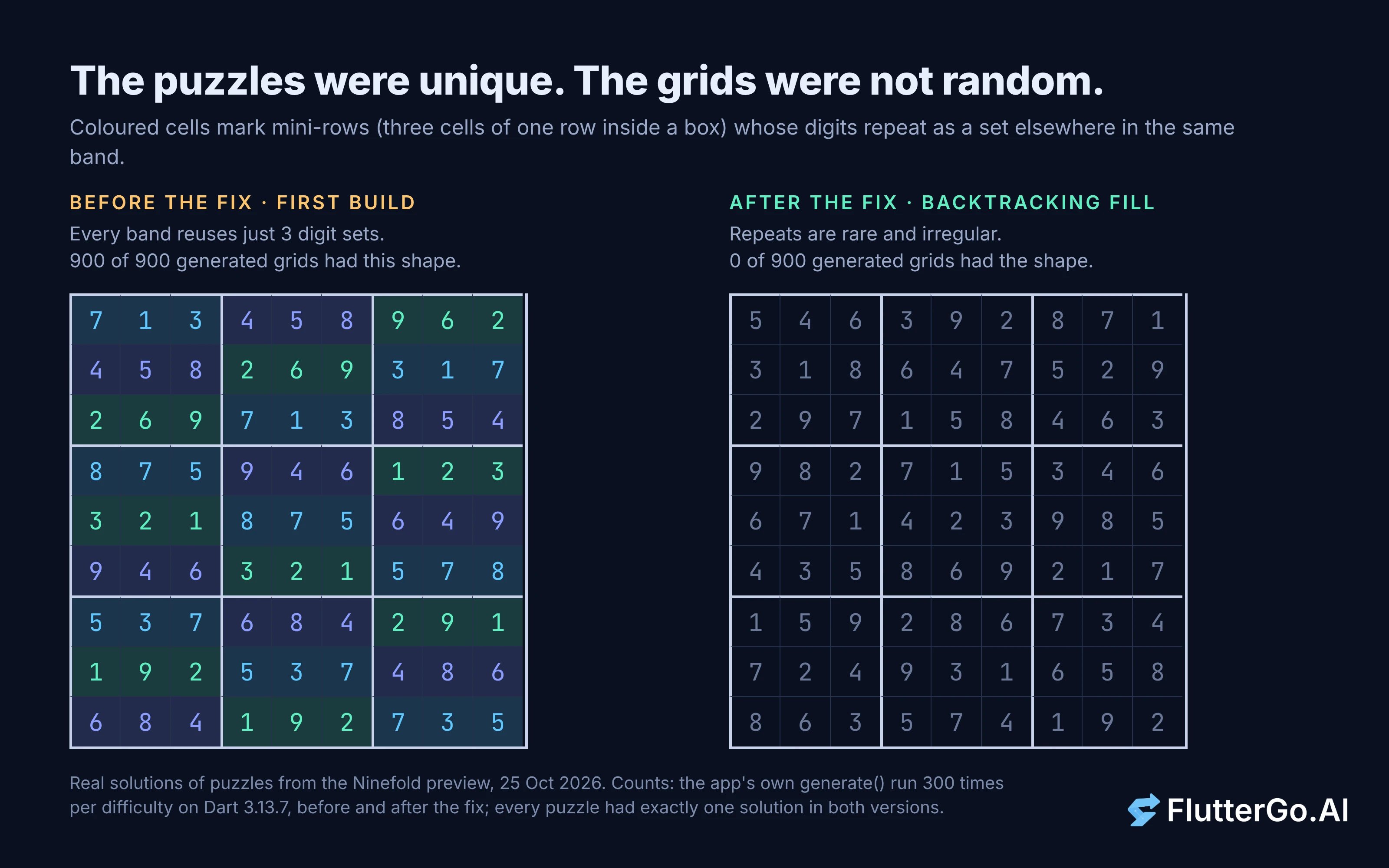
Here's the giveaway. Take any band of three rows and split each row into its three boxes. In a grid from this formula, those nine mini-rows only ever contain three different sets of digits: if a box's top mini-row is {7, 1, 3}, that same set fills a mini-row in each of the other two boxes of the band. The same holds for columns. A player who spots it gets a free shortcut on every puzzle.
We measured it. We ran the app's own generate() 300 times per difficulty and checked each solution:
- Before the fix: 900 of 900 grids had the pattern in every band and every stack.
- Grids from a plain randomised backtracking fill (our Python reference): 0 of 300.
The puzzles we got in the preview had it too, Easy and Hard alike. The formula can also only produce at most 9! × 6⁸ = 609,499,054,080 different grids, against the 6,670,903,752,021,072,936,960 valid Sudoku grids that Felgenhauer and Jarvis counted in 2005. The number isn't the problem on its own. The repeated structure is.
The tests FlutterGo wrote didn't catch this, and they weren't wrong. "Every generated puzzle has exactly one solution" was true. Nothing in the prompt or the tests described what a random grid should look like, so nothing failed. This is the same lesson as in our widget tests for AI-generated Flutter code: a test only protects the property it names.
Step 5: Fix it with one prompt, then re-test
We sent one fix prompt that named the line, described the pattern and asked for a test that would have caught it:
The puzzles always have exactly one solution, which is right, but the finished grid isn't random. generate() builds every solution from one fixed pattern (digits[(row * 3 + row ~/ 3 + col) % 9]) and then only shuffles the digits, rows and columns. Every solution keeps that pattern's structure: in each band of three rows, all nine mini-rows (the 3 cells of one row inside one box) use the same three sets of digits, and the same holds for mini-columns in each stack of three columns. A player can use that as a shortcut. Please:
- Build the complete solution grid with a randomised backtracking fill (go cell by cell, try the digits in a shuffled order, use the same row/column/box bitmasks as countSolutions), not from a pattern.
- Keep the clue-removal step and the clue targets exactly as they are.
- Add a unit test: for 50 seeds, count the solutions in which every band uses only 3 distinct mini-row digit sets and every stack uses only 3 distinct mini-column sets. Expect fewer than 5 (with the current pattern it is 50 out of 50).
- Two small board fixes: the thick outer border is hidden under the cells on the top and left edges (only the right and bottom edges show it), so draw the outer border above the cells. And a clashing number in the selected cell is red text on a red background; keep it readable (for example a different selected-cell colour or an outline for the selection).
FlutterGo finished in 2 minutes 23 seconds. It replaced the formula with a recursive fill that tries shuffled digits cell by cell, kept the clue removal unchanged, added the 50-seed test and fixed both board issues. We re-ran everything:
- Generator, after the fix: 900 of 900 puzzles had exactly one solution (independent solver), and 0 of 900 grids had the pattern. Easy and Medium hit 40 and 32 clues every time; Hard hit 26 in 296 of 300 runs and stopped at 27 in the other four, as the prompt allowed.
- Engine tests: all 6 engine tests pass on plain Dart. (The 2 notes and undo tests need Flutter and Riverpod, so we didn't run them; both behaviours passed in the preview.) The new pattern test fails against the first build's engine with "Expected: a value less than <5>, Actual: <50>", so it would have caught the bug.
- In the preview: a new Easy puzzle had one solution and no repeated mini-row sets. The outer border now shows on all four sides, and the selected clashing cell keeps a white digit with a blue outline.
What's still on you before you ship
The fix made the grids structurally random and the board readable. A few things we noticed are still yours to decide:
- Clue count isn't difficulty. "Hard" means 26 clues, not puzzles that need harder solving techniques. Real difficulty grading means solving each puzzle with human-style techniques and rating the hardest one it needs.
- The fill isn't perfectly uniform. A row-by-row backtracking fill with shuffled digits avoids any fixed pattern, but it doesn't pick each possible grid with exactly equal probability. For a casual game that's fine; say so if you ever promise otherwise.
- The timer saves on pause, not continuously. Closing a browser tab without pausing lost the seconds since the last save in our reload test. On phones the app passes through a background state first, so this mostly matters on the web.
- Undo history is saved with every move. It grows for the whole game. That's fine for one puzzle, but trim it if you add a long-running mode.
- Device testing. We tested the web preview only. Run it on a real iPhone and Android phone, at large text sizes, before release.
For a wider list of what generated apps tend to miss, see where AI app builders still fail. For the state management choices behind the game store, see Flutter state management in 2026. If you want another game build with a bug hunt, the board game score keeper tutorial is a good next read.
FAQ
How does a Sudoku app make sure a puzzle has only one solution?
It runs a solver that counts solutions and stops as soon as it finds a second one. Generators remove clues one at a time and put a clue back whenever the count stops being exactly one. That's what Ninefold does, and it held in all 1,800 puzzles we checked.
What's the fewest clues a Sudoku can have?
Seventeen. McGuire, Tugemann and Civario searched every possibility by computer and found no valid 16-clue Sudoku with a unique solution. Removing clues at random usually stops well above that; Ninefold's Hard level landed on 26 to 28 clues in our runs.
Can the preview test a Sudoku app properly?
It can test what a player does: taps, notes, clashes, saving and the solved screen. It can't tell you whether the puzzles are varied, because that only shows up across many grids. For that, run the generator in a loop and measure it, as we did here.
Next steps
Write the puzzle rules into the prompt, test the board like a player, then test the generator like a skeptic, because that's where a quiet flaw hides. Ninefold took one prompt and one fix prompt, about 11 and a half minutes of build time in total, and the check that mattered took a short script. If you want to try the same loop on your own game, start it in the AI Flutter app builder and read the generated engine before you trust its tests.