Null Check Operator Used on a Null Value: Causes and Fixes
Fix "Null check operator used on a null value" in Flutter: find the exact ! in the stack trace, then match 8 common causes to fixes tested on Flutter 3.47.8.
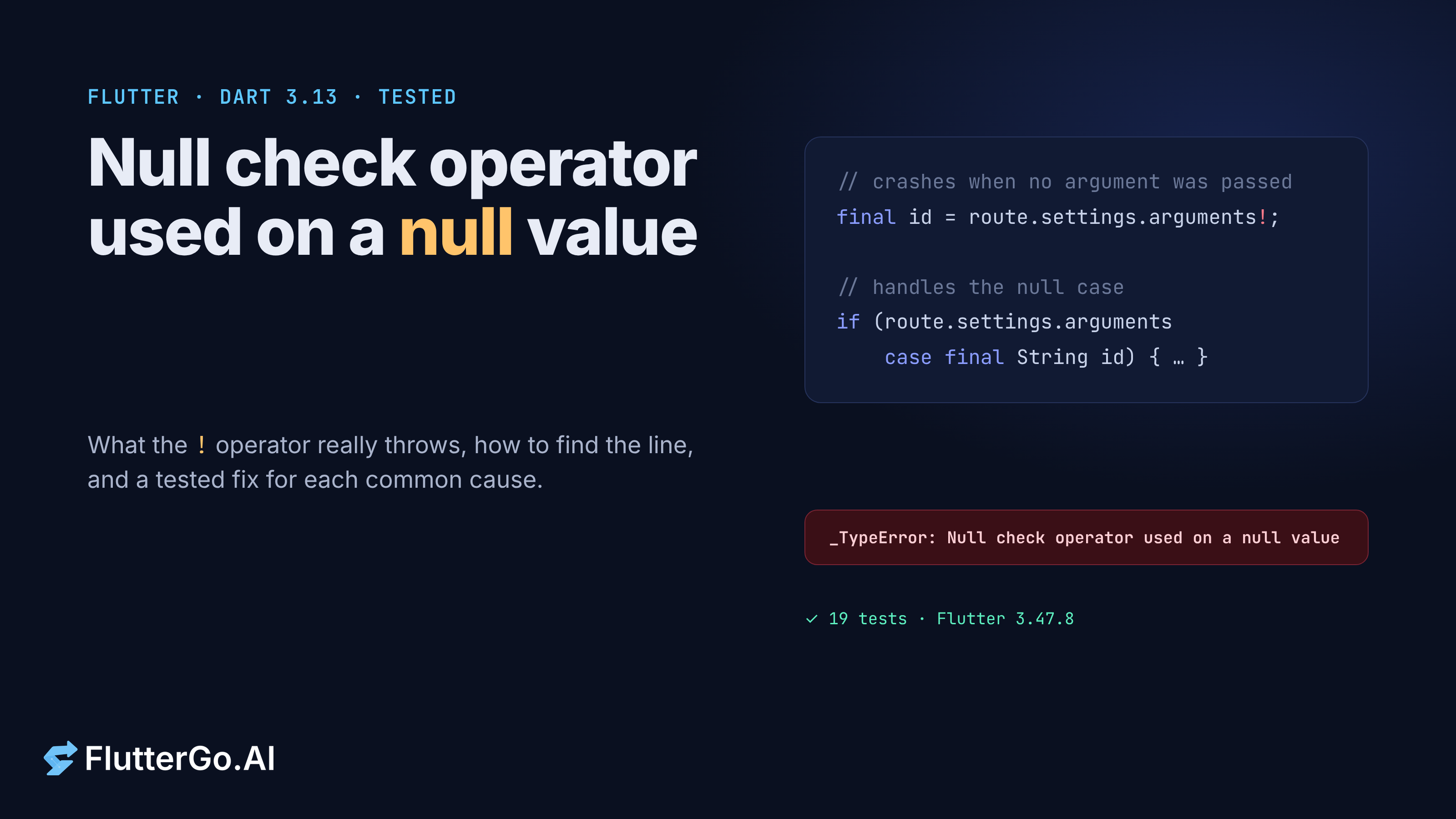
"Null check operator used on a null value" means a ! in your Dart code met a value that was null at runtime. The ! (the null assertion operator) tells the compiler "trust me, this isn't null". When that promise breaks, Dart throws instead of letting null leak further. To fix it, find the exact ! in the first stack frame that points into your own code (the line and column tell you which ! on that line failed), then ask why that value can be null at that moment. In the eight cases we reproduced, the value was null because a widget wasn't in the tree, data hadn't arrived yet, or the input didn't contain it. We built them into a small Flutter 3.47.8 project, with a passing test for every fix.
Tested on: Flutter 3.47.8 (stable) with Dart 3.13.7 and flutter_lints 6.0.0, on 25 October 2026. Our sample project, null_lab, has 19 widget and unit tests (all passing) and a clean flutter analyze. The debug and release screenshots come from flutter build web runs captured in headless Chromium. We did not run the sample on an Android or iOS device.
What does "Null check operator used on a null value" mean?
Dart's null safety splits types into nullable (String?) and non-nullable (String). When the analyzer can't prove that a nullable value is non-null, you can add a postfix ! to cast it. Dart's Understanding null safety guide calls this the not-null assertion operator. The cast is checked at runtime, and it throws if the value is null.
Under flutter test, which runs on the Dart VM (as mobile and desktop debug builds do), the thrown object is a _TypeError. Its message is exactly Null check operator used on a null value. In our debug web build, the same crash appeared in the browser console as a NullError with the same message. Either way, it isn't a compile error and the analyzer won't warn you about it. The code is valid; your assumption about the data was wrong.
How do you find which line threw it?
Read the stack trace from the top and stop at the first frame inside your own package. The frames below it belong to the framework. Here is the trace our sample printed for a broken details page:
The following _TypeError was thrown building DetailsPageBroken(dirty, dependencies:
[_ModalScopeStatus]):
Null check operator used on a null valueWhen the exception was thrown, this was the stack:
#0      DetailsPageBroken.build (package:null_lab/causes/route_args.dart:8:58)
#1      StatelessElement.build (package:flutter/src/widgets/framework.dart:5902:49)
Frame #0 points to route_args.dart, line 8, column 58. That line has two ! operators: ModalRoute.of(context)!.settings.arguments!. Column 58 is the second one, so the route existed and the missing piece was the argument. When a line chains several !, always check the column before you change anything.
Where you'll see the trace:
flutter runconsole or your IDE's debug console. The framework prints the full error block, including "The relevant error-causing widget was".- Flutter DevTools. Set the Debugger to break on all exceptions (the Ignore dropdown at the top of the view). It then pauses on the failing
!even though the framework catches the error, with the variables in scope visible. - Async callbacks. If the
!runs after anawait, the trace is short and shows<asynchronous suspension>. Our async case printed a single frame,_EditPageBrokenState._saveatasync_gap.dart:17:26, which was still enough.
In a release web build the console still printed the message, but the stack frames pointed into minified main.dart.js, so reproduce the crash in debug mode to get usable line numbers.
Which code causes it, and how do you fix each case?
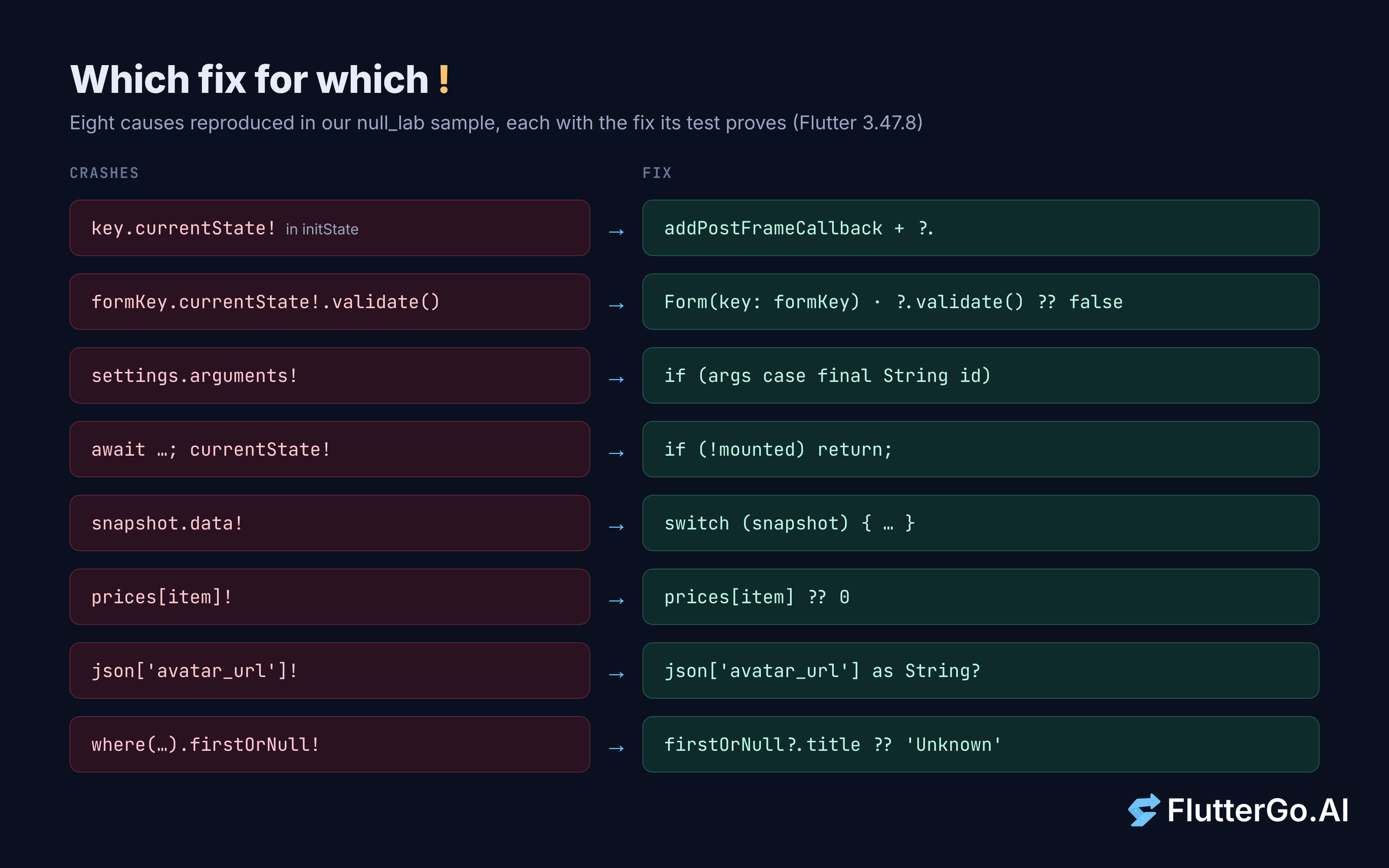
Every snippet below comes from the null_lab sample. Each broken version has a test that expects the exact message, and each fix has a test showing it no longer throws and still does its job.
1. GlobalKey.currentState! before the widget is mounted
According to the GlobalKey.currentState docs, the state is null when no widget in the tree matches the key. That is true during the parent's initState (the child hasn't been built yet) and again after the child is removed.
@override
void initState() {
  super.initState();
  _counterKey.currentState!.increment(); // throws: child not mounted yet
}
Wait until after the first frame, and accept that the state may be missing:
WidgetsBinding.instance.addPostFrameCallback((_) {
  _counterKey.currentState?.increment();
});
Our third test in this group pumps the child, removes it, and confirms that currentState is back to null and ! throws again.
2. A form key that was never attached
A form can declare final _formKey = GlobalKey<FormState>(); but build Form(child: ...) without key: _formKey. Nothing fails until the user taps Save:
onPressed: () {
  if (_formKey.currentState!.validate()) {} // throws
},
The real fix is Form(key: _formKey, ...). As a second line of defence, treat a missing state as "not valid" instead of crashing:
final valid = _formKey.currentState?.validate() ?? false;
3. Route arguments that weren't passed
A details screen may assume that every navigation passes an argument. Opening it from a new button, a deep link or a test that calls pushNamed('/details') without arguments breaks that assumption:
final id = ModalRoute.of(context)!.settings.arguments! as String;
Check the type with a pattern and render a fallback:
if (ModalRoute.of(context)?.settings.arguments case final String id) {
  return Text('Item $id');
}
return const Text('No item selected');
If you dropped the ! and kept only as String, you'd get a different message: type 'Null' is not a subtype of type 'String' in type cast. Same root cause, different wording, so search for both. If your arguments arrive from URLs, see our Flutter deep linking guide.
4. Using state after an await (the async gap)
The user taps Save, the request takes two seconds, and they press Back. When the await finishes, the page is gone and its GlobalKey no longer points at anything:
Future<void> _save() async {
  await fakeSave();
  _formKey.currentState!.reset(); // throws if the user left during the await
}
Check mounted right after the gap. The use_build_context_synchronously lint docs recommend the same check: use State.mounted for a State's own context, and context.mounted for any other BuildContext.
await fakeSave();
if (!mounted) return;
_formKey.currentState?.reset();
ScaffoldMessenger.of(context)
    .showSnackBar(const SnackBar(content: Text('Saved')));
Our test taps Save, pops the page, and advances two seconds. The broken version throws the null check; the fixed version does nothing, and a third test confirms that it still shows "Saved" when the user stays.
5. snapshot.data! in a FutureBuilder or StreamBuilder
The FutureBuilder docs say the snapshot holds null until the future completes, unless you pass initialData. The builder runs right away, so the first frame always hits the !:
builder: (context, snapshot) => Text('Hello ${snapshot.data!}'),
Handle every state. A Dart 3 switch on the snapshot reads cleanly:
builder: (context, snapshot) => switch (snapshot) {
  AsyncSnapshot(:final error?) => Text('Could not load: $error'),
  AsyncSnapshot(:final data?) => Text('Hello $data'),
  _ => const CircularProgressIndicator(),
},
Create the future in initState (or a field initializer), not inside build. The same docs warn that building it in build restarts the work on every rebuild.
6. Map lookups with map[key]!
Map.operator [] returns null for a missing key, so prices['coffee']! crashes as soon as someone orders something you didn't list. Give it a default (prices[item] ?? 0) or branch with if (prices[item] case final price?).
7. JSON fields that are sometimes missing
Many APIs leave out optional fields instead of sending null, and a model written from one sample response won't know that:
avatarUrl: json['avatar_url']! as String,
Make the field nullable in the model, too: avatarUrl: json['avatar_url'] as String?. Then decide in the UI what to show without an avatar. If you're choosing an HTTP client for those calls, see http vs dio in 2026.
8. firstWhere swapped for firstOrNull!
items.firstWhere((i) => i.id == id) throws Bad state: No element when nothing matches. A tempting "fix" is items.where((i) => i.id == id).firstOrNull!, which just trades one crash for the other. firstOrNull comes from dart:core in Dart 3, so you don't need a package. Handle the null instead:
String titleFor(int id) =>
    items.where((i) => i.id == id).firstOrNull?.title ?? 'Unknown item';
Is this the same as LateInitializationError?
No. The two look alike but come from different features, and the message tells you which one you have. We triggered these four lookalikes in the same test run: a ! on null, a read of an unassigned late field, a firstWhere with no match, and an as String cast on null.
_TypeError: Null check operator used on a null value
LateError: LateInitializationError:
  Field 'token' has not been initialized.
StateError: Bad state: No element
type 'Null' is not a subtype of type 'String' in type cast
A late field moves the check to the first read. A nullable field with ! moves it to every use of !. If you see LateInitializationError, look for a missed assignment in initState or a constructor, not for a !.
What does the crash look like in debug and release builds?
When the ! fails inside build, Flutter swaps the failing widget for an ErrorWidget. The rest of the screen keeps rendering. Flutter's Handling errors page says the default shows the message in red in debug mode and a gray background in release mode. We built our demo for the web in both modes and captured it in headless Chromium:
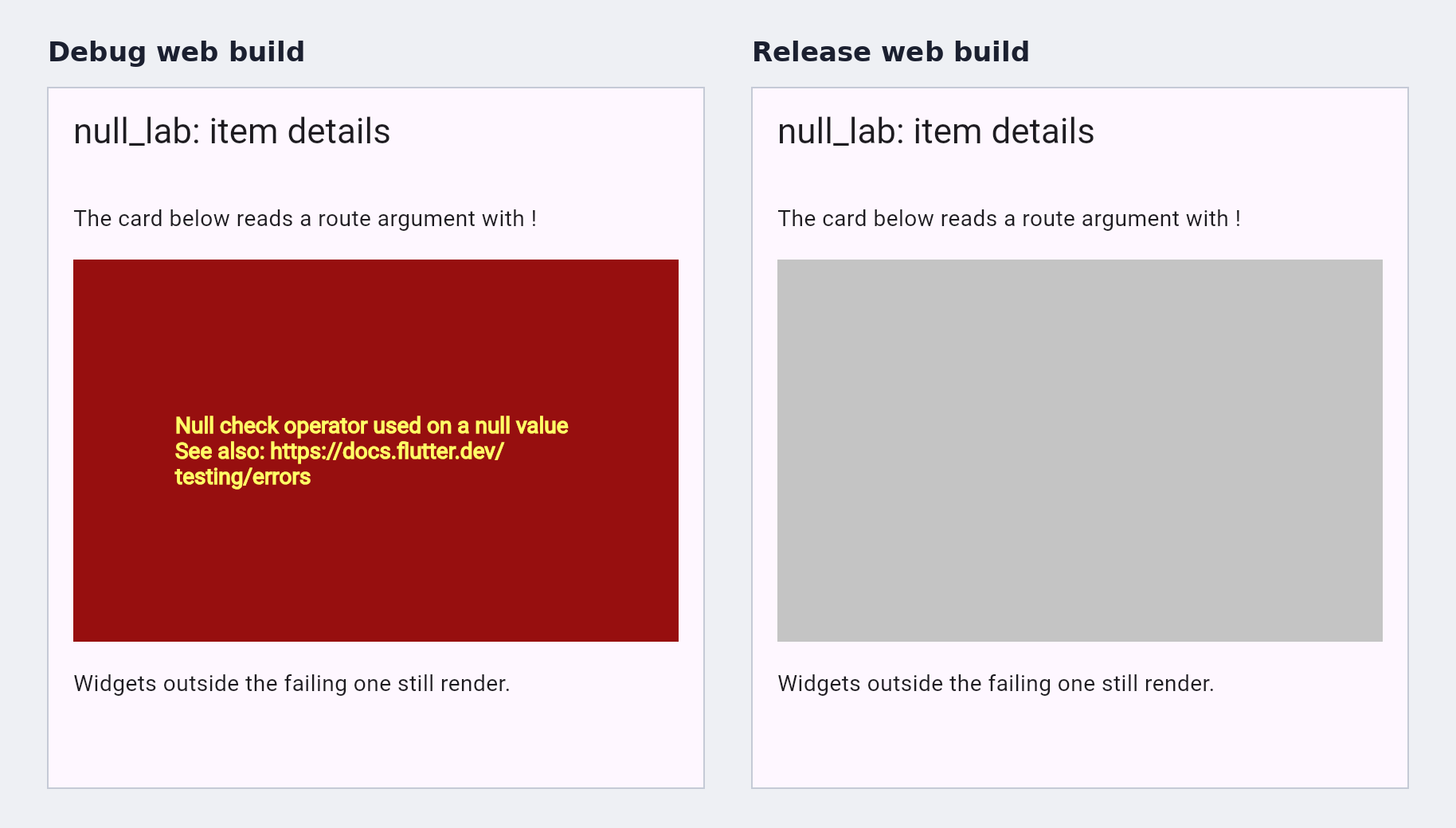
In release, nothing on screen names the problem, and users only see a gray box. Route errors to a crash reporter through FlutterError.onError and PlatformDispatcher.instance.onError (both covered on the same Flutter page), and you'll get the message and stack instead of a screenshot of a gray rectangle.
When is it fine to use !?
The ! operator isn't a code smell in itself. It's a statement that you know something the analyzer doesn't. It's reasonable when null would be a programming error you want to fail loudly. A test that just pumped a widget with a known key is one example. A value you checked on the line above, where the analyzer can't promote it (a getter or a field of another object), is another. If null is a valid state, such as data still loading, a field the API may omit or a widget that may be gone, model it with ?., ??, patterns or an early return.
The lints we checked on Dart 3.13.7 help at the edges, not the core:
null_check_on_nullable_type_parameterflags!on a value whose type is a nullable type parameter. It's in the core lint set, soflutter_lints6.0.0 enables it.unnecessary_null_checksflags a!on a value passed wherenullis accepted anyway, such as a nullable parameter. It's opt-in. Separately, the analyzer reports a built-inunnecessary_non_null_assertionwarning when the receiver can't be null.use_build_context_synchronously(influtter_lints) flagsBuildContextuse after anawait. Note that it didn't cover our_formKey.currentState!case, which doesn't touchcontext.
Our whole sample, full of crashing !s, passed flutter analyze with zero issues under flutter_lints. No default rule stops a plain ! on a nullable value. Tests are what catch these crashes, which is why we wrote one per cause. If the code came from a generator, our guide to widget tests for AI-generated Flutter code is a good next read.
FAQ
Can I catch it with try/catch?
You can catch it (it's a TypeError), but that hides a wrong assumption rather than fixing it. Also, an error thrown inside a build method is caught by the framework and shown as an ErrorWidget, so a try/catch around the code that created the widget never sees it. Remove the ! or handle the null case instead.
Does Theme.of(context).textTheme.bodyLarge! crash?
Theme.of(context).textTheme.bodyLarge! crash?Not in our tests. With the default ThemeData, and with a ThemeData given a partial TextTheme, bodyLarge was non-null on Flutter 3.47.8. It was null only on a bare const TextTheme() used directly. If you build your own TextTheme, use ?. or pass a fallback style.
Why does it only happen for some users?
Because the null depends on data or timing: a field one account lacks, a slow network that lets someone leave mid-save, or a screen reached from a path that passes no arguments. Reproduce the user's path in a test, not just the happy path. For a wider look at gaps like this in generated apps, see where AI app builders fail.
Next steps
Open the stack trace and find the first frame in your package; its column names the ! that failed. Keys and async gaps need a post-frame callback or a mounted check, loading data needs every snapshot state, and optional input needs a nullable field or a fallback. Keep ! for values that would be a bug if null, and test risky screens.
Generated code is one place this crash appears, since a model tends to write only the happy path. If you build with an AI Flutter app builder like FlutterGo, which generates Flutter code and previews it live, read its !s with this list in hand. See also how FlutterGo detects and fixes errors in AI-generated Flutter code.